
Sprache auswählen

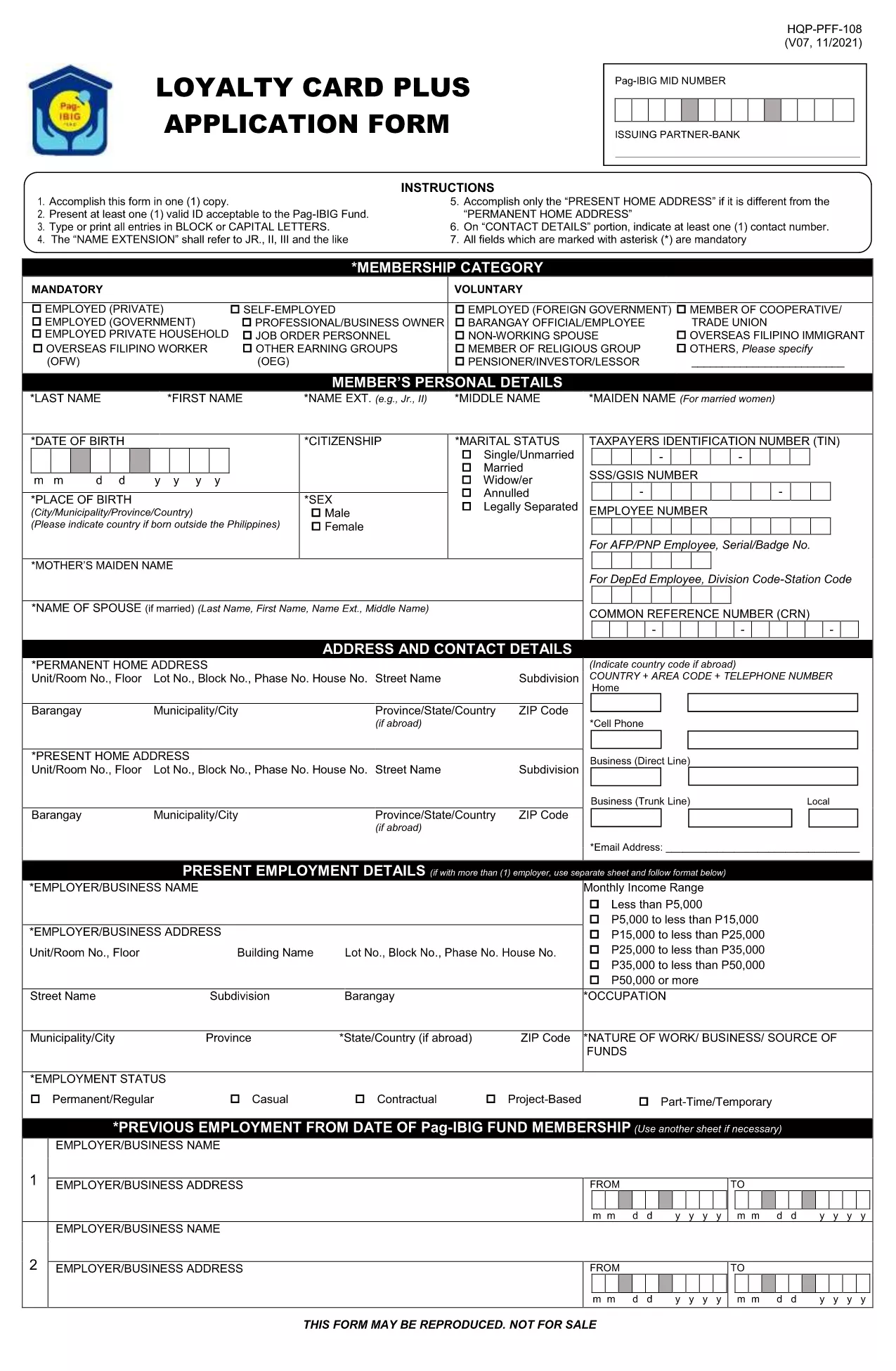
Pag‑IBIG Application Form (Fillable PDF)

  1. Sprache Englisch
  2. Land Philippines
  3. Abteilung Pag-IBIG Fund
  4. Aktivität Housing Loans
Pag‑IBIG Application Form (Fillable PDF)

The Pag‑IBIG Fund (Home Development Mutual Fund) requires a standard application form for new members, housing‑loan requests, and benefit claims. Our fillable PDF version lets you complete the form directly in your browser—no printer, no scanner.

Why Use the Fillable PDF Form?

Instant editing: Click any field, type your answer, and move on.
Auto‑save: Your data stays in the browser until you download or submit.
Secure & compliant: Formize’s PDF Filler meets e‑signature standards for government documents.

How to Complete the Pag‑IBIG Application Online

Follow the simple steps below to fill out the form, download a copy, and submit it to Pag‑IBIG.

Common Mistakes & Tips for a Successful Submission

Avoid these pitfalls to ensure your application is processed without delay:

  • Do not leave required fields blank—look for the red asterisk (*) indicator.
  • Enter numbers only where required (e.g., contribution amount, contact number).
  • Use the same spelling of your name as on your valid ID.
  • Double‑check dates (birthdate, employment dates) for correct format (MM/DD/YYYY).

Where to Submit Your Completed Form

After downloading the filled PDF, you can:

  • Upload it through the Pag‑IBIG online portal.
  • Bring a printed copy to the nearest Pag‑IBIG branch.
  • Mail it to the address indicated on the form’s last page.

Need more help? Visit the Pag‑IBIG website or your local branch for assistance.

FAQ
  • Is the Pag‑IBIG application form really free to download?

    Yes. The fillable PDF is provided at no cost. You only need an internet connection to use Formize’s online filler.

  • Can I edit the form on my phone or tablet?

    Absolutely. The Formize PDF Filler works on all modern browsers, including mobile devices, so you can complete the form anywhere.

  • Do I need to print the form after filling it online?

    Printing is optional. You can submit the electronic PDF through the Pag‑IBIG online portal, or print a hard copy if your local branch requires it.

  • What if I make a mistake after saving?

    The PDF remains editable until you finalize it with a digital signature. Simply reopen the file in Formize and correct the fields.

  • How long does it take for Pag‑IBIG to process my application?

    Processing time varies by request type, but most standard membership applications are reviewed within 7‑10 business days after submission.

  • Is my personal information safe while using Formize?

    Formize uses SSL encryption and complies with e‑signature regulations, ensuring that your data is protected during the entire filling process.

WIE MAN

So füllen Sie Pag-IBIG application form kostenlos online in 5 einfachen Schritten aus:

  1. 1
    Click the "Fill out this form" button
    On this page, press the bright blue button labeled “Fill out this form”. It will open the Formize PDF Filler in a new tab.
  2. 2
    Wait for the Formize PDF Filler to load
    The app loads the PDF in a secure viewer. This only takes a few seconds.
  3. 3
    Enter your information
    Click each field, type your answers, and use the dropdowns where provided. All changes are saved automatically.
  4. 4
    Add your electronic signature
    Use the “Sign” tool to draw or type your signature. This satisfies the Pag‑IBIG e‑signature requirement.
  5. 5
    Download or submit the completed form
    When finished, click “Download PDF” to save a copy, or use the “Submit” button to send it directly to the Pag‑IBIG portal if you have an account.
Formize PDF Filler-App
ÜBER

Pag-IBIG application form-Vorlage

Mit den traditionellen Funktionen zum Anzeigen und Ausfüllen eines PDF-Dokuments, kombiniert mit den Vorteilen einer Webanwendung und einem ansprechenden Layout, können Sie Pag-IBIG application form in wenigen Minuten fertigstellen.

MERKMALE

PDF-Filler

Der einfachste Weg, PDF-Formulare online auszufüllen

  • Füllen Sie schnell Pag-IBIG application form aus
    Suchen Sie nach einer Möglichkeit, Pag-IBIG application form schnell online auszufüllen? Mit unserem kostenlosen Online-PDF-Formularausfüller wissen Sie, wie Sie dieses PDF-Dokument in weniger als einer Minute bearbeiten und ausfüllen.
  • Einfach zu bedienender Online-PDF-Editor
    Haben Sie es satt, PDF-Dateien auszudrucken, damit Sie sie bearbeiten können, bevor Sie sie erneut scannen und zurücksenden? PDF-Dokumente kostenlos online bearbeiten. Nutzen Sie unseren Online-PDF-Editor, um Zeit und Papier zu sparen.
  • Tolle Tools, alle Plattformen
    Sie fragen sich, wie Sie Pag-IBIG application form auf einem Mac ausfüllen oder vielleicht einen kostenlosen PDF-Ausfüller verwenden können? Unsere Online-PDF-Tools funktionieren auf allen Plattformen.
  • Sichere Dateispeicherung
    Fertige "Pag-IBIG application form"-Dateien werden in einer gesicherten Datenbank gespeichert, die vom Amazon Cloud-Hosting verwaltet wird. Sie können Ihre Dateien jederzeit aus unserem System löschen. In jedem Fall werden diese Dateien nach 24 Stunden automatisch gelöscht.
  • Chatten Sie mit Pag-IBIG application form
    Chatten Sie mit „Pag-IBIG application form“ auf Chatize, einem kostenlosen PDF-Leseassistenten. Stellen Sie Fragen und erhalten Sie Antworten von „Pag-IBIG application form“. Klicken Sie einfach oben auf die Schaltfläche Mit Dokument chatten.

Füllsitzung löschen

Die ausgewählte Füllsitzung löschen? In diesem Fall gehen Ihre Fortschritte beim Ausfüllen des Formulars verloren.

Bearbeitungssitzung löschen

Ausgewählte Bearbeitungssitzung löschen? In diesem Fall geht Ihr Fortschritt beim Erstellen und Bearbeiten des Formulars verloren.