
Sprache auswählen

Download the South Africa DHA-529 Application Form (Fillable PDF)

  1. Land South Africa
  2. Sprache Englisch
  3. Abteilung Home Affairs
  4. Aktivität Government Forms
Download the South Africa DHA-529 Application Form (Fillable PDF)

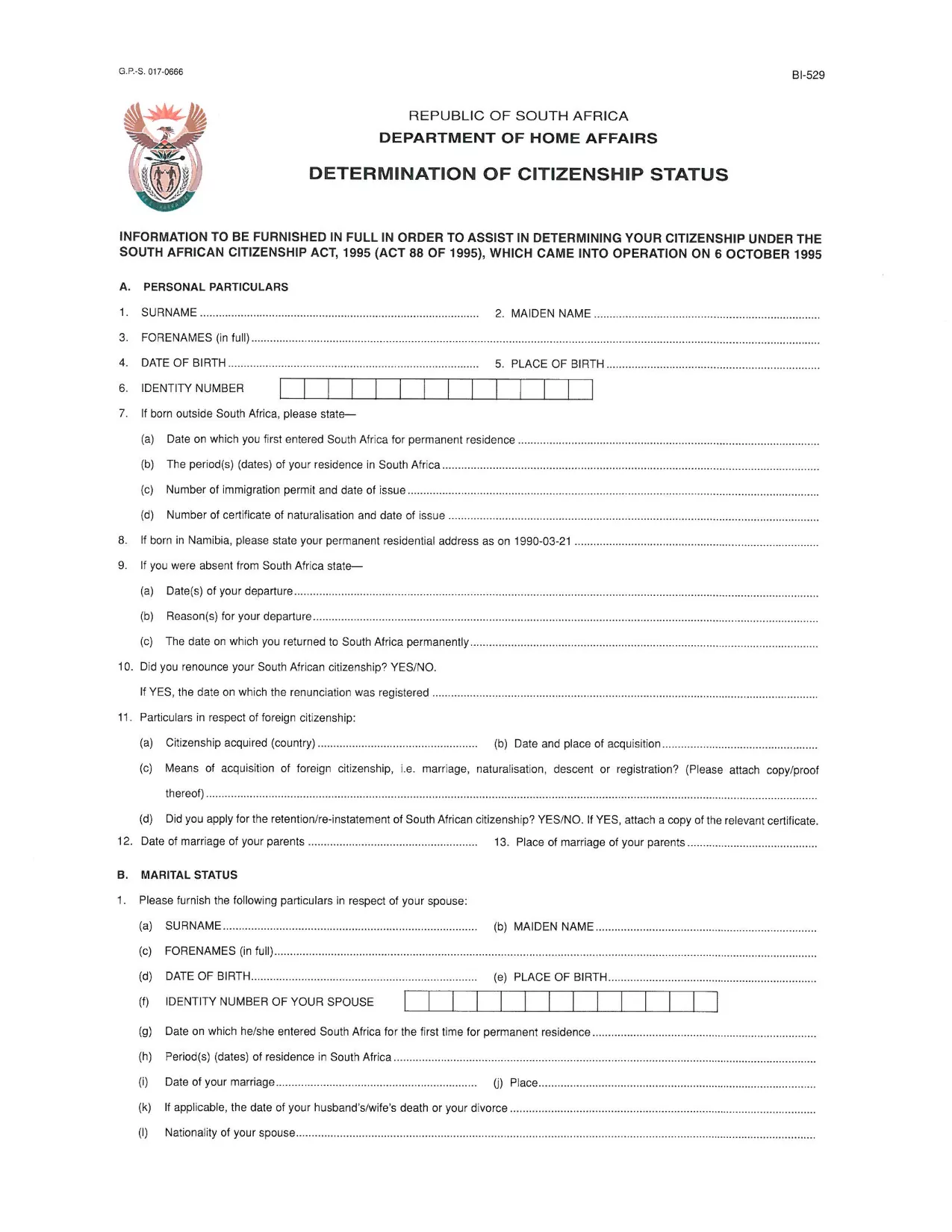
The DHA-529 is the official South African Home Affairs application used for parental consent, citizenship determination, and other vital civil matters. This fillable PDF lets you complete the form directly in your browser—no printing, scanning, or faxing required.

What Is the DHA-529 Application Form?

The DHA-529 covers a range of requests, including:

  • Parental consent for a minor’s travel or school trips
  • Application for a certificate of naturalisation
  • Requests related to birth registration and citizenship status

All South African residents and applicants can use this form, and it must be submitted to the Department of Home Affairs.

How to Fill Out the DHA-529 Form with Formize

Instead of downloading the PDF and opening a separate editor, simply click the “Fill out this form” button below. The Formize PDF Filler loads instantly, letting you type, select, and sign directly on the page.

  1. Click “Fill out this form”. The Formize viewer opens in a new tab.
  2. Enter your information. Use the keyboard to fill each field; dropdowns appear for dates and selections.
  3. Save your progress. The app autosaves, and you can download a copy at any time.
  4. Sign electronically. Use the built‑in signature tool to add your signature.
  5. Download or submit. Once completed, download the filled PDF or email it directly to Home Affairs.

Common Mistakes to Avoid

  • Leaving mandatory fields blank – the Formize validator highlights missing data.
  • Using the wrong date format – select dates from the calendar picker.
  • Uploading an unsigned form – add your electronic signature before downloading.
  • Submitting an outdated version – always use the latest PDF provided below.

Where to Submit the Completed Form

After you have saved the filled PDF, you can submit it in one of the following ways:

  • In person at any Department of Home Affairs office.
  • Via registered post to the address on the form.
  • Electronically, if the specific service you are applying for accepts email attachments.

For the most up‑to‑date submission guidelines, visit the official Home Affairs website.

FAQ
  • Do I need Adobe Acrobat Reader to fill the DHA-529 form?

    No. With Formize you can fill, sign, and download the PDF directly in your web browser—no extra software required.

  • Is the DHA-529 form free to download?

    Yes. The PDF is provided by the South African Department of Home Affairs at no cost.

  • Can I save my progress and return later?

    Absolutely. Formize autosaves your entries, and you can download a draft version at any time.

  • What if I make a mistake after downloading?

    Open the saved PDF again in Formize, make the correction, and re‑download the updated file.

  • Where do I submit the completed DHA-529 form?

    Submit it in person at any Home Affairs office, via registered post, or electronically if the specific service permits email attachments.

  • Is an electronic signature accepted?

    Yes. The Department of Home Affairs accepts electronic signatures on the DHA-529 when the form is submitted digitally or scanned after signing.

WIE MAN

So füllen Sie South Africa application form kostenlos online in 5 einfachen Schritten aus:

  1. 1
    Open the Fillable Form
    Click the “Fill out this form” button on the page. The Formize PDF Filler loads in a new browser tab.
  2. 2
    Enter Your Details
    Type directly into each field. Use dropdown menus for dates and predefined options.
  3. 3
    Add an Electronic Signature
    Select the signature field and draw or type your signature using the built‑in tool.
  4. 4
    Save and Download
    When all fields are completed, click “Download” to save a copy of the filled PDF to your device.
  5. 5
    Submit the Form
    Follow the submission instructions on the form—either upload, email, or deliver the printed copy to a Home Affairs office.
Formize PDF Filler-App
ÜBER

South Africa application form-Vorlage

Mit den traditionellen Funktionen zum Anzeigen und Ausfüllen eines PDF-Dokuments, kombiniert mit den Vorteilen einer Webanwendung und einem ansprechenden Layout, können Sie South Africa application form in wenigen Minuten fertigstellen.

MERKMALE

PDF-Filler

Der einfachste Weg, PDF-Formulare online auszufüllen

  • Füllen Sie schnell South Africa application form aus
    Suchen Sie nach einer Möglichkeit, South Africa application form schnell online auszufüllen? Mit unserem kostenlosen Online-PDF-Formularausfüller wissen Sie, wie Sie dieses PDF-Dokument in weniger als einer Minute bearbeiten und ausfüllen.
  • Einfach zu bedienender Online-PDF-Editor
    Haben Sie es satt, PDF-Dateien auszudrucken, damit Sie sie bearbeiten können, bevor Sie sie erneut scannen und zurücksenden? PDF-Dokumente kostenlos online bearbeiten. Nutzen Sie unseren Online-PDF-Editor, um Zeit und Papier zu sparen.
  • Tolle Tools, alle Plattformen
    Sie fragen sich, wie Sie South Africa application form auf einem Mac ausfüllen oder vielleicht einen kostenlosen PDF-Ausfüller verwenden können? Unsere Online-PDF-Tools funktionieren auf allen Plattformen.
  • Sichere Dateispeicherung
    Fertige "South Africa application form"-Dateien werden in einer gesicherten Datenbank gespeichert, die vom Amazon Cloud-Hosting verwaltet wird. Sie können Ihre Dateien jederzeit aus unserem System löschen. In jedem Fall werden diese Dateien nach 24 Stunden automatisch gelöscht.
  • Chatten Sie mit South Africa application form
    Chatten Sie mit „South Africa application form“ auf Chatize, einem kostenlosen PDF-Leseassistenten. Stellen Sie Fragen und erhalten Sie Antworten von „South Africa application form“. Klicken Sie einfach oben auf die Schaltfläche Mit Dokument chatten.

Füllsitzung löschen

Die ausgewählte Füllsitzung löschen? In diesem Fall gehen Ihre Fortschritte beim Ausfüllen des Formulars verloren.

Bearbeitungssitzung löschen

Ausgewählte Bearbeitungssitzung löschen? In diesem Fall geht Ihr Fortschritt beim Erstellen und Bearbeiten des Formulars verloren.