Sprache auswählen

R.1/1 Application Form – Fillable PDF Download

  1. Land Thailand
  2. Sprache Englisch
  3. Aktivität Animal Import/Export
  4. Abteilung Department of Livestock Development
R.1/1 Application Form – Fillable PDF Download

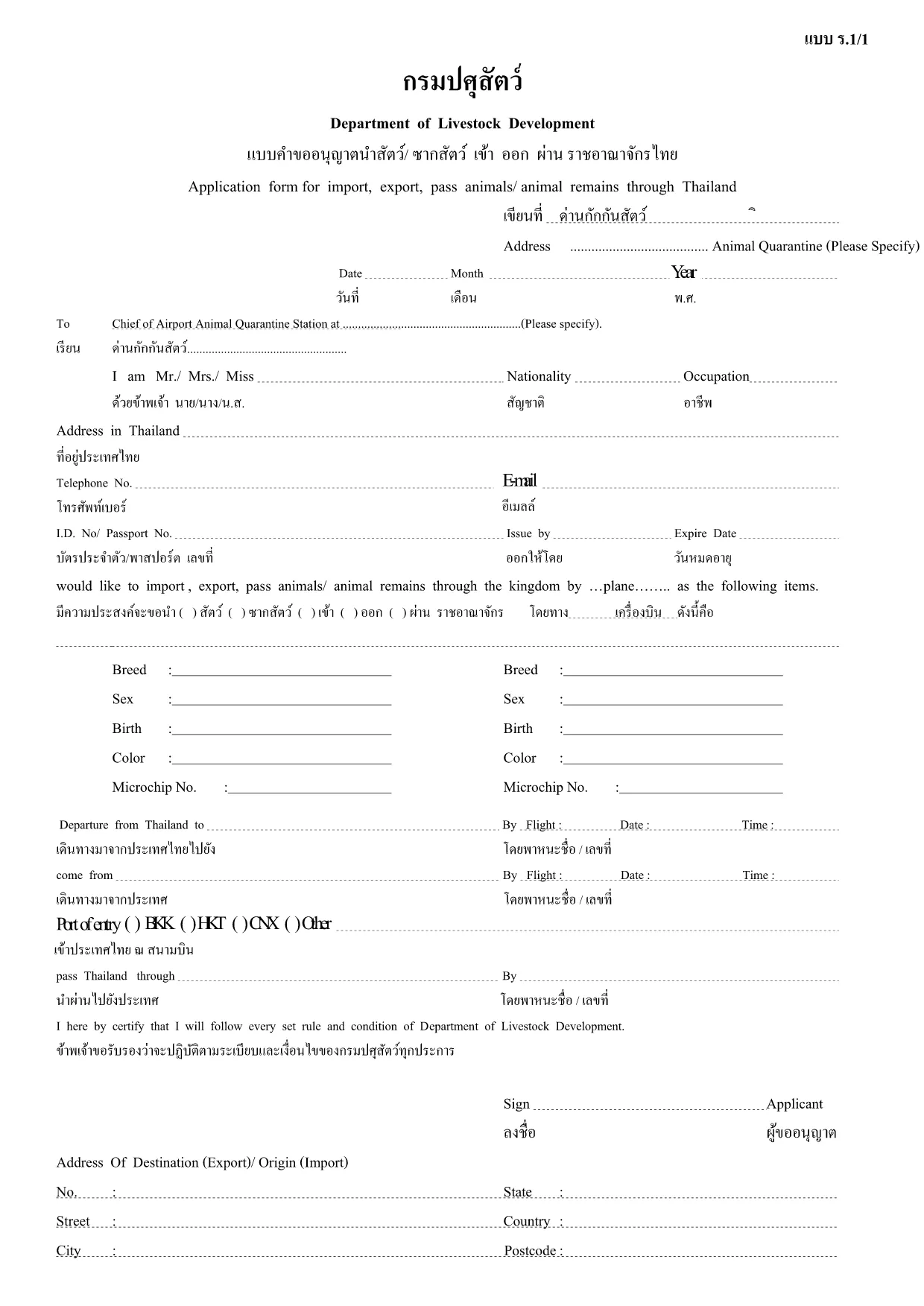
The R.1/1 application form is the official document used by Thailand's Department of Livestock Development for requesting permission to import, export, or transport animals and animal products. This fillable PDF lets you complete the form quickly, accurately, and without printing.

What Is the R.1/1 Form?

R.1/1 (sometimes written as ร.1/1) is a regulatory form required for:

  • Importing live animals, livestock, or animal products into Thailand.
  • Exporting animals or animal by‑products out of Thailand.
  • Transporting animals across provincial borders.

The form captures details such as species, quantity, origin, destination, health certificates, and the applicant’s contact information.

How to Complete the R.1/1 Form Online

Instead of downloading the PDF and using a separate editor, simply click the "Fill out this form" button on this page. The Formize PDF Filler app will load directly in your browser, providing a smooth, interactive experience.

Common Mistakes to Avoid

  • Leaving required fields blank – the filler highlights missing information.
  • Using the wrong animal classification – double‑check the species list provided by the Department.
  • Submitting an outdated health certificate – ensure the certificate matches the date of the intended shipment.

Where to Submit Your Completed Form

After you have filled and saved the PDF, submit it to the Department of Livestock Development via one of the following methods:

  • Online submission through the department’s e‑service portal.
  • Mail to the address indicated on the form.
  • In‑person delivery at any regional livestock office.

Download the Fillable PDF

Ready to start? Click the button below, fill out the form in seconds, and download the completed PDF for your records.

FAQ
  • Is the R.1/1 form available in languages other than Thai?

    The official version is in Thai, but the fillable PDF can be completed using English characters for names and addresses. Translation assistance is recommended for detailed sections.

  • Can I edit the form after I have downloaded it?

    Yes. Using the Formize PDF Filler you can reopen the saved file, make changes, and re‑download the updated version.

  • Do I need a digital signature?

    A digital signature is accepted if the department’s e‑service portal is used. Otherwise, print the form, sign manually, and scan it before submission.

  • How long does it take to process an R.1/1 application?

    Processing time varies by request type, but typically 5‑10 business days after the department receives a complete application.

  • What documents must accompany the R.1/1 form?

    Attach a valid health certificate, import/export permit (if applicable), and any supporting documents such as invoices or transport permits.

  • Is there a fee for submitting the R.1/1 form?

    Yes, a processing fee is required. The exact amount is listed on the form’s fee schedule and must be paid before submission.

  • Can I submit the form directly from the Formize filler?

    The Formize filler only creates the PDF. You must upload the completed file to the Department of Livestock Development’s online portal or send it by mail.

WIE MAN

So füllen Sie R.1/1 application form kostenlos online in 5 einfachen Schritten aus:

  1. 1
    Click the Fill button
    Press the "Fill out this form" button on the page. The Formize PDF Filler will open in a new tab.
  2. 2
    Wait for the filler to load
    A few seconds later the interactive PDF appears. All fields are ready for data entry.
  3. 3
    Enter required information
    Type or select values for each highlighted field – species, quantity, origin, health certificates, and contact details.
  4. 4
    Save or download the completed form
    When finished, click "Save" to store it in your browser or "Download" to get a copy on your computer.
  5. 5
    Submit to the Department
    Follow the submission instructions on the form (online portal, mail, or in‑person) to complete your application.
Formize PDF Filler-App
ÜBER

R.1/1 application form-Vorlage

Mit den traditionellen Funktionen zum Anzeigen und Ausfüllen eines PDF-Dokuments, kombiniert mit den Vorteilen einer Webanwendung und einem ansprechenden Layout, können Sie R.1/1 application form in wenigen Minuten fertigstellen.

MERKMALE

PDF-Filler

Der einfachste Weg, PDF-Formulare online auszufüllen

  • Füllen Sie schnell R.1/1 application form aus
    Suchen Sie nach einer Möglichkeit, R.1/1 application form schnell online auszufüllen? Mit unserem kostenlosen Online-PDF-Formularausfüller wissen Sie, wie Sie dieses PDF-Dokument in weniger als einer Minute bearbeiten und ausfüllen.
  • Einfach zu bedienender Online-PDF-Editor
    Haben Sie es satt, PDF-Dateien auszudrucken, damit Sie sie bearbeiten können, bevor Sie sie erneut scannen und zurücksenden? PDF-Dokumente kostenlos online bearbeiten. Nutzen Sie unseren Online-PDF-Editor, um Zeit und Papier zu sparen.
  • Tolle Tools, alle Plattformen
    Sie fragen sich, wie Sie R.1/1 application form auf einem Mac ausfüllen oder vielleicht einen kostenlosen PDF-Ausfüller verwenden können? Unsere Online-PDF-Tools funktionieren auf allen Plattformen.
  • Sichere Dateispeicherung
    Fertige "R.1/1 application form"-Dateien werden in einer gesicherten Datenbank gespeichert, die vom Amazon Cloud-Hosting verwaltet wird. Sie können Ihre Dateien jederzeit aus unserem System löschen. In jedem Fall werden diese Dateien nach 24 Stunden automatisch gelöscht.
  • Chatten Sie mit R.1/1 application form
    Chatten Sie mit „R.1/1 application form“ auf Chatize, einem kostenlosen PDF-Leseassistenten. Stellen Sie Fragen und erhalten Sie Antworten von „R.1/1 application form“. Klicken Sie einfach oben auf die Schaltfläche Mit Dokument chatten.

Füllsitzung löschen

Die ausgewählte Füllsitzung löschen? In diesem Fall gehen Ihre Fortschritte beim Ausfüllen des Formulars verloren.

Bearbeitungssitzung löschen

Ausgewählte Bearbeitungssitzung löschen? In diesem Fall geht Ihr Fortschritt beim Erstellen und Bearbeiten des Formulars verloren.