Sprache auswählen

Medicare Part A Application Form (CMS‑18F5) – Fillable PDF

  1. Land USA
  2. Sprache Englisch
  3. Aktivität Healthcare
  4. Abteilung CMS
Medicare Part A Application Form (CMS‑18F5) – Fillable PDF

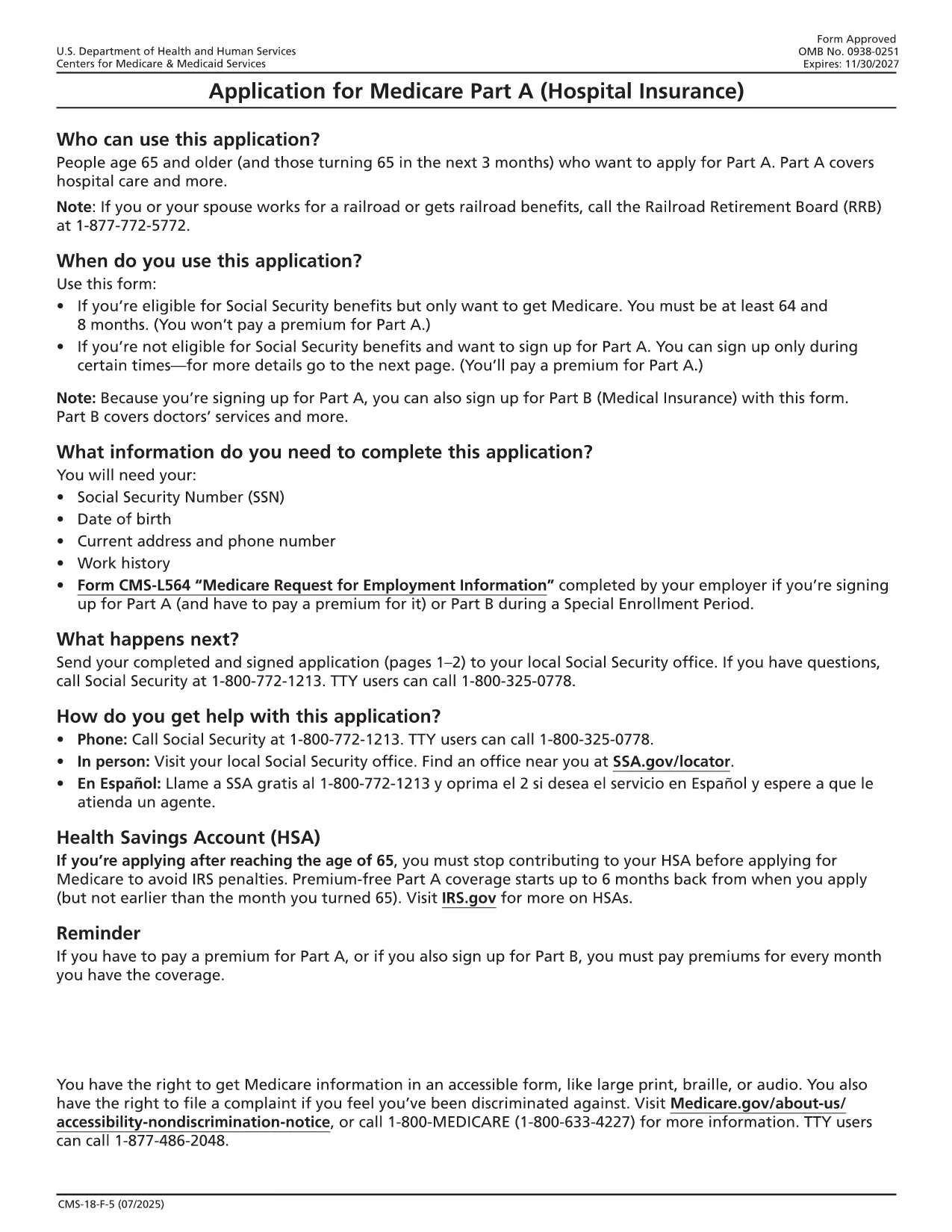
The CMS‑18F5 is the official application for Medicare Part A (Hospital Insurance). Whether you’re enrolling for the first time or updating your information, the fillable PDF on this page lets you complete the form quickly without printing or scanning.

Our integrated Fill out this form button launches the Formize PDF Filler app directly in your browser. All fields are interactive, and you can save your progress, add an electronic signature, and download the completed PDF in seconds.

What is the Medicare Part A Application?

Medicare Part A provides coverage for inpatient hospital stays, skilled nursing facility care, hospice, and some home health services. The CMS‑18F5 form collects personal details, citizenship status, employment history, and other information required by the Centers for Medicare & Medicaid Services (CMS) to determine eligibility.

How to Fill Out the CMS‑18F5 Form Online

  • Step 1: Click the “Fill out this form” button on this page.
  • Step 2: Wait for the Formize PDF Filler to load (usually a few seconds).
  • Step 3: Complete each field. The filler includes tool‑tips and automatic date formatting.
  • Step 4: Add your electronic signature in the designated box.
  • Step 5: Review the form, then click “Download Completed PDF” or “Print & Mail” according to your preference.

Common Mistakes to Avoid

Even a small error can delay processing. Keep these tips in mind:

  • Double‑check Social Security numbers and dates of birth.
  • Provide a current mailing address; PO boxes are not accepted for eligibility verification.
  • Ensure the signature matches the one on file with the Social Security Administration.
  • Do not leave any required fields blank; the filler will highlight missing information.

Eligibility Requirements

Generally, you qualify for Part A if you:

  • Are 65 years or older, or
  • Receive Social Security Disability Insurance (SSDI) for 24 months, or
  • Have End‑Stage Renal Disease (ESRD) or Amyotrophic Lateral Sclerosis (ALS).

Where to Submit Your Completed Form

After downloading the filled PDF, you can:

  • Mail it to your local Social Security Administration office.
  • Upload it securely through the SSA Medicare portal if you have an online account.
  • Bring a printed copy to your nearest SSA office for in‑person assistance.

Using Formize’s fillable PDF saves you time, reduces errors, and keeps your personal data protected.

FAQ
  • Is the CMS‑18F5 form free to download?

    Yes, the fillable PDF is provided by the federal government at no cost. Formize only hosts the interactive version.

  • Can I submit the completed form electronically?

    You can upload the filled PDF through the Social Security Administration’s online portal if you have an account, or mail a printed copy.

  • What if I make a mistake after downloading?

    Simply reopen the saved PDF in Formize, edit the incorrect fields, and re‑download the corrected version.

  • Do I need a digital signature for Part A?

    An electronic signature is accepted as long as it matches the signature on file with the SSA.

  • How long does processing take after I submit?

    Processing typically takes 30‑45 days. You’ll receive a notice by mail confirming your enrollment status.

  • Is my personal information secure while using Formize?

    Formize uses SSL encryption and does not store any of your data on its servers after the session ends.

WIE MAN

So füllen Sie Medicare Part A application kostenlos online in 5 einfachen Schritten aus:

  1. 1
    Open the Fillable Form
    Click the “Fill out this form” button on the page. The Formize PDF Filler will open in a new tab.
  2. 2
    Load the Formizer App
    Wait a few seconds while the filler loads the CMS‑18F5 document.
  3. 3
    Complete All Required Fields
    Enter your personal information, citizenship details, and employment history. Tool‑tips appear for each field.
  4. 4
    Add Your Electronic Signature
    Use the signature field to draw or type your signature. This satisfies the legal signing requirement.
  5. 5
    Save or Submit
    Click “Download Completed PDF” to save a copy, or print and mail it to the SSA as instructed.
Formize PDF Filler-App
ÜBER

Medicare Part A application-Vorlage

Mit den traditionellen Funktionen zum Anzeigen und Ausfüllen eines PDF-Dokuments, kombiniert mit den Vorteilen einer Webanwendung und einem ansprechenden Layout, können Sie Medicare Part A application in wenigen Minuten fertigstellen.

MERKMALE

PDF-Filler

Der einfachste Weg, PDF-Formulare online auszufüllen

  • Füllen Sie schnell Medicare Part A application aus
    Suchen Sie nach einer Möglichkeit, Medicare Part A application schnell online auszufüllen? Mit unserem kostenlosen Online-PDF-Formularausfüller wissen Sie, wie Sie dieses PDF-Dokument in weniger als einer Minute bearbeiten und ausfüllen.
  • Einfach zu bedienender Online-PDF-Editor
    Haben Sie es satt, PDF-Dateien auszudrucken, damit Sie sie bearbeiten können, bevor Sie sie erneut scannen und zurücksenden? PDF-Dokumente kostenlos online bearbeiten. Nutzen Sie unseren Online-PDF-Editor, um Zeit und Papier zu sparen.
  • Tolle Tools, alle Plattformen
    Sie fragen sich, wie Sie Medicare Part A application auf einem Mac ausfüllen oder vielleicht einen kostenlosen PDF-Ausfüller verwenden können? Unsere Online-PDF-Tools funktionieren auf allen Plattformen.
  • Sichere Dateispeicherung
    Fertige "Medicare Part A application"-Dateien werden in einer gesicherten Datenbank gespeichert, die vom Amazon Cloud-Hosting verwaltet wird. Sie können Ihre Dateien jederzeit aus unserem System löschen. In jedem Fall werden diese Dateien nach 24 Stunden automatisch gelöscht.
  • Chatten Sie mit Medicare Part A application
    Chatten Sie mit „Medicare Part A application“ auf Chatize, einem kostenlosen PDF-Leseassistenten. Stellen Sie Fragen und erhalten Sie Antworten von „Medicare Part A application“. Klicken Sie einfach oben auf die Schaltfläche Mit Dokument chatten.

Füllsitzung löschen

Die ausgewählte Füllsitzung löschen? In diesem Fall gehen Ihre Fortschritte beim Ausfüllen des Formulars verloren.

Bearbeitungssitzung löschen

Ausgewählte Bearbeitungssitzung löschen? In diesem Fall geht Ihr Fortschritt beim Erstellen und Bearbeiten des Formulars verloren.