
Sprache auswählen

Secure Test Declaration – Fillable PDF Form

  1. Sprache Englisch
  2. Land USA
  3. Abteilung Amt für Urheberrecht
Secure Test Declaration – Fillable PDF Form

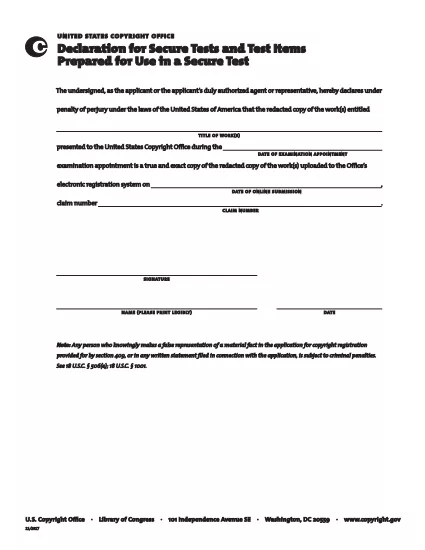
The Secure Test Declaration is a legally‑required statement used by the United States Copyright Office to certify that a test item is protected and will be handled securely. Our fillable PDF version lets you complete the form quickly, accurately, and without installing any extra software.

With Formize’s integrated PDF Filler, you can open the document directly in your browser, enter the required information, and save or print a certified copy. This eliminates the hassle of downloading, editing, and re‑uploading static PDFs.

Below you’ll find a brief overview of the form’s sections, tips for avoiding common errors, and step‑by‑step instructions for completing the declaration online.

What Is a Secure Test Declaration?

A Secure Test Declaration confirms that the test material you are submitting is confidential, that you have the authority to submit it, and that you understand the penalties for false statements. It is commonly required for copyrighted works that involve proprietary testing methods or confidential data.

Key Sections of the Form

  • Applicant Information – Name, address, and contact details.
  • Test Description – Title, purpose, and nature of the test.
  • Security Measures – How the test will be protected.
  • Declaration Statement – Signature line confirming truthfulness.

How to Fill Out the Secure Test Declaration Online

Instead of downloading the PDF and opening it in a separate editor, simply click the "Fill out this form" button on this page. The Formize PDF Filler app will load automatically, allowing you to complete every field directly in your browser.

Common Mistakes to Avoid

  • Leaving required fields blank – the filler will highlight missing information.
  • Using an unofficial signature image – type your name in the signature field for a legally accepted electronic signature.
  • Submitting outdated contact details – double‑check phone numbers and email addresses before saving.

Where to Submit the Completed Form

After saving the completed declaration, you can either:

  1. Upload the PDF through the Copyright Office’s online portal.
  2. Print, sign physically (if required), and mail it to the address listed on the form.

For most users, the electronic submission option is faster and provides immediate confirmation of receipt.

FAQ
  • Do I need Adobe Acrobat to fill out the Secure Test Declaration?

    No. Formize’s online PDF Filler works in any modern browser, so you don’t need Acrobat or any other software.

  • Can I edit the form after I’ve saved it?

    Yes. Open the saved PDF with Formize again, make any necessary changes, and re‑save.

  • Is an electronic signature accepted by the Copyright Office?

    For the Secure Test Declaration, an electronic signature entered through the Formize filler is considered valid, provided the form is submitted electronically.

  • What happens if I submit incomplete information?

    The filler will highlight missing required fields before you can save. Submitting an incomplete form may delay processing.

  • Is there a fee to download or use the Secure Test Declaration form?

    The PDF download and online filling are free. Any filing fees are set by the Copyright Office and are paid separately during submission.

WIE MAN

So füllen Sie secure test declaration kostenlos online in 4 einfachen Schritten aus:

  1. 1
    Open the Fillable Form
    Click the "Fill out this form" button on the page. The Formize PDF Filler loads in a new tab.
  2. 2
    Enter Your Information
    Complete each highlighted field – the filler will guide you through Applicant Information, Test Description, and Security Measures.
  3. 3
    Sign Electronically
    Type your name in the signature field. The system records a timestamp for legal validity.
  4. 4
    Save and Submit
    Click "Save PDF" to download a copy, then upload it to the Copyright Office portal or print and mail as instructed.
Formize PDF Filler-App
ÜBER

Formulare des Urheberrechtsamts

secure test declaration ist eines der offiziellen Formulare, die vom United States Copyright Office, einer Abteilung der Library of Congress, zur Registrierung und zum Schutz von Urheberrechten verwendet werden. Das Copyright Office ist für die Verwaltung der Urheberrechtsgesetze in den Vereinigten Staaten verantwortlich, einschließlich der Registrierung von Urheberrechten, der Aufzeichnung von Urheberrechtsübertragungen und -lizenzen sowie der Bereitstellung von Informationen und Dienstleistungen im Zusammenhang mit dem Urheberrecht.

Hier sind einige Beispiele für Copyright Office-Formulare:

Antrag auf Registrierung eines Urheberrechts: Dies ist das Hauptformular für die Registrierung eines Urheberrechts beim U.S. Copyright Office. Für verschiedene Arten von Werken stehen unterschiedliche Antragsformulare zur Verfügung, beispielsweise für literarische Werke, bildende Kunst, Musikkompositionen, Tonaufnahmen, Spielfilme und mehr. Der Antrag sammelt Informationen über das registrierte Werk, den Autor, den Antragsteller und andere relevante Details.

Dokumentenaufzeichnungsformulare: Diese Formulare werden verwendet, um Übertragungen von Urheberrechten, wie z. B. Abtretungen oder Lizenzen, beim Copyright Office aufzuzeichnen. Sie bieten eine Möglichkeit, eine öffentliche Aufzeichnung der Übertragung des Urheberrechtseigentums zu erstellen.

DMCA Designated Agent Directory-Formular: Dieses Formular wird verwendet, um einen Agenten beim Copyright Office gemäß dem Digital Millennium Copyright Act (DMCA) zu benennen. Der benannte Vertreter ist für den Empfang und die Bearbeitung von Deaktivierungsmitteilungen im Zusammenhang mit Online-Urheberrechtsverletzungen verantwortlich.

Gebührenordnung des Urheberrechtsamtes: Die Gebührenordnung ist zwar kein spezifisches Formular, bietet aber Informationen zu den Gebühren, die mit verschiedenen Urheberrechtsdiensten verbunden sind, einschließlich Registrierung, Aufzeichnung und anderen damit verbundenen Diensten.

Es ist wichtig zu beachten, dass sich die spezifischen Formulare und Anforderungen im Laufe der Zeit ändern können und für verschiedene Arten von Urheberrechtsregistrierungen oder -diensten möglicherweise unterschiedliche Formulare erforderlich sind. Es wird empfohlen, die offizielle Website des U.S. Copyright Office (www.copyright.gov) zu besuchen oder sich an auf Urheberrecht spezialisierte Rechtsexperten zu wenden, um genaue und aktuelle Informationen zu erhalten Informationen zu den spezifischen Copyright Office-Formularen, die für Ihre urheberrechtlichen Anforderungen relevant sind.

MERKMALE

PDF-Filler

Der einfachste Weg, PDF-Formulare online auszufüllen

  • Füllen Sie schnell secure test declaration aus
    Suchen Sie nach einer Möglichkeit, secure test declaration schnell online auszufüllen? Mit unserem kostenlosen Online-PDF-Formularausfüller wissen Sie, wie Sie dieses PDF-Dokument in weniger als einer Minute bearbeiten und ausfüllen.
  • Einfach zu bedienender Online-PDF-Editor
    Haben Sie es satt, PDF-Dateien auszudrucken, damit Sie sie bearbeiten können, bevor Sie sie erneut scannen und zurücksenden? PDF-Dokumente kostenlos online bearbeiten. Nutzen Sie unseren Online-PDF-Editor, um Zeit und Papier zu sparen.
  • Tolle Tools, alle Plattformen
    Sie fragen sich, wie Sie secure test declaration auf einem Mac ausfüllen oder vielleicht einen kostenlosen PDF-Ausfüller verwenden können? Unsere Online-PDF-Tools funktionieren auf allen Plattformen.
  • Sichere Dateispeicherung
    Fertige "secure test declaration"-Dateien werden in einer gesicherten Datenbank gespeichert, die vom Amazon Cloud-Hosting verwaltet wird. Sie können Ihre Dateien jederzeit aus unserem System löschen. In jedem Fall werden diese Dateien nach 24 Stunden automatisch gelöscht.
  • Chatten Sie mit secure test declaration
    Chatten Sie mit „secure test declaration“ auf Chatize, einem kostenlosen PDF-Leseassistenten. Stellen Sie Fragen und erhalten Sie Antworten von „secure test declaration“. Klicken Sie einfach oben auf die Schaltfläche Mit Dokument chatten.

Füllsitzung löschen

Die ausgewählte Füllsitzung löschen? In diesem Fall gehen Ihre Fortschritte beim Ausfüllen des Formulars verloren.

Bearbeitungssitzung löschen

Ausgewählte Bearbeitungssitzung löschen? In diesem Fall geht Ihr Fortschritt beim Erstellen und Bearbeiten des Formulars verloren.