
Sprache auswählen

Form 750-F Fillable PDF – Download & Complete Online

  1. Sprache Englisch
  2. Land USA
  3. Aktivität Legal Forms
  4. Abteilung Justizministerium
Form 750-F Fillable PDF – Download & Complete Online

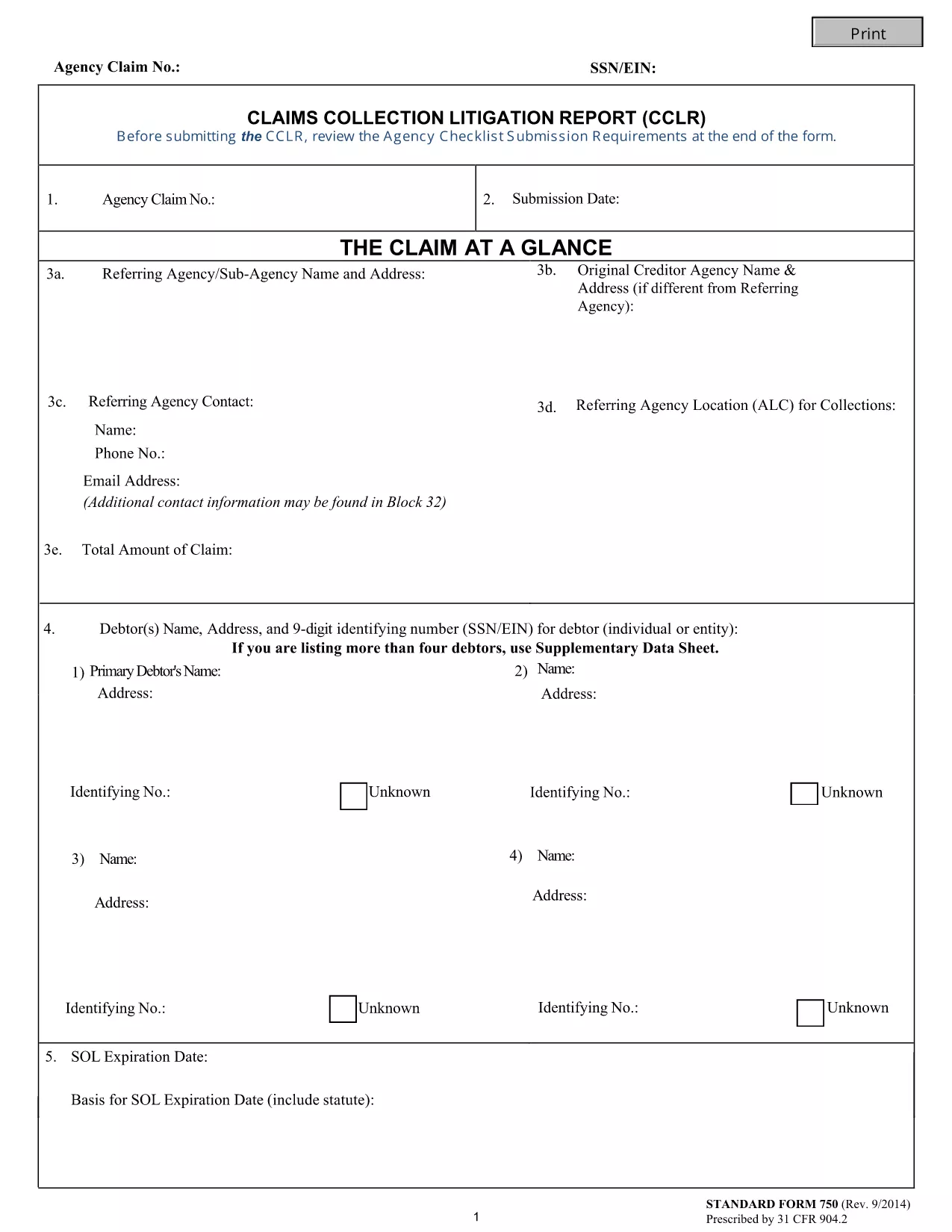
The Form 750-F (Standard Form 750) is the Department of Justice’s official debt‑substantiation report required under 31 CFR 904.2. It is used by government agencies and contractors to document and justify the collection of debts owed to the United States.

Our fillable PDF version lets you complete the form directly in your browser—no Adobe Acrobat or other editor needed. Simply click the button below, let the Formize PDF Filler load, and start typing.

What Is Form 750-F?

Form 750-F collects detailed information about the debtor, the nature of the debt, and the actions taken to recover the amount. It is commonly called the “Debt Substantiation List” and is required for:

  • Federal contract compliance audits
  • Department of Justice investigations
  • Any agency that must prove the validity of a debt before collection

How to Fill Out Form 750-F Online

Follow the step‑by‑step guide below to complete the form quickly and accurately.

Common Mistakes to Avoid

Even small errors can delay processing. Keep these tips in mind:

  • Do not leave required fields blank.
  • Use the exact format for dates (MM/DD/YYYY).
  • Enter the full legal name of the debtor as it appears on official records.
  • Double‑check dollar amounts for commas and decimal points.

Where to Submit the Completed Form

After you have saved the completed PDF, submit it according to the instructions on the covering letter of your agency or the specific contract notice. Most agencies accept electronic uploads through their secure portals.

FAQs About Form 750-F

Find quick answers to the most common questions below. If you need more help, consult your agency’s legal department.

FAQ
  • Is Form 750-F required for all federal contracts?

    Only contracts that involve debt recovery or collection actions require Form 750-F. Check your contract clause or contact your contracting officer for confirmation.

  • Can I edit the PDF after I download it?

    Yes, but using the Formize online filler is recommended because it preserves the original formatting and prevents accidental corruption of the file.

  • What should I do if I make a mistake while filling the form?

    You can clear the field and re‑enter the correct information. If you have already saved the PDF, simply open it again in the Formize filler and edit the needed sections.

  • Do I need a digital signature on Form 750-F?

    Most agencies accept an electronic signature generated by the PDF filler. Confirm with your agency whether a handwritten signature is required.

  • How long should I keep a copy of the completed Form 750-F?

    Retain a copy for at least three years, or longer if your agency’s record‑keeping policy specifies a different period.

  • Is there a cost to use the Formize PDF Filler?

    No. The Formize PDF Filler is free for all users accessing fillable forms on Formize.com.

  • Can I submit the form directly from the filler?

    The filler allows you to download the completed PDF. Submission must be done through your agency’s designated portal or mailing address.

WIE MAN

So füllen Sie Form 750-F kostenlos online in 5 einfachen Schritten aus:

  1. 1
    Click the Fill‑out Button
    Press the “Fill out this form” button on the page. The Formize PDF Filler app will open in a new tab.
  2. 2
    Wait for the Filler to Load
    The app loads the fillable PDF automatically. This usually takes a few seconds.
  3. 3
    Complete All Required Fields
    Enter the requested information exactly as it appears on your source documents. Required fields are marked with an asterisk.
  4. 4
    Review and Save
    Use the built‑in preview to double‑check your entries, then click “Save” to download the completed PDF to your device.
  5. 5
    Submit or Print
    Follow your agency’s instructions to upload the PDF electronically or print and mail a hard copy.
Formize PDF Filler-App
ÜBER

Formulare des Justizministeriums (DOJ).

Form 750-F ist eines der offiziellen Formulare, die vom US-Justizministerium und seinen verschiedenen Abteilungen, Behörden und Komponenten verwendet werden. Das DOJ ist eine Exekutivabteilung des Bundes, die für die Durchsetzung von Bundesgesetzen, die Verteidigung der Interessen der Vereinigten Staaten in rechtlichen Angelegenheiten und die Rechtspflege zuständig ist.

Hier sind einige Beispiele für Formulare des Justizministeriums:

Antrag auf Bundeshilfe (SF-424): Dieses Formular wird von Organisationen verwendet, die Bundeszuschüsse oder finanzielle Unterstützung beantragen, die vom DOJ oder seinen Komponenten verwaltet werden. Es sammelt Informationen über die Organisation, das vorgeschlagene Projekt und das Budget.

Bürgerrechtsbeschwerdeformular: Dieses Formular wird verwendet, um bei der Bürgerrechtsabteilung des DOJ eine Beschwerde über angebliche Verstöße gegen Bürgerrechtsgesetze einzureichen, wie z. B. Diskriminierung aufgrund von Rasse, Geschlecht, Behinderung oder nationaler Herkunft.

Antragsformular für Opferbenachrichtigung: Dieses Formular wird von Opfern von Straftaten verwendet, um im Rahmen der Bemühungen des DOJ, Opfer von Straftaten Informationen und Unterstützung bereitzustellen, eine Benachrichtigung über den Status und das Verfahren eines Bundesstrafverfahrens anzufordern.

Einwanderungsformulare: Das Executive Office for Immigration Review (EOIR) des DOJ verwaltet Einwanderungsgerichte und einwanderungsbezogene Verfahren. In Verfahren vor Einwanderungsgerichten werden verschiedene Formulare verwendet, beispielsweise das Formular EOIR-42B für Anträge auf Erleichterung der Abschiebung oder das Formular EOIR-28 für Berufungen.

ATF-Formulare: Das Bureau of Alcohol, Tobacco, Firearms, and Explosives (ATF), ein Teil des DOJ, verfügt über eigene Formulare für verschiedene Zwecke, wie in einer früheren Antwort erwähnt.

Formulare der Drug Enforcement Administration (DEA): Die DEA, eine weitere Abteilung des DOJ, verwendet ihre eigenen Formulare für Angelegenheiten im Zusammenhang mit kontrollierten Substanzen, einschließlich Anträgen auf Registrierung, Berichterstattung und Aufzeichnungspflichten.

Diese Beispiele heben einige Kategorien von DOJ-Formularen hervor, aber die spezifischen Formulare, die das Justizministerium verwendet, können je nach Abteilung, Behörde oder beteiligter Komponente und der Art der Dienste oder Verfahren variieren. Es empfiehlt sich, die offizielle Website der jeweiligen Abteilung oder Behörde innerhalb des DOJ zu konsultieren oder Rechtsberatung einzuholen, um genaue und aktuelle Informationen zu den spezifischen DOJ-Formularen zu erhalten, die für Ihre Situation relevant sind.

MERKMALE

PDF-Filler

Der einfachste Weg, PDF-Formulare online auszufüllen

  • Füllen Sie schnell Form 750-F aus
    Suchen Sie nach einer Möglichkeit, Form 750-F schnell online auszufüllen? Mit unserem kostenlosen Online-PDF-Formularausfüller wissen Sie, wie Sie dieses PDF-Dokument in weniger als einer Minute bearbeiten und ausfüllen.
  • Einfach zu bedienender Online-PDF-Editor
    Haben Sie es satt, PDF-Dateien auszudrucken, damit Sie sie bearbeiten können, bevor Sie sie erneut scannen und zurücksenden? PDF-Dokumente kostenlos online bearbeiten. Nutzen Sie unseren Online-PDF-Editor, um Zeit und Papier zu sparen.
  • Tolle Tools, alle Plattformen
    Sie fragen sich, wie Sie Form 750-F auf einem Mac ausfüllen oder vielleicht einen kostenlosen PDF-Ausfüller verwenden können? Unsere Online-PDF-Tools funktionieren auf allen Plattformen.
  • Sichere Dateispeicherung
    Fertige "Form 750-F"-Dateien werden in einer gesicherten Datenbank gespeichert, die vom Amazon Cloud-Hosting verwaltet wird. Sie können Ihre Dateien jederzeit aus unserem System löschen. In jedem Fall werden diese Dateien nach 24 Stunden automatisch gelöscht.
  • Chatten Sie mit Form 750-F
    Chatten Sie mit „Form 750-F“ auf Chatize, einem kostenlosen PDF-Leseassistenten. Stellen Sie Fragen und erhalten Sie Antworten von „Form 750-F“. Klicken Sie einfach oben auf die Schaltfläche Mit Dokument chatten.

Füllsitzung löschen

Die ausgewählte Füllsitzung löschen? In diesem Fall gehen Ihre Fortschritte beim Ausfüllen des Formulars verloren.

Bearbeitungssitzung löschen

Ausgewählte Bearbeitungssitzung löschen? In diesem Fall geht Ihr Fortschritt beim Erstellen und Bearbeiten des Formulars verloren.