
Sprache auswählen

Parole Form I‑24 – Fillable PDF Download

  1. Sprache Englisch
  2. Land USA
  3. Abteilung Justizministerium
Parole Form I‑24 – Fillable PDF Download

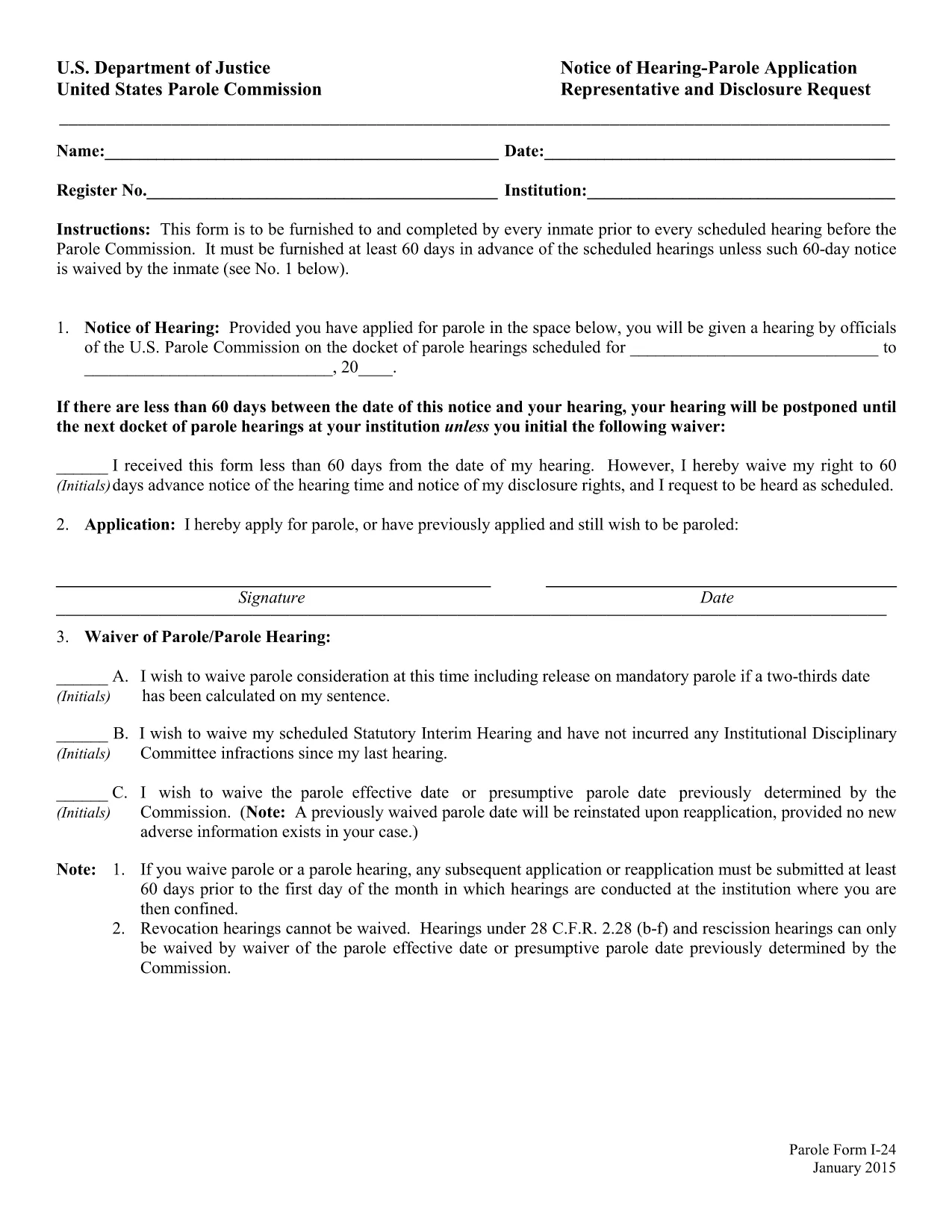
The Parole Form I‑24 (Notice of Hearing – Parole Application Representative and Disclosure Request) is the mandatory document that every inmate must submit before a scheduled hearing before the United States Parole Commission. The form must be delivered at least 60 days prior to the hearing unless the inmate waives the notice period.

What Is Form I‑24?

Form I‑24 collects essential information about the inmate, the requested representative, and any disclosure requests. It ensures the Parole Commission has all the details needed to schedule and conduct a fair hearing.

How to Fill Out the Parole Form Online

Instead of downloading the PDF and opening a separate editor, simply click the "Fill out this form" button on this page. The Formize PDF Filler app will load in your browser, allowing you to complete every field directly online.

  • Step 1: Click the button and wait for the Formize editor to appear.
  • Step 2: Enter inmate details, hearing date, and representative information.
  • Step 3: Review the disclosure request section and add any required attachments.
  • Step 4: Use the built‑in validation to catch missing or incorrectly formatted data.
  • Step 5: Save the completed form as a PDF or submit it directly to your facility.

Common Mistakes to Avoid

Even a small error can delay your hearing. Watch out for:

  • Leaving the "Notice of Hearing" date blank or entering a date less than 60 days before the hearing.
  • Misspelling the representative’s name or providing an incorrect address.
  • Forgetting to sign the form in the designated fields.
  • Submitting an outdated PDF version – always use the latest fillable file provided below.

Download & Save the Fillable PDF

If you prefer to work offline, you can download the official fillable PDF from the United States Department of Justice. The file is fully searchable and compatible with most PDF editors.

Submission Deadlines & Requirements

Remember, the completed Form I‑24 must reach the Parole Commission at least 60 days before the scheduled hearing. If you waive the notice period, include a written waiver on the form. Keep a copy of the submitted PDF for your records.

FAQ
  • What is the purpose of Form I‑24?

    Form I‑24 notifies the United States Parole Commission of an upcoming hearing and records the inmate’s representative and any disclosure requests.

  • Do I have to submit the form 60 days before the hearing?

    Yes, unless the inmate waives the notice period in writing on the form.

  • Can I edit the PDF after I download it?

    The official file is fillable, but using the Formize online editor is recommended to avoid compatibility issues.

  • Is an electronic signature accepted?

    Yes. The Parole Commission accepts electronic signatures as long as the form is fully completed and saved as a PDF.

  • What should I do if I make a mistake after submitting?

    Contact your facility’s parole office immediately and request a corrected Form I‑24. Submit the revised form with a brief explanation of the error.

  • Where can I find a printable version of the form?

    A printable, fillable PDF is available via the download link below. You can print it after completing the fields online.

  • Do I need legal representation to fill out Form I‑24?

    Legal representation is not required, but you may list a representative if you have one. The form includes a section for that information.

WIE MAN

So füllen Sie parole form i-24 kostenlos online in 5 einfachen Schritten aus:

  1. 1
    Open the Formize PDF Filler
    Click the "Fill out this form" button on the page. The Formize editor will load in a new tab.
  2. 2
    Enter All Required Information
    Type inmate details, hearing date, representative name, and any disclosure requests directly into the fields.
  3. 3
    Validate Your Entries
    Use the built‑in validation to ensure dates are correct and required fields are not left blank.
  4. 4
    Review and Sign
    Double‑check all information, add your electronic signature, and confirm the waiver if you are skipping the 60‑day notice.
  5. 5
    Save or Submit
    Download the completed PDF for your records or follow your facility’s instructions to submit the form electronically.
Formize PDF Filler-App
ÜBER

Formulare des Justizministeriums (DOJ).

parole form i-24 ist eines der offiziellen Formulare, die vom US-Justizministerium und seinen verschiedenen Abteilungen, Behörden und Komponenten verwendet werden. Das DOJ ist eine Exekutivabteilung des Bundes, die für die Durchsetzung von Bundesgesetzen, die Verteidigung der Interessen der Vereinigten Staaten in rechtlichen Angelegenheiten und die Rechtspflege zuständig ist.

Hier sind einige Beispiele für Formulare des Justizministeriums:

Antrag auf Bundeshilfe (SF-424): Dieses Formular wird von Organisationen verwendet, die Bundeszuschüsse oder finanzielle Unterstützung beantragen, die vom DOJ oder seinen Komponenten verwaltet werden. Es sammelt Informationen über die Organisation, das vorgeschlagene Projekt und das Budget.

Bürgerrechtsbeschwerdeformular: Dieses Formular wird verwendet, um bei der Bürgerrechtsabteilung des DOJ eine Beschwerde über angebliche Verstöße gegen Bürgerrechtsgesetze einzureichen, wie z. B. Diskriminierung aufgrund von Rasse, Geschlecht, Behinderung oder nationaler Herkunft.

Antragsformular für Opferbenachrichtigung: Dieses Formular wird von Opfern von Straftaten verwendet, um im Rahmen der Bemühungen des DOJ, Opfer von Straftaten Informationen und Unterstützung bereitzustellen, eine Benachrichtigung über den Status und das Verfahren eines Bundesstrafverfahrens anzufordern.

Einwanderungsformulare: Das Executive Office for Immigration Review (EOIR) des DOJ verwaltet Einwanderungsgerichte und einwanderungsbezogene Verfahren. In Verfahren vor Einwanderungsgerichten werden verschiedene Formulare verwendet, beispielsweise das Formular EOIR-42B für Anträge auf Erleichterung der Abschiebung oder das Formular EOIR-28 für Berufungen.

ATF-Formulare: Das Bureau of Alcohol, Tobacco, Firearms, and Explosives (ATF), ein Teil des DOJ, verfügt über eigene Formulare für verschiedene Zwecke, wie in einer früheren Antwort erwähnt.

Formulare der Drug Enforcement Administration (DEA): Die DEA, eine weitere Abteilung des DOJ, verwendet ihre eigenen Formulare für Angelegenheiten im Zusammenhang mit kontrollierten Substanzen, einschließlich Anträgen auf Registrierung, Berichterstattung und Aufzeichnungspflichten.

Diese Beispiele heben einige Kategorien von DOJ-Formularen hervor, aber die spezifischen Formulare, die das Justizministerium verwendet, können je nach Abteilung, Behörde oder beteiligter Komponente und der Art der Dienste oder Verfahren variieren. Es empfiehlt sich, die offizielle Website der jeweiligen Abteilung oder Behörde innerhalb des DOJ zu konsultieren oder Rechtsberatung einzuholen, um genaue und aktuelle Informationen zu den spezifischen DOJ-Formularen zu erhalten, die für Ihre Situation relevant sind.

MERKMALE

PDF-Filler

Der einfachste Weg, PDF-Formulare online auszufüllen

  • Füllen Sie schnell parole form i-24 aus
    Suchen Sie nach einer Möglichkeit, parole form i-24 schnell online auszufüllen? Mit unserem kostenlosen Online-PDF-Formularausfüller wissen Sie, wie Sie dieses PDF-Dokument in weniger als einer Minute bearbeiten und ausfüllen.
  • Einfach zu bedienender Online-PDF-Editor
    Haben Sie es satt, PDF-Dateien auszudrucken, damit Sie sie bearbeiten können, bevor Sie sie erneut scannen und zurücksenden? PDF-Dokumente kostenlos online bearbeiten. Nutzen Sie unseren Online-PDF-Editor, um Zeit und Papier zu sparen.
  • Tolle Tools, alle Plattformen
    Sie fragen sich, wie Sie parole form i-24 auf einem Mac ausfüllen oder vielleicht einen kostenlosen PDF-Ausfüller verwenden können? Unsere Online-PDF-Tools funktionieren auf allen Plattformen.
  • Sichere Dateispeicherung
    Fertige "parole form i-24"-Dateien werden in einer gesicherten Datenbank gespeichert, die vom Amazon Cloud-Hosting verwaltet wird. Sie können Ihre Dateien jederzeit aus unserem System löschen. In jedem Fall werden diese Dateien nach 24 Stunden automatisch gelöscht.
  • Chatten Sie mit parole form i-24
    Chatten Sie mit „parole form i-24“ auf Chatize, einem kostenlosen PDF-Leseassistenten. Stellen Sie Fragen und erhalten Sie Antworten von „parole form i-24“. Klicken Sie einfach oben auf die Schaltfläche Mit Dokument chatten.

Füllsitzung löschen

Die ausgewählte Füllsitzung löschen? In diesem Fall gehen Ihre Fortschritte beim Ausfüllen des Formulars verloren.

Bearbeitungssitzung löschen

Ausgewählte Bearbeitungssitzung löschen? In diesem Fall geht Ihr Fortschritt beim Erstellen und Bearbeiten des Formulars verloren.