
Sprache auswählen

MV-58A Fillable PDF Form – New York DMV

  1. Sprache Englisch
  2. Land USA
  3. Aktivität Kfz-Zulassung
  4. Abteilung Department of Motor Vehicles
MV-58A Fillable PDF Form – New York DMV

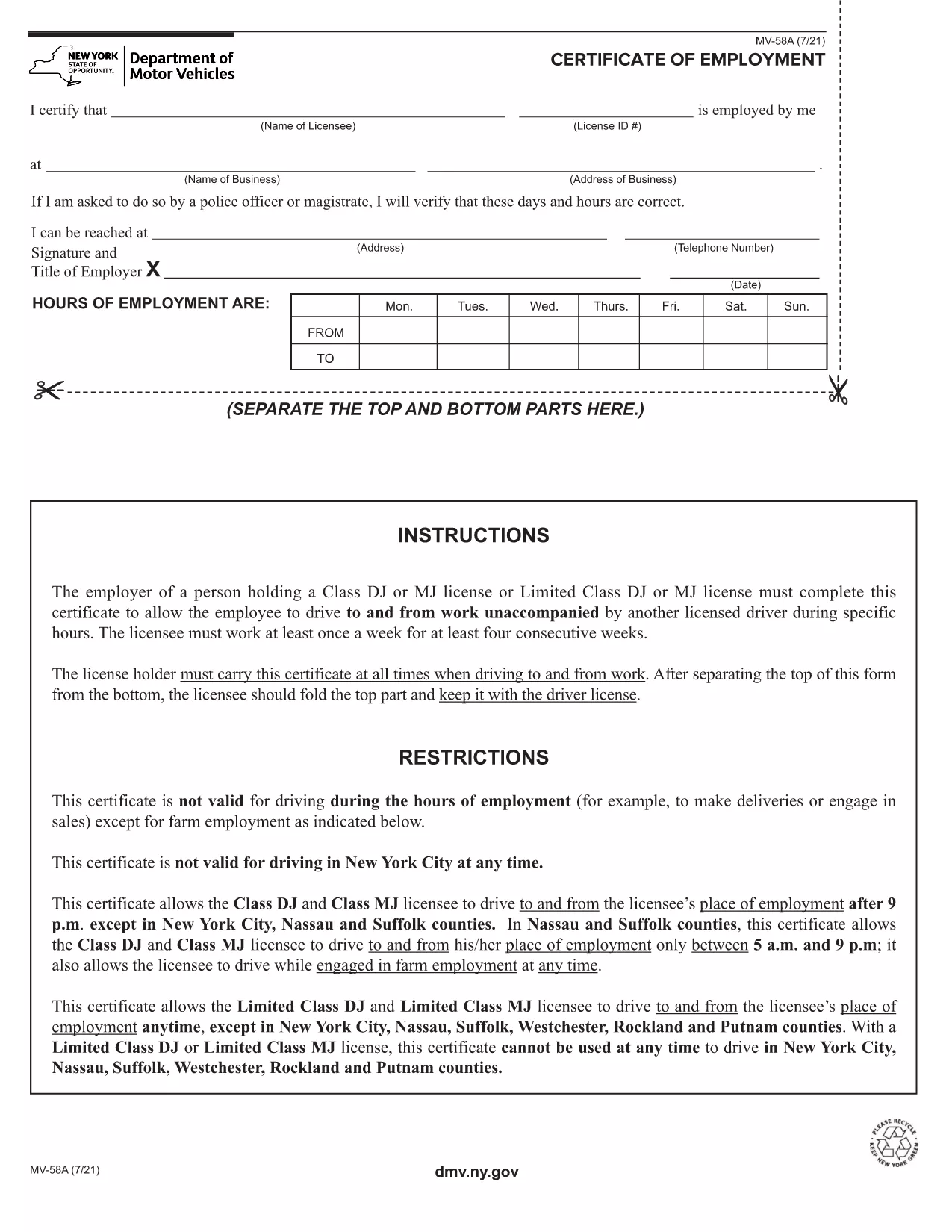
The MV-58A is the New York State Department of Motor Vehicles (DMV) form used for specific vehicle‑related transactions. Whether you need to correct registration details, request a duplicate, or handle a special circumstance, the MV-58A is the official document required by the NY DMV.

Formize.com offers a fillable PDF version of the MV-58A that lets you complete the form instantly in your browser—no extra software needed. Simply click the “Fill out this form” button, let the Formize PDF Filler load, and start entering your information.

Below you’ll find everything you need to know about the MV-58A, step‑by‑step instructions for filling it out online, common pitfalls to watch out for, and where to send the finished form.

What Is the MV-58A Form?

The MV-58A is typically used for:

  • Updating vehicle ownership information.
  • Correcting errors on a title or registration.
  • Submitting special requests that are not covered by standard DMV forms.

It is a mandatory paper‑based form for the NY DMV, but with Formize’s fillable PDF you can complete it digitally and print a clean copy for submission.

How to Complete the MV-58A Online

Follow our quick guide to finish the form without ever opening a separate PDF editor:

  1. Click the “Fill out this form” button on the page.
  2. Wait a few seconds while the Formize PDF Filler app loads the MV-58A.
  3. Enter your information in the highlighted fields. The app automatically saves your progress.
  4. Review each section for accuracy; the filler highlights any required fields you missed.
  5. When you’re done, click “Download PDF” to save a printable copy or “Print” to send it directly to your printer.

Common Mistakes to Avoid

  • Leaving required fields blank: The filler will flag empty required boxes, but double‑check before downloading.
  • Using the wrong date format: NY DMV expects MM/DD/YYYY.
  • Signing the wrong copy: The MV-58A has multiple copies; sign only the copy you will submit.
  • Incorrect vehicle identification number (VIN): Verify the VIN matches the title exactly.

Where to Submit the Completed Form

After printing, mail or deliver the signed MV-58A to your local NY DMV office. Include any supporting documents referenced on the form. For faster processing, consider using certified mail with a tracking number.

Need a reminder? Bookmark this page and return anytime you need the MV-58A fillable PDF again.

FAQ
  • What is the purpose of the MV-58A form?

    The MV-58A is used for special vehicle registration requests, corrections, or ownership updates that are not covered by standard DMV forms.

  • Can I fill out MV-58A on a phone or tablet?

    Yes. The Formize fillable PDF works on any modern browser, including mobile devices, though a larger screen makes data entry easier.

  • Do I need to print the form after filling it online?

    The NY DMV requires a signed paper copy, so you must print the completed form, sign it, and submit it by mail or in person.

  • How long does it take for the DMV to process the MV-58A?

    Processing times vary, but most requests are handled within 10‑14 business days after the DMV receives the complete form.

  • Is there a fee for submitting MV-58A?

    A processing fee may apply depending on the specific request. Check the form instructions or the NY DMV fee schedule for details.

  • What should I do if I make a mistake after printing?

    If you notice an error, correct it on a new copy of the form. Do not use correction fluid; instead, start a fresh fillable PDF and print again.

  • Can I submit the MV-58A electronically?

    The NY DMV currently requires a handwritten signature on a printed copy, so electronic submission alone is not accepted.

  • Where can I find a local NY DMV office?

    Visit the official NY DMV website and use the office locator tool to find the nearest location.

WIE MAN

So füllen Sie MV-58A kostenlos online in 5 einfachen Schritten aus:

  1. 1
    Open the Fillable Form
    Click the “Fill out this form” button on the page. The Formize PDF Filler will open in a new tab.
  2. 2
    Enter Your Information
    Type directly into each highlighted field. The app saves your entries automatically.
  3. 3
    Validate and Review
    Check for any highlighted missing fields or format warnings, then review all entered data.
  4. 4
    Download or Print
    When satisfied, click “Download PDF” to save a copy or “Print” to produce a hard‑copy for mailing.
  5. 5
    Submit to the NY DMV
    Mail or deliver the signed form to your local New York DMV office along with any required attachments.
Formize PDF Filler-App
ÜBER

Fahrzeugregistrierungsformulare

MV-58A ist eines der Fahrzeugzulassungsformulare, bei denen es sich um Dokumente handelt, die zur Registrierung eines Kraftfahrzeugs bei der zuständigen Regierungsbehörde verwendet werden, normalerweise beim Department of Motor Vehicles (DMV) oder einer gleichwertigen Behörde. Diese Formulare sind erforderlich, wenn eine Person ein neues oder gebrauchtes Fahrzeug kauft, den Besitz eines Fahrzeugs überträgt oder mit einem Fahrzeug in eine neue Gerichtsbarkeit zieht.

Die spezifischen Fahrzeugzulassungsformulare können je nach Gerichtsbarkeit variieren, erfordern jedoch im Allgemeinen die folgenden Informationen:

Fahrzeuginformationen: Dazu gehören Details zum Fahrzeug, wie Marke, Modell, Baujahr, Fahrzeugidentifikationsnummer (VIN) und Kilometerstand.

Besitzerinformationen: Das Formular erfordert Informationen über den Fahrzeugbesitzer, einschließlich Name, Adresse, Kontaktinformationen und Führerscheinnummer.

Eigentumsnachweis: Abhängig von den Umständen kann ein Eigentumsnachweis erforderlich sein, z. B. eine Eigentumsurkunde, ein Kaufvertrag oder ein Ursprungszeugnis des Herstellers (für Neufahrzeuge).

Versicherungsinformationen: In der Regel ist ein Nachweis einer gültigen Kfz-Versicherung erforderlich. Dazu kann die Angabe der Versicherungspolicennummer, der Versicherungsdaten und der Angaben zur Versicherungsgesellschaft gehören.

Zahlung von Gebühren: Die Fahrzeugregistrierung erfordert die Zahlung verschiedener Gebühren, wie z. B. Registrierungsgebühren, Steuern und möglicherweise anderer gebietsspezifischer Gebühren.

Zusätzlich zu diesen grundlegenden Anforderungen können in einigen Gerichtsbarkeiten zusätzliche Formulare oder Dokumentationsanforderungen gelten. In bestimmten Gebieten können beispielsweise Ergebnisse von Abgastests, Sicherheitsinspektionen oder ein Wohnsitznachweis erforderlich sein.

Sobald die Fahrzeugzulassungsformulare ausgefüllt und eingereicht wurden, stellt die Regierungsbehörde eine Zulassungsbescheinigung, Nummernschilder und Zulassungsaufkleber aus. Aus diesen Dokumenten geht hervor, dass das Fahrzeug ordnungsgemäß zugelassen und für den Betrieb auf öffentlichen Straßen zugelassen ist.

Es ist wichtig zu beachten, dass die Zulassungsanforderungen für Fahrzeuge je nach Gerichtsbarkeit erheblich variieren können. Daher wird empfohlen, sich bezüglich der für Ihren Standort geltenden spezifischen Formulare und Verfahren an das örtliche DMV oder eine gleichwertige Behörde zu wenden.

MERKMALE

PDF-Filler

Der einfachste Weg, PDF-Formulare online auszufüllen

  • Füllen Sie schnell MV-58A aus
    Suchen Sie nach einer Möglichkeit, MV-58A schnell online auszufüllen? Mit unserem kostenlosen Online-PDF-Formularausfüller wissen Sie, wie Sie dieses PDF-Dokument in weniger als einer Minute bearbeiten und ausfüllen.
  • Einfach zu bedienender Online-PDF-Editor
    Haben Sie es satt, PDF-Dateien auszudrucken, damit Sie sie bearbeiten können, bevor Sie sie erneut scannen und zurücksenden? PDF-Dokumente kostenlos online bearbeiten. Nutzen Sie unseren Online-PDF-Editor, um Zeit und Papier zu sparen.
  • Tolle Tools, alle Plattformen
    Sie fragen sich, wie Sie MV-58A auf einem Mac ausfüllen oder vielleicht einen kostenlosen PDF-Ausfüller verwenden können? Unsere Online-PDF-Tools funktionieren auf allen Plattformen.
  • Sichere Dateispeicherung
    Fertige "MV-58A"-Dateien werden in einer gesicherten Datenbank gespeichert, die vom Amazon Cloud-Hosting verwaltet wird. Sie können Ihre Dateien jederzeit aus unserem System löschen. In jedem Fall werden diese Dateien nach 24 Stunden automatisch gelöscht.
  • Chatten Sie mit MV-58A
    Chatten Sie mit „MV-58A“ auf Chatize, einem kostenlosen PDF-Leseassistenten. Stellen Sie Fragen und erhalten Sie Antworten von „MV-58A“. Klicken Sie einfach oben auf die Schaltfläche Mit Dokument chatten.

Füllsitzung löschen

Die ausgewählte Füllsitzung löschen? In diesem Fall gehen Ihre Fortschritte beim Ausfüllen des Formulars verloren.

Bearbeitungssitzung löschen

Ausgewählte Bearbeitungssitzung löschen? In diesem Fall geht Ihr Fortschritt beim Erstellen und Bearbeiten des Formulars verloren.