
Sprache auswählen

REG 4008 – Declaration of Gross Vehicle Weight (Fillable PDF)

  1. Sprache Englisch
  2. Land USA
  3. Aktivität Kfz-Zulassung
  4. Abteilung Department of Motor Vehicles
REG 4008 – Declaration of Gross Vehicle Weight (Fillable PDF)

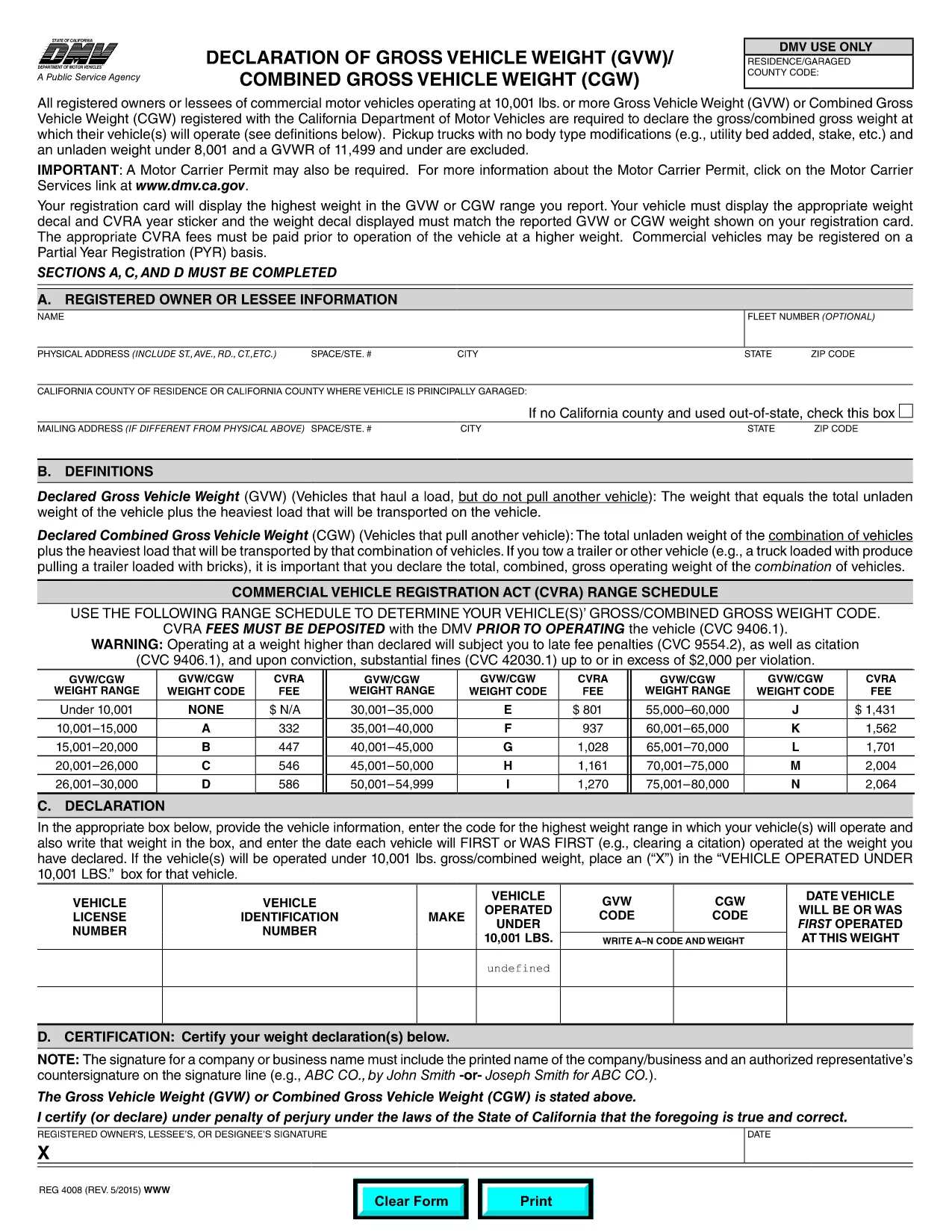
The REG 4008 – Declaration of Gross Vehicle Weight is required by the California Department of Motor Vehicles (DMV) for any commercial motor vehicle that operates at a Gross Vehicle Weight (GVW) or Combined Gross Vehicle Weight (CGW) of 10,001 lb or more. Our fillable PDF version lets you complete the form quickly, accurately, and without printing.

What Is the REG 4008 Form?

This form captures the vehicle’s weight specifications, including axle configuration, GVW, and CGW. It ensures that the DMV has the correct data for registration, licensing, and safety compliance.

Who Must File This Form?

  • Owners or lessees of commercial motor vehicles ≥ 10,001 lb GVW.
  • Vehicles used for freight, passenger transport, or any commercial purpose.
  • Pick‑up trucks with modified bodies that exceed the weight threshold (standard pickups are excluded).

How to Complete the REG 4008 Online

Instead of downloading the PDF and using a separate editor, simply click the "Fill out this form" button on this page. The Formize PDF Filler app will load the fillable version in seconds. Follow the on‑screen prompts to enter your data, then save, print, or submit directly to the DMV.

Common Mistakes to Avoid

  • Entering the vehicle’s curb weight instead of the gross weight.
  • Leaving the "Date of Inspection" blank.
  • Using an outdated VIN or license plate number.
  • Failing to sign the form electronically before submission.

Where to Submit the Completed Form

After you finish, you can:

  • Print and mail the form to your local DMV office.
  • Upload the completed PDF through the DMV’s online portal (if available).
  • Bring the printed copy to a DMV field office for immediate processing.

Need help? Review the California DMV weight‑declaration guidelines for detailed instructions.

FAQ
  • What is the purpose of the REG 4008 form?

    It declares the gross and combined gross vehicle weight for commercial vehicles, ensuring the DMV has accurate data for registration and safety compliance.

  • Do I need to file REG 4008 for a standard pickup truck?

    No. Standard pickups without body modifications are excluded. Only modified pickups or vehicles over 10,001 lb GVW must file.

  • Can I file the form electronically?

    Yes. After filling the form with Formize PDF Filler, you can upload the completed PDF to the California DMV’s online portal or mail a printed copy.

  • Is a signature required on the REG 4008?

    A signature (electronic or handwritten) is mandatory. The Formize filler lets you add an electronic signature before saving.

  • How often must I update the weight declaration?

    Whenever the vehicle’s weight changes due to modifications, new equipment, or load capacity adjustments. Failure to update can result in registration penalties.

  • What happens if I submit incorrect weight information?

    The DMV may reject the registration, issue fines, or require a re‑inspection. Accurate data helps avoid costly delays.

  • Where can I find help if I’m stuck while filling the form?

    Refer to the California DMV’s weight‑declaration guide or contact your local DMV office for assistance.

WIE MAN

So füllen Sie REG 4008 kostenlos online in 4 einfachen Schritten aus:

  1. 1
    Open the Fillable Form
    Click the "Fill out this form" button on the page. The Formize PDF Filler app will load the REG 4008 PDF directly in your browser.
  2. 2
    Enter Vehicle Information
    Complete each field – VIN, license plate, GVW, CGW, axle details, and inspection date. Use drop‑down menus where provided.
  3. 3
    Review and Confirm
    Double‑check every entry for accuracy. The app will highlight any missing required fields before you can proceed.
  4. 4
    Submit or Print
    When finished, save the filled PDF to your device, print it for a hard copy, or submit electronically through the DMV portal.
Formize PDF Filler-App
ÜBER

Fahrzeugregistrierungsformulare

REG 4008 ist eines der Fahrzeugzulassungsformulare, bei denen es sich um Dokumente handelt, die zur Registrierung eines Kraftfahrzeugs bei der zuständigen Regierungsbehörde verwendet werden, normalerweise beim Department of Motor Vehicles (DMV) oder einer gleichwertigen Behörde. Diese Formulare sind erforderlich, wenn eine Person ein neues oder gebrauchtes Fahrzeug kauft, den Besitz eines Fahrzeugs überträgt oder mit einem Fahrzeug in eine neue Gerichtsbarkeit zieht.

Die spezifischen Fahrzeugzulassungsformulare können je nach Gerichtsbarkeit variieren, erfordern jedoch im Allgemeinen die folgenden Informationen:

Fahrzeuginformationen: Dazu gehören Details zum Fahrzeug, wie Marke, Modell, Baujahr, Fahrzeugidentifikationsnummer (VIN) und Kilometerstand.

Besitzerinformationen: Das Formular erfordert Informationen über den Fahrzeugbesitzer, einschließlich Name, Adresse, Kontaktinformationen und Führerscheinnummer.

Eigentumsnachweis: Abhängig von den Umständen kann ein Eigentumsnachweis erforderlich sein, z. B. eine Eigentumsurkunde, ein Kaufvertrag oder ein Ursprungszeugnis des Herstellers (für Neufahrzeuge).

Versicherungsinformationen: In der Regel ist ein Nachweis einer gültigen Kfz-Versicherung erforderlich. Dazu kann die Angabe der Versicherungspolicennummer, der Versicherungsdaten und der Angaben zur Versicherungsgesellschaft gehören.

Zahlung von Gebühren: Die Fahrzeugregistrierung erfordert die Zahlung verschiedener Gebühren, wie z. B. Registrierungsgebühren, Steuern und möglicherweise anderer gebietsspezifischer Gebühren.

Zusätzlich zu diesen grundlegenden Anforderungen können in einigen Gerichtsbarkeiten zusätzliche Formulare oder Dokumentationsanforderungen gelten. In bestimmten Gebieten können beispielsweise Ergebnisse von Abgastests, Sicherheitsinspektionen oder ein Wohnsitznachweis erforderlich sein.

Sobald die Fahrzeugzulassungsformulare ausgefüllt und eingereicht wurden, stellt die Regierungsbehörde eine Zulassungsbescheinigung, Nummernschilder und Zulassungsaufkleber aus. Aus diesen Dokumenten geht hervor, dass das Fahrzeug ordnungsgemäß zugelassen und für den Betrieb auf öffentlichen Straßen zugelassen ist.

Es ist wichtig zu beachten, dass die Zulassungsanforderungen für Fahrzeuge je nach Gerichtsbarkeit erheblich variieren können. Daher wird empfohlen, sich bezüglich der für Ihren Standort geltenden spezifischen Formulare und Verfahren an das örtliche DMV oder eine gleichwertige Behörde zu wenden.

MERKMALE

PDF-Filler

Der einfachste Weg, PDF-Formulare online auszufüllen

  • Füllen Sie schnell REG 4008 aus
    Suchen Sie nach einer Möglichkeit, REG 4008 schnell online auszufüllen? Mit unserem kostenlosen Online-PDF-Formularausfüller wissen Sie, wie Sie dieses PDF-Dokument in weniger als einer Minute bearbeiten und ausfüllen.
  • Einfach zu bedienender Online-PDF-Editor
    Haben Sie es satt, PDF-Dateien auszudrucken, damit Sie sie bearbeiten können, bevor Sie sie erneut scannen und zurücksenden? PDF-Dokumente kostenlos online bearbeiten. Nutzen Sie unseren Online-PDF-Editor, um Zeit und Papier zu sparen.
  • Tolle Tools, alle Plattformen
    Sie fragen sich, wie Sie REG 4008 auf einem Mac ausfüllen oder vielleicht einen kostenlosen PDF-Ausfüller verwenden können? Unsere Online-PDF-Tools funktionieren auf allen Plattformen.
  • Sichere Dateispeicherung
    Fertige "REG 4008"-Dateien werden in einer gesicherten Datenbank gespeichert, die vom Amazon Cloud-Hosting verwaltet wird. Sie können Ihre Dateien jederzeit aus unserem System löschen. In jedem Fall werden diese Dateien nach 24 Stunden automatisch gelöscht.
  • Chatten Sie mit REG 4008
    Chatten Sie mit „REG 4008“ auf Chatize, einem kostenlosen PDF-Leseassistenten. Stellen Sie Fragen und erhalten Sie Antworten von „REG 4008“. Klicken Sie einfach oben auf die Schaltfläche Mit Dokument chatten.

Füllsitzung löschen

Die ausgewählte Füllsitzung löschen? In diesem Fall gehen Ihre Fortschritte beim Ausfüllen des Formulars verloren.

Bearbeitungssitzung löschen

Ausgewählte Bearbeitungssitzung löschen? In diesem Fall geht Ihr Fortschritt beim Erstellen und Bearbeiten des Formulars verloren.