
Sprache auswählen

E‑1 Treaty Trader Visa Application Form (DS‑156E) – Fillable PDF

  1. Sprache Englisch
  2. Land USA
  3. Abteilung Außenministerium
  4. Aktivität Visa
E‑1 Treaty Trader Visa Application Form (DS‑156E) – Fillable PDF

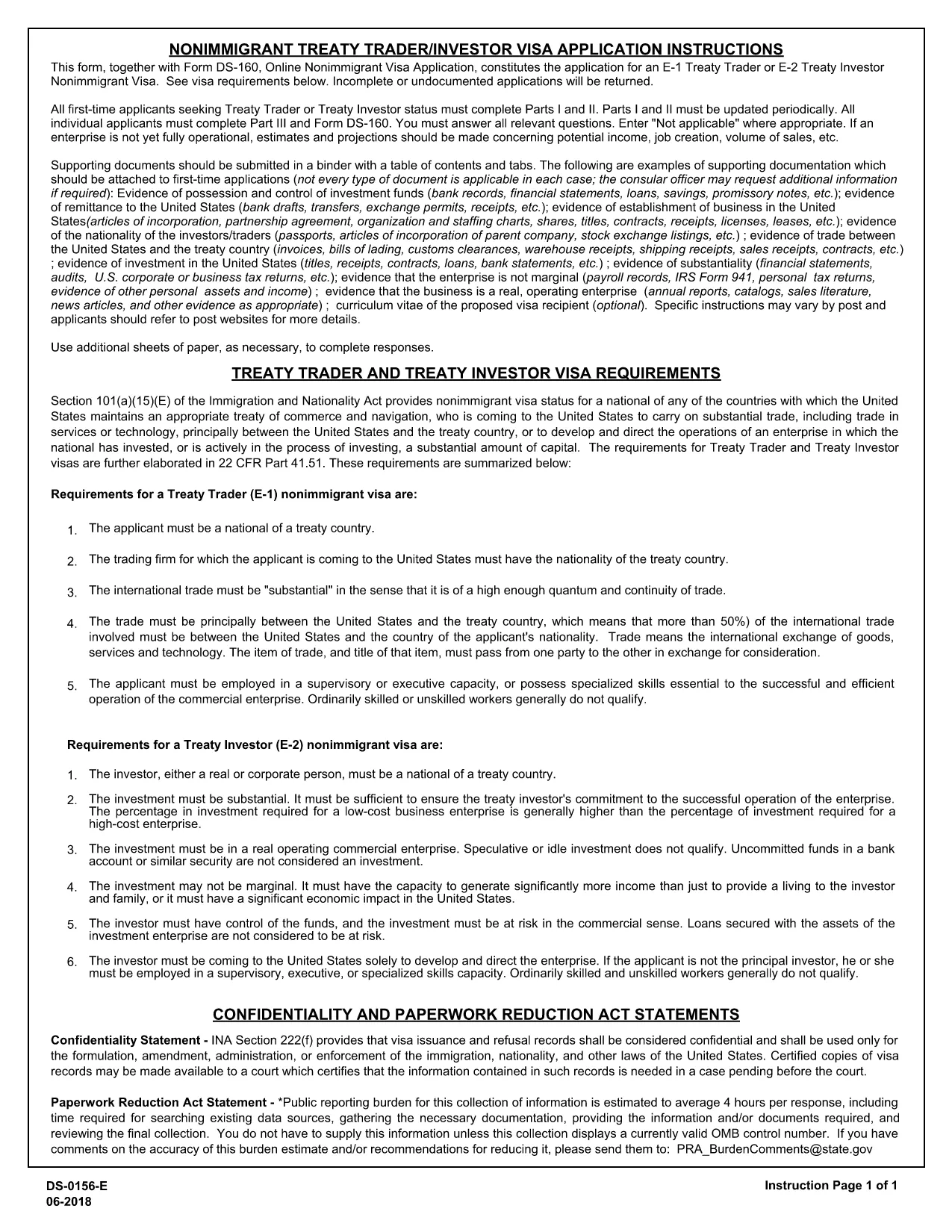
The DS‑156E, commonly called the “Application Form E‑1,” is the official online non‑immigrant visa application for the U.S. E‑1 Treaty Trader visa. This fillable PDF lets you complete the entire form from any device, then submit it directly to the U.S. Department of State.

What Is the DS‑156E E‑1 Visa Application?

The DS‑156E collects personal, travel, and business‑trade information required to prove you qualify as a treaty trader under the E‑1 category. It is used together with the standard DS‑160 form.

How to Complete the Fillable E‑1 Form Online

Instead of downloading the PDF and editing it manually, simply click the “Fill out this form” button on our page. The Formize PDF Filler loads instantly, allowing you to type, select, and save your answers without any software installation.

Common Mistakes to Avoid on the DS‑156E

  • Leaving required fields blank – the filler will highlight missing data.
  • Entering a passport number that does not match your current passport.
  • Providing inconsistent trade‑activity details that differ from your supporting documents.
  • Not signing the form electronically before saving.

Where to Submit Your Completed Form

After you finish, download the completed PDF and upload it with your DS‑160 when scheduling a visa interview at the U.S. embassy or consulate. Keep a copy for your records.

Need Help?

Review the U.S. Department of State’s instructions or consult an immigration attorney if you have complex trade‑structure questions.

FAQ
  • What is the difference between DS‑160 and DS‑156E?

    DS‑160 is the general non‑immigrant visa application; DS‑156E is specific to the E‑1 Treaty Trader visa and must be submitted together with DS‑160.

  • Can I edit the form after I download it?

    Yes, you can reopen the saved PDF in any standard PDF editor, but using Formize’s online filler ensures all data remains editable without extra software.

  • Is there a filing fee for the DS‑156E?

    The DS‑156E itself has no separate fee; the fee is paid when you schedule your visa interview through the DS‑160 process.

  • How long does it take to complete the DS‑156E?

    Most applicants finish in 15‑30 minutes if they have their trade documents ready.

  • Do I need to print the form before submitting?

    No. You can submit the electronic PDF directly with your online DS‑160. A printed copy may be requested at the interview.

  • What should I do if I make a mistake after saving?

    Open the saved PDF with Formize’s filler again, correct the error, and re‑save.

  • Is the Formize filler secure?

    Yes, all data is processed in your browser and never stored on our servers, ensuring privacy.

WIE MAN

So füllen Sie E-1 visa application kostenlos online in 4 einfachen Schritten aus:

  1. 1
    Open the Fillable Form
    Click the “Fill out this form” button on this page. The Formize PDF Filler app loads in seconds.
  2. 2
    Enter Your Information
    Complete each section – personal details, passport data, trade information – using the on‑screen fields.
  3. 3
    Validate and Save
    The filler checks for required fields. When all sections are complete, click “Save PDF” to download the finished form.
  4. 4
    Submit with Your Visa Application
    Attach the saved DS‑156E PDF to your DS‑160 submission during the embassy interview scheduling process.
Formize PDF Filler-App
ÜBER

Visa-Formulare

E-1 visa application ist eines der Visa-Formulare, bei denen es sich um Dokumente handelt, die zur Beantragung eines Visums für die Einreise in ein fremdes Land verwendet werden. Ein Visum ist ein Dokument, das es einem Ausländer ermöglicht, für einen bestimmten Zeitraum in ein fremdes Land einzureisen, sich dort aufzuhalten und manchmal dort zu arbeiten. Die genauen Formulare und Anforderungen für die Erlangung eines Visums variieren je nach Land und Art des Visums.

Visaformulare erfordern in der Regel persönliche Informationen wie Name, Geburtsdatum und Passinformationen sowie Informationen über den Zweck und die Dauer der Reise, das beabsichtigte Ziel und ob dem Antragsteller zuvor ein Visum verweigert oder aus einem Land ausgewiesen wurde. Die Formulare können auch Begleitdokumente wie einen Reisepass, Fotos und einen Nachweis über finanzielle Unterstützung erfordern.

In den Vereinigten Staaten sind die häufigsten Visumformulare die Formulare DS-160 und DS-260. Das DS-160-Formular wird zur Beantragung eines Nichteinwanderungsvisums verwendet, während das DS-260-Formular zur Beantragung eines Einwanderungsvisums verwendet wird. Diese Formulare erfordern detaillierte Informationen über die persönliche und Reisegeschichte des Antragstellers sowie unterstützende Unterlagen wie Reisepass, Reiseroute und Finanzunterlagen.

Andere Länder haben möglicherweise andere Visaformulare und -anforderungen, aber das grundlegende Verfahren umfasst in der Regel das Ausfüllen eines Visumantrags, das Bereitstellen von Begleitdokumenten und die Teilnahme an einem Gespräch mit einem Konsularbeamten in einer US-Botschaft oder einem US-Konsulat. Es ist wichtig zu beachten, dass das Visumantragsverfahren komplex und zeitaufwändig sein kann, und es wird empfohlen, dass Personen, die ein Visum beantragen, einen Anwalt für Einwanderungsfragen oder einen anderen qualifizierten Fachmann konsultieren, um sicherzustellen, dass alle erforderlichen Formulare und Anforderungen erfüllt sind.

MERKMALE

PDF-Filler

Der einfachste Weg, PDF-Formulare online auszufüllen

  • Füllen Sie schnell E-1 visa application aus
    Suchen Sie nach einer Möglichkeit, E-1 visa application schnell online auszufüllen? Mit unserem kostenlosen Online-PDF-Formularausfüller wissen Sie, wie Sie dieses PDF-Dokument in weniger als einer Minute bearbeiten und ausfüllen.
  • Einfach zu bedienender Online-PDF-Editor
    Haben Sie es satt, PDF-Dateien auszudrucken, damit Sie sie bearbeiten können, bevor Sie sie erneut scannen und zurücksenden? PDF-Dokumente kostenlos online bearbeiten. Nutzen Sie unseren Online-PDF-Editor, um Zeit und Papier zu sparen.
  • Tolle Tools, alle Plattformen
    Sie fragen sich, wie Sie E-1 visa application auf einem Mac ausfüllen oder vielleicht einen kostenlosen PDF-Ausfüller verwenden können? Unsere Online-PDF-Tools funktionieren auf allen Plattformen.
  • Sichere Dateispeicherung
    Fertige "E-1 visa application"-Dateien werden in einer gesicherten Datenbank gespeichert, die vom Amazon Cloud-Hosting verwaltet wird. Sie können Ihre Dateien jederzeit aus unserem System löschen. In jedem Fall werden diese Dateien nach 24 Stunden automatisch gelöscht.
  • Chatten Sie mit E-1 visa application
    Chatten Sie mit „E-1 visa application“ auf Chatize, einem kostenlosen PDF-Leseassistenten. Stellen Sie Fragen und erhalten Sie Antworten von „E-1 visa application“. Klicken Sie einfach oben auf die Schaltfläche Mit Dokument chatten.

Füllsitzung löschen

Die ausgewählte Füllsitzung löschen? In diesem Fall gehen Ihre Fortschritte beim Ausfüllen des Formulars verloren.

Bearbeitungssitzung löschen

Ausgewählte Bearbeitungssitzung löschen? In diesem Fall geht Ihr Fortschritt beim Erstellen und Bearbeiten des Formulars verloren.