
Sprache auswählen

Form 5839 – Physician’s Statement and Authorization (Fillable PDF)

  1. Sprache Englisch
  2. Land USA
  3. Aktivität Führerschein
  4. Zustand Missouri
Form 5839 – Physician’s Statement and Authorization (Fillable PDF)

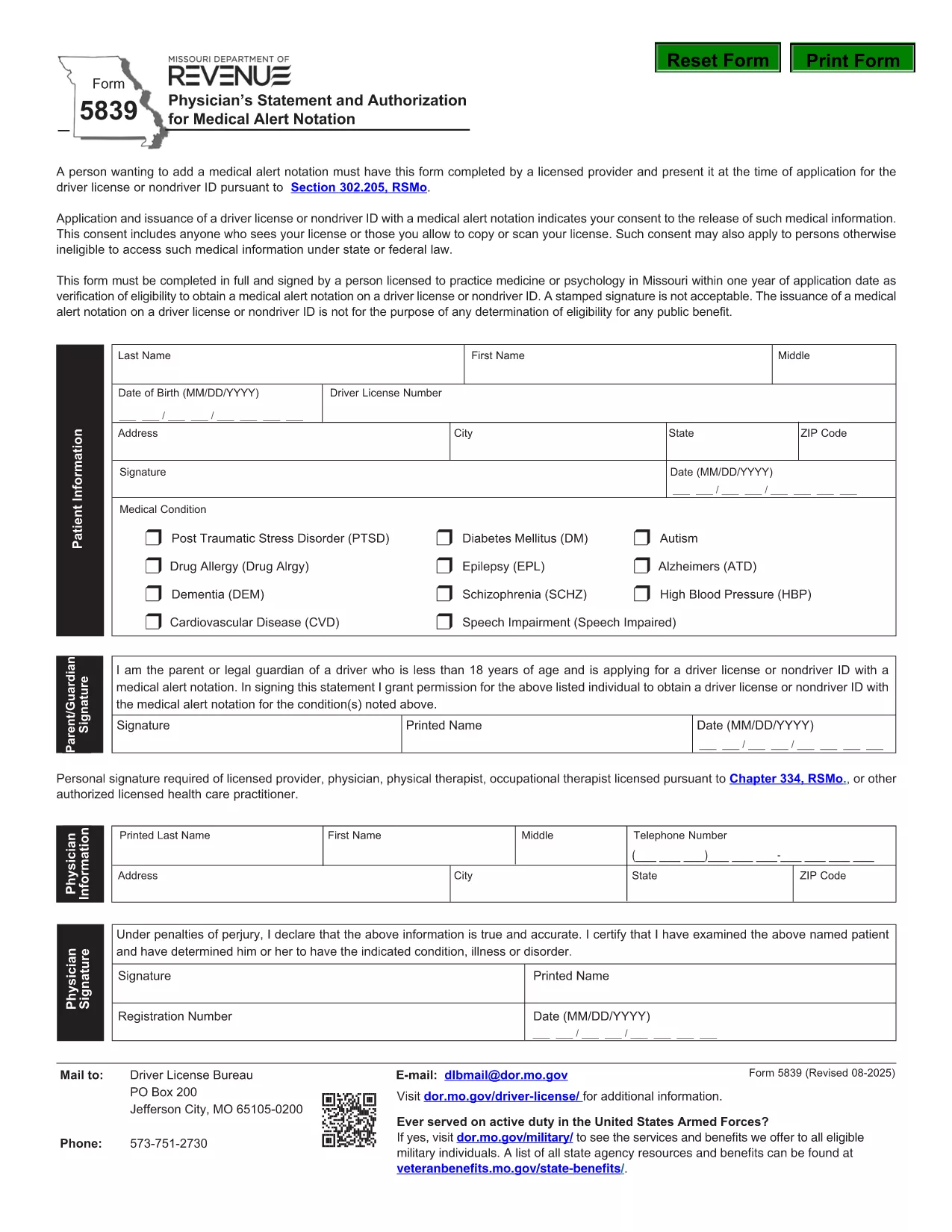
Form 5839 is the official Missouri Physician’s Statement and Authorization required when you want a medical alert notation placed on a driver’s license or non‑driver ID. The form must be completed by a licensed health‑care provider and presented at the time of application.

What Is Form 5839 and Who Needs It?

This form is used under Section 302.205, RSMo to certify medical conditions that affect driving ability. It is typically needed by individuals with conditions such as epilepsy, diabetes, vision impairments, or any health issue that the Missouri Department of Revenue deems relevant for a medical alert.

How to Complete Form 5839 Online

Instead of downloading the PDF and editing it manually, simply click the "Fill out this form" button on this page. The Formize PDF Filler app will load, allowing you to complete every field directly in your browser. Once finished, you can save or print the completed form.

Common Mistakes to Avoid on Form 5839

  • Leaving any required fields blank – the form will be rejected.
  • Using an unsigned or non‑licensed provider’s signature.
  • Providing outdated contact information for the physician.
  • Submitting a scanned copy with low resolution; use the online filler for a clear PDF.

Where to Submit the Completed Form

After filling out Form 5839, bring the printed copy (or a saved electronic version) to your local Missouri Department of Revenue office when applying for or renewing a driver’s license or ID. The office will verify the medical information before adding the alert notation.

FAQs About Form 5839

Below are answers to the most common questions about this form. For more details, refer to the downloadable PDF linked at the bottom of the page.

FAQ
  • Who is authorized to sign Form 5839?

    Only a licensed physician, osteopathic doctor, or other qualified health‑care professional can sign the form.

  • Can I submit a scanned copy of the form?

    Yes, but the scan must be clear and legible. Using the online Formize filler ensures a high‑quality PDF.

  • Do I need to attach medical records?

    Generally no, unless the Department of Revenue specifically requests supporting documentation.

  • How long does the medical alert stay on my license?

    The alert remains until the physician provides a new statement indicating the condition has resolved.

  • Is there a fee to file Form 5839?

    No separate fee is charged for the medical statement; any standard licensing fees still apply.

  • What if my physician’s signature is missing?

    The form will be rejected. Contact the physician to obtain a proper signature before submission.

WIE MAN

So füllen Sie Form 5839 kostenlos online in 4 einfachen Schritten aus:

  1. 1
    Click the Fill‑out Button
    Press the "Fill out this form" button on the page. The Formize PDF Filler loads in your browser.
  2. 2
    Enter All Required Information
    Complete each field – patient details, physician’s credentials, and the medical condition description.
  3. 3
    Save or Print the Completed Form
    When all sections are filled, click "Save" to download a copy or "Print" to obtain a hard‑copy for submission.
  4. 4
    Submit to the Missouri Department of Revenue
    Take the printed form (or a saved PDF) to your local DMV office when applying for or renewing your license.
Formize PDF Filler-App
ÜBER

Führerscheinantragsformulare

In den meisten Ländern ist es Pflicht, einen Führerschein zu besitzen, bevor Sie auf die Straße gehen dürfen. Der Erwerb des Führerscheins ist ein wichtiger Meilenstein für jeden, der ein Auto fahren möchte.

Form 5839 ist eines der Führerscheinantragsformulare, die Dokumente sind, die verwendet werden, um Informationen von Personen zu sammeln, die einen Führerschein beantragen möchten. Es enthält normalerweise Felder für den Namen, das Geburtsdatum, die ID-Nummer, die Kontaktinformationen des Antragstellers sowie die Geschichte und Erfahrung seines Führerscheins.

MERKMALE

PDF-Filler

Der einfachste Weg, PDF-Formulare online auszufüllen

  • Füllen Sie schnell Form 5839 aus
    Suchen Sie nach einer Möglichkeit, Form 5839 schnell online auszufüllen? Mit unserem kostenlosen Online-PDF-Formularausfüller wissen Sie, wie Sie dieses PDF-Dokument in weniger als einer Minute bearbeiten und ausfüllen.
  • Einfach zu bedienender Online-PDF-Editor
    Haben Sie es satt, PDF-Dateien auszudrucken, damit Sie sie bearbeiten können, bevor Sie sie erneut scannen und zurücksenden? PDF-Dokumente kostenlos online bearbeiten. Nutzen Sie unseren Online-PDF-Editor, um Zeit und Papier zu sparen.
  • Tolle Tools, alle Plattformen
    Sie fragen sich, wie Sie Form 5839 auf einem Mac ausfüllen oder vielleicht einen kostenlosen PDF-Ausfüller verwenden können? Unsere Online-PDF-Tools funktionieren auf allen Plattformen.
  • Sichere Dateispeicherung
    Fertige "Form 5839"-Dateien werden in einer gesicherten Datenbank gespeichert, die vom Amazon Cloud-Hosting verwaltet wird. Sie können Ihre Dateien jederzeit aus unserem System löschen. In jedem Fall werden diese Dateien nach 24 Stunden automatisch gelöscht.
  • Chatten Sie mit Form 5839
    Chatten Sie mit „Form 5839“ auf Chatize, einem kostenlosen PDF-Leseassistenten. Stellen Sie Fragen und erhalten Sie Antworten von „Form 5839“. Klicken Sie einfach oben auf die Schaltfläche Mit Dokument chatten.

Füllsitzung löschen

Die ausgewählte Füllsitzung löschen? In diesem Fall gehen Ihre Fortschritte beim Ausfüllen des Formulars verloren.

Bearbeitungssitzung löschen

Ausgewählte Bearbeitungssitzung löschen? In diesem Fall geht Ihr Fortschritt beim Erstellen und Bearbeiten des Formulars verloren.