
Sprache auswählen

BLS‑75 Driving School Endorsement Application – Fillable PDF

  1. Sprache Englisch
  2. Land USA
  3. Aktivität Führerschein
  4. Zustand New Jersey
BLS‑75 Driving School Endorsement Application – Fillable PDF

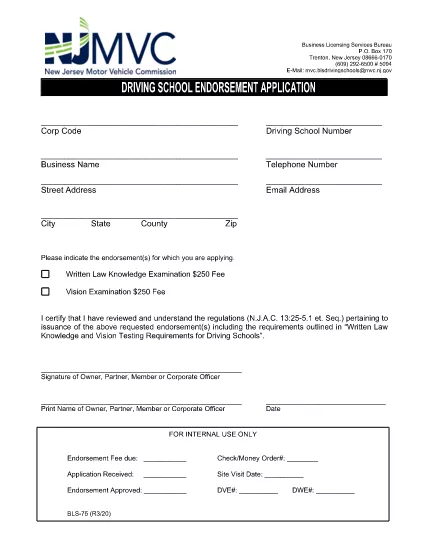
What Is the BLS‑75 Form?

The BLS‑75 is the official New Jersey Motor Vehicle Commission (MVC) application used by driving schools to request endorsement approval. It verifies that the school meets all state‑required regulations before issuing a commercial driving‑school endorsement.

Who Must Complete the BLS‑75?

Any individual or organization that operates a driving school in New Jersey and wishes to receive the MVC endorsement must submit a completed BLS‑75. This includes new schools, schools renewing their endorsement, and schools adding new locations.

How to Fill Out the BLS‑75 Online

Instead of downloading the PDF and editing it with a separate editor, simply click the "Fill out this form" button on this page. The Formize PDF Filler app will load directly in your browser, allowing you to:

  • Enter information into each field with auto‑save.
  • Validate signatures and dates instantly.
  • Preview the completed form before submission.

Common Mistakes to Avoid

  • Leaving required fields blank. The filler highlights missing information before you can submit.
  • Using an outdated version of the form. The link on this page always points to the current BLS‑75 PDF.
  • Incorrectly formatting phone numbers or dates. Follow the sample formats shown in each field.

Where to Submit the Completed Form

After you finish, you can either:

  • Download the signed PDF and mail it to the New Jersey MVC, Division of Motor Vehicles, 124 Halsey St., Trenton, NJ 08625.
  • Upload the PDF directly through the MVC online portal (if you have an account).

For any questions about eligibility or submission, contact the New Jersey MVC Business Services Division at (609) 292‑6500.

FAQ
  • Do I need Adobe Acrobat to complete the BLS‑75?

    No. The Formize PDF Filler works in any modern browser, so you can fill out the form without installing additional software.

  • Is the online filler secure?

    Yes. All data is processed locally in your browser and transmitted over HTTPS. Formize does not store your personal information.

  • Can I save my progress and return later?

    Absolutely. Use the "Save Draft" button to download a partially completed PDF, then re‑upload it later to continue editing.

  • What if I make a mistake after submitting?

    Contact the NJ MVC Business Services Division. They will advise whether you need to submit a corrected BLS‑75 or if an amendment can be made.

  • Is there a filing fee for the BLS‑75?

    Yes, the MVC charges a processing fee. Check the latest fee schedule on the NJ MVC website or the form’s instruction page.

  • How long does the endorsement approval take?

    Processing typically takes 10‑15 business days after the MVC receives a complete and accurate BLS‑75.

WIE MAN

So füllen Sie BLS-75 kostenlos online in 4 einfachen Schritten aus:

  1. 1
    Click the Fill‑out Button
    Press the "Fill out this form" button on the page. The Formize PDF Filler will open in a new browser tab.
  2. 2
    Wait for the Filler to Load
    The app loads the BLS‑75 PDF automatically. All fields become editable, and a progress bar shows the loading status.
  3. 3
    Complete Each Section
    Enter your information, upload required signatures, and double‑check the auto‑validation messages. The filler saves your work every few seconds.
  4. 4
    Save or Submit
    When finished, click "Download" to save a copy for your records or use the built‑in "Submit" button to send the PDF directly to the NJ MVC portal.
Formize PDF Filler-App
ÜBER

Führerscheinantragsformulare

In den meisten Ländern ist es Pflicht, einen Führerschein zu besitzen, bevor Sie auf die Straße gehen dürfen. Der Erwerb des Führerscheins ist ein wichtiger Meilenstein für jeden, der ein Auto fahren möchte.

BLS-75 ist eines der Führerscheinantragsformulare, die Dokumente sind, die verwendet werden, um Informationen von Personen zu sammeln, die einen Führerschein beantragen möchten. Es enthält normalerweise Felder für den Namen, das Geburtsdatum, die ID-Nummer, die Kontaktinformationen des Antragstellers sowie die Geschichte und Erfahrung seines Führerscheins.

MERKMALE

PDF-Filler

Der einfachste Weg, PDF-Formulare online auszufüllen

  • Füllen Sie schnell BLS-75 aus
    Suchen Sie nach einer Möglichkeit, BLS-75 schnell online auszufüllen? Mit unserem kostenlosen Online-PDF-Formularausfüller wissen Sie, wie Sie dieses PDF-Dokument in weniger als einer Minute bearbeiten und ausfüllen.
  • Einfach zu bedienender Online-PDF-Editor
    Haben Sie es satt, PDF-Dateien auszudrucken, damit Sie sie bearbeiten können, bevor Sie sie erneut scannen und zurücksenden? PDF-Dokumente kostenlos online bearbeiten. Nutzen Sie unseren Online-PDF-Editor, um Zeit und Papier zu sparen.
  • Tolle Tools, alle Plattformen
    Sie fragen sich, wie Sie BLS-75 auf einem Mac ausfüllen oder vielleicht einen kostenlosen PDF-Ausfüller verwenden können? Unsere Online-PDF-Tools funktionieren auf allen Plattformen.
  • Sichere Dateispeicherung
    Fertige "BLS-75"-Dateien werden in einer gesicherten Datenbank gespeichert, die vom Amazon Cloud-Hosting verwaltet wird. Sie können Ihre Dateien jederzeit aus unserem System löschen. In jedem Fall werden diese Dateien nach 24 Stunden automatisch gelöscht.
  • Chatten Sie mit BLS-75
    Chatten Sie mit „BLS-75“ auf Chatize, einem kostenlosen PDF-Leseassistenten. Stellen Sie Fragen und erhalten Sie Antworten von „BLS-75“. Klicken Sie einfach oben auf die Schaltfläche Mit Dokument chatten.

Füllsitzung löschen

Die ausgewählte Füllsitzung löschen? In diesem Fall gehen Ihre Fortschritte beim Ausfüllen des Formulars verloren.

Bearbeitungssitzung löschen

Ausgewählte Bearbeitungssitzung löschen? In diesem Fall geht Ihr Fortschritt beim Erstellen und Bearbeiten des Formulars verloren.