
Sprache auswählen

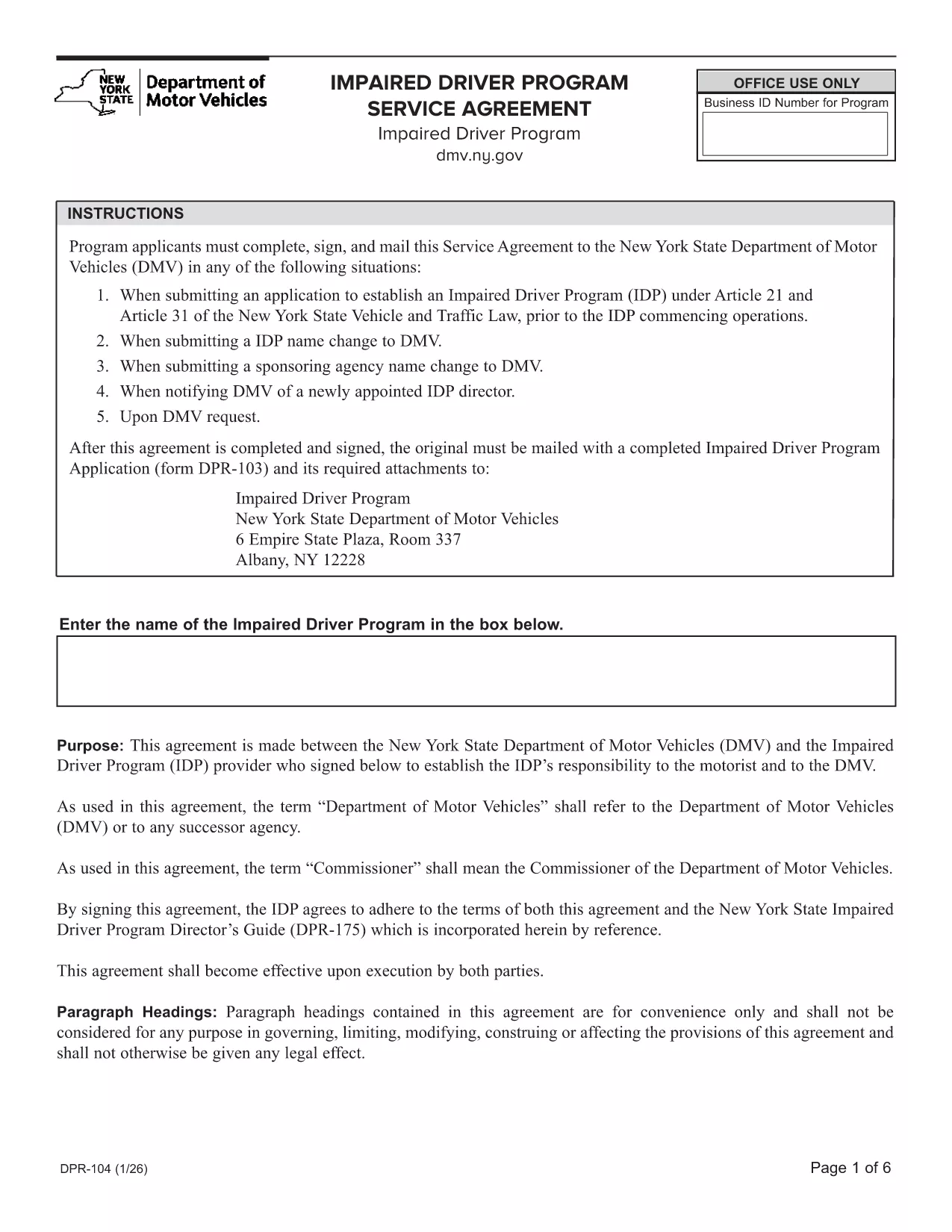
DPR-104 Impaired Driver Program Service Agreement – Fillable PDF

  1. Sprache Englisch
  2. Land USA
  3. Aktivität Führerschein
  4. Zustand New York
DPR-104 Impaired Driver Program Service Agreement – Fillable PDF

DPR-104 Impaired Driver Program Service Agreement – Fillable PDF

The DPR-104 is the official Impaired Driver Program (IDP) Service Agreement required by the New York State Department of Motor Vehicles (NY DMV). This form confirms that an instructor or driving school meets all IDP eligibility rules before a student with a documented impairment can begin training.

What Is the DPR-104 Form?

DPR-104 documents the relationship between the IDP and the driving instructor. It verifies that the instructor’s out‑of‑state license is valid, not suspended, and that the school complies with NY DMV’s safety standards.

Who Must Complete DPR-104?

  • Driving schools or private instructors enrolled in the NY Impaired Driver Program.
  • Any instructor whose license was issued outside of New York but who wishes to teach IDP students.
  • Schools applying for a new classroom site or a change to an existing site.

How to Fill Out DPR-104 Online

Instead of downloading the PDF and editing it manually, simply click the "Fill out this form" button below. The Formize PDF Filler app will load the fillable version directly in your browser:

  1. Click the blue Fill out this form button.
  2. Wait a few seconds while the Formize filler loads.
  3. Enter the required information into each field. All fields are interactive and saved automatically.
  4. When you’re finished, choose Download Completed PDF or Submit Directly to NY DMV (if your agency supports it).

Common Mistakes to Avoid

  • Using an expired out‑of‑state license. The form requires a license that has been valid for the past five years.
  • Leaving conditional or restricted status unchecked. Any restriction must be disclosed.
  • Misspelling the instructor’s name or school address. Errors can delay approval.
  • Forgetting the signature. The form is not valid without a handwritten or digital signature.

Where to Submit the Completed Form

After you’ve filled and saved DPR‑104, mail or fax the printed copy to the NY DMV IDP Office, or upload it through the NY DMV online portal if you have an account. Keep a copy for your records.

Download the original DPR‑104 PDF

FAQ
  • What is the purpose of the DPR‑104 form?

    DPR‑104 is the Service Agreement that proves an IDP instructor or school meets NY DMV requirements before teaching drivers with impairments.

  • Who is required to file DPR‑104?

    Any driving instructor or school participating in New York’s Impaired Driver Program, especially those with out‑of‑state licenses.

  • Can I fill out DPR‑104 on a mobile device?

    Yes. The Formize filler is responsive and works on smartphones, tablets, and desktop browsers.

  • Do I need to print the form after filling it online?

    A printed copy with a handwritten signature is recommended for submission, though some NY DMV offices accept a digitally signed PDF.

  • How long is a valid out‑of‑state license for DPR‑104?

    The license must have been valid for the five years preceding the application date, with no suspensions or revocations (except those that have been terminated).

  • What happens if I make a mistake on the form?

    You can reopen the fillable PDF in Formize, correct the error, and re‑download. If you have already submitted, contact the NY DMV IDP Office for a correction.

  • Is there a filing fee for DPR‑104?

    No separate fee is charged for the DPR‑104 itself; any fees are associated with the overall Impaired Driver Program enrollment.

  • Where can I find additional IDP resources?

    Visit the NY DMV website’s Impaired Driver Program page for guidelines, training manuals, and contact information.

WIE MAN

So füllen Sie DPR-104 kostenlos online in 3 einfachen Schritten aus:

  1. 1
    Open the Fillable Form
    Click the blue “Fill out this form” button on the page. The Formize PDF Filler will load the DPR‑104 directly in your browser.
  2. 2
    Enter All Required Information
    Complete each interactive field—license details, school address, instructor name, and signatures. The filler saves your entries automatically.
  3. 3
    Save or Submit
    When finished, choose to download the completed PDF for printing or submit it online through the NY DMV portal if available.
Formize PDF Filler-App
ÜBER

Führerscheinantragsformulare

DPR-104 ist eines der Führerscheinformulare, bei denen es sich um Dokumente handelt, die bei der Erlangung oder Erneuerung eines Führerscheins verwendet werden. Hierbei handelt es sich um ein offizielles, von der Regierung ausgestelltes Dokument, das Einzelpersonen das Führen eines Kraftfahrzeugs auf öffentlichen Straßen gestattet. Diese Formulare können je nach Gerichtsbarkeit variieren, umfassen jedoch im Allgemeinen Folgendes:

Antragsformular: Dieses Formular wird zur Beantragung eines Führerscheins verwendet und fragt in der Regel nach persönlichen Informationen wie Name, Adresse, Geburtsdatum und Sozialversicherungsnummer.

Ausweisdokumente: Zusammen mit dem Antragsformular müssen Einzelpersonen in der Regel spezifische Ausweisdokumente vorlegen, um ihre Identität, ihren Wohnsitz und ihre rechtliche Präsenz im Land nachzuweisen. Dazu können ein gültiger Reisepass, eine Geburtsurkunde, eine Sozialversicherungskarte oder ein anderer amtlicher Ausweis gehören.

Ansässigkeitsnachweis: In vielen Gerichtsbarkeiten müssen Antragsteller einen Wohnsitznachweis vorlegen, z. B. eine Rechnung eines Versorgungsunternehmens, einen Mietvertrag oder einen Kontoauszug, um ihre Adresse zu überprüfen.

Formular für eine ärztliche Untersuchung: In einigen Gerichtsbarkeiten kann eine ärztliche Untersuchung erforderlich sein, um sicherzustellen, dass der Antragsteller die notwendigen körperlichen und geistigen Voraussetzungen für sicheres Fahren erfüllt. Normalerweise wird dieses Formular von einem Arzt ausgefüllt.

Abschlussformular für die Fahrerausbildung: Für Fahranfänger kann der Abschluss einer Fahrerausbildung erforderlich sein. Für die Beantragung eines Führerscheins ist häufig ein Formular oder eine Bescheinigung über den erfolgreichen Abschluss erforderlich.

Sehtest-Formular: Ein Sehtest wird üblicherweise während des Antragsverfahrens für den Führerschein durchgeführt. Ein Augenarzt oder autorisiertes Personal beurteilt die Sehschärfe des Antragstellers und füllt das erforderliche Formular aus.

Diese Formulare sind in der Regel beim örtlichen Department of Motor Vehicles (DMV) oder einer entsprechenden Regierungsbehörde erhältlich, die für die Ausstellung von Führerscheinen zuständig ist. Es ist wichtig, die für Ihr Land geltenden spezifischen Anforderungen und Formulare zu prüfen, da diese variieren können.

MERKMALE

PDF-Filler

Der einfachste Weg, PDF-Formulare online auszufüllen

  • Füllen Sie schnell DPR-104 aus
    Suchen Sie nach einer Möglichkeit, DPR-104 schnell online auszufüllen? Mit unserem kostenlosen Online-PDF-Formularausfüller wissen Sie, wie Sie dieses PDF-Dokument in weniger als einer Minute bearbeiten und ausfüllen.
  • Einfach zu bedienender Online-PDF-Editor
    Haben Sie es satt, PDF-Dateien auszudrucken, damit Sie sie bearbeiten können, bevor Sie sie erneut scannen und zurücksenden? PDF-Dokumente kostenlos online bearbeiten. Nutzen Sie unseren Online-PDF-Editor, um Zeit und Papier zu sparen.
  • Tolle Tools, alle Plattformen
    Sie fragen sich, wie Sie DPR-104 auf einem Mac ausfüllen oder vielleicht einen kostenlosen PDF-Ausfüller verwenden können? Unsere Online-PDF-Tools funktionieren auf allen Plattformen.
  • Sichere Dateispeicherung
    Fertige "DPR-104"-Dateien werden in einer gesicherten Datenbank gespeichert, die vom Amazon Cloud-Hosting verwaltet wird. Sie können Ihre Dateien jederzeit aus unserem System löschen. In jedem Fall werden diese Dateien nach 24 Stunden automatisch gelöscht.
  • Chatten Sie mit DPR-104
    Chatten Sie mit „DPR-104“ auf Chatize, einem kostenlosen PDF-Leseassistenten. Stellen Sie Fragen und erhalten Sie Antworten von „DPR-104“. Klicken Sie einfach oben auf die Schaltfläche Mit Dokument chatten.

Füllsitzung löschen

Die ausgewählte Füllsitzung löschen? In diesem Fall gehen Ihre Fortschritte beim Ausfüllen des Formulars verloren.

Bearbeitungssitzung löschen

Ausgewählte Bearbeitungssitzung löschen? In diesem Fall geht Ihr Fortschritt beim Erstellen und Bearbeiten des Formulars verloren.