
Sprache auswählen

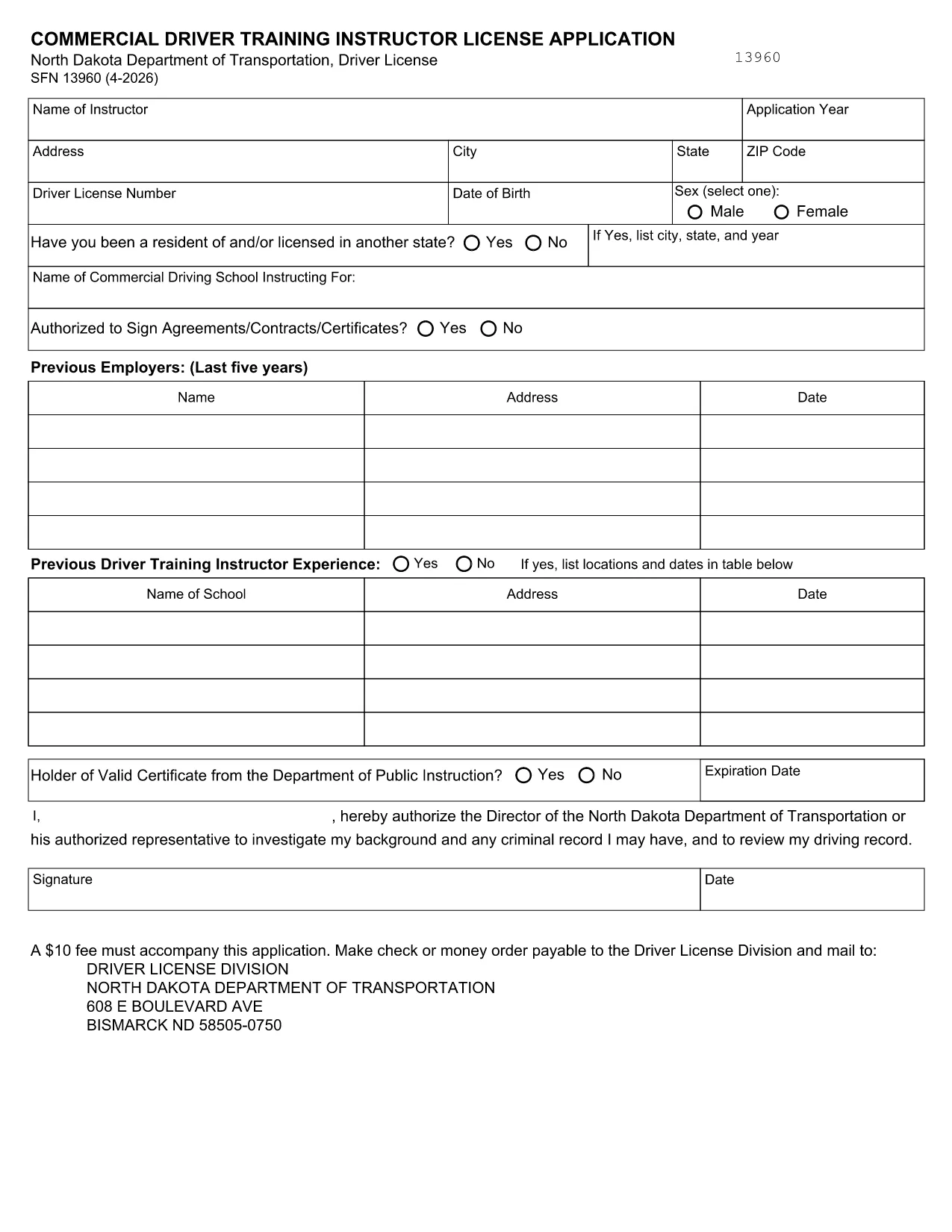
SFN 13960 Fillable PDF – Commercial Driver Training Instructor License

  1. Sprache Englisch
  2. Land USA
  3. Aktivität Führerschein
  4. Zustand Norddakota
SFN 13960 Fillable PDF – Commercial Driver Training Instructor License

What Is Form SFN 13960?

Form SFN 13960 is the North Dakota Department of Transportation’s application for a Commercial Driver Training Instructor License. The form is required for anyone who wants to teach commercial‑driver‑training courses in North Dakota.

Why Use a Fillable PDF?

A fillable PDF lets you type directly into the document, eliminates handwritten errors, and speeds up submission. With Formize’s online PDF Filler you can complete the form in any web browser, sign electronically, and download a clean copy ready for filing.

How to Complete SFN 13960 Online

Instead of downloading the PDF and opening a desktop editor, simply click the “Fill out this form” button on this page. The Formize PDF Filler app will load, presenting the exact fields from the official SFN 13960. Fill each field, add your electronic signature, and hit **Submit** or **Download** when finished.

Common Mistakes to Avoid

  • Missing signatures: The form requires both the applicant’s and the employer’s signatures. Use the electronic signature tool.
  • Incorrect license numbers: Double‑check your commercial driver’s license (CDL) number before submitting.
  • Skipping required attachments: If you have certifications or proof of training, attach them as separate PDF files.
  • Using the wrong version: The link on this page always points to the latest ND DOT version (2024‑2026).

Where to Find Help

If you have questions about any field, consult the North Dakota DOT’s official instructions PDF. For technical assistance with the Formize filler, use the built‑in help tooltip on each field.

FAQ
  • Do I need to print the form after filling it online?

    No. The Formize filler creates a fully completed PDF that you can save, print for your records, or submit electronically if accepted.

  • What version of SFN 13960 is this?

    The PDF linked here is the current 2024‑2026 version published by the North Dakota Department of Transportation.

  • Can I use a mobile device to fill out the form?

    Yes. The Formize PDF Filler works on smartphones and tablets as long as you have a modern web browser.

  • Is there a fee to use Formize’s filler?

    Formize offers a free basic filler for government forms like SFN 13960. No payment is required to complete or download the form.

  • What should I do if a field is unclear?

    Hover over the help icon next to the field for a brief description, or refer to the official instructions linked in the “Where to Find Help” section.

  • How do I add supporting documents?

    Use the “Attach File” button inside the filler to upload PDFs such as certifications or proof of training.

  • Can I save my progress and return later?

    Yes. Click the “Save Draft” button to download a partially completed PDF that you can reopen in Formize later.

WIE MAN

So füllen Sie SFN 13960 kostenlos online in 3 einfachen Schritten aus:

  1. 1
    Open the Fillable Form
    Click the “Fill out this form” button on the page. The Formize PDF Filler will launch in your browser.
  2. 2
    Enter Your Information
    Type into each highlighted field, upload any required attachments, and use the signature tool for both applicant and employer signatures.
  3. 3
    Save or Submit
    When all fields are complete, click **Download** to save a copy for your records or **Submit** to send it directly to the North Dakota DOT if they accept electronic submissions.
Formize PDF Filler-App
ÜBER

Führerscheinantragsformulare

In den meisten Ländern ist es Pflicht, einen Führerschein zu besitzen, bevor Sie auf die Straße gehen dürfen. Der Erwerb des Führerscheins ist ein wichtiger Meilenstein für jeden, der ein Auto fahren möchte.

SFN 13960 ist eines der Führerscheinantragsformulare, die Dokumente sind, die verwendet werden, um Informationen von Personen zu sammeln, die einen Führerschein beantragen möchten. Es enthält normalerweise Felder für den Namen, das Geburtsdatum, die ID-Nummer, die Kontaktinformationen des Antragstellers sowie die Geschichte und Erfahrung seines Führerscheins.

MERKMALE

PDF-Filler

Der einfachste Weg, PDF-Formulare online auszufüllen

  • Füllen Sie schnell SFN 13960 aus
    Suchen Sie nach einer Möglichkeit, SFN 13960 schnell online auszufüllen? Mit unserem kostenlosen Online-PDF-Formularausfüller wissen Sie, wie Sie dieses PDF-Dokument in weniger als einer Minute bearbeiten und ausfüllen.
  • Einfach zu bedienender Online-PDF-Editor
    Haben Sie es satt, PDF-Dateien auszudrucken, damit Sie sie bearbeiten können, bevor Sie sie erneut scannen und zurücksenden? PDF-Dokumente kostenlos online bearbeiten. Nutzen Sie unseren Online-PDF-Editor, um Zeit und Papier zu sparen.
  • Tolle Tools, alle Plattformen
    Sie fragen sich, wie Sie SFN 13960 auf einem Mac ausfüllen oder vielleicht einen kostenlosen PDF-Ausfüller verwenden können? Unsere Online-PDF-Tools funktionieren auf allen Plattformen.
  • Sichere Dateispeicherung
    Fertige "SFN 13960"-Dateien werden in einer gesicherten Datenbank gespeichert, die vom Amazon Cloud-Hosting verwaltet wird. Sie können Ihre Dateien jederzeit aus unserem System löschen. In jedem Fall werden diese Dateien nach 24 Stunden automatisch gelöscht.
  • Chatten Sie mit SFN 13960
    Chatten Sie mit „SFN 13960“ auf Chatize, einem kostenlosen PDF-Leseassistenten. Stellen Sie Fragen und erhalten Sie Antworten von „SFN 13960“. Klicken Sie einfach oben auf die Schaltfläche Mit Dokument chatten.

Füllsitzung löschen

Die ausgewählte Füllsitzung löschen? In diesem Fall gehen Ihre Fortschritte beim Ausfüllen des Formulars verloren.

Bearbeitungssitzung löschen

Ausgewählte Bearbeitungssitzung löschen? In diesem Fall geht Ihr Fortschritt beim Erstellen und Bearbeiten des Formulars verloren.