
Sprache auswählen

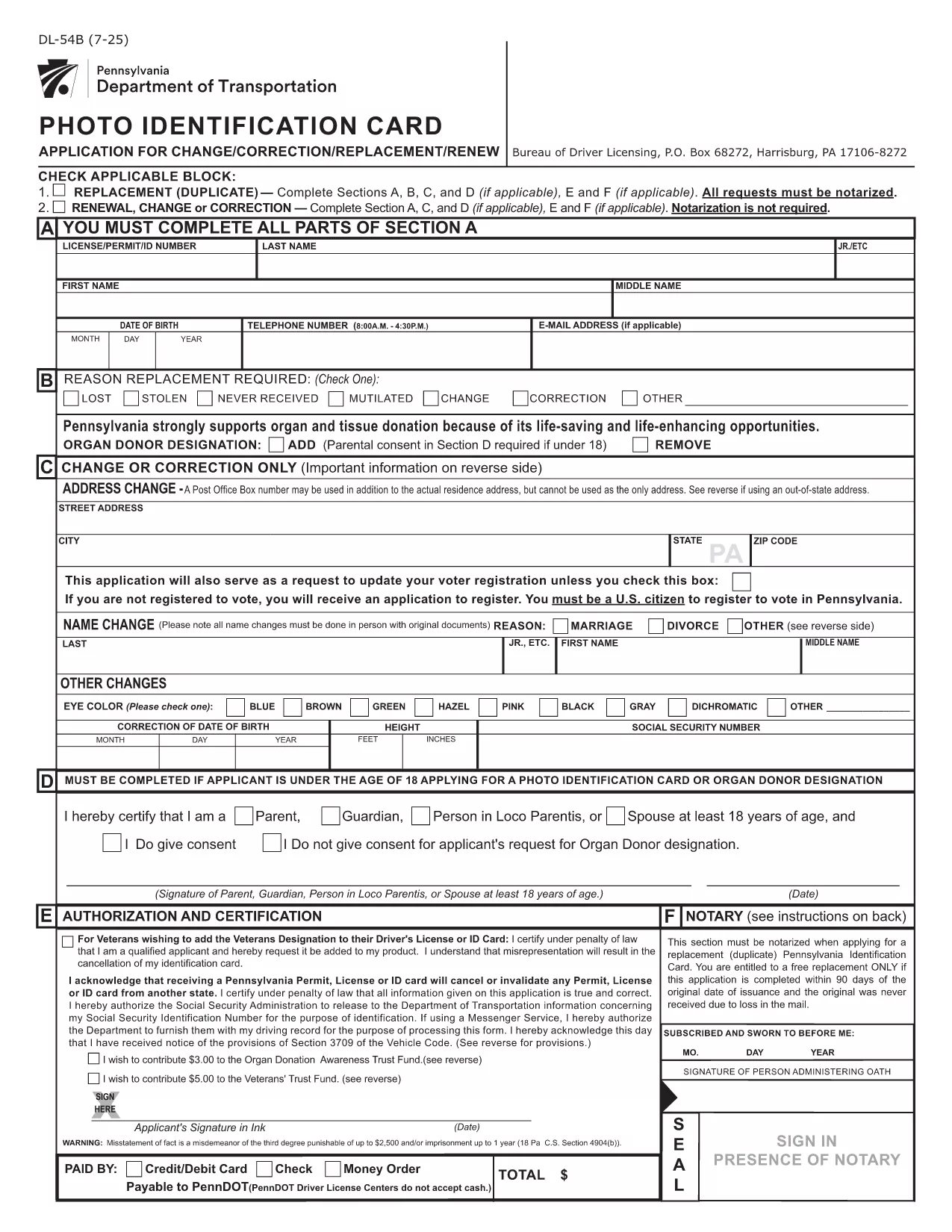
Pennsylvania DL-54B Photo Identification Card Change Form (Fillable PDF)

  1. Sprache Englisch
  2. Land USA
  3. Aktivität Führerschein
  4. Zustand Pennsylvania
Pennsylvania DL-54B Photo Identification Card Change Form (Fillable PDF)

The DL-54B is Pennsylvania’s official Photo Identification Card change form. It is used when you need to update personal information—most commonly an out‑of‑state address—on your PennDOT ID card.

What Is the DL-54B Form?

The DL-54B is a printable, fillable PDF provided by the Pennsylvania Department of Transportation (PennDOT). It captures the same data required on a paper application, but with the convenience of electronic completion.

When Do You Need the DL-54B?

  • Moving to an address outside Pennsylvania while maintaining a PA driver’s license or ID.
  • Correcting any personal details on your existing Photo ID card.
  • Updating information after a name change, marital status change, or other legal updates.

How to Complete the DL-54B Online with Formize

Instead of downloading the PDF and editing it in a separate editor, simply click the "Fill out this form" button on this page. The Formize PDF Filler app will load the fillable PDF directly in your browser.

Common Mistakes to Avoid

  • Leaving required fields blank – the form will not submit.
  • Providing an out‑of‑state address that does not meet PennDOT’s exemption criteria (e.g., not a federal or military employee).
  • Signing the form with a stylus that does not register as a digital signature.

Submit Your Form and Next Steps

After you finish filling out the DL-54B, click Submit to download a completed copy. Mail the signed form, along with any required fees, to the PennDOT Bureau of Driver Licensing (P.O. Box 68272, Harrisburg, PA 17106‑8272).

Need a printable version? Use the download link below to get the official PDF.

FAQ
  • Can I submit the DL-54B electronically?

    PennDOT currently requires a mailed, signed paper copy. The online filler only helps you complete the PDF faster.

  • What fee is required with the DL-54B?

    A standard ID card fee applies. Include a check or money order payable to "PennDOT" with your submission.

  • Do I need a Pennsylvania driver’s license to use this form?

    No. The DL-54B is for the Pennsylvania Photo Identification Card, which is available to residents without a driver’s license.

  • Will the form accept an out‑of‑state address for anyone?

    Only federal or state government employees, armed forces personnel, or their families can keep a PA ID with an out‑of‑state address.

  • How long does it take to receive my updated ID after mailing?

    Processing typically takes 7‑10 business days once PennDOT receives your completed form and payment.

  • Can I correct mistakes after I’ve mailed the form?

    If you discover an error, submit a new DL-54B with the correct information and include a brief note explaining the correction.

WIE MAN

So füllen Sie DL-54B kostenlos online in 4 einfachen Schritten aus:

  1. 1
    Click the Fill‑out Button
    Press the "Fill out this form" button on the page to launch the Formize PDF Filler.
  2. 2
    Wait for the Filler to Load
    The fillable PDF loads directly in your browser – no extra software needed.
  3. 3
    Complete All Required Fields
    Enter your new address, personal details, and sign electronically where indicated.
  4. 4
    Save or Download Your Completed Form
    When finished, click "Save" to download the completed PDF and print it for mailing to PennDOT.
Formize PDF Filler-App
ÜBER

Führerscheinantragsformulare

In den meisten Ländern ist es Pflicht, einen Führerschein zu besitzen, bevor Sie auf die Straße gehen dürfen. Der Erwerb des Führerscheins ist ein wichtiger Meilenstein für jeden, der ein Auto fahren möchte.

DL-54B ist eines der Führerscheinantragsformulare, die Dokumente sind, die verwendet werden, um Informationen von Personen zu sammeln, die einen Führerschein beantragen möchten. Es enthält normalerweise Felder für den Namen, das Geburtsdatum, die ID-Nummer, die Kontaktinformationen des Antragstellers sowie die Geschichte und Erfahrung seines Führerscheins.

MERKMALE

PDF-Filler

Der einfachste Weg, PDF-Formulare online auszufüllen

  • Füllen Sie schnell DL-54B aus
    Suchen Sie nach einer Möglichkeit, DL-54B schnell online auszufüllen? Mit unserem kostenlosen Online-PDF-Formularausfüller wissen Sie, wie Sie dieses PDF-Dokument in weniger als einer Minute bearbeiten und ausfüllen.
  • Einfach zu bedienender Online-PDF-Editor
    Haben Sie es satt, PDF-Dateien auszudrucken, damit Sie sie bearbeiten können, bevor Sie sie erneut scannen und zurücksenden? PDF-Dokumente kostenlos online bearbeiten. Nutzen Sie unseren Online-PDF-Editor, um Zeit und Papier zu sparen.
  • Tolle Tools, alle Plattformen
    Sie fragen sich, wie Sie DL-54B auf einem Mac ausfüllen oder vielleicht einen kostenlosen PDF-Ausfüller verwenden können? Unsere Online-PDF-Tools funktionieren auf allen Plattformen.
  • Sichere Dateispeicherung
    Fertige "DL-54B"-Dateien werden in einer gesicherten Datenbank gespeichert, die vom Amazon Cloud-Hosting verwaltet wird. Sie können Ihre Dateien jederzeit aus unserem System löschen. In jedem Fall werden diese Dateien nach 24 Stunden automatisch gelöscht.
  • Chatten Sie mit DL-54B
    Chatten Sie mit „DL-54B“ auf Chatize, einem kostenlosen PDF-Leseassistenten. Stellen Sie Fragen und erhalten Sie Antworten von „DL-54B“. Klicken Sie einfach oben auf die Schaltfläche Mit Dokument chatten.

Füllsitzung löschen

Die ausgewählte Füllsitzung löschen? In diesem Fall gehen Ihre Fortschritte beim Ausfüllen des Formulars verloren.

Bearbeitungssitzung löschen

Ausgewählte Bearbeitungssitzung löschen? In diesem Fall geht Ihr Fortschritt beim Erstellen und Bearbeiten des Formulars verloren.