
Sprache auswählen

Virginia DMV DMS-004 Fillable PDF – Payment Authorization Form

  1. Land USA
  2. Sprache Englisch
  3. Aktivität Führerschein
  4. Zustand Virginia
Virginia DMV DMS-004 Fillable PDF – Payment Authorization Form

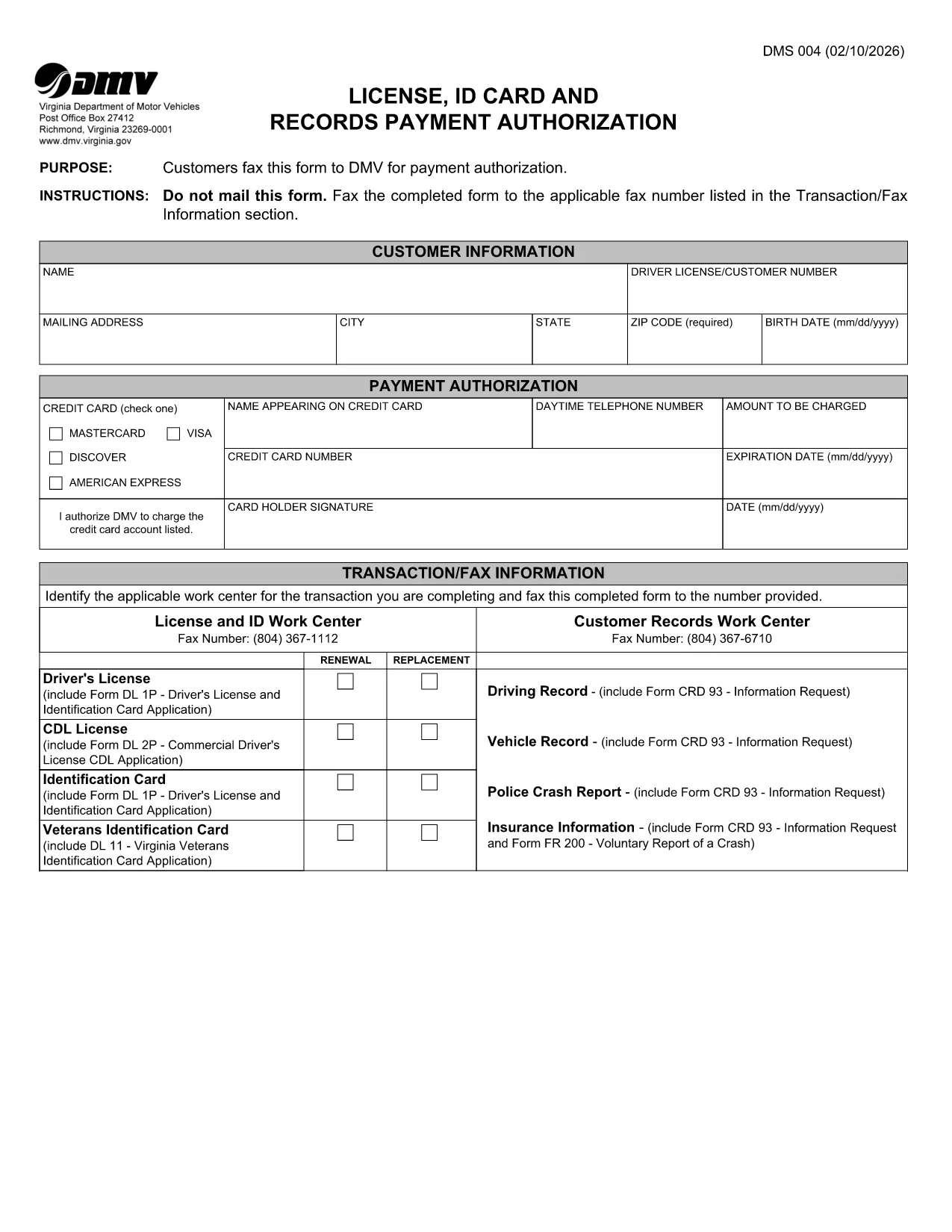
The DMS-004 is the official Virginia Department of Motor Vehicles (DMV) form used to authorize payment for a driver's license, ID card, or records request. This fillable PDF lets you complete the payment authorization quickly, without printing or faxing.

Our online Formize PDF Filler loads the DMS-004 directly in your browser, so you can type, sign, and submit the form in minutes. No additional software is required.

What Is the DMS-004 Form?

The DMS-004, titled "License, ID Card and Records Payment Authorization," captures:

  • Applicant’s personal information (name, address, driver’s license number)
  • Details of the requested service (license renewal, new ID, record copy)
  • Payment method and authorization signature

It is required whenever you need to pay the DMV for a license, ID card, or official record request.

How to Fill Out DMS-004 Online with Formize

Follow the simple steps below to complete the form without ever leaving the page.

Common Mistakes to Avoid

Even a tiny error can delay processing. Keep these tips in mind:

  • Double‑check the driver’s license number – a single digit off will cause a rejection.
  • Use a valid credit or debit card number; the form does not accept expired cards.
  • Sign exactly where the signature box appears; digital signatures are accepted.
  • Do not leave any mandatory fields blank; the Formize validator will highlight them.

Where to Submit the Completed Form

After you finish, you have two options:

  • Fax – The form automatically generates a fax‑ready PDF you can send to the number listed in the “Transaction/Fax Information” section.
  • Upload – Use the Virginia DMV online portal to upload the completed PDF directly.

Both methods are accepted, but the online upload is faster and provides an instant confirmation.

FAQ
  • What is the purpose of the DMS-004 form?

    The DMS-004 authorizes the Virginia DMV to process payment for a driver's license, state ID card, or official records request.

  • Can I fill out DMS-004 on a mobile device?

    Yes. The Formize PDF Filler is fully responsive, allowing you to complete the form on smartphones or tablets.

  • Is a digital signature accepted?

    A digital signature created within the Formize app meets the DMV’s requirements and is treated the same as a handwritten signature.

  • Do I need to print the form after filling it out?

    No. You can fax the completed PDF directly from the app or upload the file to the DMV’s online portal.

  • What payment methods are accepted on DMS-004?

    The form accepts credit or debit card numbers. Ensure the card is current and has sufficient funds.

  • How long does it take for the DMV to process the form?

    Processing is typically 2–3 business days after the DMV receives the completed and authorized form.

  • Can I save a draft and finish later?

    Yes. The Formize app allows you to save a draft locally in your browser and return to it anytime before submission.

  • What should I do if I make a mistake?

    Edit the field directly in the Formize app before final submission. If you have already submitted, contact the Virginia DMV to request a correction.

WIE MAN

So füllen Sie DMS-004 kostenlos online in 4 einfachen Schritten aus:

  1. 1
    Open the Fillable Form
    Click the "Fill out this form" button on the page. The Formize PDF Filler app loads the DMS-004 directly in your browser.
  2. 2
    Enter Your Information
    Type in all required fields: personal details, service requested, and payment information. The form validates entries in real time.
  3. 3
    Add Your Digital Signature
    Use your mouse, trackpad, or touchscreen to sign in the signature box. Formize captures a secure digital signature.
  4. 4
    Review and Submit
    Click the "Review" button to ensure no fields are missing. Then choose to either fax the PDF automatically or download it for online upload to the Virginia DMV portal.
Formize PDF Filler-App
ÜBER

Führerscheinantragsformulare

DMS-004 ist eines der Führerscheinformulare, bei denen es sich um Dokumente handelt, die zur Beantragung eines Führerscheins oder zur Anforderung verschiedener Dienstleistungen im Zusammenhang mit dem Führerschein verwendet werden. Diese Formulare werden in der Regel von der Abteilung oder Behörde bereitgestellt, die für die Ausstellung von Führerscheinen in einer bestimmten Gerichtsbarkeit zuständig ist, beispielsweise dem Department of Motor Vehicles (DMV) in den Vereinigten Staaten.

Zu den gängigen Führerscheinformularen gehören:

Führerscheinantrag: Dieses Formular wird verwendet, um einen neuen Führerschein zu beantragen oder einen bestehenden zu erneuern. In der Regel sind persönliche Informationen wie Name, Adresse, Geburtsdatum und Sozialversicherungsnummer erforderlich.

Ausweisdokumente: In einigen Gerichtsbarkeiten sind spezielle Ausweisdokumente erforderlich, um die Identität und den Wohnsitz des Antragstellers zu überprüfen. Dazu können Formulare wie eine Geburtsurkunde, ein Reisepass oder eine Sozialversicherungskarte gehören.

Sehtest: Für viele Führerscheinanträge ist ein Sehtestformular erforderlich, in dem ein autorisierter Arzt oder Augenarzt bescheinigt, dass der Antragsteller die Mindestanforderungen an das Sehvermögen zum Fahren erfüllt.

Fahrerausbildungsformulare: In einigen Fällen müssen Einzelpersonen möglicherweise einen Nachweis über den Abschluss eines Fahrerausbildungskurses vorlegen, z. B. ein Abschlusszertifikat für die Fahrerausbildung oder ein von einem Ausbilder unterzeichnetes Formular.

Medizinische Beurteilung: Bestimmte Erkrankungen erfordern möglicherweise das Ausfüllen zusätzlicher Formulare durch einen Arzt. Mit diesen Formularen wird die körperliche und geistige Eignung des Antragstellers zum Fahren überprüft.

Adressänderungsformular: Wenn ein Führerscheininhaber an eine neue Adresse umzieht, muss er möglicherweise ein Adressänderungsformular ausfüllen, um seine Führerscheininformationen zu aktualisieren.

Führerscheinformulare können beim örtlichen DMV-Büro angefordert oder von deren Website heruntergeladen werden. Es ist wichtig, die erforderlichen Formulare zusammen mit allen Belegen sorgfältig auszufüllen und einzureichen, um einen reibungslosen Bewerbungs- oder Serviceprozess zu gewährleisten.

MERKMALE

PDF-Filler

Der einfachste Weg, PDF-Formulare online auszufüllen

  • Füllen Sie schnell DMS-004 aus
    Suchen Sie nach einer Möglichkeit, DMS-004 schnell online auszufüllen? Mit unserem kostenlosen Online-PDF-Formularausfüller wissen Sie, wie Sie dieses PDF-Dokument in weniger als einer Minute bearbeiten und ausfüllen.
  • Einfach zu bedienender Online-PDF-Editor
    Haben Sie es satt, PDF-Dateien auszudrucken, damit Sie sie bearbeiten können, bevor Sie sie erneut scannen und zurücksenden? PDF-Dokumente kostenlos online bearbeiten. Nutzen Sie unseren Online-PDF-Editor, um Zeit und Papier zu sparen.
  • Tolle Tools, alle Plattformen
    Sie fragen sich, wie Sie DMS-004 auf einem Mac ausfüllen oder vielleicht einen kostenlosen PDF-Ausfüller verwenden können? Unsere Online-PDF-Tools funktionieren auf allen Plattformen.
  • Sichere Dateispeicherung
    Fertige "DMS-004"-Dateien werden in einer gesicherten Datenbank gespeichert, die vom Amazon Cloud-Hosting verwaltet wird. Sie können Ihre Dateien jederzeit aus unserem System löschen. In jedem Fall werden diese Dateien nach 24 Stunden automatisch gelöscht.
  • Chatten Sie mit DMS-004
    Chatten Sie mit „DMS-004“ auf Chatize, einem kostenlosen PDF-Leseassistenten. Stellen Sie Fragen und erhalten Sie Antworten von „DMS-004“. Klicken Sie einfach oben auf die Schaltfläche Mit Dokument chatten.

Füllsitzung löschen

Die ausgewählte Füllsitzung löschen? In diesem Fall gehen Ihre Fortschritte beim Ausfüllen des Formulars verloren.

Bearbeitungssitzung löschen

Ausgewählte Bearbeitungssitzung löschen? In diesem Fall geht Ihr Fortschritt beim Erstellen und Bearbeiten des Formulars verloren.