
Sprache auswählen

Virginia DMV DTS-22 Surety Bond Affidavit (Fillable PDF)

  1. Land USA
  2. Sprache Englisch
  3. Aktivität Führerschein
  4. Zustand Virginia
Virginia DMV DTS-22 Surety Bond Affidavit (Fillable PDF)

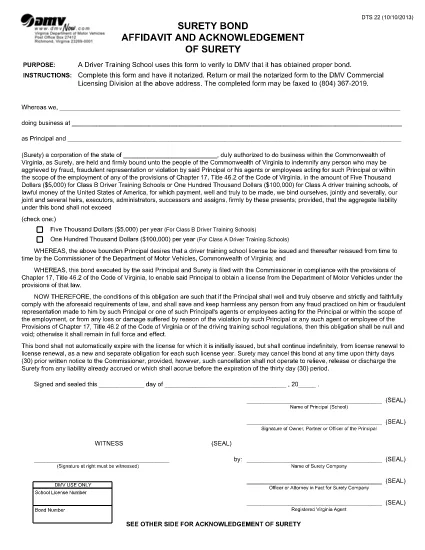
The DTS-22 is the Virginia Department of Motor Vehicles (DMV) Surety Bond Affidavit required by driver training schools and commercial licensing applicants. This form proves that the applicant has obtained the proper bond before operating a school or commercial vehicle program.

Our fillable PDF version lets you complete the entire affidavit directly in your browser—no printing, scanning, or manual data entry required. Once completed, you can download, print, and mail or fax the notarized form to the DMV Commercial Licensing Division.

What Is the DTS-22 Form?

The DTS-22 collects information about the applicant, the surety company, and the bond amount. It must be signed, notarized, and submitted with supporting documentation. Failure to provide a correctly completed form can delay licensing approval.

How to Fill Out the DTS-22 Online

Using the Formize PDF Filler, you can fill out every field, add dates, and insert your electronic signature. The tool validates required fields in real time, reducing errors before you print.

Common Mistakes to Avoid

  • Leaving any required field blank (the filler will highlight these).
  • Using a handwritten signature before notarization—sign only after the notary witnesses your signature.
  • Submitting the form on double‑sided paper; the DMV requires single‑sided printing.
  • Forgetting to include the bond number and surety company’s contact details.

Where to Submit the Completed Form

After notarizing, mail or fax the form to the DMV Commercial Licensing Division at the address listed on the form. You can also drop it off at any Virginia DMV office that handles commercial licensing.

Ready to start? Click the button below to launch the fillable PDF in the Formize PDF Filler app.

FAQ
  • What is the purpose of the DTS-22 form?

    The DTS-22 certifies that a driver training school or commercial licensing applicant has secured a surety bond, a prerequisite for DMV approval.

  • Can I submit the DTS-22 electronically?

    No. The DMV requires a notarized hard copy. You can fill it out online, then print, notarize, and mail or fax the document.

  • Do I need a notary for the DTS-22?

    Yes. The applicant’s signature must be notarized before the form is submitted to the DMV.

  • What bond amount is required?

    The required bond amount varies by the type of training program. Refer to the instructions on the form or contact your surety provider for details.

  • How long does it take for the DMV to process the DTS-22?

    Processing time depends on the completeness of your submission. A correctly completed and notarized form is usually processed within 5‑7 business days.

  • Can I use a PDF editor instead of Formize?

    You can, but Formize’s fillable PDF ensures field validation and reduces errors. Using a standard PDF editor may miss required fields.

  • Where do I send the completed DTS-22?

    Mail or fax the notarized form to the DMV Commercial Licensing Division at the address printed on the form. Check the DMV website for the latest contact details.

WIE MAN

So füllen Sie DTS-22 form kostenlos online in 5 einfachen Schritten aus:

  1. 1
    Open the Fillable Form
    Click the "Fill out this form" button on the page. The Formize PDF Filler will open in a new tab.
  2. 2
    Load the Formize PDF Filler
    Wait a few seconds while the PDF Filler app loads the DTS-22 document.
  3. 3
    Complete All Required Fields
    Enter your information, bond details, and surety company data. Required fields are highlighted in real time.
  4. 4
    Add Your Signature
    Use the built‑in signature tool to place your electronic signature. Do not sign until a notary is present.
  5. 5
    Download or Print
    When finished, click "Download" to save the completed PDF, then print it for notarization and submission.
Formize PDF Filler-App
ÜBER

Führerscheinantragsformulare

DTS-22 form ist eines der Führerscheinformulare, bei denen es sich um Dokumente handelt, die zur Beantragung eines Führerscheins oder zur Anforderung verschiedener Dienstleistungen im Zusammenhang mit dem Führerschein verwendet werden. Diese Formulare werden in der Regel von der Abteilung oder Behörde bereitgestellt, die für die Ausstellung von Führerscheinen in einer bestimmten Gerichtsbarkeit zuständig ist, beispielsweise dem Department of Motor Vehicles (DMV) in den Vereinigten Staaten.

Zu den gängigen Führerscheinformularen gehören:

Führerscheinantrag: Dieses Formular wird verwendet, um einen neuen Führerschein zu beantragen oder einen bestehenden zu erneuern. In der Regel sind persönliche Informationen wie Name, Adresse, Geburtsdatum und Sozialversicherungsnummer erforderlich.

Ausweisdokumente: In einigen Gerichtsbarkeiten sind spezielle Ausweisdokumente erforderlich, um die Identität und den Wohnsitz des Antragstellers zu überprüfen. Dazu können Formulare wie eine Geburtsurkunde, ein Reisepass oder eine Sozialversicherungskarte gehören.

Sehtest: Für viele Führerscheinanträge ist ein Sehtestformular erforderlich, in dem ein autorisierter Arzt oder Augenarzt bescheinigt, dass der Antragsteller die Mindestanforderungen an das Sehvermögen zum Fahren erfüllt.

Fahrerausbildungsformulare: In einigen Fällen müssen Einzelpersonen möglicherweise einen Nachweis über den Abschluss eines Fahrerausbildungskurses vorlegen, z. B. ein Abschlusszertifikat für die Fahrerausbildung oder ein von einem Ausbilder unterzeichnetes Formular.

Medizinische Beurteilung: Bestimmte Erkrankungen erfordern möglicherweise das Ausfüllen zusätzlicher Formulare durch einen Arzt. Mit diesen Formularen wird die körperliche und geistige Eignung des Antragstellers zum Fahren überprüft.

Adressänderungsformular: Wenn ein Führerscheininhaber an eine neue Adresse umzieht, muss er möglicherweise ein Adressänderungsformular ausfüllen, um seine Führerscheininformationen zu aktualisieren.

Führerscheinformulare können beim örtlichen DMV-Büro angefordert oder von deren Website heruntergeladen werden. Es ist wichtig, die erforderlichen Formulare zusammen mit allen Belegen sorgfältig auszufüllen und einzureichen, um einen reibungslosen Bewerbungs- oder Serviceprozess zu gewährleisten.

MERKMALE

PDF-Filler

Der einfachste Weg, PDF-Formulare online auszufüllen

  • Füllen Sie schnell DTS-22 form aus
    Suchen Sie nach einer Möglichkeit, DTS-22 form schnell online auszufüllen? Mit unserem kostenlosen Online-PDF-Formularausfüller wissen Sie, wie Sie dieses PDF-Dokument in weniger als einer Minute bearbeiten und ausfüllen.
  • Einfach zu bedienender Online-PDF-Editor
    Haben Sie es satt, PDF-Dateien auszudrucken, damit Sie sie bearbeiten können, bevor Sie sie erneut scannen und zurücksenden? PDF-Dokumente kostenlos online bearbeiten. Nutzen Sie unseren Online-PDF-Editor, um Zeit und Papier zu sparen.
  • Tolle Tools, alle Plattformen
    Sie fragen sich, wie Sie DTS-22 form auf einem Mac ausfüllen oder vielleicht einen kostenlosen PDF-Ausfüller verwenden können? Unsere Online-PDF-Tools funktionieren auf allen Plattformen.
  • Sichere Dateispeicherung
    Fertige "DTS-22 form"-Dateien werden in einer gesicherten Datenbank gespeichert, die vom Amazon Cloud-Hosting verwaltet wird. Sie können Ihre Dateien jederzeit aus unserem System löschen. In jedem Fall werden diese Dateien nach 24 Stunden automatisch gelöscht.
  • Chatten Sie mit DTS-22 form
    Chatten Sie mit „DTS-22 form“ auf Chatize, einem kostenlosen PDF-Leseassistenten. Stellen Sie Fragen und erhalten Sie Antworten von „DTS-22 form“. Klicken Sie einfach oben auf die Schaltfläche Mit Dokument chatten.

Füllsitzung löschen

Die ausgewählte Füllsitzung löschen? In diesem Fall gehen Ihre Fortschritte beim Ausfüllen des Formulars verloren.

Bearbeitungssitzung löschen

Ausgewählte Bearbeitungssitzung löschen? In diesem Fall geht Ihr Fortschritt beim Erstellen und Bearbeiten des Formulars verloren.