
Sprache auswählen

Employer Declaration for Ignition Interlock Exemption

  1. Sprache Englisch
  2. Land USA
  3. Aktivität Führerschein
  4. Zustand Washington
Employer Declaration for Ignition Interlock Exemption

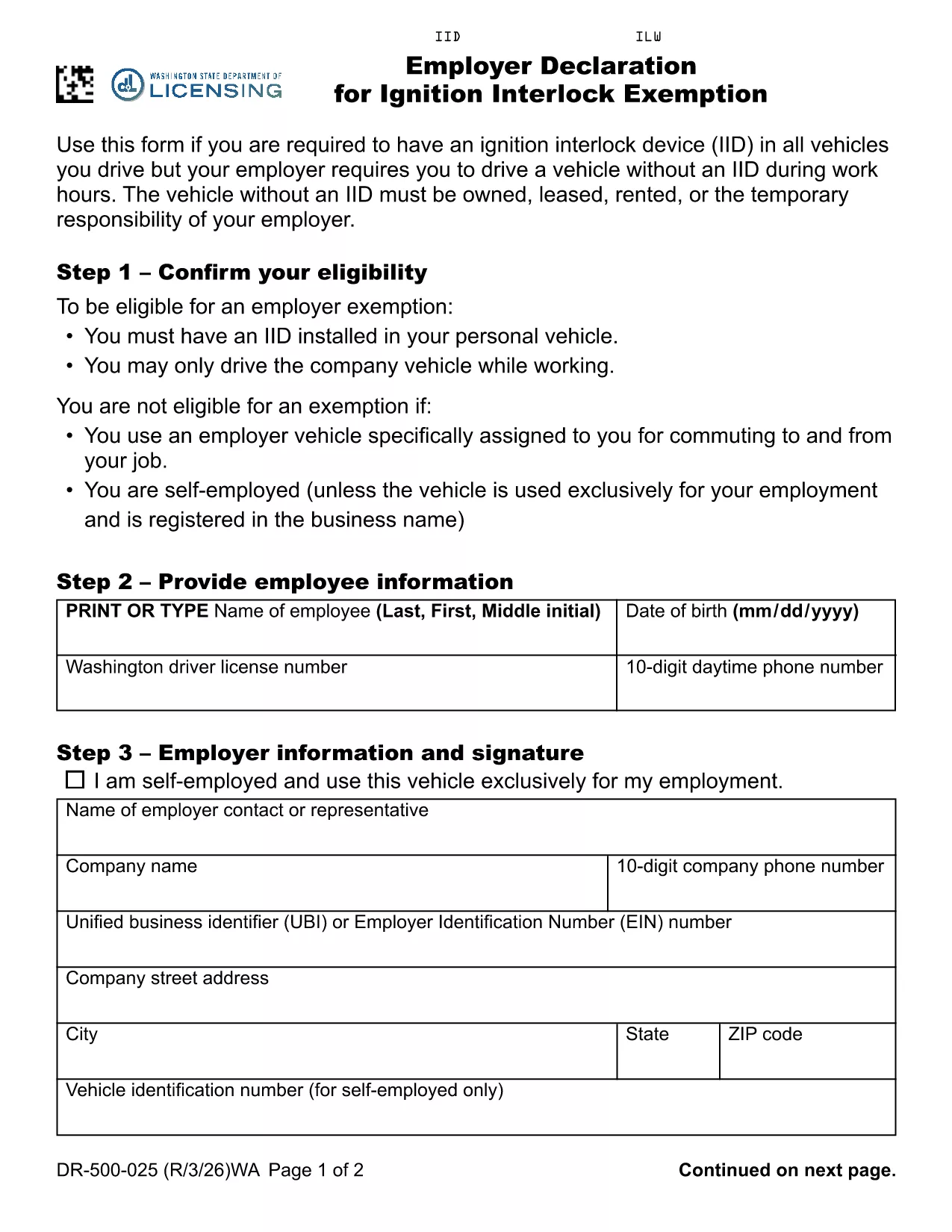
Washington law requires drivers with an ignition interlock device (IID) to have the device installed in every vehicle they operate. If your employer requires you to drive a company‑owned, leased, rented or temporarily assigned vehicle that does not have an IID, you must submit an Employer Declaration for Ignition Interlock Exemption (RCW 46.20.720 (6)(b)). This fillable PDF form satisfies the Department of Licensing’s requirement and protects both you and your employer.

What Is an Ignition Interlock Exemption?

An exemption allows a driver who is otherwise required to use an IID to operate a specific vehicle without the device, provided the vehicle is under the employer’s responsibility during work hours. The exemption is granted on a case‑by‑case basis and must be documented with a signed employer declaration.

Who Needs This Declaration?

  • Employees who have an IID installed in their personal vehicle.
  • Employees whose job requires them to drive a company vehicle that does not have an IID.
  • Employers who temporarily assign vehicles to employees during work hours.

How to Complete the Form Online

Instead of downloading the PDF and editing it manually, simply click the "Fill out this form" button below. The Formize PDF Filler app will load the fillable PDF directly in your browser.

Common Mistakes to Avoid

  • Leaving the employer’s address or phone number blank.
  • Forgetting to include the vehicle’s VIN, make, and model.
  • Not signing the declaration electronically before submitting.
  • Submitting an incomplete form, which can delay the exemption approval.

Where to Submit the Completed Form

After you finish the online fill‑out, download the completed PDF and mail it to the Washington State Department of Licensing, or submit it electronically if your employer uses the state’s online portal. Keep a copy for your records.

FAQ
  • Do I need a separate exemption for each company vehicle?

    Yes. Each vehicle that does not have an IID must be listed on a separate Employer Declaration form.

  • Can my employer fill out the form on my behalf?

    The employer can complete the employer‑specific sections, but the driver must sign the declaration electronically.

  • Is an electronic signature accepted?

    Washington State Department of Licensing accepts electronic signatures submitted through a certified PDF filler like Formize.

  • How long does the exemption approval take?

    Processing typically takes 5‑10 business days after the Department receives a complete, signed declaration.

  • What happens if the form is incomplete?

    An incomplete form will be returned for correction, which can delay the exemption and may result in a citation if you drive without an IID.

  • Do I need to renew the exemption?

    The exemption is valid as long as the driver’s IID requirement remains in effect. If circumstances change, a new declaration must be submitted.

  • Can I use this form if I work outside Washington?

    This specific declaration is for Washington State drivers under RCW 46.20.720. Other states have their own exemption procedures.

WIE MAN

So füllen Sie ignition interlock exemption kostenlos online in 6 einfachen Schritten aus:

  1. 1
    Click the Fill‑out Button
    Press the "Fill out this form" button on the page to launch the Formize PDF Filler.
  2. 2
    Wait for the Filler to Load
    The fillable PDF will appear in your browser within a few seconds.
  3. 3
    Enter Employer Information
    Type the employer’s name, address, and contact details in the highlighted fields.
  4. 4
    Provide Vehicle Details
    Enter the VIN, make, model, and license plate of the company vehicle you will drive.
  5. 5
    Sign Electronically
    Use the signature field to sign the declaration electronically.
  6. 6
    Submit or Download
    Click "Submit" to send the form directly to the Washington Department of Licensing, or download the completed PDF for mailing.
Formize PDF Filler-App
ÜBER

Führerscheinantragsformulare

ignition interlock exemption ist eines der Führerscheinformulare, bei denen es sich um Dokumente handelt, die bei der Erlangung oder Erneuerung eines Führerscheins verwendet werden. Hierbei handelt es sich um ein offizielles, von der Regierung ausgestelltes Dokument, das Einzelpersonen das Führen eines Kraftfahrzeugs auf öffentlichen Straßen gestattet. Diese Formulare können je nach Gerichtsbarkeit variieren, umfassen jedoch im Allgemeinen Folgendes:

Antragsformular: Dieses Formular wird zur Beantragung eines Führerscheins verwendet und fragt in der Regel nach persönlichen Informationen wie Name, Adresse, Geburtsdatum und Sozialversicherungsnummer.

Ausweisdokumente: Zusammen mit dem Antragsformular müssen Einzelpersonen in der Regel spezifische Ausweisdokumente vorlegen, um ihre Identität, ihren Wohnsitz und ihre rechtliche Präsenz im Land nachzuweisen. Dazu können ein gültiger Reisepass, eine Geburtsurkunde, eine Sozialversicherungskarte oder ein anderer amtlicher Ausweis gehören.

Ansässigkeitsnachweis: In vielen Gerichtsbarkeiten müssen Antragsteller einen Wohnsitznachweis vorlegen, z. B. eine Rechnung eines Versorgungsunternehmens, einen Mietvertrag oder einen Kontoauszug, um ihre Adresse zu überprüfen.

Formular für eine ärztliche Untersuchung: In einigen Gerichtsbarkeiten kann eine ärztliche Untersuchung erforderlich sein, um sicherzustellen, dass der Antragsteller die notwendigen körperlichen und geistigen Voraussetzungen für sicheres Fahren erfüllt. Normalerweise wird dieses Formular von einem Arzt ausgefüllt.

Abschlussformular für die Fahrerausbildung: Für Fahranfänger kann der Abschluss einer Fahrerausbildung erforderlich sein. Für die Beantragung eines Führerscheins ist häufig ein Formular oder eine Bescheinigung über den erfolgreichen Abschluss erforderlich.

Sehtest-Formular: Ein Sehtest wird üblicherweise während des Antragsverfahrens für den Führerschein durchgeführt. Ein Augenarzt oder autorisiertes Personal beurteilt die Sehschärfe des Antragstellers und füllt das erforderliche Formular aus.

Diese Formulare sind in der Regel beim örtlichen Department of Motor Vehicles (DMV) oder einer entsprechenden Regierungsbehörde erhältlich, die für die Ausstellung von Führerscheinen zuständig ist. Es ist wichtig, die für Ihr Land geltenden spezifischen Anforderungen und Formulare zu prüfen, da diese variieren können.

MERKMALE

PDF-Filler

Der einfachste Weg, PDF-Formulare online auszufüllen

  • Füllen Sie schnell ignition interlock exemption aus
    Suchen Sie nach einer Möglichkeit, ignition interlock exemption schnell online auszufüllen? Mit unserem kostenlosen Online-PDF-Formularausfüller wissen Sie, wie Sie dieses PDF-Dokument in weniger als einer Minute bearbeiten und ausfüllen.
  • Einfach zu bedienender Online-PDF-Editor
    Haben Sie es satt, PDF-Dateien auszudrucken, damit Sie sie bearbeiten können, bevor Sie sie erneut scannen und zurücksenden? PDF-Dokumente kostenlos online bearbeiten. Nutzen Sie unseren Online-PDF-Editor, um Zeit und Papier zu sparen.
  • Tolle Tools, alle Plattformen
    Sie fragen sich, wie Sie ignition interlock exemption auf einem Mac ausfüllen oder vielleicht einen kostenlosen PDF-Ausfüller verwenden können? Unsere Online-PDF-Tools funktionieren auf allen Plattformen.
  • Sichere Dateispeicherung
    Fertige "ignition interlock exemption"-Dateien werden in einer gesicherten Datenbank gespeichert, die vom Amazon Cloud-Hosting verwaltet wird. Sie können Ihre Dateien jederzeit aus unserem System löschen. In jedem Fall werden diese Dateien nach 24 Stunden automatisch gelöscht.
  • Chatten Sie mit ignition interlock exemption
    Chatten Sie mit „ignition interlock exemption“ auf Chatize, einem kostenlosen PDF-Leseassistenten. Stellen Sie Fragen und erhalten Sie Antworten von „ignition interlock exemption“. Klicken Sie einfach oben auf die Schaltfläche Mit Dokument chatten.

Füllsitzung löschen

Die ausgewählte Füllsitzung löschen? In diesem Fall gehen Ihre Fortschritte beim Ausfüllen des Formulars verloren.

Bearbeitungssitzung löschen

Ausgewählte Bearbeitungssitzung löschen? In diesem Fall geht Ihr Fortschritt beim Erstellen und Bearbeiten des Formulars verloren.