Sprache auswählen

Underground Storage Tank (UST) Application Form – Fillable PDF

  1. Sprache Englisch
  2. Land USA
  3. Abteilung Environmental Protection Agency
  4. Aktivität Underground Storage Tanks
Underground Storage Tank (UST) Application Form – Fillable PDF

Regulated entities that install, modify, or close an underground storage tank (UST) must submit an official application to the state environmental agency. The UST Application Form is available as a fillable PDF, making it easy to complete on any device.

What Is the UST Application Form?

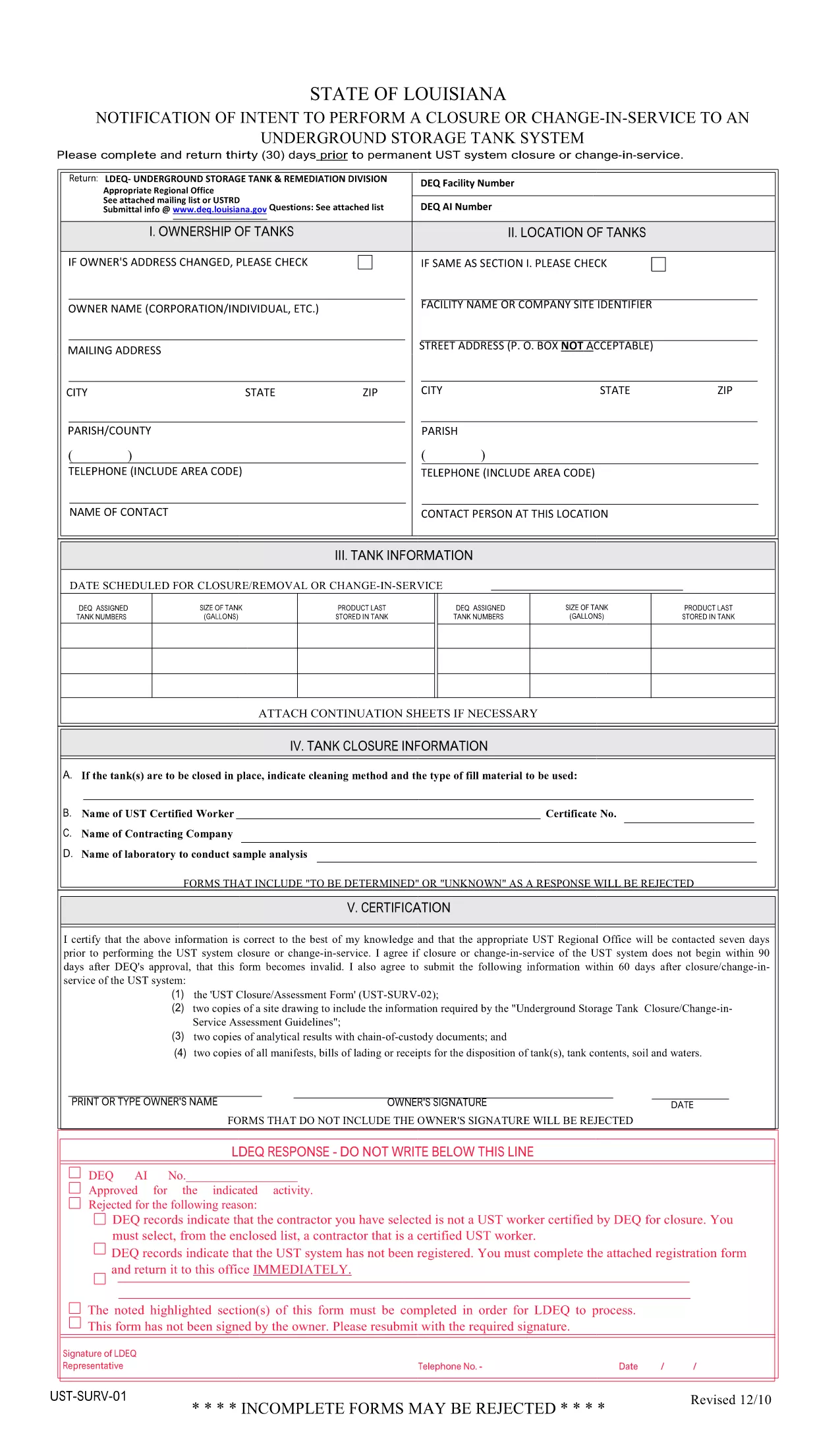
This form is the UST Notice of Intent to Perform Closure or Change‑In‑Service (PDF: UST‑SURV‑01). It is used to notify the Louisiana Department of Environmental Quality (or the equivalent state agency) 30 days before a permanent closure, significant renovation, or any change in service for an underground storage tank.

How to Fill the Form Online with Formize

Instead of downloading the PDF and editing it in a separate editor, simply click the "Fill out this form" button on this page. The Formize PDF Filler will load instantly, allowing you to enter data, add signatures, and save your completed form directly in the browser.

Key Sections You Must Complete

  • Tank Identification – tank number, location, and capacity.
  • Owner/Operator Information – legal name, contact details, and EPA ID.
  • Type of Action – closure, renovation, or change‑in‑service.
  • Technical Details – removal method, closure plan, or modification description.
  • Signature & Date – authorized representative’s signature and the date of submission.

Common Mistakes & Tips for a Smooth Submission

Do not leave any required fields blank. The online filler highlights missing data before you can submit.

Use exact tank numbers. Mismatched numbers cause processing delays.

Attach supporting documents. Upload PDF copies of permits, engineering plans, or financial assurance documents using the attachment field.

Review before sending. The preview function lets you see the final layout exactly as the agency will receive it.

Where to Find Help and Additional Resources

If you have questions about the form, consult the official PDF guide or contact your state environmental agency. The Formize help center provides step‑by‑step videos on using the PDF filler.

FAQ
  • Do I need a special PDF reader to fill this form?

    No. The Formize PDF Filler works in any modern browser, so you don’t need Adobe Acrobat or any other software.

  • Can I save my progress and finish later?

    Yes. Click the "Save" button to download a draft copy. Re‑upload the draft later to continue editing.

  • What if I make a mistake after submitting?

    Contact your state environmental agency immediately. Most agencies allow a corrected form to be submitted within 10 business days.

  • Is the electronic signature legally accepted?

    Electronic signatures are accepted by most state agencies for UST applications, provided they meet the agency’s signing requirements.

  • Do I need to print the form after filling it online?

    Only if the agency requires a hard‑copy signature. Otherwise, the completed PDF can be submitted electronically.

  • How do I know which version of the form is current?

    The PDF linked on this page is the latest version released by the Louisiana DEQ. Check the agency’s website for any updates.

  • Can I fill out multiple UST forms at once?

    Yes. Open each form in a separate browser tab and use the same Formize account to manage all of them.

  • Is there a fee to use Formize’s PDF filler?

    Formize offers a free tier for basic forms. Larger organizations may need a paid plan for advanced features, but filling this UST form is free.

WIE MAN

So füllen Sie UST application form kostenlos online in 5 einfachen Schritten aus:

  1. 1
    Open the Fillable Form
    Click the "Fill out this form" button on the page. The Formize PDF Filler loads in your browser instantly.
  2. 2
    Enter Your Information
    Type directly into each field. Use the tab key to move quickly between sections.
  3. 3
    Add Attachments
    Use the attachment icon to upload supporting documents such as permits or engineering drawings.
  4. 4
    Review & Sign
    Click the preview button, check all entries, then add your electronic signature and the date.
  5. 5
    Submit or Download
    When the form is complete, either submit it directly to the agency (if the option is enabled) or download the finished PDF for manual submission.
Formize PDF Filler-App
ÜBER

UST application form-Vorlage

Mit den traditionellen Funktionen zum Anzeigen und Ausfüllen eines PDF-Dokuments, kombiniert mit den Vorteilen einer Webanwendung und einem ansprechenden Layout, können Sie UST application form in wenigen Minuten fertigstellen.

MERKMALE

PDF-Filler

Der einfachste Weg, PDF-Formulare online auszufüllen

  • Füllen Sie schnell UST application form aus
    Suchen Sie nach einer Möglichkeit, UST application form schnell online auszufüllen? Mit unserem kostenlosen Online-PDF-Formularausfüller wissen Sie, wie Sie dieses PDF-Dokument in weniger als einer Minute bearbeiten und ausfüllen.
  • Einfach zu bedienender Online-PDF-Editor
    Haben Sie es satt, PDF-Dateien auszudrucken, damit Sie sie bearbeiten können, bevor Sie sie erneut scannen und zurücksenden? PDF-Dokumente kostenlos online bearbeiten. Nutzen Sie unseren Online-PDF-Editor, um Zeit und Papier zu sparen.
  • Tolle Tools, alle Plattformen
    Sie fragen sich, wie Sie UST application form auf einem Mac ausfüllen oder vielleicht einen kostenlosen PDF-Ausfüller verwenden können? Unsere Online-PDF-Tools funktionieren auf allen Plattformen.
  • Sichere Dateispeicherung
    Fertige "UST application form"-Dateien werden in einer gesicherten Datenbank gespeichert, die vom Amazon Cloud-Hosting verwaltet wird. Sie können Ihre Dateien jederzeit aus unserem System löschen. In jedem Fall werden diese Dateien nach 24 Stunden automatisch gelöscht.
  • Chatten Sie mit UST application form
    Chatten Sie mit „UST application form“ auf Chatize, einem kostenlosen PDF-Leseassistenten. Stellen Sie Fragen und erhalten Sie Antworten von „UST application form“. Klicken Sie einfach oben auf die Schaltfläche Mit Dokument chatten.

Füllsitzung löschen

Die ausgewählte Füllsitzung löschen? In diesem Fall gehen Ihre Fortschritte beim Ausfüllen des Formulars verloren.

Bearbeitungssitzung löschen

Ausgewählte Bearbeitungssitzung löschen? In diesem Fall geht Ihr Fortschritt beim Erstellen und Bearbeiten des Formulars verloren.