
Sprache auswählen

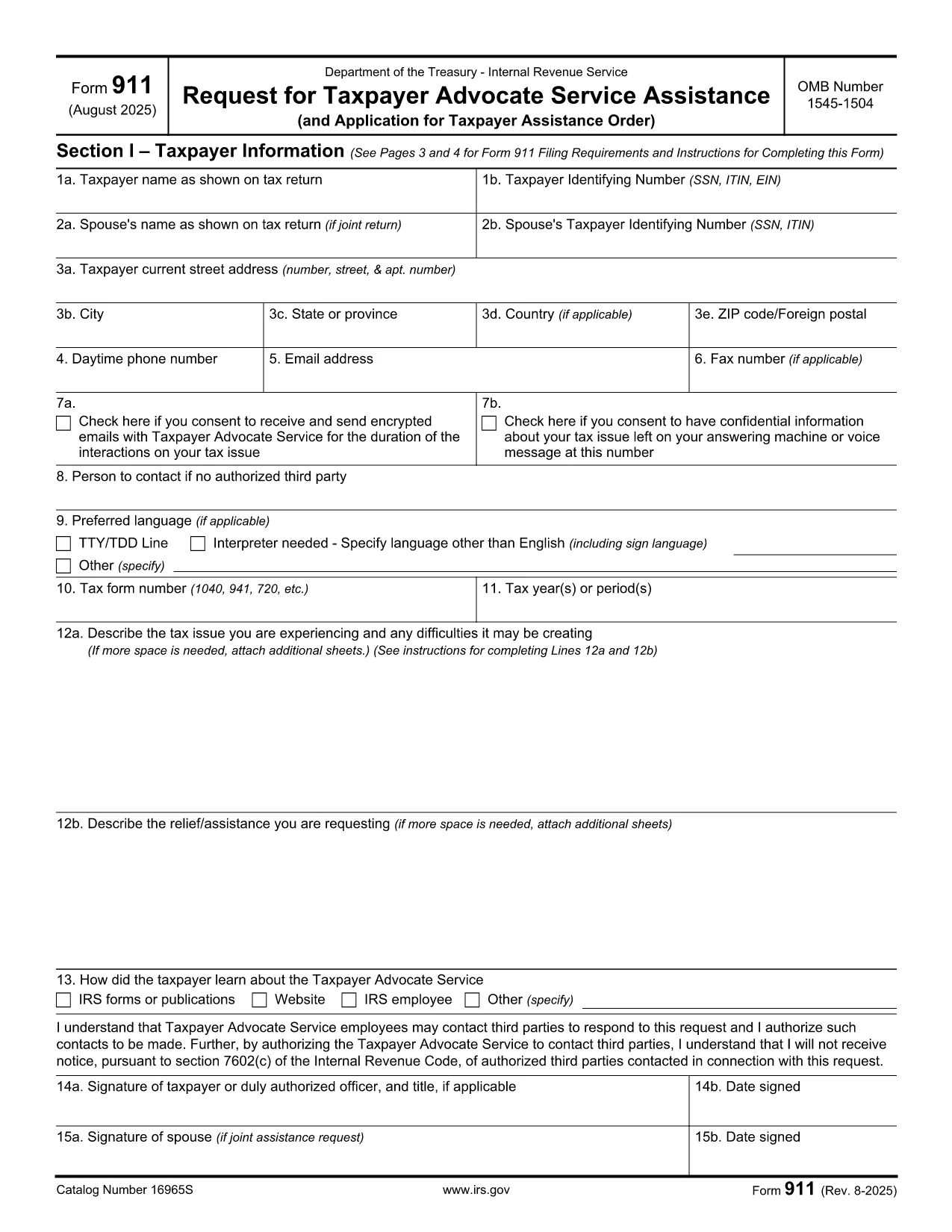
IRS Form CM‑911 (Form 911) – Taxpayer Advocate Service Request

  1. Land USA
  2. Sprache Englisch
  3. Aktivität Steuern
  4. Abteilung IRS
IRS Form CM‑911 (Form 911) – Taxpayer Advocate Service Request

If you need help resolving a tax problem, the IRS Form CM‑911 (also known as Form 911) is the official request for assistance from the Taxpayer Advocate Service. This page lets you download the fillable PDF, complete it instantly in your browser, and submit it securely.

What is Form CM‑911?

Form CM‑911 is used to request assistance from the Taxpayer Advocate Service (TAS). It allows you to explain the issue you’re facing, provide supporting documentation, and request a Taxpayer Assistance Order if necessary. The form is available for individuals, businesses, and representatives.

How to Fill Out Form CM‑911 Online

Instead of printing and editing the PDF, simply click the "Fill out this form" button on this page. The Formize PDF Filler app will load the document, and you can type directly into each field. When you’re done, click Submit to download the completed file or send it to the IRS.

Common Mistakes to Avoid

  • Leaving required fields blank: Every field marked with an asterisk (*) must be completed.
  • Submitting incomplete documentation: Attach any letters, notices, or records that support your request.
  • Using the wrong tax year: Verify the tax year referenced on the form matches the year of your issue.
  • Incorrect signatures: The taxpayer or authorized representative must sign the form.

Where to Submit the Completed Form

After filling out the form, you can:

  1. Mail it to the address listed in the form’s instructions.
  2. Fax it to the TAS regional office (fax number provided on the form).
  3. Upload the PDF through the IRS Taxpayer Advocate Service portal if you have an account.

Download the Fillable PDF

Click the button below to open the fillable version of Form CM‑911 directly in the Formize PDF Filler. No software download is required.

Fill out this form

FAQ
  • What is the purpose of Form CM‑911?

    Form CM‑911 requests assistance from the Taxpayer Advocate Service when you’re experiencing a serious tax problem that the IRS has not resolved.

  • Can I file Form CM‑911 electronically?

    Yes. Use the Formize PDF Filler on this page to complete the fillable PDF online, then download and submit it by mail, fax, or the IRS TAS portal.

  • Do I need to attach supporting documents?

    Attaching relevant notices, letters, or records speeds up the review process and is strongly recommended.

  • How long does it take for the Taxpayer Advocate Service to respond?

    The TAS aims to respond within 30 days, but response time can vary based on case complexity and workload.

  • Is there a fee to use Formize PDF Filler?

    No. Formize PDF Filler is free for filling out and downloading IRS forms like CM‑911.

  • Can a representative fill out Form CM‑911 on my behalf?

    Yes, a qualified representative (CPA, attorney, enrolled agent) can complete the form and must sign as the authorized representative.

  • What if I make a mistake after submitting?

    You can file an amended Form CM‑911 or send a written correction to the same address where you mailed the original request.

  • Where can I find the mailing address for my region?

    The mailing address is listed in the form’s instructions and varies by state; check the “Where to Send” section of the PDF.

WIE MAN

So füllen Sie Form 911 kostenlos online in 4 einfachen Schritten aus:

  1. 1
    Open the Fillable Form
    Click the "Fill out this form" button on the page. The Formize PDF Filler will load the Form CM‑911 directly in your browser.
  2. 2
    Complete Each Field
    Enter your information, answer the questions, and attach any supporting documents using the uploader inside the filler.
  3. 3
    Review and Sign
    Check all entries for accuracy, then use the digital signature tool to sign the form.
  4. 4
    Download or Submit
    When finished, click "Download" to save a copy or follow the on‑screen instructions to submit the form to the IRS.
Formize PDF Filler-App
ÜBER

Steuerformulare

Form 911 ist eines der Steuerformulare, bei denen es sich um Dokumente handelt, mit denen Informationen über das Einkommen, die Abzüge und die Steuerschuld einer Einzelperson oder eines Unternehmens an die zuständige Steuerbehörde gemeldet werden. Diese Formulare sind zur Einhaltung der Steuergesetze und zur Erfüllung steuerlicher Pflichten erforderlich. Die Steuerformulare variieren je nach Land und den spezifischen Steueranforderungen. Hier sind einige gängige Arten von Steuerformularen:

Individuelle Steuerformulare: Diese Formulare werden von einzelnen Steuerzahlern verwendet, um ihr persönliches Einkommen anzugeben und Abzüge, Gutschriften und Befreiungen zu beantragen. Beispiele hierfür sind das Formular 1040 in den Vereinigten Staaten oder das Formular „Self-Assessment Tax Return“ im Vereinigten Königreich.

Gewerbesteuerformulare: Gewerbesteuerformulare werden von Unternehmen, Personengesellschaften oder Selbständigen verwendet, um ihre Geschäftseinnahmen, -ausgaben und andere steuerbezogene Informationen anzugeben. Beispiele hierfür sind das Schedule C-Formular (Profit or Loss from Business) in den Vereinigten Staaten oder das CT600-Formular (Company Tax Return) im Vereinigten Königreich.

Lohnsteuerformulare: Diese Formulare werden von Arbeitgebern verwendet, um die von den Gehaltsschecks ihrer Mitarbeiter einbehaltenen Löhne, Gehälter und Steuern anzugeben. Beispiele hierfür sind das W-2-Formular in den Vereinigten Staaten oder das P60-Formular im Vereinigten Königreich.

Umsatzsteuerformulare: Umsatzsteuerformulare werden von Unternehmen verwendet, um die auf steuerpflichtige Waren oder Dienstleistungen erhobene Umsatzsteuer zu melden und abzuführen. Die spezifischen Umsatzsteuerformulare variieren je nach Gerichtsbarkeit.

Mehrwertsteuerformulare (MwSt.): Mehrwertsteuerformulare werden in Ländern verwendet, die eine Mehrwertsteuer erheben, um die auf Verkäufe erhobene Mehrwertsteuer zu melden und abzuführen und Mehrwertsteuergutschriften für Einkäufe zu beantragen. Beispiele hierfür sind die in vielen Ländern verwendeten Mehrwertsteuererklärungsformulare.

Schätzungssteuerformulare: Schätzsteuerformulare werden verwendet, um geschätzte Steuern auf Einkünfte zu melden und zu zahlen, die nicht der Quellensteuer unterliegen, beispielsweise Einkünfte aus selbständiger Tätigkeit oder Kapitalerträge.

Dies sind nur einige Beispiele für die zahlreichen Steuerformulare, die es geben kann. Welche konkreten Formulare erforderlich sind, hängt von den Steuergesetzen und -vorschriften in Ihrem Land oder Ihrer Gerichtsbarkeit ab. Es ist wichtig, die Richtlinien der Steuerbehörde zu konsultieren oder professionellen Rat einzuholen, um festzustellen, welche Formulare auf Ihre Situation anwendbar sind.

MERKMALE

PDF-Filler

Der einfachste Weg, PDF-Formulare online auszufüllen

  • Füllen Sie schnell Form 911 aus
    Suchen Sie nach einer Möglichkeit, Form 911 schnell online auszufüllen? Mit unserem kostenlosen Online-PDF-Formularausfüller wissen Sie, wie Sie dieses PDF-Dokument in weniger als einer Minute bearbeiten und ausfüllen.
  • Einfach zu bedienender Online-PDF-Editor
    Haben Sie es satt, PDF-Dateien auszudrucken, damit Sie sie bearbeiten können, bevor Sie sie erneut scannen und zurücksenden? PDF-Dokumente kostenlos online bearbeiten. Nutzen Sie unseren Online-PDF-Editor, um Zeit und Papier zu sparen.
  • Tolle Tools, alle Plattformen
    Sie fragen sich, wie Sie Form 911 auf einem Mac ausfüllen oder vielleicht einen kostenlosen PDF-Ausfüller verwenden können? Unsere Online-PDF-Tools funktionieren auf allen Plattformen.
  • Sichere Dateispeicherung
    Fertige "Form 911"-Dateien werden in einer gesicherten Datenbank gespeichert, die vom Amazon Cloud-Hosting verwaltet wird. Sie können Ihre Dateien jederzeit aus unserem System löschen. In jedem Fall werden diese Dateien nach 24 Stunden automatisch gelöscht.
  • Chatten Sie mit Form 911
    Chatten Sie mit „Form 911“ auf Chatize, einem kostenlosen PDF-Leseassistenten. Stellen Sie Fragen und erhalten Sie Antworten von „Form 911“. Klicken Sie einfach oben auf die Schaltfläche Mit Dokument chatten.

Füllsitzung löschen

Die ausgewählte Füllsitzung löschen? In diesem Fall gehen Ihre Fortschritte beim Ausfüllen des Formulars verloren.

Bearbeitungssitzung löschen

Ausgewählte Bearbeitungssitzung löschen? In diesem Fall geht Ihr Fortschritt beim Erstellen und Bearbeiten des Formulars verloren.