
Sprache auswählen

Form 943 (SP) – Fillable PDF for Agricultural Employers

  1. Land USA
  2. Sprache Englisch
  3. Aktivität Steuern
  4. Abteilung IRS
Form 943 (SP) – Fillable PDF for Agricultural Employers

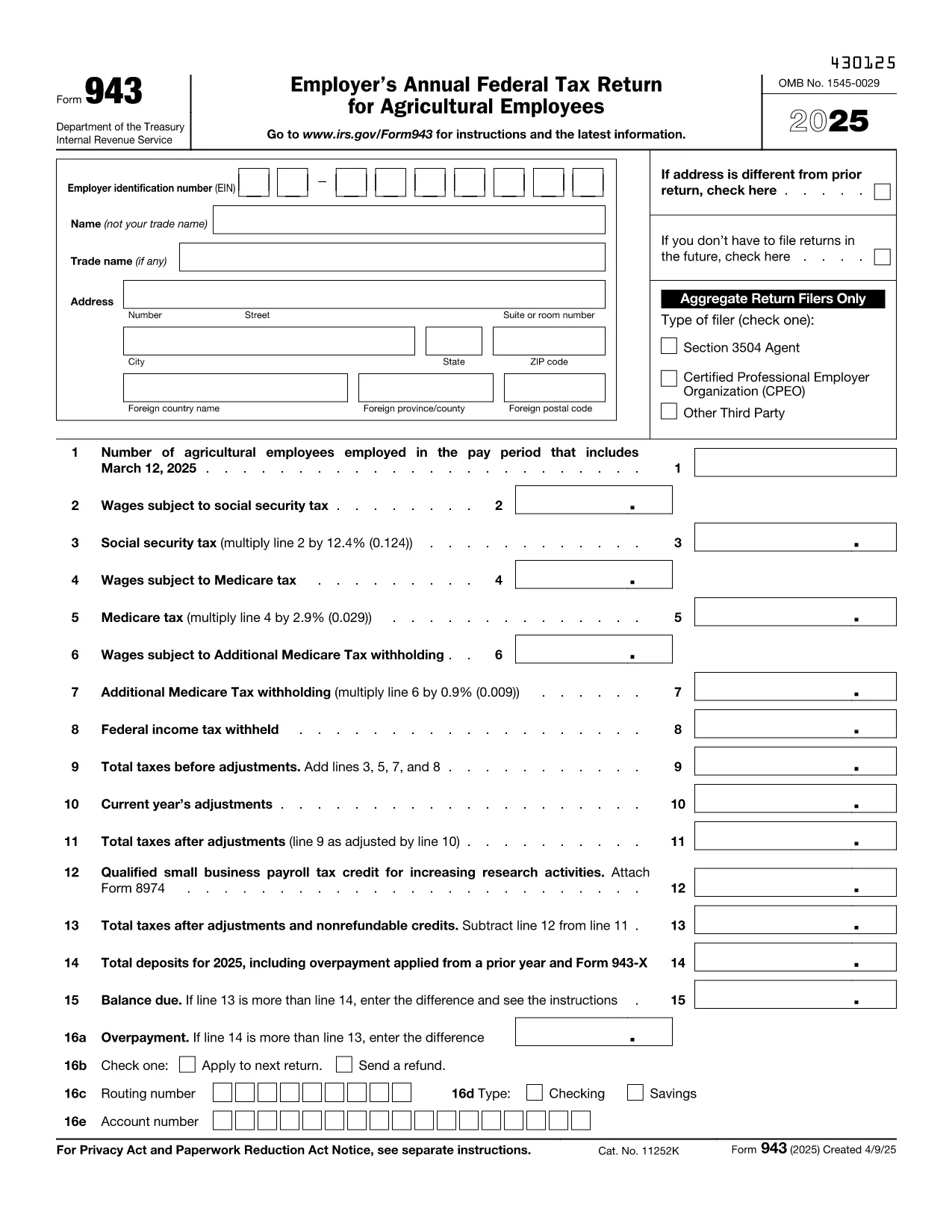
Form 943 (SP) is the Employer's Annual Federal Tax Return for Agricultural Employees. It is required each year from farms and other agricultural businesses that withhold federal income tax, Social Security tax, and Medicare tax from workers’ wages.

Instead of printing, printing‑and‑scanning, or using a desktop PDF editor, you can fill out the official IRS form directly in your browser with Formize’s secure fillable PDF tool. The process is fast, accurate, and fully compliant with IRS requirements.

What Is Form 943 (SP)?

The “SP” version of Form 943 is used by employers who file on a semi‑weekly or monthly deposit schedule. The form reports:

  • Total wages paid to agricultural employees
  • Federal income tax withheld
  • Social Security and Medicare taxes
  • Any additional Medicare tax

How to Complete the Form Online

Follow the simple steps below – no PDF editor needed:

  1. Click the "Fill out this form" button on this page.
  2. Wait a few seconds while the Formize PDF Filler app loads the official IRS PDF.
  3. Enter your Employer Identification Number (EIN), legal name, and address exactly as they appear on IRS records.
  4. Fill in wage totals, tax withholdings, and any adjustments in the highlighted fields.
  5. Use the built‑in calculator to verify Social Security (12.4%) and Medicare (2.9%) amounts.
  6. Review the completed form, then click Submit to generate a downloadable PDF copy.

Common Mistakes to Avoid

  • Missing EIN or incorrect format – the IRS will reject the return.
  • Double‑entering wages in both the regular and supplemental sections.
  • Leaving the balance‑due and overpayment boxes filled – only one should contain a value.
  • Using an outdated form version – always use the latest PDF linked below.

Download & Save Your Completed Form

After you submit, the Formize platform creates a clean, printable PDF that you can save, print, or email directly to the IRS. Keep a copy for your records and for any future audits.

Ready to get started? Click the button below and let Formize handle the rest.

FAQ
  • Who must file Form 943 (SP)?

    Any agricultural employer who withholds federal income tax, Social Security tax, or Medicare tax from farm workers’ wages and follows a semi‑weekly or monthly deposit schedule must file Form 943 (SP).

  • Can I file Form 943 (SP) electronically?

    The IRS does not accept electronic filing for Form 943. However, you can fill it out online with Formize, then print and mail the completed PDF to the IRS.

  • What is the deadline for filing Form 943 (SP)?

    Form 943 (SP) is due by January 31 of the year following the tax year. If you file on time and have no balance due, you may also file by February 10.

  • Do I need to attach any supporting documents?

    Generally, no attachments are required unless the IRS specifically requests additional information. Keep your payroll records for at least four years in case of an audit.

  • What if I make a mistake after filing?

    You can file Form 943‑X, the Amended Return for Agricultural Employees, to correct errors on a previously filed Form 943 (SP).

  • Is there a fee to use Formize’s fillable PDF tool?

    Formize offers free access to the fillable version of Form 943 (SP). No subscription or payment is required to complete and download the form.

  • Where do I mail the completed Form 943 (SP)?

    Mail the signed form to the address listed in the IRS instructions for Form 943, which varies by state. The address is included in the form’s instruction page.

WIE MAN

So füllen Sie Form 943 kostenlos online in 6 einfachen Schritten aus:

  1. 1
    Click the Fill‑out Button
    Press the "Fill out this form" button on the page to launch the Formize PDF Filler.
  2. 2
    Load the Fillable PDF
    The official IRS Form 943 (SP) PDF loads automatically in the secure editor.
  3. 3
    Enter Employer Information
    Provide your EIN, legal business name, and address exactly as the IRS records show.
  4. 4
    Complete Wage & Tax Fields
    Input total wages, federal income tax withheld, Social Security and Medicare taxes. Use the built‑in calculator for accuracy.
  5. 5
    Review and Submit
    Check all entries, correct any errors, then click Submit to generate a completed PDF.
  6. 6
    Download or Email the Finished Form
    Save the PDF to your computer, print it, or email it directly to the IRS.
Formize PDF Filler-App
ÜBER

Steuerformulare

Form 943 ist eines der Steuerformulare, mit denen Informationen zu Steuern an die zuständige Steuerbehörde gemeldet werden. Es gibt verschiedene Arten von Steuerformularen, einschließlich bundesstaatlicher, bundesstaatlicher und lokaler Steuerformulare, die je nach den Umständen und dem Standort des Steuerzahlers variieren können.

MERKMALE

PDF-Filler

Der einfachste Weg, PDF-Formulare online auszufüllen

  • Füllen Sie schnell Form 943 aus
    Suchen Sie nach einer Möglichkeit, Form 943 schnell online auszufüllen? Mit unserem kostenlosen Online-PDF-Formularausfüller wissen Sie, wie Sie dieses PDF-Dokument in weniger als einer Minute bearbeiten und ausfüllen.
  • Einfach zu bedienender Online-PDF-Editor
    Haben Sie es satt, PDF-Dateien auszudrucken, damit Sie sie bearbeiten können, bevor Sie sie erneut scannen und zurücksenden? PDF-Dokumente kostenlos online bearbeiten. Nutzen Sie unseren Online-PDF-Editor, um Zeit und Papier zu sparen.
  • Tolle Tools, alle Plattformen
    Sie fragen sich, wie Sie Form 943 auf einem Mac ausfüllen oder vielleicht einen kostenlosen PDF-Ausfüller verwenden können? Unsere Online-PDF-Tools funktionieren auf allen Plattformen.
  • Sichere Dateispeicherung
    Fertige "Form 943"-Dateien werden in einer gesicherten Datenbank gespeichert, die vom Amazon Cloud-Hosting verwaltet wird. Sie können Ihre Dateien jederzeit aus unserem System löschen. In jedem Fall werden diese Dateien nach 24 Stunden automatisch gelöscht.
  • Chatten Sie mit Form 943
    Chatten Sie mit „Form 943“ auf Chatize, einem kostenlosen PDF-Leseassistenten. Stellen Sie Fragen und erhalten Sie Antworten von „Form 943“. Klicken Sie einfach oben auf die Schaltfläche Mit Dokument chatten.

Füllsitzung löschen

Die ausgewählte Füllsitzung löschen? In diesem Fall gehen Ihre Fortschritte beim Ausfüllen des Formulars verloren.

Bearbeitungssitzung löschen

Ausgewählte Bearbeitungssitzung löschen? In diesem Fall geht Ihr Fortschritt beim Erstellen und Bearbeiten des Formulars verloren.