Sprache auswählen

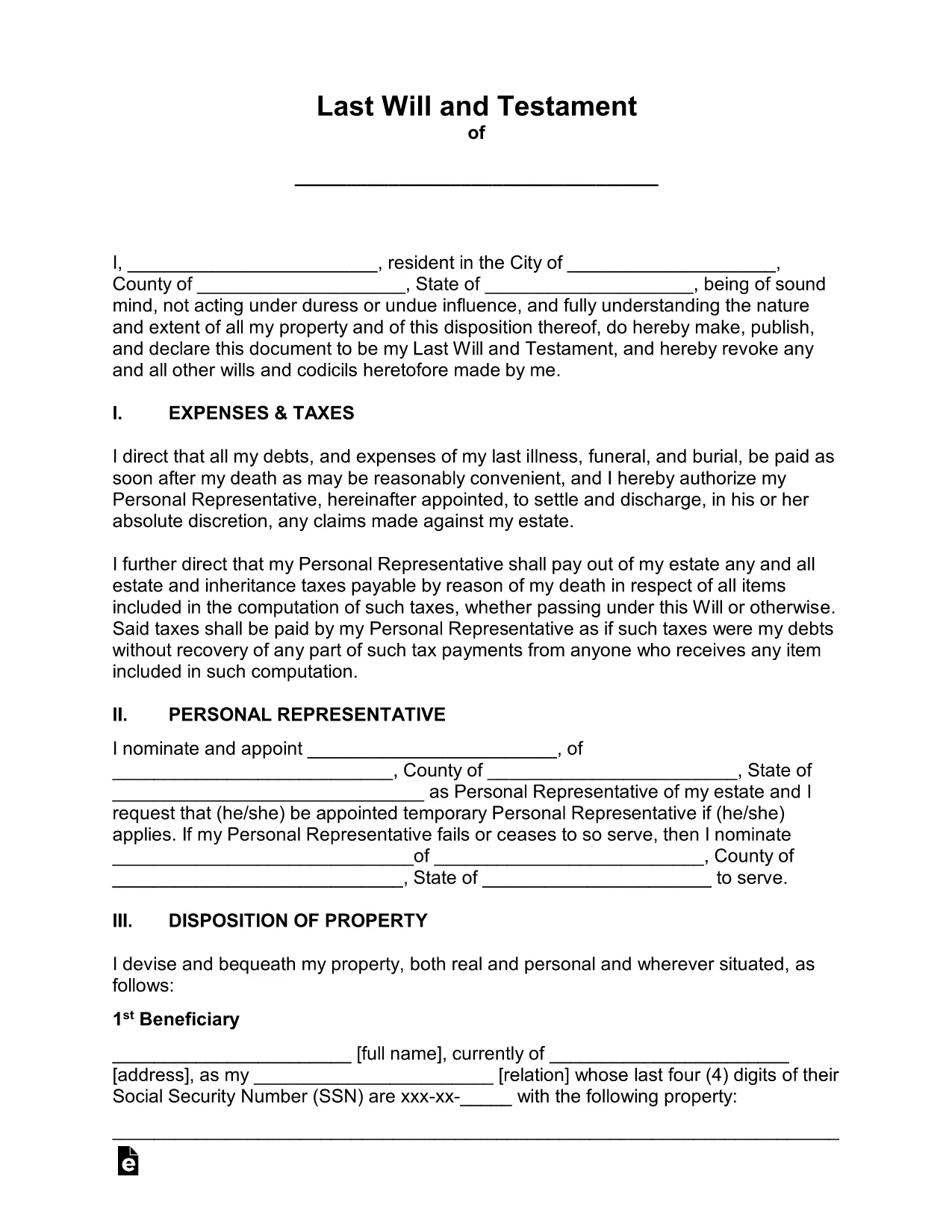
Free Fillable Legal Will Form Template

  1. Land USA
  2. Sprache Englisch
  3. Abteilung Legal
  4. Aktivität Estate Planning
Free Fillable Legal Will Form Template

Planning for the future has never been easier. Our free fillable legal will form lets you create a binding Last Will and Testament in minutes—no printer, no fax, no attorney fees.

Why Use a Fillable Will Form?

Traditional paper wills require careful handwriting, legible printing, and often a notary. A fillable PDF eliminates those hassles. You can type directly into each field, save changes, and securely store the document online. The form complies with U.S. estate‑planning standards, making it suitable for most states.

How to Complete the Legal Will Form Online

Simply click the "Fill out this form" button on this page. The Formize PDF Filler app will load in your browser, and you can start entering your information right away. No extra software download is needed.

Common Mistakes to Avoid When Drafting a Will

  • Leaving fields blank – every section should be completed or marked as "N/A".
  • Using vague language – be specific about assets, beneficiaries, and guardians.
  • Forgetting to sign and date – an unsigned will is not legally enforceable.
  • Not updating the will after major life events – revisit the form after marriage, divorce, birth, or purchase of significant assets.

Key Sections of the Will Template

The template includes:

  • Testator Information – your full legal name and address.
  • Executor Appointment – who will manage your estate.
  • Beneficiary Designations – how assets are distributed.
  • Guardian Selection – for minor children or dependents.
  • Signature & Witnesses – legal signing requirements.

When you finish, click Save to download a completed PDF, then print, sign, and store it in a safe place.

FAQ
  • Is a fillable PDF will legally binding?

    Yes, as long as it is signed, dated, and witnessed according to your state’s requirements, a fillable PDF has the same legal effect as a handwritten will.

  • Do I need a notary for this will?

    Most states do not require a notary for a will, but they do require two disinterested witnesses. Check your local laws for any specific requirements.

  • Can I edit the form after I download it?

    After you download the completed PDF, you can reopen it in Formize’s editor to make further changes, but you’ll need to re‑sign any edited sections.

  • What if I have a large estate with many assets?

    The template includes sections for real property, personal belongings, financial accounts, and digital assets. You can add supplemental schedules if needed.

  • How should I store my finished will?

    Store the signed original in a fire‑proof safe, and give copies to your executor, a trusted family member, or your attorney. Keep a digital copy in a secure cloud service.

  • Is this form suitable for all U.S. states?

    The template follows general U.S. will‑making principles and works in most states. However, some states have unique provisions (e.g., community property). Review local statutes or consult an attorney if you have specific concerns.

WIE MAN

So füllen Sie legal will form kostenlos online in 5 einfachen Schritten aus:

  1. 1
    Open the Fillable Form
    Click the "Fill out this form" button on the page. The Formize PDF Filler will launch directly in your browser.
  2. 2
    Wait for the Filler to Load
    A few seconds may pass while the app loads. Once ready, you’ll see editable fields highlighted in blue.
  3. 3
    Enter Your Information
    Type your personal details, executor name, beneficiaries, and any guardians into the appropriate sections.
  4. 4
    Review and Validate
    Double‑check each entry for accuracy. Use the built‑in validation to catch missed required fields.
  5. 5
    Sign & Download
    Add your electronic signature, have the required witnesses sign, then click "Download" to save the completed will to your device.
Formize PDF Filler-App
ÜBER

legal will form-Vorlage

Mit den traditionellen Funktionen zum Anzeigen und Ausfüllen eines PDF-Dokuments, kombiniert mit den Vorteilen einer Webanwendung und einem ansprechenden Layout, können Sie legal will form in wenigen Minuten fertigstellen.

MERKMALE

PDF-Filler

Der einfachste Weg, PDF-Formulare online auszufüllen

  • Füllen Sie schnell legal will form aus
    Suchen Sie nach einer Möglichkeit, legal will form schnell online auszufüllen? Mit unserem kostenlosen Online-PDF-Formularausfüller wissen Sie, wie Sie dieses PDF-Dokument in weniger als einer Minute bearbeiten und ausfüllen.
  • Einfach zu bedienender Online-PDF-Editor
    Haben Sie es satt, PDF-Dateien auszudrucken, damit Sie sie bearbeiten können, bevor Sie sie erneut scannen und zurücksenden? PDF-Dokumente kostenlos online bearbeiten. Nutzen Sie unseren Online-PDF-Editor, um Zeit und Papier zu sparen.
  • Tolle Tools, alle Plattformen
    Sie fragen sich, wie Sie legal will form auf einem Mac ausfüllen oder vielleicht einen kostenlosen PDF-Ausfüller verwenden können? Unsere Online-PDF-Tools funktionieren auf allen Plattformen.
  • Sichere Dateispeicherung
    Fertige "legal will form"-Dateien werden in einer gesicherten Datenbank gespeichert, die vom Amazon Cloud-Hosting verwaltet wird. Sie können Ihre Dateien jederzeit aus unserem System löschen. In jedem Fall werden diese Dateien nach 24 Stunden automatisch gelöscht.
  • Chatten Sie mit legal will form
    Chatten Sie mit „legal will form“ auf Chatize, einem kostenlosen PDF-Leseassistenten. Stellen Sie Fragen und erhalten Sie Antworten von „legal will form“. Klicken Sie einfach oben auf die Schaltfläche Mit Dokument chatten.

Füllsitzung löschen

Die ausgewählte Füllsitzung löschen? In diesem Fall gehen Ihre Fortschritte beim Ausfüllen des Formulars verloren.

Bearbeitungssitzung löschen

Ausgewählte Bearbeitungssitzung löschen? In diesem Fall geht Ihr Fortschritt beim Erstellen und Bearbeiten des Formulars verloren.