
Sprache auswählen

VP 275 Fillable PDF – Nevada DMV Form

  1. Land USA
  2. Sprache Englisch
  3. Abteilung Nevada DMV
  4. Aktivität Kfz-Zulassung
VP 275 Fillable PDF – Nevada DMV Form

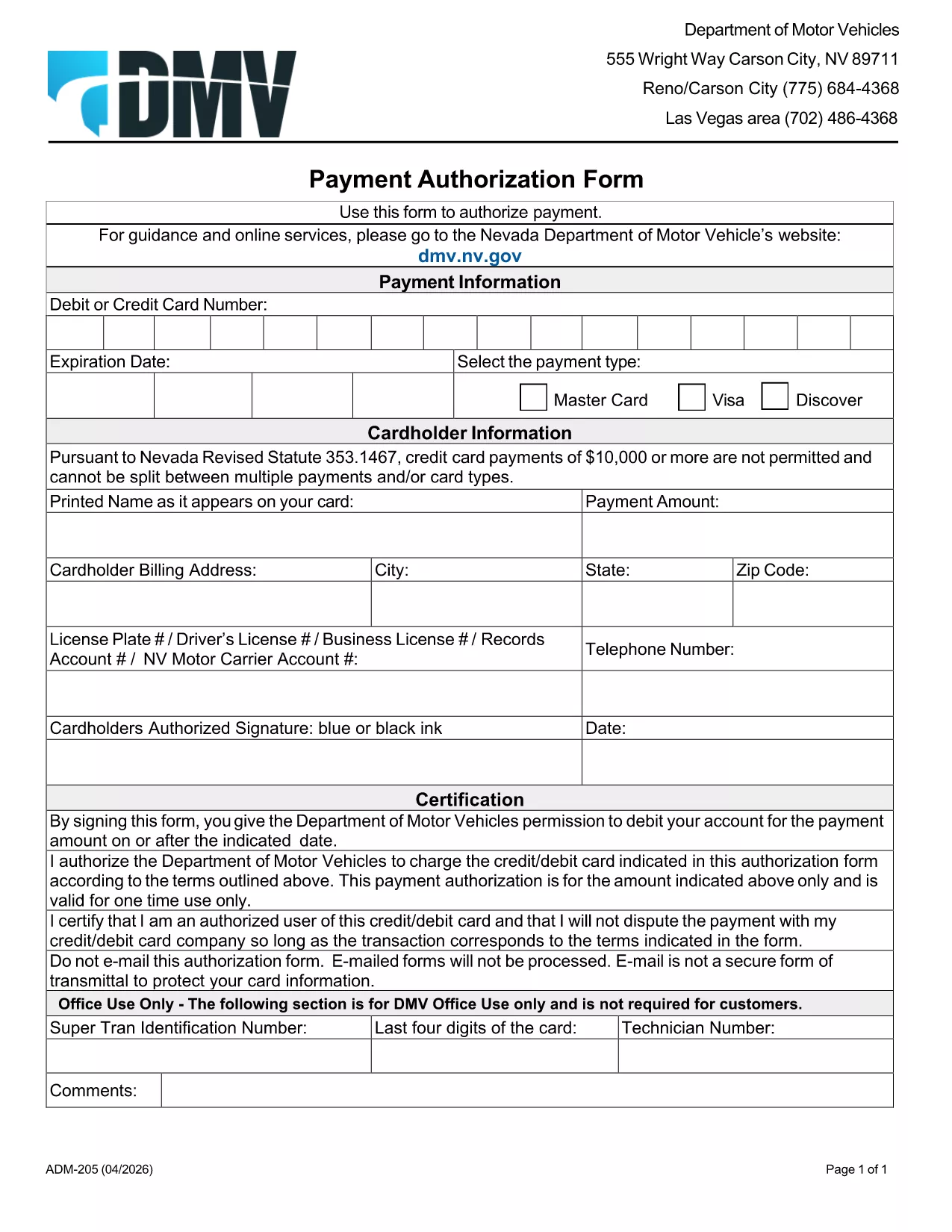
The VP 275 is the Nevada Department of Motor Vehicles (DMV) form used to authorize payment for vehicle‑related fees, such as registration renewals, title transfers, and specialty plates. This form is available as a fillable PDF, so you can complete it on any computer, tablet, or smartphone before you head to the DMV.

Formize.com hosts a secure, browser‑based PDF filler that lets you edit the VP 275 directly on our site – no extra software required. Simply click the "Fill out this form" button below, make your entries, and download the finished document ready for signature.

What Is the VP 275 Form?

VP 275 is the official Payment Authorization Form for the Nevada DMV. It captures:

  • Vehicle identification details (VIN, plate number)
  • Owner’s contact information
  • Amount to be charged to a credit or debit card
  • Authorization signature (added after printing)

Using the fillable PDF saves you time at the DMV counter and reduces the risk of errors.

How to Complete the VP 275 Online with Formize

Follow these simple steps to fill out the form instantly:

  1. Click the "Fill out this form" button on this page.
  2. Wait a few seconds while the Formize PDF Filler app loads.
  3. Enter the required information in each field – the interface highlights required fields.
  4. Click Save to store a copy in your browser or download the completed PDF.
  5. Print the form, sign it in person, and bring it to your nearest Nevada DMV office.

Common Mistakes to Avoid When Filling VP 275

  • Leaving required fields blank: The filler will warn you, but double‑check before saving.
  • Incorrect card information: Verify the card number, expiration date, and CVV to prevent payment rejections.
  • Using an outdated VIN: Ensure the VIN matches the vehicle you are registering.
  • Signing the PDF before printing: The DMV requires a handwritten signature on the physical copy.

Where to Submit the Completed VP 275

After printing and signing, you can:

  • Mail the form to your local DMV office (address listed on the form).
  • Bring it in person during your appointment.
  • Attach it to any online submission portal that accepts scanned PDFs.

Having a correctly completed VP 275 speeds up processing and helps you avoid extra visits.

FAQ
  • Is the VP 275 form available for free?

    Yes. The fillable PDF is provided at no cost. You only need an internet connection to use Formize’s online filler.

  • Can I submit the VP 275 electronically?

    The Nevada DMV still requires a physical signature, so you must print, sign, and mail or bring the form in person.

  • What if I make a mistake after saving?

    You can reopen the saved PDF in the Formize filler, correct the error, and re‑download the updated version.

  • Do I need Adobe Acrobat to fill out VP 275?

    No. Formize’s browser‑based filler works with any modern browser—no additional software is needed.

  • How long does the Formize filler take to load?

    Typically less than 5 seconds on a standard broadband connection.

  • Is my personal and payment information secure?

    Yes. Formize uses SSL encryption, and no data is stored on our servers after you download the completed PDF.

  • Can I use the VP 275 for a vehicle owned by a business?

    Absolutely. Just enter the business name and tax ID in the appropriate fields.

  • What should I do if the form won’t save?

    Refresh the page, ensure your browser allows pop‑ups, and try again. If the issue persists, try a different browser.

WIE MAN

So füllen Sie VP 275 form kostenlos online in 4 einfachen Schritten aus:

  1. 1
    Open the Fillable Form
    Click the "Fill out this form" button on this page. The Formize PDF Filler will open in a new browser tab.
  2. 2
    Enter Your Information
    Type directly into each highlighted field. Required fields are marked with an asterisk.
  3. 3
    Save and Download
    When all data is entered, click the Save button, then download the completed PDF to your device.
  4. 4
    Print and Sign
    Print the downloaded file, add your handwritten signature, and submit it to the Nevada DMV as instructed.
Formize PDF Filler-App
ÜBER

Fahrzeugregistrierungsformulare

VP 275 form ist eines der Fahrzeugzulassungsformulare, bei denen es sich um Dokumente handelt, die zur Registrierung eines Kraftfahrzeugs bei der zuständigen Regierungsbehörde verwendet werden, normalerweise beim Department of Motor Vehicles (DMV) oder einer gleichwertigen Behörde. Diese Formulare sind erforderlich, wenn eine Person ein neues oder gebrauchtes Fahrzeug kauft, den Besitz eines Fahrzeugs überträgt oder mit einem Fahrzeug in eine neue Gerichtsbarkeit zieht.

Die spezifischen Fahrzeugzulassungsformulare können je nach Gerichtsbarkeit variieren, erfordern jedoch im Allgemeinen die folgenden Informationen:

Fahrzeuginformationen: Dazu gehören Details zum Fahrzeug, wie Marke, Modell, Baujahr, Fahrzeugidentifikationsnummer (VIN) und Kilometerstand.

Besitzerinformationen: Das Formular erfordert Informationen über den Fahrzeugbesitzer, einschließlich Name, Adresse, Kontaktinformationen und Führerscheinnummer.

Eigentumsnachweis: Abhängig von den Umständen kann ein Eigentumsnachweis erforderlich sein, z. B. eine Eigentumsurkunde, ein Kaufvertrag oder ein Ursprungszeugnis des Herstellers (für Neufahrzeuge).

Versicherungsinformationen: In der Regel ist ein Nachweis einer gültigen Kfz-Versicherung erforderlich. Dazu kann die Angabe der Versicherungspolicennummer, der Versicherungsdaten und der Angaben zur Versicherungsgesellschaft gehören.

Zahlung von Gebühren: Die Fahrzeugregistrierung erfordert die Zahlung verschiedener Gebühren, wie z. B. Registrierungsgebühren, Steuern und möglicherweise anderer gebietsspezifischer Gebühren.

Zusätzlich zu diesen grundlegenden Anforderungen können in einigen Gerichtsbarkeiten zusätzliche Formulare oder Dokumentationsanforderungen gelten. In bestimmten Gebieten können beispielsweise Ergebnisse von Abgastests, Sicherheitsinspektionen oder ein Wohnsitznachweis erforderlich sein.

Sobald die Fahrzeugzulassungsformulare ausgefüllt und eingereicht wurden, stellt die Regierungsbehörde eine Zulassungsbescheinigung, Nummernschilder und Zulassungsaufkleber aus. Aus diesen Dokumenten geht hervor, dass das Fahrzeug ordnungsgemäß zugelassen und für den Betrieb auf öffentlichen Straßen zugelassen ist.

Es ist wichtig zu beachten, dass die Zulassungsanforderungen für Fahrzeuge je nach Gerichtsbarkeit erheblich variieren können. Daher wird empfohlen, sich bezüglich der für Ihren Standort geltenden spezifischen Formulare und Verfahren an das örtliche DMV oder eine gleichwertige Behörde zu wenden.

MERKMALE

PDF-Filler

Der einfachste Weg, PDF-Formulare online auszufüllen

  • Füllen Sie schnell VP 275 form aus
    Suchen Sie nach einer Möglichkeit, VP 275 form schnell online auszufüllen? Mit unserem kostenlosen Online-PDF-Formularausfüller wissen Sie, wie Sie dieses PDF-Dokument in weniger als einer Minute bearbeiten und ausfüllen.
  • Einfach zu bedienender Online-PDF-Editor
    Haben Sie es satt, PDF-Dateien auszudrucken, damit Sie sie bearbeiten können, bevor Sie sie erneut scannen und zurücksenden? PDF-Dokumente kostenlos online bearbeiten. Nutzen Sie unseren Online-PDF-Editor, um Zeit und Papier zu sparen.
  • Tolle Tools, alle Plattformen
    Sie fragen sich, wie Sie VP 275 form auf einem Mac ausfüllen oder vielleicht einen kostenlosen PDF-Ausfüller verwenden können? Unsere Online-PDF-Tools funktionieren auf allen Plattformen.
  • Sichere Dateispeicherung
    Fertige "VP 275 form"-Dateien werden in einer gesicherten Datenbank gespeichert, die vom Amazon Cloud-Hosting verwaltet wird. Sie können Ihre Dateien jederzeit aus unserem System löschen. In jedem Fall werden diese Dateien nach 24 Stunden automatisch gelöscht.
  • Chatten Sie mit VP 275 form
    Chatten Sie mit „VP 275 form“ auf Chatize, einem kostenlosen PDF-Leseassistenten. Stellen Sie Fragen und erhalten Sie Antworten von „VP 275 form“. Klicken Sie einfach oben auf die Schaltfläche Mit Dokument chatten.

Füllsitzung löschen

Die ausgewählte Füllsitzung löschen? In diesem Fall gehen Ihre Fortschritte beim Ausfüllen des Formulars verloren.

Bearbeitungssitzung löschen

Ausgewählte Bearbeitungssitzung löschen? In diesem Fall geht Ihr Fortschritt beim Erstellen und Bearbeiten des Formulars verloren.