Sprache auswählen

UST‑6 Application Form – Fillable PDF

  1. Sprache Englisch
  2. Land USA
  3. Aktivität Environmental Compliance
  4. Abteilung North Carolina Department of Environmental Quality
UST‑6 Application Form – Fillable PDF

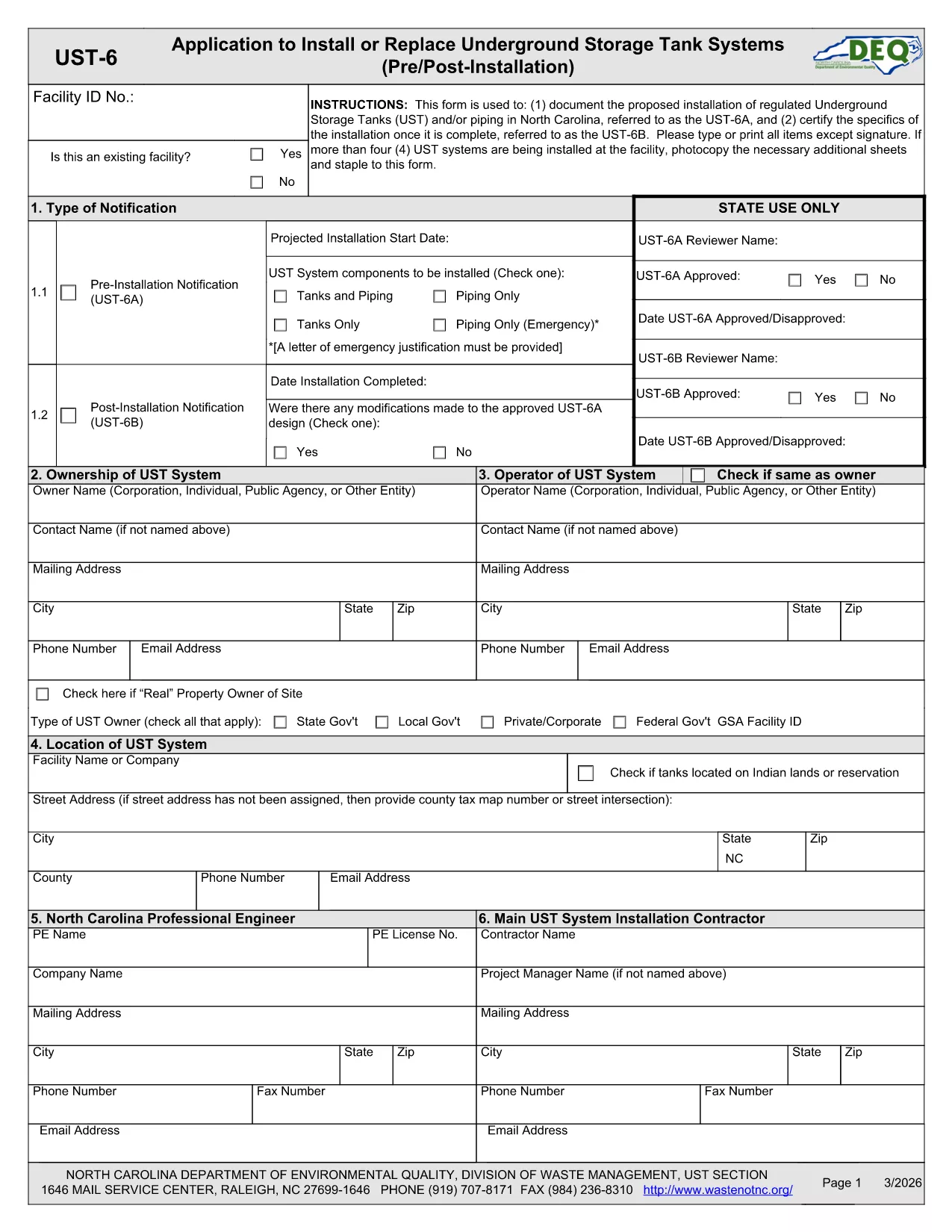
The UST‑6 Application Form is required by the North Carolina Department of Environmental Quality (DEQ) for owners and operators of underground storage tanks (USTs) who need to certify pre‑installation information, report modifications, or request approvals. This page gives you everything you need to download, fill out, and submit the form quickly using Formize’s online PDF filler.

What is the UST‑6 Form?

The UST‑6 is a certification and pre‑installation questionnaire that ensures UST systems meet state environmental standards. It collects details about tank location, design, materials, and compliance measures. Submitting a correctly completed UST‑6 helps avoid penalties and keeps your operation compliant with North Carolina regulations.

How to Fill Out the UST‑6 Online

Instead of printing the PDF and using a third‑party editor, simply click the "Fill out this form" button on this page. The Formize PDF Filler app will load directly in your browser, allowing you to type, select dates, and sign electronically.

Common Mistakes to Avoid

  • Leaving required fields blank – the filler will highlight missing information before you can submit.
  • Using outdated tank specifications – double‑check that the data matches the most recent engineering drawings.
  • Forgetting to attach supporting documents – upload any required permits or inspection reports in the designated attachment sections.

Download the Fillable PDF

If you prefer to work offline, you can download the official UST‑6 PDF using the link below. The file is fully fillable with standard PDF readers, but we recommend the online Formize filler for a smoother experience.

Download UST‑6 Application Form (PDF)

FAQs About the UST‑6 Application

Find quick answers to the most common questions below. If you need further assistance, consult the DEQ guidance documents linked on the form.

FAQ
  • What is the purpose of the UST‑6 form?

    The UST‑6 certifies that a new or modified underground storage tank complies with North Carolina environmental regulations before installation.

  • Can I submit the form electronically?

    Yes. After filling it out with Formize, you can download the completed PDF and upload it through the DEQ online portal, or print and mail it if required.

  • Do I need a digital signature?

    A digital signature is accepted for most submissions. Use the signature field in the Formize filler to add your electronic signature.

  • What supporting documents are required?

    Attach tank design drawings, installation permits, and any previous inspection reports as specified in the attachment sections of the form.

  • Is there a fee to file the UST‑6?

    The UST‑6 itself does not carry a filing fee, but DEQ may charge processing fees for related permits or inspections.

  • How long does it take to process the form?

    Processing time varies, but DEQ typically reviews a completed UST‑6 within 10‑15 business days after receipt.

  • What if I make a mistake after submitting?

    Contact the DEQ UST program office to request a correction. You may need to submit an amended UST‑6 with a cover letter explaining the changes.

  • Can I save my progress and return later?

    Yes. The Formize filler lets you save a draft locally on your computer and resume editing at any time before final submission.

WIE MAN

So füllen Sie UST-6 form kostenlos online in 5 einfachen Schritten aus:

  1. 1
    Click the Fill Out Button
    On this page, click the "Fill out this form" button to launch the Formize PDF Filler.
  2. 2
    Wait for the Filler to Load
    The browser will open the fillable PDF inside the Formize app – no download required.
  3. 3
    Complete All Required Fields
    Enter the requested information, select dates, and use the drop‑down menus where applicable.
  4. 4
    Review and Sign
    Check each section for completeness, then add your electronic signature in the designated field.
  5. 5
    Submit or Save
    When finished, click "Submit" to send the form to DEQ (if supported) or download the completed PDF for manual submission.
Formize PDF Filler-App
ÜBER

UST-6 form-Vorlage

Mit den traditionellen Funktionen zum Anzeigen und Ausfüllen eines PDF-Dokuments, kombiniert mit den Vorteilen einer Webanwendung und einem ansprechenden Layout, können Sie UST-6 form in wenigen Minuten fertigstellen.

MERKMALE

PDF-Filler

Der einfachste Weg, PDF-Formulare online auszufüllen

  • Füllen Sie schnell UST-6 form aus
    Suchen Sie nach einer Möglichkeit, UST-6 form schnell online auszufüllen? Mit unserem kostenlosen Online-PDF-Formularausfüller wissen Sie, wie Sie dieses PDF-Dokument in weniger als einer Minute bearbeiten und ausfüllen.
  • Einfach zu bedienender Online-PDF-Editor
    Haben Sie es satt, PDF-Dateien auszudrucken, damit Sie sie bearbeiten können, bevor Sie sie erneut scannen und zurücksenden? PDF-Dokumente kostenlos online bearbeiten. Nutzen Sie unseren Online-PDF-Editor, um Zeit und Papier zu sparen.
  • Tolle Tools, alle Plattformen
    Sie fragen sich, wie Sie UST-6 form auf einem Mac ausfüllen oder vielleicht einen kostenlosen PDF-Ausfüller verwenden können? Unsere Online-PDF-Tools funktionieren auf allen Plattformen.
  • Sichere Dateispeicherung
    Fertige "UST-6 form"-Dateien werden in einer gesicherten Datenbank gespeichert, die vom Amazon Cloud-Hosting verwaltet wird. Sie können Ihre Dateien jederzeit aus unserem System löschen. In jedem Fall werden diese Dateien nach 24 Stunden automatisch gelöscht.
  • Chatten Sie mit UST-6 form
    Chatten Sie mit „UST-6 form“ auf Chatize, einem kostenlosen PDF-Leseassistenten. Stellen Sie Fragen und erhalten Sie Antworten von „UST-6 form“. Klicken Sie einfach oben auf die Schaltfläche Mit Dokument chatten.

Füllsitzung löschen

Die ausgewählte Füllsitzung löschen? In diesem Fall gehen Ihre Fortschritte beim Ausfüllen des Formulars verloren.

Bearbeitungssitzung löschen

Ausgewählte Bearbeitungssitzung löschen? In diesem Fall geht Ihr Fortschritt beim Erstellen und Bearbeiten des Formulars verloren.