
Sprache auswählen

OPM Form 1310 – Fillable PDF for PMF Leadership Development

  1. Sprache Englisch
  2. Land USA
  3. Abteilung Amt für Personalmanagement
  4. Sektor OPM-Formulare
OPM Form 1310 – Fillable PDF for PMF Leadership Development

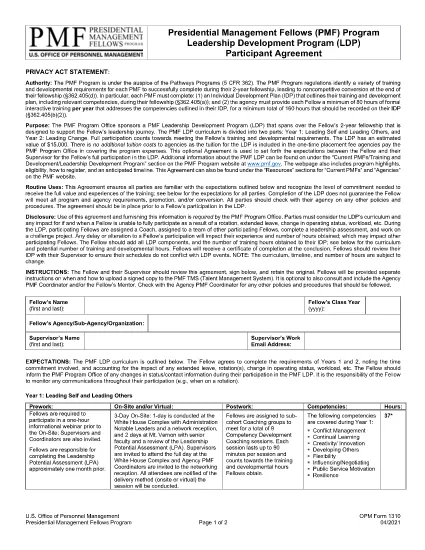
The OPM Form 1310 is the official Presidential Management Fellows (PMF) Leadership Development Program (LDP) Participant Agreement. Federal agencies use this form to confirm a fellow’s participation in the two‑year LDP and to outline the training commitments.

What Is OPM Form 1310?

Issued by the U.S. Office of Personnel Management (OPM), Form 1310 captures the fellow’s signature, agency details, and program expectations. It is a required document for every PMF who enrolls in the LDP.

How to Complete OPM Form 1310 Online

Instead of downloading, printing, and scanning, you can fill the form directly in your browser using Formize’s secure PDF filler:

  1. Click the "Fill out this form" button below.
  2. Wait a few seconds while the Formize PDF Filler app loads.
  3. Enter the required information in each fillable field.
  4. Save the completed document to your computer or cloud storage.
  5. Print or submit electronically as instructed by your agency.

Common Mistakes to Avoid When Filling the Form

  • Leaving required fields blank – the filler will highlight missing data.
  • Using an unofficial PDF – always start with the official OPM 1310 file linked below.
  • Incorrect date format – use MM/DD/YYYY as shown in the example.
  • Signature issues – use the digital signature tool in Formize for a clear, legible signature.

Where to Submit the Completed Form

After saving the filled PDF, follow your agency’s submission guidelines. Most agencies accept an electronic upload to the HR portal, while some may still require a printed copy.

FAQs About OPM Form 1310

Find quick answers to the most common questions below (full FAQ list appears further down the page).

FAQ
  • Is OPM Form 1310 required for every PMF?

    Yes. All Presidential Management Fellows who participate in the Leadership Development Program must sign and submit Form 1310.

  • Can I edit the form after I download it?

    You can edit the official fillable PDF using Formize’s online filler or any PDF editor that supports form fields.

  • What if I make a mistake while filling the form?

    Simply click the field again to correct the entry. The online filler saves changes in real time.

  • Do I need a Adobe Acrobat license to fill this form?

    No. Formize provides a free, web‑based PDF filler that works in any modern browser.

  • How long does it take to complete OPM Form 1310?

    Typically 5‑10 minutes, depending on how quickly you gather the required information.

  • Is the PDF secure?

    Yes. The Formize platform uses HTTPS encryption, and the PDF never leaves your browser unless you choose to download it.

  • Can I submit a partially completed Form 1310?

    No. All required fields must be completed before the form can be considered valid.

  • Where can I find the official OPM Form 1310 PDF?

    Use the download button on this page; it links directly to the official OPM version.

WIE MAN

So füllen Sie OPM Form 1310 kostenlos online in 5 einfachen Schritten aus:

  1. 1
    Open the Fillable Form
    Click the "Fill out this form" button on the page. The Formize PDF Filler will open in a new tab.
  2. 2
    Enter Your Information
    Use the on‑screen fields to type your name, agency, dates, and other required details.
  3. 3
    Add a Digital Signature
    Select the signature field and either draw your signature with the mouse/touchpad or upload an image of your handwritten signature.
  4. 4
    Save and Download
    When all fields are completed, click "Save". Download the completed PDF to your device.
  5. 5
    Submit to Your Agency
    Follow your agency’s instructions—usually an upload to the HR portal or a printed copy mailed to the designated office.
Formize PDF Filler-App
ÜBER

Formulare des Office of Personnel Management (OPM).

OPM Form 1310 ist eines der offiziellen Formulare, die vom United States Office of Personnel Management verwendet werden, einer unabhängigen Behörde der Bundesregierung, die für die Verwaltung des Personals im öffentlichen Dienst und die Leistungen an Bundesangestellte zuständig ist. Das OPM legt Richtlinien und Vorschriften im Zusammenhang mit der Bundesbeschäftigung fest, verwaltet verschiedene Personalprogramme und bietet Dienstleistungen für Bundesbedienstete, Rentner und Stellenbewerber.

Hier einige Beispiele für Formulare des Amtes für Personalmanagement:

Standardformular 86 (SF-86) : Dieses Formular wird für den Hintergrundermittlungsprozess für Personen verwendet, die eine Sicherheitsfreigabe beantragen. Es sammelt umfassende persönliche, Beschäftigungs-, Bildungs- und Finanzinformationen sowie Details zu ausländischen Kontakten und Aktivitäten.

Standardformular 2809 (SF-2809) : Dieses Formular wird für die Anmeldung beim Federal Employees Health Benefits (FEHB)-Programm verwendet, das Bundesangestellten, Rentnern und ihren berechtigten Familienangehörigen Krankenversicherungsschutz bietet.

Standardformular 2817 (SF-2817): Dieses Formular wird verwendet, um die Fortsetzung des Versicherungsschutzes im Rahmen des Federal Employees Dental and Vision Insurance Program (FEDVIP) nach der Pensionierung oder dem Ausscheiden aus dem Bundesdienst zu beantragen.

Standardformular 3107 (SF-3107) : Dieses Formular wird zur Beantragung von Altersleistungen im Rahmen des Civil Service Retirement System (CSRS) verwendet.

Standardformular 2801 (SF-2801) : Dieses Formular wird zur Beantragung von Altersvorsorgeleistungen im Rahmen des Federal Employees Retirement System (FERS) verwendet.

Standardformular 15 (SF-15) : Dieses Formular wird verwendet, um die Präferenz eines Veteranen für eine Bundesbeschäftigung zu beantragen. Es wird von Veteranen oder ihren berechtigten Familienangehörigen eingereicht, die nach Beschäftigungsmöglichkeiten bei der Bundesregierung suchen.

Diese Beispiele stellen einige gängige OPM-Formulare dar, die im Zusammenhang mit Bundesbeschäftigungs- und Arbeitnehmerleistungen verwendet werden. Das OPM verfügt jedoch über eine Reihe anderer Formen im Zusammenhang mit verschiedenen Personalprogrammen, Ruhestand, Versicherungen und anderen Aspekten der Bundesbeschäftigung. Die erforderlichen spezifischen Formulare können je nach Art der Transaktion, des Programms oder der angestrebten Leistung variieren. Es wird empfohlen, die offizielle Website des U.S. Office of Personnel Management (www.opm.gov) zu konsultieren oder sich vom OPM oder dem zuständigen Personalpersonal beraten zu lassen, um genaue und aktuelle Informationen zu erhalten. Aktuelle Informationen zu den spezifischen OPM-Formularen, die für Ihre bundesstaatlichen Beschäftigungs- oder Sozialleistungsbedürfnisse relevant sind.

MERKMALE

PDF-Filler

Der einfachste Weg, PDF-Formulare online auszufüllen

  • Füllen Sie schnell OPM Form 1310 aus
    Suchen Sie nach einer Möglichkeit, OPM Form 1310 schnell online auszufüllen? Mit unserem kostenlosen Online-PDF-Formularausfüller wissen Sie, wie Sie dieses PDF-Dokument in weniger als einer Minute bearbeiten und ausfüllen.
  • Einfach zu bedienender Online-PDF-Editor
    Haben Sie es satt, PDF-Dateien auszudrucken, damit Sie sie bearbeiten können, bevor Sie sie erneut scannen und zurücksenden? PDF-Dokumente kostenlos online bearbeiten. Nutzen Sie unseren Online-PDF-Editor, um Zeit und Papier zu sparen.
  • Tolle Tools, alle Plattformen
    Sie fragen sich, wie Sie OPM Form 1310 auf einem Mac ausfüllen oder vielleicht einen kostenlosen PDF-Ausfüller verwenden können? Unsere Online-PDF-Tools funktionieren auf allen Plattformen.
  • Sichere Dateispeicherung
    Fertige "OPM Form 1310"-Dateien werden in einer gesicherten Datenbank gespeichert, die vom Amazon Cloud-Hosting verwaltet wird. Sie können Ihre Dateien jederzeit aus unserem System löschen. In jedem Fall werden diese Dateien nach 24 Stunden automatisch gelöscht.
  • Chatten Sie mit OPM Form 1310
    Chatten Sie mit „OPM Form 1310“ auf Chatize, einem kostenlosen PDF-Leseassistenten. Stellen Sie Fragen und erhalten Sie Antworten von „OPM Form 1310“. Klicken Sie einfach oben auf die Schaltfläche Mit Dokument chatten.

Füllsitzung löschen

Die ausgewählte Füllsitzung löschen? In diesem Fall gehen Ihre Fortschritte beim Ausfüllen des Formulars verloren.

Bearbeitungssitzung löschen

Ausgewählte Bearbeitungssitzung löschen? In diesem Fall geht Ihr Fortschritt beim Erstellen und Bearbeiten des Formulars verloren.