
Sprache auswählen

RI 20-97 – Military Earnings Request Form (Fillable PDF)

  1. Land USA
  2. Sprache Englisch
  3. Abteilung Amt für Personalmanagement
  4. Sektor Renten- und Versicherungsformulare
RI 20-97 – Military Earnings Request Form (Fillable PDF)

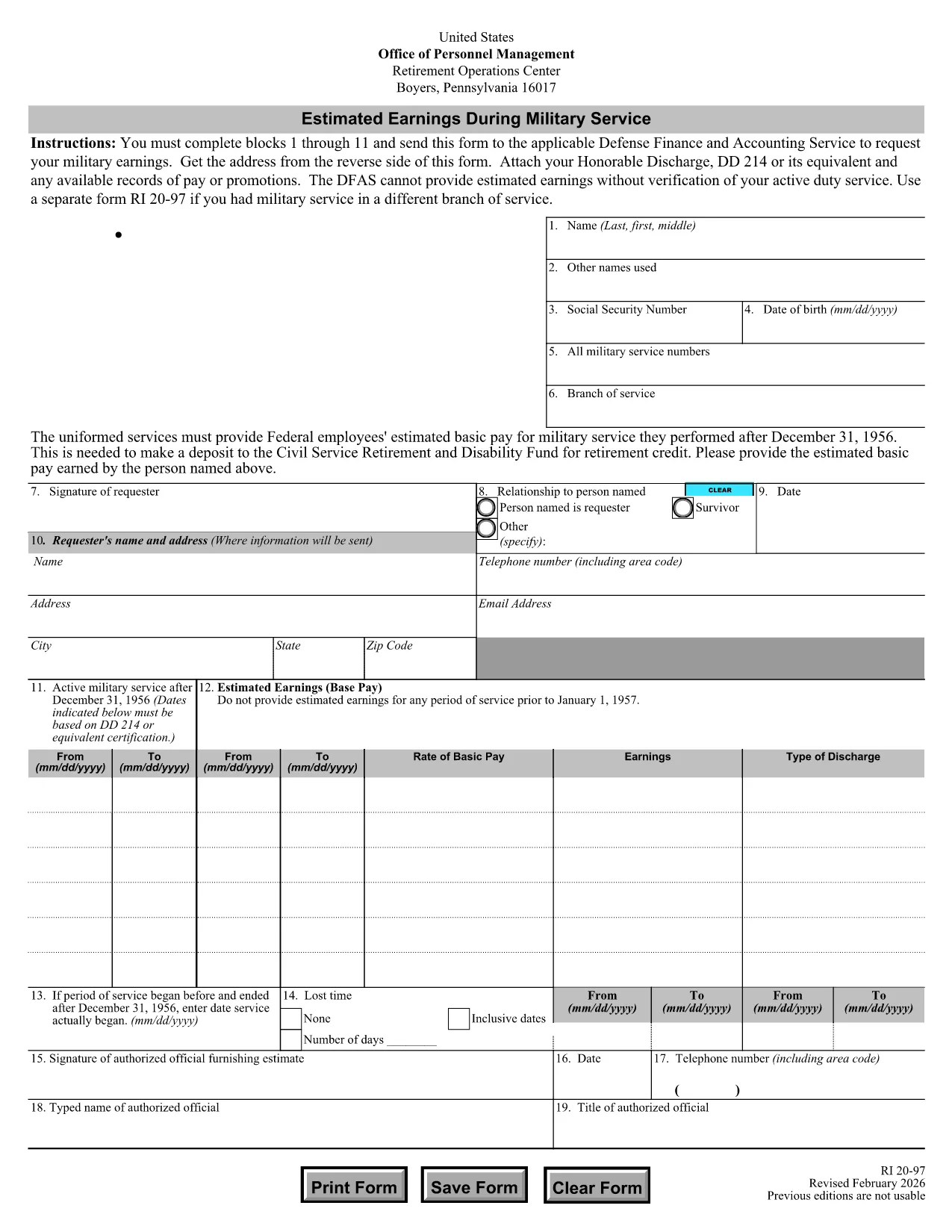
The RI 20-97 is the U.S. Office of Personnel Management (OPM) form used to request an estimate of your military earnings for retirement credit. Federal employees who have served in the armed forces use this form to ensure their service pay is counted toward their civil service pension.

What Is the RI 20-97 Form?

This official PDF, provided by OPM, captures personal details, service dates, pay grade, and any special pay received. Once completed, the form is sent to the Defense Finance and Accounting Service (DFAS) for calculation.

How to Complete the RI 20-97 Online with Formize

Instead of downloading, printing, and scanning, you can fill out the form directly on our site:

  1. Click the "Fill out this form" button below.
  2. The Formize PDF Filler app loads the fillable RI 20-97 template.
  3. Enter your information in each field (blocks 1‑11).
  4. Upload supporting documents such as your DD‑214.
  5. Review, e‑sign, and submit the form securely.

Common Mistakes & Tips for a Successful Submission

  • Missing DD‑214: The form will be rejected if you don’t attach a copy of your discharge papers.
  • Incorrect Service Dates: Double‑check start and end dates; even a one‑day error can delay processing.
  • Skipping Optional Fields: Fill in all optional fields when applicable; they help DFAS calculate a more accurate estimate.
  • Signature Errors: Both electronic and wet signatures are accepted – make sure the signature field is not left blank.

Supporting Documents You’ll Need

Prepare these items before you start:

  • DD‑214 or official military service record
  • Pay statements or promotion orders (if available)
  • Any previous RI 20‑97 submissions for reference

Where to Send Your Completed Form

After you finish the online fill, the Formize app will give you two options:

  • Download a PDF copy to mail to DFAS
  • Securely upload the completed form directly to DFAS through the provided portal link

Following these steps ensures your military earnings are counted toward your federal retirement benefits.

FAQ
  • Who needs to fill out the RI 20-97 form?

    Any current or former federal employee who served in the U.S. military and wants their service earnings counted toward their civil service retirement credit.

  • Can I use a wet signature on the RI 20-97?

    Yes. Both electronic and wet signatures are accepted. If you print the form, sign it, and mail it, DFAS will process it without issue.

  • What if I don’t have my DD‑214?

    The DD‑214 is required for verification. If it’s lost, request a replacement from the National Archives before submitting the RI 20‑97.

  • How long does DFAS take to calculate my earnings?

    Processing typically takes 2‑4 weeks after receipt of a complete, correctly signed RI 20‑97 with all supporting documents.

  • Is the Formize filler secure?

    Yes. Formize uses SSL encryption and complies with federal data‑privacy standards, ensuring your personal and military information is protected.

  • Do I need to fill out every field?

    All mandatory fields (blocks 1‑11) must be completed. Optional fields should be filled when applicable to improve accuracy.

  • Can I submit the form directly to DFAS from Formize?

    After completing the form, you can either download a PDF to mail or use the secure upload link provided by Formize to send it directly to DFAS.

  • What is the difference between the RI 20‑97 and the RI‑20‑97‑2023 version?

    The content is the same; the year in the file name reflects the most recent revision. All versions are accepted by DFAS as long as they are the official OPM form.

WIE MAN

So füllen Sie RI 20-97 kostenlos online in 5 einfachen Schritten aus:

  1. 1
    Open the Fillable Form
    Click the "Fill out this form" button on the page. The Formize PDF Filler will load the RI 20-97 template instantly.
  2. 2
    Enter Your Information
    Complete fields 1 through 11 with accurate personal and service details. Use dropdowns and date pickers for consistency.
  3. 3
    Attach Supporting Documents
    Upload your DD‑214 and any pay records using the attachment area. The system validates file types before you proceed.
  4. 4
    Review and Sign
    Double‑check every entry, then add an electronic signature or upload a scanned wet signature as required.
  5. 5
    Submit or Download
    Choose to submit directly to DFAS through the secure portal, or download the completed PDF to mail it yourself.
Formize PDF Filler-App
ÜBER

Formulare des Office of Personnel Management (OPM).

RI 20-97 ist eines der offiziellen Formulare, die vom United States Office of Personnel Management verwendet werden, einer unabhängigen Behörde der Bundesregierung, die für die Verwaltung des Personals im öffentlichen Dienst und die Leistungen an Bundesangestellte zuständig ist. Das OPM legt Richtlinien und Vorschriften im Zusammenhang mit der Bundesbeschäftigung fest, verwaltet verschiedene Personalprogramme und bietet Dienstleistungen für Bundesbedienstete, Rentner und Stellenbewerber.

Hier einige Beispiele für Formulare des Amtes für Personalmanagement:

Standardformular 86 (SF-86) : Dieses Formular wird für den Hintergrundermittlungsprozess für Personen verwendet, die eine Sicherheitsfreigabe beantragen. Es sammelt umfassende persönliche, Beschäftigungs-, Bildungs- und Finanzinformationen sowie Details zu ausländischen Kontakten und Aktivitäten.

Standardformular 2809 (SF-2809) : Dieses Formular wird für die Anmeldung beim Federal Employees Health Benefits (FEHB)-Programm verwendet, das Bundesangestellten, Rentnern und ihren berechtigten Familienangehörigen Krankenversicherungsschutz bietet.

Standardformular 2817 (SF-2817): Dieses Formular wird verwendet, um die Fortsetzung des Versicherungsschutzes im Rahmen des Federal Employees Dental and Vision Insurance Program (FEDVIP) nach der Pensionierung oder dem Ausscheiden aus dem Bundesdienst zu beantragen.

Standardformular 3107 (SF-3107) : Dieses Formular wird zur Beantragung von Altersleistungen im Rahmen des Civil Service Retirement System (CSRS) verwendet.

Standardformular 2801 (SF-2801) : Dieses Formular wird zur Beantragung von Altersvorsorgeleistungen im Rahmen des Federal Employees Retirement System (FERS) verwendet.

Standardformular 15 (SF-15) : Dieses Formular wird verwendet, um die Präferenz eines Veteranen für eine Bundesbeschäftigung zu beantragen. Es wird von Veteranen oder ihren berechtigten Familienangehörigen eingereicht, die nach Beschäftigungsmöglichkeiten bei der Bundesregierung suchen.

Diese Beispiele stellen einige gängige OPM-Formulare dar, die im Zusammenhang mit Bundesbeschäftigungs- und Arbeitnehmerleistungen verwendet werden. Das OPM verfügt jedoch über eine Reihe anderer Formen im Zusammenhang mit verschiedenen Personalprogrammen, Ruhestand, Versicherungen und anderen Aspekten der Bundesbeschäftigung. Die erforderlichen spezifischen Formulare können je nach Art der Transaktion, des Programms oder der angestrebten Leistung variieren. Es wird empfohlen, die offizielle Website des U.S. Office of Personnel Management (www.opm.gov) zu konsultieren oder sich vom OPM oder dem zuständigen Personalpersonal beraten zu lassen, um genaue und aktuelle Informationen zu erhalten. Aktuelle Informationen zu den spezifischen OPM-Formularen, die für Ihre bundesstaatlichen Beschäftigungs- oder Sozialleistungsbedürfnisse relevant sind.

MERKMALE

PDF-Filler

Der einfachste Weg, PDF-Formulare online auszufüllen

  • Füllen Sie schnell RI 20-97 aus
    Suchen Sie nach einer Möglichkeit, RI 20-97 schnell online auszufüllen? Mit unserem kostenlosen Online-PDF-Formularausfüller wissen Sie, wie Sie dieses PDF-Dokument in weniger als einer Minute bearbeiten und ausfüllen.
  • Einfach zu bedienender Online-PDF-Editor
    Haben Sie es satt, PDF-Dateien auszudrucken, damit Sie sie bearbeiten können, bevor Sie sie erneut scannen und zurücksenden? PDF-Dokumente kostenlos online bearbeiten. Nutzen Sie unseren Online-PDF-Editor, um Zeit und Papier zu sparen.
  • Tolle Tools, alle Plattformen
    Sie fragen sich, wie Sie RI 20-97 auf einem Mac ausfüllen oder vielleicht einen kostenlosen PDF-Ausfüller verwenden können? Unsere Online-PDF-Tools funktionieren auf allen Plattformen.
  • Sichere Dateispeicherung
    Fertige "RI 20-97"-Dateien werden in einer gesicherten Datenbank gespeichert, die vom Amazon Cloud-Hosting verwaltet wird. Sie können Ihre Dateien jederzeit aus unserem System löschen. In jedem Fall werden diese Dateien nach 24 Stunden automatisch gelöscht.
  • Chatten Sie mit RI 20-97
    Chatten Sie mit „RI 20-97“ auf Chatize, einem kostenlosen PDF-Leseassistenten. Stellen Sie Fragen und erhalten Sie Antworten von „RI 20-97“. Klicken Sie einfach oben auf die Schaltfläche Mit Dokument chatten.

Füllsitzung löschen

Die ausgewählte Füllsitzung löschen? In diesem Fall gehen Ihre Fortschritte beim Ausfüllen des Formulars verloren.

Bearbeitungssitzung löschen

Ausgewählte Bearbeitungssitzung löschen? In diesem Fall geht Ihr Fortschritt beim Erstellen und Bearbeiten des Formulars verloren.