
Sprache auswählen

DS-5504 Fillable PDF – Name Change, Data Correction & Limited Passport Replacement

  1. Sprache Englisch
  2. Land USA
  3. Aktivität Reisepass
DS-5504 Fillable PDF – Name Change, Data Correction & Limited Passport Replacement

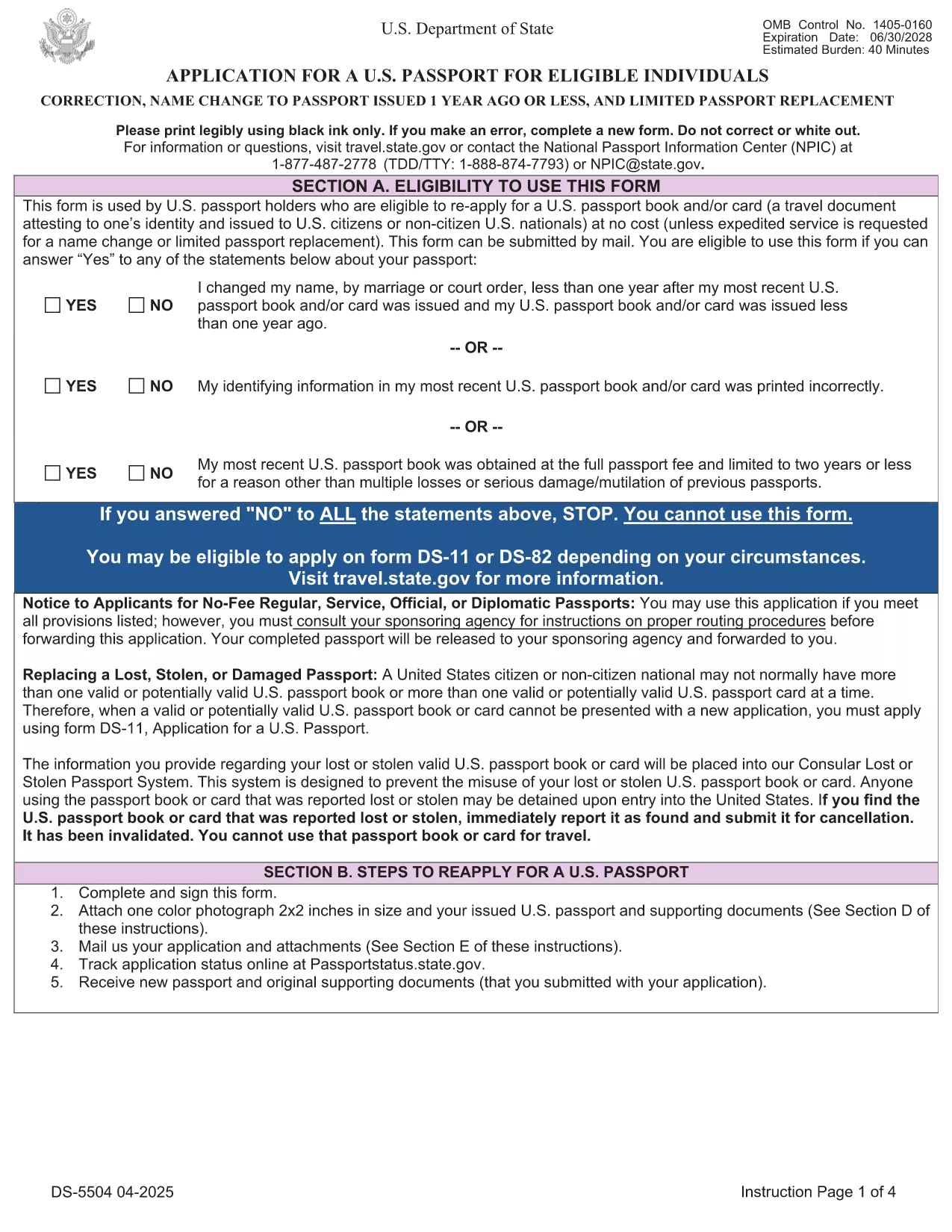
The DS-5504 is the official U.S. Department of State application used when you need to change the name on a passport, correct a printing error, or replace a limited‑validity passport. With Formize’s fillable PDF tool you can complete the form online, avoid manual errors, and print a clean copy ready for submission.

What Is the DS-5504 Form?

DS-5504 is designed for three specific situations:

  • Name change – if your legal name changed within one year of your last passport issuance.
  • Data correction – to fix a typo or incorrect personal information on an existing passport.
  • Limited passport replacement – when a temporary or limited‑validity passport expires or is damaged.

How to Fill Out DS-5504 with Formize

Instead of downloading the PDF and opening a separate editor, simply click the “Fill out this form” button on this page. The Formize PDF Filler app loads in your browser, letting you:

  1. Enter personal details directly into interactive fields.
  2. Upload a passport‑style photo.
  3. Save a draft and return later if needed.
  4. Download the completed, printable PDF with one click.

Common Mistakes to Avoid

  • Using a name change older than one year – the form will be rejected.
  • Leaving the signature line blank or signing on the wrong page.
  • Submitting an incorrect passport number or expiration date.
  • Forgetting to attach the required supporting documents (photo, legal name‑change proof, etc.).

Required Supporting Documents

Depending on your request, you will need to include:

  • Current valid U.S. passport (or limited‑validity passport).
  • One recent color passport photo (2" x 2").
  • Legal name‑change documentation (marriage certificate, court order) – if applicable.
  • Proof of the printing error (e.g., a copy of the original passport showing the mistake).

Where to Submit Your Completed Form

After printing, mail the DS-5504 package to the address listed in the form’s instructions or bring it to a regional passport agency. The application is free of charge; expedited processing is available for a fee.

Need help? Review the official DS‑5504 PDF for detailed instructions.

FAQ
  • Can I use DS-5504 for a name change after one year?

    No. The DS‑5504 is only valid for name changes that occurred within one year of your most recent passport issuance. For older changes, use form DS‑82.

  • Is there a fee to file DS-5504?

    The DS‑5504 application itself is free. Fees only apply if you request expedited processing or need a new passport book.

  • Do I need a photo for a data‑correction request?

    Yes. All DS‑5504 submissions require one recent color passport photo, even if you are only correcting printed information.

  • Can I submit the completed form electronically?

    The State Department currently requires a printed, signed PDF with supporting documents. Electronic submission is not accepted for DS‑5504.

  • What if my limited‑validity passport is still valid?

    You can use DS‑5504 to replace a limited‑validity passport that is damaged, lost, or you simply need a full‑validity book. Include the limited passport and a written explanation.

  • How long does processing take?

    Regular processing usually takes 6‑8 weeks. Expedited service (for a fee) can reduce the time to 2‑3 weeks.

  • Can I use Formize on a mobile device?

    Yes. The Formize PDF Filler works on most modern smartphones and tablets, letting you fill out DS‑5504 on the go.

WIE MAN

So füllen Sie DS-5504 kostenlos online in 5 einfachen Schritten aus:

  1. 1
    Open the Fillable Form
    Click the "Fill out this form" button on the page. The Formize PDF Filler loads instantly in your browser.
  2. 2
    Enter Your Information
    Complete each interactive field – personal details, passport number, reason for the request, and upload your passport‑style photo.
  3. 3
    Review & Sign
    Double‑check all entries for accuracy, then add your electronic signature in the designated box.
  4. 4
    Download & Print
    Save the completed PDF, print a clean copy on white paper, and attach any required supporting documents.
  5. 5
    Submit to the State Department
    Mail or deliver the package to the address specified in the form instructions, or schedule an appointment at a passport agency.
Formize PDF Filler-App
ÜBER

Passformulare

DS-5504 ist eines der Passformulare, die zur Beantragung eines Reisepasses verwendet werden, bei dem es sich um ein Reisedokument handelt, das die Identität und Nationalität des Inhabers bestätigt und ihm erlaubt, international zu reisen. Passformulare können je nach Land, das den Pass ausstellt, variieren, sie enthalten jedoch im Allgemeinen persönliche Informationen über den Antragsteller, wie Name, Geburtsdatum und Geburtsort, sowie Informationen über die Eltern des Antragstellers und alle früheren Pässe oder Reisedokumente .

In den Vereinigten Staaten sind die beiden häufigsten Passformen DS-11 und DS-82. Das DS-11-Formular wird für Erstantragsteller, Minderjährige oder Personen verwendet, die nicht berechtigt sind, das DS-82-Formular zu verwenden. Das DS-82-Formular wird für die Passerneuerung per Post für berechtigte Antragsteller verwendet. Bei beiden Formularen muss der Antragsteller persönliche Informationen und Belege wie ein Passfoto und einen Staatsbürgerschaftsnachweis vorlegen.

Andere Länder haben möglicherweise andere Passformulare und -anforderungen, aber der grundlegende Prozess umfasst normalerweise das Ausfüllen eines Passantrags, das Bereitstellen von Begleitdokumenten und die Teilnahme an einem Interview mit einem Passbeamten in einer staatlichen Einrichtung oder Botschaft. Es ist wichtig zu beachten, dass das Passantragsverfahren mehrere Wochen oder sogar Monate dauern kann, daher wird empfohlen, den Antrag rechtzeitig vor jeder geplanten Reise zu stellen.

MERKMALE

PDF-Filler

Der einfachste Weg, PDF-Formulare online auszufüllen

  • Füllen Sie schnell DS-5504 aus
    Suchen Sie nach einer Möglichkeit, DS-5504 schnell online auszufüllen? Mit unserem kostenlosen Online-PDF-Formularausfüller wissen Sie, wie Sie dieses PDF-Dokument in weniger als einer Minute bearbeiten und ausfüllen.
  • Einfach zu bedienender Online-PDF-Editor
    Haben Sie es satt, PDF-Dateien auszudrucken, damit Sie sie bearbeiten können, bevor Sie sie erneut scannen und zurücksenden? PDF-Dokumente kostenlos online bearbeiten. Nutzen Sie unseren Online-PDF-Editor, um Zeit und Papier zu sparen.
  • Tolle Tools, alle Plattformen
    Sie fragen sich, wie Sie DS-5504 auf einem Mac ausfüllen oder vielleicht einen kostenlosen PDF-Ausfüller verwenden können? Unsere Online-PDF-Tools funktionieren auf allen Plattformen.
  • Sichere Dateispeicherung
    Fertige "DS-5504"-Dateien werden in einer gesicherten Datenbank gespeichert, die vom Amazon Cloud-Hosting verwaltet wird. Sie können Ihre Dateien jederzeit aus unserem System löschen. In jedem Fall werden diese Dateien nach 24 Stunden automatisch gelöscht.
  • Chatten Sie mit DS-5504
    Chatten Sie mit „DS-5504“ auf Chatize, einem kostenlosen PDF-Leseassistenten. Stellen Sie Fragen und erhalten Sie Antworten von „DS-5504“. Klicken Sie einfach oben auf die Schaltfläche Mit Dokument chatten.

Füllsitzung löschen

Die ausgewählte Füllsitzung löschen? In diesem Fall gehen Ihre Fortschritte beim Ausfüllen des Formulars verloren.

Bearbeitungssitzung löschen

Ausgewählte Bearbeitungssitzung löschen? In diesem Fall geht Ihr Fortschritt beim Erstellen und Bearbeiten des Formulars verloren.