
Sprache auswählen

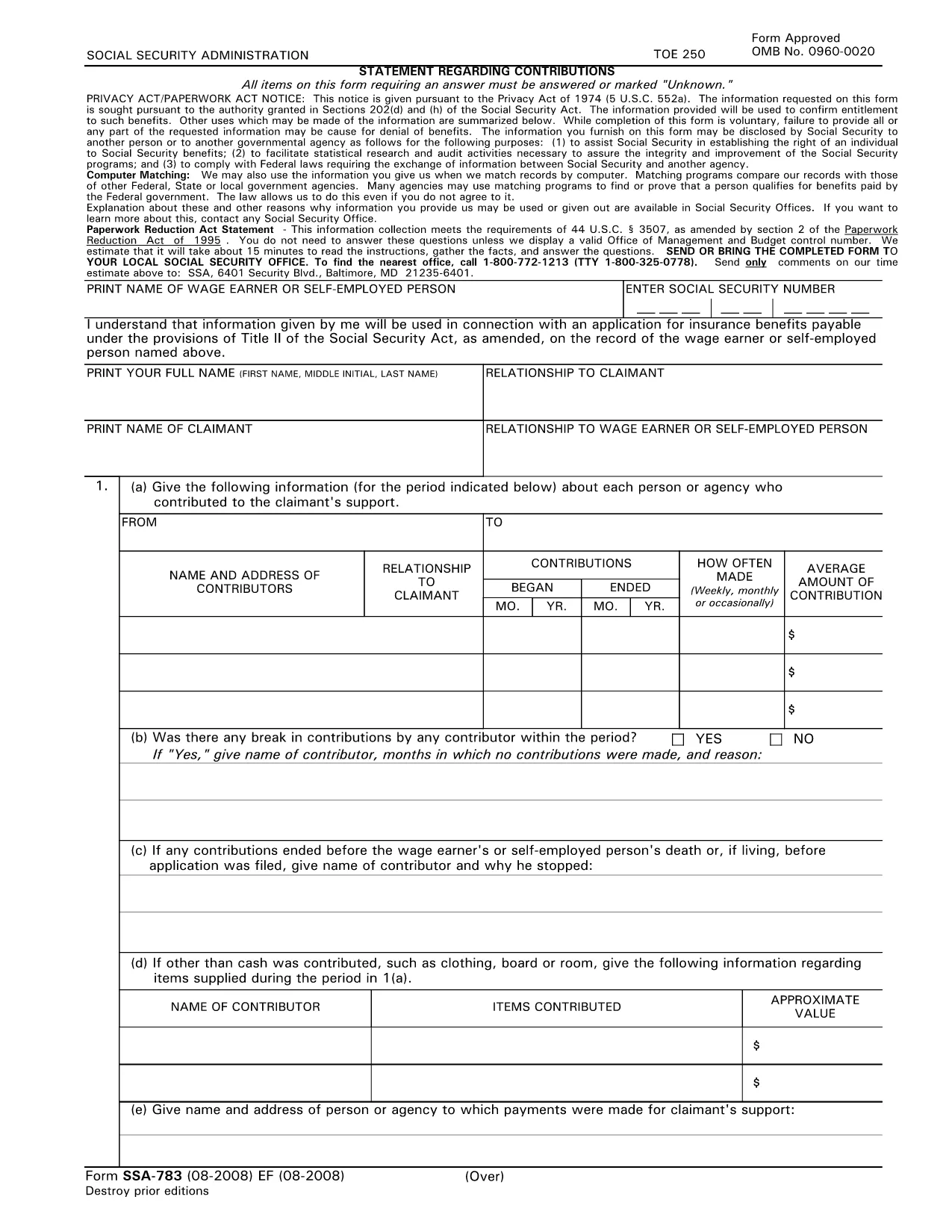
SSA‑783 Statement Regarding Contributions – Fillable PDF Form

  1. Sprache Englisch
  2. Land USA
  3. Aktivität Sozialversicherung
Fülle dieses Formular aus
SSA‑783 Statement Regarding Contributions – Fillable PDF Form

The SSA‑783 Statement Regarding Contributions is the official Social Security Administration (SSA) form used to report contributions made to a claimant’s support. Whether you’re a wage earner, self‑employed person, or an agency, completing this form accurately is essential for establishing benefit eligibility.

What Is the SSA‑783 Form?

SSA‑783 collects detailed information about each contributor, the amount contributed, and the frequency of payments. The data helps the SSA verify entitlement to benefits under Title II of the Social Security Act.

How to Fill Out the SSA‑783 Form Online

With Formize you can complete the SSA‑783 without printing or using a separate PDF editor. Follow these simple steps:

  • Click the "Fill out this form" button on the page.
  • Wait a few seconds while the Formize PDF Filler app loads.
  • Enter your information directly into the fillable fields.
  • Review each section for accuracy, then click Submit to download the completed PDF.

Common Mistakes to Avoid

  • Leaving fields blank: Incomplete forms are rejected.
  • Incorrect dates or amounts: Double‑check contribution periods and dollar figures.
  • Illegible handwriting: Using a digital fillable PDF eliminates this issue.
  • Missing signatures: The form requires the signer’s name and signature at the end.

Where to Submit the Completed Form

After you download the finished SSA‑783 PDF, mail it to your local Social Security office or bring it in person. You can locate the nearest office by calling 1‑800‑772‑1213 (TTY 1‑800‑325‑0778).

Why Use Formize’s Fillable PDF

Formize provides a secure, browser‑based PDF filler that:

  • Eliminates the need for third‑party PDF editors.
  • Auto‑saves your progress so you can return later.
  • Ensures the final document meets SSA formatting requirements.

Ready to start? Click the button below and complete your SSA‑783 in minutes.

Fill out this form

FAQ
  • Who must file the SSA‑783 form?

    Anyone who has received contributions toward a claimant’s support—such as a wage earner, self‑employed individual, or agency—must file SSA‑783 to document those payments.

  • Is the SSA‑783 form free to download?

    Yes. Formize provides a free, downloadable fillable PDF of the SSA‑783 form.

  • Can I save my progress and finish later?

    Yes. The Formize PDF Filler automatically saves your entries, allowing you to return and complete the form at any time.

  • How long does it usually take to complete?

    Most users finish the SSA‑783 in 10‑15 minutes, depending on the number of contributors listed.

  • What should I do if I make a mistake?

    Simply correct the field in the fillable PDF before downloading the final version. If you’ve already submitted, contact your local SSA office for guidance.

  • Where do I send the completed SSA‑783?

    Mail the completed form to your local Social Security office or bring it in person. Use the SSA office locator at 1‑800‑772‑1213 for the nearest address.

  • Can I submit the SSA‑783 electronically?

    The SSA currently requires a hard‑copy submission. After filling it out online, print the PDF and send it by mail.

  • Do I need a special PDF editor?

    No. Formize’s browser‑based filler handles everything—no additional software is required.

  • Is my personal information safe?

    Formize uses SSL encryption to protect all data entered into the fillable PDF. Your information is not stored on our servers after you download the completed form.

  • What if I don’t have all the contribution details?

    Provide as much accurate information as possible. If you’re missing data, note “unknown” in the appropriate fields and explain the gap in the comments section.

WIE MAN

So füllen Sie SSA-783 kostenlos online in 5 einfachen Schritten aus:

  1. 1
    Click the Fill‑out Button
    Locate the “Fill out this form” button on the page and click it to launch the Formize PDF Filler.
  2. 2
    Wait for the Filler to Load
    A few seconds after clicking, the fillable PDF interface will appear in your browser.
  3. 3
    Enter Your Information
    Complete each required field—contributor names, dates, amounts, and signatures—using your keyboard.
  4. 4
    Review and Download
    Check all entries for accuracy, then click “Submit” to download the finished SSA‑783 PDF.
  5. 5
    Submit to SSA
    Print the saved PDF (if needed) and mail or deliver it to your local Social Security office.
Formize PDF Filler-App
ÜBER

Sozialversicherungsformulare

SSA-783 ist eines der Sozialversicherungsformulare, die zur Beantragung verschiedener Leistungen und Dienstleistungen der United States Social Security Administration (SSA) verwendet werden. Die SSA ist eine Bundesbehörde, die Programme zur Bereitstellung finanzieller Unterstützung für anspruchsberechtigte Einzelpersonen und Familien verwaltet, einschließlich Altersversorgung, Invaliditätsleistungen, Hinterbliebenenleistungen und ergänzendem Sicherheitseinkommen (SSI).

Einige gängige Sozialversicherungsformulare umfassen:

Antrag auf Rentenleistungen der sozialen Sicherheit: Dieses Formular wird verwendet, um Rentenleistungen basierend auf der Arbeitsgeschichte und dem Einkommen einer Person zu beantragen.

Antrag auf Sozialversicherungsleistungen bei Erwerbsunfähigkeit: Dieses Formular wird zur Beantragung von Leistungen bei Erwerbsunfähigkeit verwendet, wenn eine Person einen körperlichen oder geistigen Zustand hat, der sie daran hindert, zu arbeiten.

Antrag auf Sozialversicherungsleistungen für Hinterbliebene: Dieses Formular wird verwendet, um Hinterbliebenenleistungen zu beantragen, wenn der Ehepartner oder Elternteil einer Person verstorben ist und Anspruch auf Hinterbliebenenleistungen hat.

Medicare-Anmeldungsantrag: Dieses Formular wird verwendet, um sich bei Medicare anzumelden, dem staatlichen Krankenversicherungsprogramm für Personen über 65 und Personen mit bestimmten Behinderungen oder Erkrankungen.

Formular zur Adressänderung: Dieses Formular wird verwendet, um die Adresse einer Person bei der SSA zu aktualisieren.

Formular zur Anforderung von Einkommensnachweisen: Dieses Formular wird verwendet, um eine Kopie des Einkommensnachweises einer Person anzufordern, der zur Berechnung der Sozialversicherungsleistungen verwendet wird.

Diese Formulare können online, per Post oder persönlich bei einem örtlichen Sozialversicherungsamt ausgefüllt werden. Es ist wichtig, alle erforderlichen Formulare sorgfältig zu prüfen und auszufüllen, um eine rechtzeitige und genaue Bearbeitung der Sozialversicherungsleistungen sicherzustellen.

MERKMALE

PDF-Filler

Der einfachste Weg, PDF-Formulare online auszufüllen

  • Füllen Sie schnell SSA-783 aus
    Suchen Sie nach einer Möglichkeit, SSA-783 schnell online auszufüllen? Mit unserem kostenlosen Online-PDF-Formularausfüller wissen Sie, wie Sie dieses PDF-Dokument in weniger als einer Minute bearbeiten und ausfüllen.
  • Einfach zu bedienender Online-PDF-Editor
    Haben Sie es satt, PDF-Dateien auszudrucken, damit Sie sie bearbeiten können, bevor Sie sie erneut scannen und zurücksenden? PDF-Dokumente kostenlos online bearbeiten. Nutzen Sie unseren Online-PDF-Editor, um Zeit und Papier zu sparen.
  • Tolle Tools, alle Plattformen
    Sie fragen sich, wie Sie SSA-783 auf einem Mac ausfüllen oder vielleicht einen kostenlosen PDF-Ausfüller verwenden können? Unsere Online-PDF-Tools funktionieren auf allen Plattformen.
  • Sichere Dateispeicherung
    Fertige "SSA-783"-Dateien werden in einer gesicherten Datenbank gespeichert, die vom Amazon Cloud-Hosting verwaltet wird. Sie können Ihre Dateien jederzeit aus unserem System löschen. In jedem Fall werden diese Dateien nach 24 Stunden automatisch gelöscht.
  • Chatten Sie mit SSA-783
    Chatten Sie mit „SSA-783“ auf Chatize, einem kostenlosen PDF-Leseassistenten. Stellen Sie Fragen und erhalten Sie Antworten von „SSA-783“. Klicken Sie einfach oben auf die Schaltfläche Mit Dokument chatten.

Füllsitzung löschen

Die ausgewählte Füllsitzung löschen? In diesem Fall gehen Ihre Fortschritte beim Ausfüllen des Formulars verloren.

Bearbeitungssitzung löschen

Ausgewählte Bearbeitungssitzung löschen? In diesem Fall geht Ihr Fortschritt beim Erstellen und Bearbeiten des Formulars verloren.