Sprache auswählen

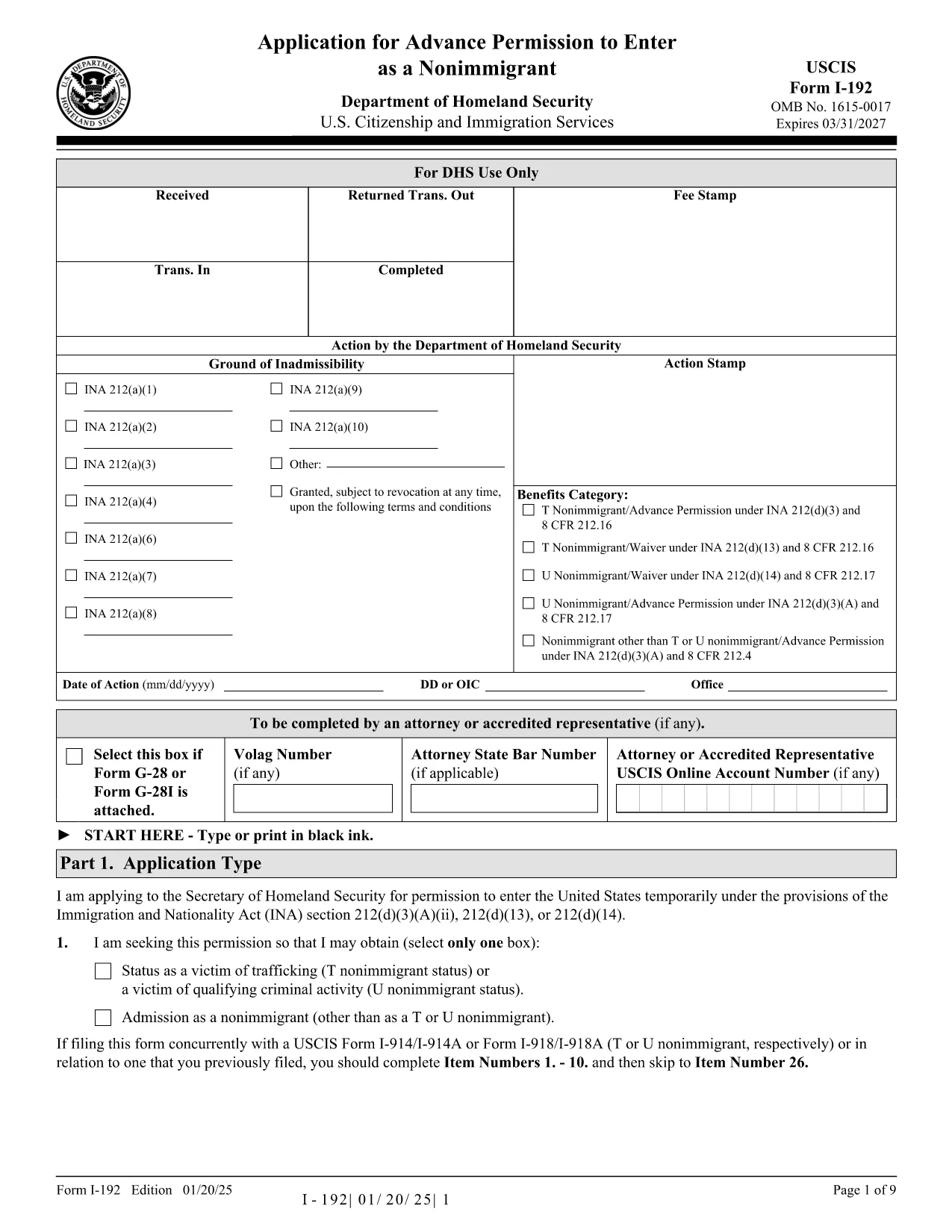
Form I-192 – Application for Advance Permission to Enter as a Nonimmigrant

  1. Land USA
  2. Sprache Englisch
  3. Abteilung US-amerikanische Staatsbürgerschafts- und Einwanderungsbehörde
Form I-192 – Application for Advance Permission to Enter as a Nonimmigrant

The Form I-192 is the official USCIS application used by inadmissible nonimmigrants who need advance permission to temporarily enter the United States. Whether you are applying as a T‑visa victim, a U‑visa applicant, or an inadmissible nonimmigrant who already holds the required documents, this page provides everything you need to fill out the form correctly.

Who Must File Form I-192?

Typical applicants include:

  • Inadmissible nonimmigrants who already possess the appropriate supporting documents.
  • Applicants for T‑nonimmigrant status (victims of human trafficking).
  • Applicants for U‑nonimmigrant status (victims of certain crimes).

If you are traveling under the Visa Waiver Program (VWP) and are inadmissible, you must apply for a regular nonimmigrant visa instead of using Form I-192.

How to Complete and Submit the Form

Follow these simple steps to fill the form online with Formize’s fillable PDF tool:

  1. Click the "Fill out this form" button below.
  2. The Formize PDF Filler app loads instantly – no download or extra software needed.
  3. Enter your information directly into the fillable fields.
  4. Review the completed form for accuracy.
  5. Print, sign, and submit the form according to the filing instructions (USCIS or CBP, depending on your case).

Common Mistakes & Tips for a Smooth Filing

  • Use the correct edition: The PDF at the bottom of each page shows the edition date. Do not mix pages from different editions.
  • Complete every required field: Blank required fields cause delays or rejections.
  • Attach English translations: Any supporting document not in English must have a certified translation.
  • Sign the form: Electronic signatures are not accepted; you must sign a printed copy.
  • Check filing locations: USCIS lockbox addresses differ by state and visa category.

Ready to start? Click the button below to open the fillable PDF and begin your application.

FAQ
  • Do I need a lawyer to file Form I-192?

    A lawyer is not required, but legal advice can help ensure you meet all eligibility criteria and submit complete documentation.

  • Can I submit Form I-192 electronically?

    No. The form must be printed, signed, and mailed. However, you can fill it out electronically using our fillable PDF before printing.

  • How long does USCIS take to process I-192?

    Processing typically ranges from 90 to 120 days, but times can vary based on case complexity and biometric appointment scheduling.

  • What supporting documents are required?

    You must provide a written statement explaining inadmissibility, copies of any waivers, and English translations of foreign‑language documents.

  • I am a VWP citizen—can I use Form I-192?

    No. VWP travelers who are inadmissible must apply for a regular nonimmigrant visa at a U.S. Embassy or Consulate.

  • Is there a filing fee for Form I-192?

    Yes. Check the current fee on the USCIS Fee Schedule page before submitting your application.

  • Where do I send my completed Form I-192?

    Filing locations differ by visa type and state. Refer to the USCIS filing address table on the official I-192 webpage.

WIE MAN

So füllen Sie Form I-192 kostenlos online in 4 einfachen Schritten aus:

  1. 1
    Open the Fillable Form
    Click the "Fill out this form" button on the page. The Formize PDF Filler loads instantly in your browser.
  2. 2
    Enter Your Information
    Type directly into each field—name, passport details, reason for inadmissibility, and supporting document references.
  3. 3
    Review & Save
    Use the preview function to double‑check all entries. Save a copy of the completed PDF to your computer.
  4. 4
    Print, Sign, and Submit
    Print the filled form, sign it by hand, attach required evidence, and mail it to the appropriate USCIS or CBP filing address.
Formize PDF Filler-App
ÜBER

Form I-192-Vorlage

Mit den traditionellen Funktionen zum Anzeigen und Ausfüllen eines PDF-Dokuments, kombiniert mit den Vorteilen einer Webanwendung und einem ansprechenden Layout, können Sie Form I-192 in wenigen Minuten fertigstellen.

MERKMALE

PDF-Filler

Der einfachste Weg, PDF-Formulare online auszufüllen

  • Füllen Sie schnell Form I-192 aus
    Suchen Sie nach einer Möglichkeit, Form I-192 schnell online auszufüllen? Mit unserem kostenlosen Online-PDF-Formularausfüller wissen Sie, wie Sie dieses PDF-Dokument in weniger als einer Minute bearbeiten und ausfüllen.
  • Einfach zu bedienender Online-PDF-Editor
    Haben Sie es satt, PDF-Dateien auszudrucken, damit Sie sie bearbeiten können, bevor Sie sie erneut scannen und zurücksenden? PDF-Dokumente kostenlos online bearbeiten. Nutzen Sie unseren Online-PDF-Editor, um Zeit und Papier zu sparen.
  • Tolle Tools, alle Plattformen
    Sie fragen sich, wie Sie Form I-192 auf einem Mac ausfüllen oder vielleicht einen kostenlosen PDF-Ausfüller verwenden können? Unsere Online-PDF-Tools funktionieren auf allen Plattformen.
  • Sichere Dateispeicherung
    Fertige "Form I-192"-Dateien werden in einer gesicherten Datenbank gespeichert, die vom Amazon Cloud-Hosting verwaltet wird. Sie können Ihre Dateien jederzeit aus unserem System löschen. In jedem Fall werden diese Dateien nach 24 Stunden automatisch gelöscht.
  • Chatten Sie mit Form I-192
    Chatten Sie mit „Form I-192“ auf Chatize, einem kostenlosen PDF-Leseassistenten. Stellen Sie Fragen und erhalten Sie Antworten von „Form I-192“. Klicken Sie einfach oben auf die Schaltfläche Mit Dokument chatten.

Füllsitzung löschen

Die ausgewählte Füllsitzung löschen? In diesem Fall gehen Ihre Fortschritte beim Ausfüllen des Formulars verloren.

Bearbeitungssitzung löschen

Ausgewählte Bearbeitungssitzung löschen? In diesem Fall geht Ihr Fortschritt beim Erstellen und Bearbeiten des Formulars verloren.