Sprache auswählen

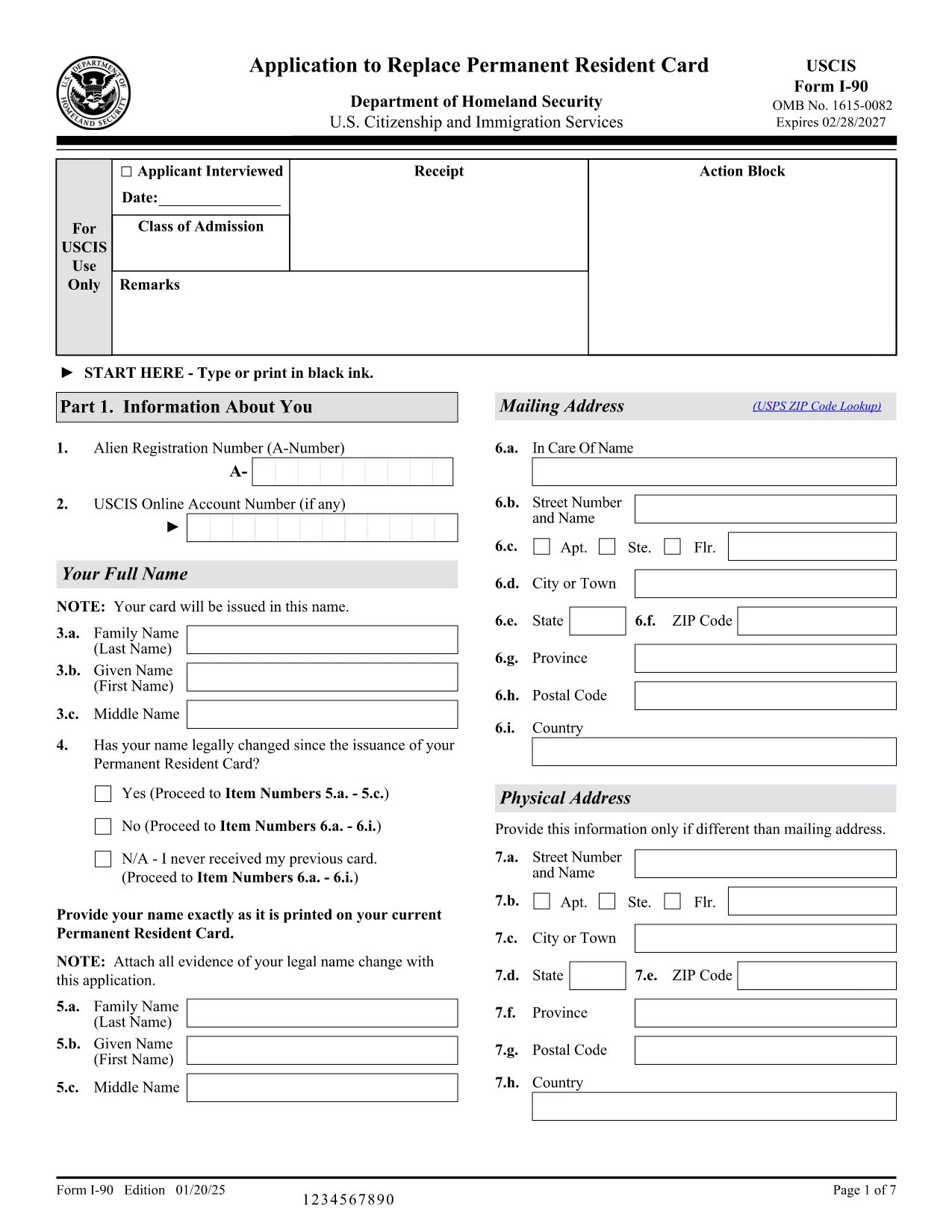
Application Form to Renew Your Green Card (Form I‑90)

  1. Land USA
  2. Sprache Englisch
  3. Abteilung US-amerikanische Staatsbürgerschafts- und Einwanderungsbehörde
  4. Aktivität Einwanderung
Application Form to Renew Your Green Card (Form I‑90)

Renewing your Permanent Resident Card (Green Card) is simple when you have the right form and a reliable online filler. Form I‑90, the Application to Replace Permanent Resident Card, is the official USCIS document used by lawful permanent residents to replace an expired, lost, or damaged Green Card.

This page provides a direct, fillable PDF version of Form I‑90, step‑by‑step instructions, and answers to the most common questions. All you need to do is click Fill out this form and let the Formize PDF Filler load the document for you.

What Is Form I‑90 and Who Needs It?

Form I‑90 is required for anyone who needs a new Green Card because:

  • The card is expiring within six months.
  • The card was lost, stolen, or damaged.
  • Personal information (name, gender, etc.) has changed.

Conditional residents must use a different form (I‑751 or I‑829), but all other permanent residents use I‑90.

How to Complete the Fillable I‑90 Form Online

Follow the simple steps below. No PDF editor is required – the Formize PDF Filler handles everything in your browser.

Common Mistakes to Avoid When Filing

Even a small error can delay processing. Watch out for:

  • Using an outdated edition of the form (check the edition date at the bottom of each page).
  • Leaving required fields blank.
  • Signing the form with a scanned image instead of a digital signature.
  • Submitting the form without the required filing fee.

Where to Submit Your Completed Application

You have two options:

  1. Online filing: Create a USCIS online account, upload the completed PDF, and pay the fee electronically.
  2. Paper filing: Print the completed form, attach supporting documents, and mail it to the USCIS Lockbox address listed in the form instructions.

Helpful Resources and FAQs

For additional guidance, visit the USCIS I‑90 page or use the Formize help section on this page.

FAQ
  • Do I need to fill out Form I‑90 if my Green Card is only a few months from expiration?

    Yes. USCIS recommends filing the renewal up to six months before the card expires to avoid a lapse in proof of status.

  • Can I file Form I‑90 online instead of using the PDF?

    Absolutely. USCIS offers an online filing option, but the fillable PDF is useful if you prefer to submit a paper application or need a copy for your records.

  • What fee is required to file Form I‑90?

    As of the latest edition, the filing fee is $455 plus an $85 biometrics fee, payable online or by check/money order if filing by mail.

  • How long does it take to receive a new Green Card after filing?

    Processing times vary by service center, but most applicants receive their new card within 6‑8 months after USCIS receives a complete application.

  • What should I do if I lose my receipt notice after filing?

    Log into your USCIS online account to retrieve the receipt number, or contact USCIS Customer Service with your personal details for assistance.

  • Do conditional residents use Form I‑90?

    No. Conditional residents must file Form I‑751 (for marriage‑based) or Form I‑829 (for investor‑based) to remove conditions before renewing their card.

  • Is the fillable PDF compatible with mobile devices?

    Yes. The Formize PDF Filler works on most modern smartphones and tablets, allowing you to complete the form on the go.

WIE MAN

So füllen Sie I-90 form kostenlos online in 4 einfachen Schritten aus:

  1. 1
    Open the Fillable Form
    Click the "Fill out this form" button on this page. The Formize PDF Filler app will load the I‑90 PDF directly in your browser.
  2. 2
    Enter Your Information
    Complete each field using your keyboard. The filler validates entries in real time, so you’ll know instantly if something is missing or incorrectly formatted.
  3. 3
    Review and Sign
    After all sections are filled, review the entire form, add a digital signature, and save the completed PDF to your computer.
  4. 4
    Submit Your Application
    Upload the saved PDF to your USCIS online account or print it for paper filing. Remember to include the filing fee and any required supporting documents.
Formize PDF Filler-App
ÜBER

I-90 form-Vorlage

Mit den traditionellen Funktionen zum Anzeigen und Ausfüllen eines PDF-Dokuments, kombiniert mit den Vorteilen einer Webanwendung und einem ansprechenden Layout, können Sie I-90 form in wenigen Minuten fertigstellen.

MERKMALE

PDF-Filler

Der einfachste Weg, PDF-Formulare online auszufüllen

  • Füllen Sie schnell I-90 form aus
    Suchen Sie nach einer Möglichkeit, I-90 form schnell online auszufüllen? Mit unserem kostenlosen Online-PDF-Formularausfüller wissen Sie, wie Sie dieses PDF-Dokument in weniger als einer Minute bearbeiten und ausfüllen.
  • Einfach zu bedienender Online-PDF-Editor
    Haben Sie es satt, PDF-Dateien auszudrucken, damit Sie sie bearbeiten können, bevor Sie sie erneut scannen und zurücksenden? PDF-Dokumente kostenlos online bearbeiten. Nutzen Sie unseren Online-PDF-Editor, um Zeit und Papier zu sparen.
  • Tolle Tools, alle Plattformen
    Sie fragen sich, wie Sie I-90 form auf einem Mac ausfüllen oder vielleicht einen kostenlosen PDF-Ausfüller verwenden können? Unsere Online-PDF-Tools funktionieren auf allen Plattformen.
  • Sichere Dateispeicherung
    Fertige "I-90 form"-Dateien werden in einer gesicherten Datenbank gespeichert, die vom Amazon Cloud-Hosting verwaltet wird. Sie können Ihre Dateien jederzeit aus unserem System löschen. In jedem Fall werden diese Dateien nach 24 Stunden automatisch gelöscht.
  • Chatten Sie mit I-90 form
    Chatten Sie mit „I-90 form“ auf Chatize, einem kostenlosen PDF-Leseassistenten. Stellen Sie Fragen und erhalten Sie Antworten von „I-90 form“. Klicken Sie einfach oben auf die Schaltfläche Mit Dokument chatten.

Füllsitzung löschen

Die ausgewählte Füllsitzung löschen? In diesem Fall gehen Ihre Fortschritte beim Ausfüllen des Formulars verloren.

Bearbeitungssitzung löschen

Ausgewählte Bearbeitungssitzung löschen? In diesem Fall geht Ihr Fortschritt beim Erstellen und Bearbeiten des Formulars verloren.