
Sprache auswählen

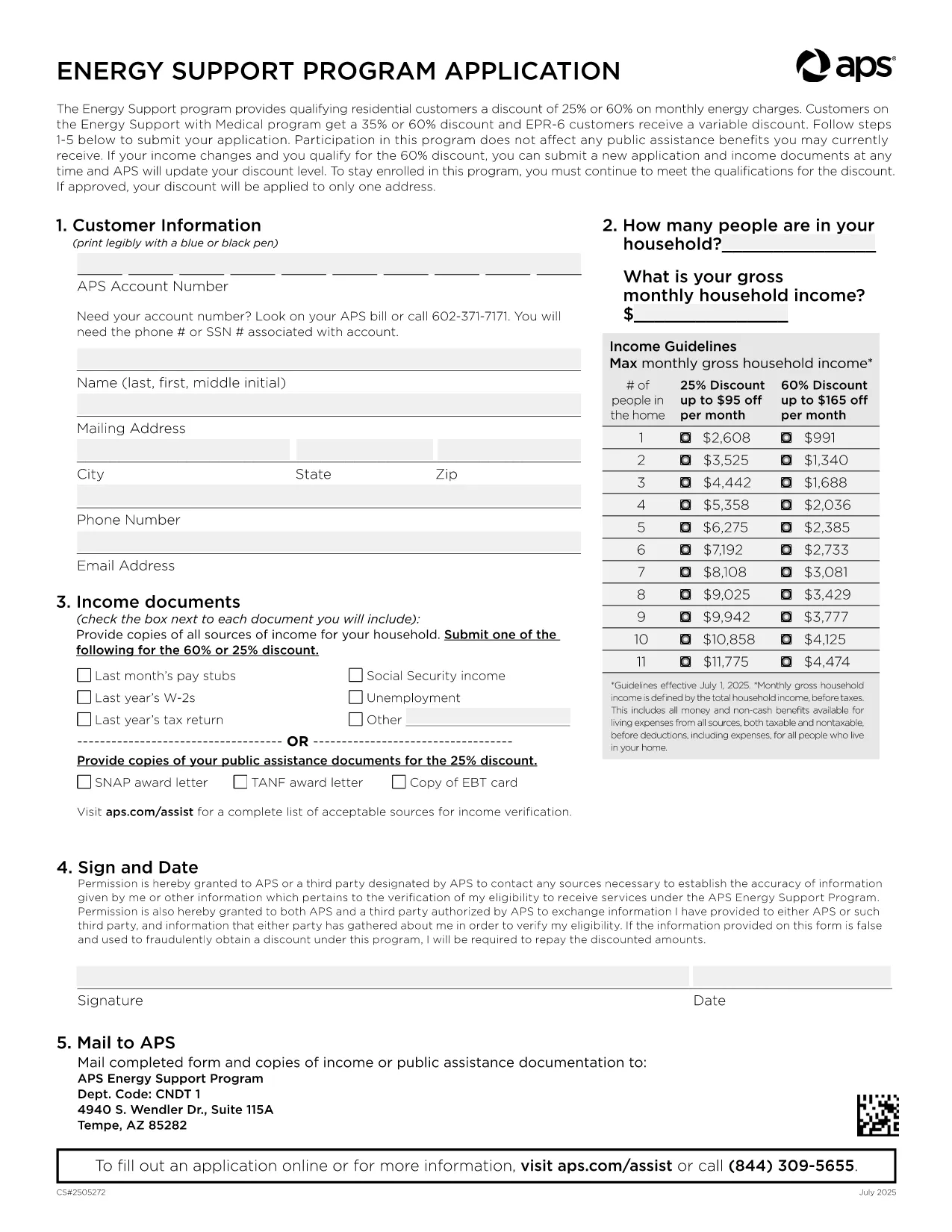
APS Energy Support Program Application Form (Fillable PDF)

  1. Sprache Englisch
  2. Land USA
  3. Abteilung Utility
  4. Aktivität Energy Assistance
APS Energy Support Program Application Form (Fillable PDF)

Arizona Public Service (APS) offers the Energy Support Program to help qualifying households lower their monthly electric bill. The official Application Form APS is now available as a fillable PDF that you can complete directly on this page.

Why Choose the APS Energy Support Application?

The APS Energy Support Program provides a discount of up to 60% on your electricity charges. Using the online fillable PDF saves you time, eliminates printing errors, and speeds up processing—your application can be submitted in minutes.

How to Fill the APS Application Form Online

Simply click the "Fill out this form" button below. The Formize PDF Filler will load, allowing you to type, select, and sign directly in your browser. No additional software is required.

Common Mistakes to Avoid

  • Leaving required fields blank – the filler highlights missing information.
  • Submitting incomplete income documents – attach clear scans or photos of each document.
  • Forgetting the signature – the digital signature field must be completed before submission.

Eligibility & Required Documents

To qualify, you must meet the household income guidelines and provide proof for every adult in the home. Acceptable documents include recent pay stubs, tax returns, Social Security statements, SNAP benefits letters, or other listed income sources.

Submit Your Completed Form

After filling the form, click Submit. Your application will be securely sent to APS for processing. You’ll receive a confirmation email with a reference number and next‑step instructions.

Need help? Review the FAQs below or contact APS Customer Care at (602) 371‑7171.

FAQ
  • What is the APS Energy Support Program?

    It is a discount program offered by Arizona Public Service that reduces eligible households' electric bills by up to 60% based on income.

  • Do I need to print the form?

    No. The fillable PDF can be completed entirely online using the Formize PDF Filler, then submitted electronically.

  • Which documents are required?

    Proof of income for every adult (pay stubs, tax returns, Social Security statements, SNAP letters, etc.) and a valid signature from the account holder.

  • How long does processing take?

    APS typically processes online applications within 10‑15 business days. You will receive an email notification of the decision.

  • Can I edit the form after submitting?

    Once submitted, the form cannot be edited. If you need to make changes, contact APS Customer Care to request a new application.

  • Is my information secure?

    Yes. Formize uses SSL encryption to protect all data entered in the PDF filler. APS also follows strict privacy standards.

  • How often do I need to reapply?

    Eligibility must be recertified every 24 months. APS will mail a re‑certification form before your current enrollment expires.

  • What if I have trouble with the online filler?

    Refresh the page, ensure your browser is up‑to‑date, and try again. If the issue persists, you can download the PDF (link below) and complete it manually.

WIE MAN

So füllen Sie APS application form kostenlos online in 5 einfachen Schritten aus:

  1. 1
    Open the Fillable Form
    Click the "Fill out this form" button on the page. The Formize PDF Filler loads instantly in your browser.
  2. 2
    Enter Your Information
    Type directly into each field, select options from dropdowns, and upload required documents using the attachment icons.
  3. 3
    Add Your Digital Signature
    Use the signature field to draw or type your name. The filler validates the signature before allowing submission.
  4. 4
    Review and Submit
    Check all entered data, ensure every required document is attached, then click the Submit button to send your application to APS.
  5. 5
    Save a Copy
    After submission, download a PDF copy for your records by clicking the "Download Completed Form" link.
Formize PDF Filler-App
ÜBER

APS application form-Vorlage

Mit den traditionellen Funktionen zum Anzeigen und Ausfüllen eines PDF-Dokuments, kombiniert mit den Vorteilen einer Webanwendung und einem ansprechenden Layout, können Sie APS application form in wenigen Minuten fertigstellen.

MERKMALE

PDF-Filler

Der einfachste Weg, PDF-Formulare online auszufüllen

  • Füllen Sie schnell APS application form aus
    Suchen Sie nach einer Möglichkeit, APS application form schnell online auszufüllen? Mit unserem kostenlosen Online-PDF-Formularausfüller wissen Sie, wie Sie dieses PDF-Dokument in weniger als einer Minute bearbeiten und ausfüllen.
  • Einfach zu bedienender Online-PDF-Editor
    Haben Sie es satt, PDF-Dateien auszudrucken, damit Sie sie bearbeiten können, bevor Sie sie erneut scannen und zurücksenden? PDF-Dokumente kostenlos online bearbeiten. Nutzen Sie unseren Online-PDF-Editor, um Zeit und Papier zu sparen.
  • Tolle Tools, alle Plattformen
    Sie fragen sich, wie Sie APS application form auf einem Mac ausfüllen oder vielleicht einen kostenlosen PDF-Ausfüller verwenden können? Unsere Online-PDF-Tools funktionieren auf allen Plattformen.
  • Sichere Dateispeicherung
    Fertige "APS application form"-Dateien werden in einer gesicherten Datenbank gespeichert, die vom Amazon Cloud-Hosting verwaltet wird. Sie können Ihre Dateien jederzeit aus unserem System löschen. In jedem Fall werden diese Dateien nach 24 Stunden automatisch gelöscht.
  • Chatten Sie mit APS application form
    Chatten Sie mit „APS application form“ auf Chatize, einem kostenlosen PDF-Leseassistenten. Stellen Sie Fragen und erhalten Sie Antworten von „APS application form“. Klicken Sie einfach oben auf die Schaltfläche Mit Dokument chatten.

Füllsitzung löschen

Die ausgewählte Füllsitzung löschen? In diesem Fall gehen Ihre Fortschritte beim Ausfüllen des Formulars verloren.

Bearbeitungssitzung löschen

Ausgewählte Bearbeitungssitzung löschen? In diesem Fall geht Ihr Fortschritt beim Erstellen und Bearbeiten des Formulars verloren.