
Sprache auswählen

Connecticut Form A‑83 – Special Power of Attorney (Fillable PDF)

  1. Sprache Englisch
  2. Land USA
  3. Aktivität Kfz-Zulassung
  4. Zustand Connecticut
Connecticut Form A‑83 – Special Power of Attorney (Fillable PDF)

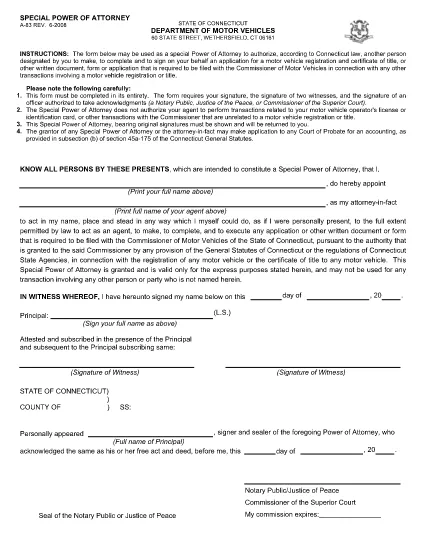
The Connecticut Department of Motor Vehicles (DMV) requires Form A‑83 – Special Power of Attorney when you want to authorize another person to act on your behalf for motor‑vehicle registration, title transfers, or other DMV transactions. This fillable PDF lets you complete the form quickly, securely, and without printing.

What Is Form A‑83 and When Is It Needed?

Form A‑83 gives a designated agent the legal authority to sign applications, submit documents, and receive certificates related to vehicle registration or title. Typical scenarios include:

  • Out‑of‑state owners needing a local representative.
  • Elderly or disabled drivers who cannot visit the DMV in person.
  • Dealers handling title transfers for multiple customers.

How to Complete the A‑83 Form Online with Formize

Instead of downloading the PDF and using a separate editor, simply click the "Fill out this form" button on our page. The Formize PDF Filler loads automatically, allowing you to type, select, and sign directly in the browser.

Common Mistakes & Tips for a Successful Submission

  • Incorrect agent information: Double‑check the agent’s full legal name and address.
  • Missing signatures: Both the principal and the agent must sign; unsigned fields cause delays.
  • Wrong vehicle details: Ensure VIN, plate number, and title number match the records.
  • Using a non‑fillable copy: Always use the official fillable PDF (linked below) to avoid formatting errors.

Where to Submit the Completed Form

After saving the filled PDF, you can:

  • Mail it to your local Connecticut DMV office.
  • Upload it through the DMV’s online portal (if available).
  • Hand‑deliver it to a DMV service center.

Keep a copy for your records in case the DMV requests clarification.

FAQ
  • Can I use Form A‑83 for a vehicle title transfer?

    Yes. Form A‑83 authorizes your agent to complete title transfers, registrations, and any related DMV paperwork.

  • Do both the principal and the agent need to sign?

    Both signatures are mandatory. The principal signs to grant authority, and the agent signs to acknowledge the responsibility.

  • Is a notarization required on Form A‑83?

    No. Connecticut does not require notarization for Form A‑83, but the signatures must be legible and match the IDs provided.

  • What if I make a mistake after submitting?

    Contact the Connecticut DMV immediately. You may need to submit a corrected Form A‑83 with a brief explanation of the error.

  • Can I submit the form electronically?

    Yes, many Connecticut DMV offices accept a scanned copy of the completed PDF. Check the specific office’s submission guidelines.

  • Is there a fee to file Form A‑83?

    There is no separate fee for the power of attorney itself, but standard DMV transaction fees still apply.

  • How long is the power of attorney valid?

    Form A‑83 remains valid until the DMV receives a revocation, the principal withdraws the authority, or the DMV updates its records.

WIE MAN

So füllen Sie Connecticut A‑83 form kostenlos online in 4 einfachen Schritten aus:

  1. 1
    Open the Fillable Form
    Click the "Fill out this form" button on the page. The Formize PDF Filler app will load in a new tab.
  2. 2
    Enter Your Information
    Type directly into each field – principal’s details, agent’s details, vehicle information, and signatures.
  3. 3
    Save and Download
    When all required fields are completed, click "Save". Download the filled PDF to your computer.
  4. 4
    Submit to the DMV
    Print the saved PDF (if required) and mail or upload it according to Connecticut DMV instructions.
Formize PDF Filler-App
ÜBER

Fahrzeugregistrierungsformulare

Connecticut A‑83 form ist eines der DMV-Formulare, auch bekannt als Formulare des Department of Motor Vehicles, bei denen es sich um Dokumente handelt, die bei verschiedenen Transaktionen und Prozessen im Zusammenhang mit Kraftfahrzeugen verwendet werden. Das DMV ist eine staatliche Behörde, die für die Ausstellung von Führerscheinen, die Fahrzeugzulassung und die Durchsetzung der Kraftfahrzeuggesetze zuständig ist. Die spezifischen verfügbaren DMV-Formulare können je nach Gerichtsbarkeit variieren, aber hier sind einige gängige Beispiele:

Führerscheinformulare: Diese Formulare werden zur Beantragung eines Führerscheins oder zur Beantragung von Änderungen oder Erneuerungen verwendet. Sie erfordern in der Regel persönliche Informationen und einen Identitätsnachweis und können Abschnitte für medizinische Informationen oder den Fahrverlauf enthalten.

Fahrzeugzulassungsformulare: Diese Formulare werden zur Registrierung eines Kraftfahrzeugs beim DMV verwendet. Sie benötigen Fahrzeuginformationen, Eigentumsdaten und einen Versicherungsnachweis.

Formulare zur Eigentumsübertragung: Beim Kauf oder Verkauf eines Fahrzeugs werden diese Formulare verwendet, um das Eigentum von einer Partei auf eine andere zu übertragen. Sie erfordern Informationen über den Käufer, den Verkäufer, Fahrzeugdetails und können einen Kaufvertrag enthalten.

Haftungsfreistellungsformulare für Fahrzeuge: Beim Verkauf oder der Eigentumsübertragung eines Fahrzeugs informieren diese Formulare das DMV darüber, dass der Verkäufer nicht mehr für das Fahrzeug verantwortlich ist. Es trägt dazu bei, den Verkäufer vor der Haftung für Unfälle oder Zwischenfälle mit dem Fahrzeug nach dem Verkauf zu schützen.

Formulare zur Erneuerung von Kennzeichen und Registrierung: Diese Formulare werden verwendet, um die Fahrzeugzulassung zu erneuern oder neue Nummernschilder anzufordern. Sie benötigen in der Regel Informationen über den eingetragenen Eigentümer, aktuelle Registrierungsdaten und die Zahlung anfallender Gebühren.

Antragsformulare für Fahrunterlagen: Mit diesen Formularen können Einzelpersonen ihre Fahrunterlagen beim DMV anfordern, die Informationen über Fahrverstöße, den Führerscheinstatus und andere relevante Details enthalten.

Formulare für spezielle oder personalisierte Nummernschilder: Diese Formulare werden für die Beantragung personalisierter oder spezieller Nummernschilder verwendet, die es Einzelpersonen ermöglichen, ihr Nummernschild mit bestimmten Zeichen oder Designs zu personalisieren.

Dies sind nur einige Beispiele der vielen Formulare, die über das DMV erhältlich sein können. Die spezifischen Formulare und Anforderungen können je nach Gerichtsbarkeit variieren. Daher ist es wichtig, die lokale DMV-Website zu konsultieren oder ein DMV-Büro aufzusuchen, um die richtigen Formulare für Ihre speziellen Bedürfnisse zu erhalten.

MERKMALE

PDF-Filler

Der einfachste Weg, PDF-Formulare online auszufüllen

  • Füllen Sie schnell Connecticut A‑83 form aus
    Suchen Sie nach einer Möglichkeit, Connecticut A‑83 form schnell online auszufüllen? Mit unserem kostenlosen Online-PDF-Formularausfüller wissen Sie, wie Sie dieses PDF-Dokument in weniger als einer Minute bearbeiten und ausfüllen.
  • Einfach zu bedienender Online-PDF-Editor
    Haben Sie es satt, PDF-Dateien auszudrucken, damit Sie sie bearbeiten können, bevor Sie sie erneut scannen und zurücksenden? PDF-Dokumente kostenlos online bearbeiten. Nutzen Sie unseren Online-PDF-Editor, um Zeit und Papier zu sparen.
  • Tolle Tools, alle Plattformen
    Sie fragen sich, wie Sie Connecticut A‑83 form auf einem Mac ausfüllen oder vielleicht einen kostenlosen PDF-Ausfüller verwenden können? Unsere Online-PDF-Tools funktionieren auf allen Plattformen.
  • Sichere Dateispeicherung
    Fertige "Connecticut A‑83 form"-Dateien werden in einer gesicherten Datenbank gespeichert, die vom Amazon Cloud-Hosting verwaltet wird. Sie können Ihre Dateien jederzeit aus unserem System löschen. In jedem Fall werden diese Dateien nach 24 Stunden automatisch gelöscht.
  • Chatten Sie mit Connecticut A‑83 form
    Chatten Sie mit „Connecticut A‑83 form“ auf Chatize, einem kostenlosen PDF-Leseassistenten. Stellen Sie Fragen und erhalten Sie Antworten von „Connecticut A‑83 form“. Klicken Sie einfach oben auf die Schaltfläche Mit Dokument chatten.

Füllsitzung löschen

Die ausgewählte Füllsitzung löschen? In diesem Fall gehen Ihre Fortschritte beim Ausfüllen des Formulars verloren.

Bearbeitungssitzung löschen

Ausgewählte Bearbeitungssitzung löschen? In diesem Fall geht Ihr Fortschritt beim Erstellen und Bearbeiten des Formulars verloren.