
Sprache auswählen

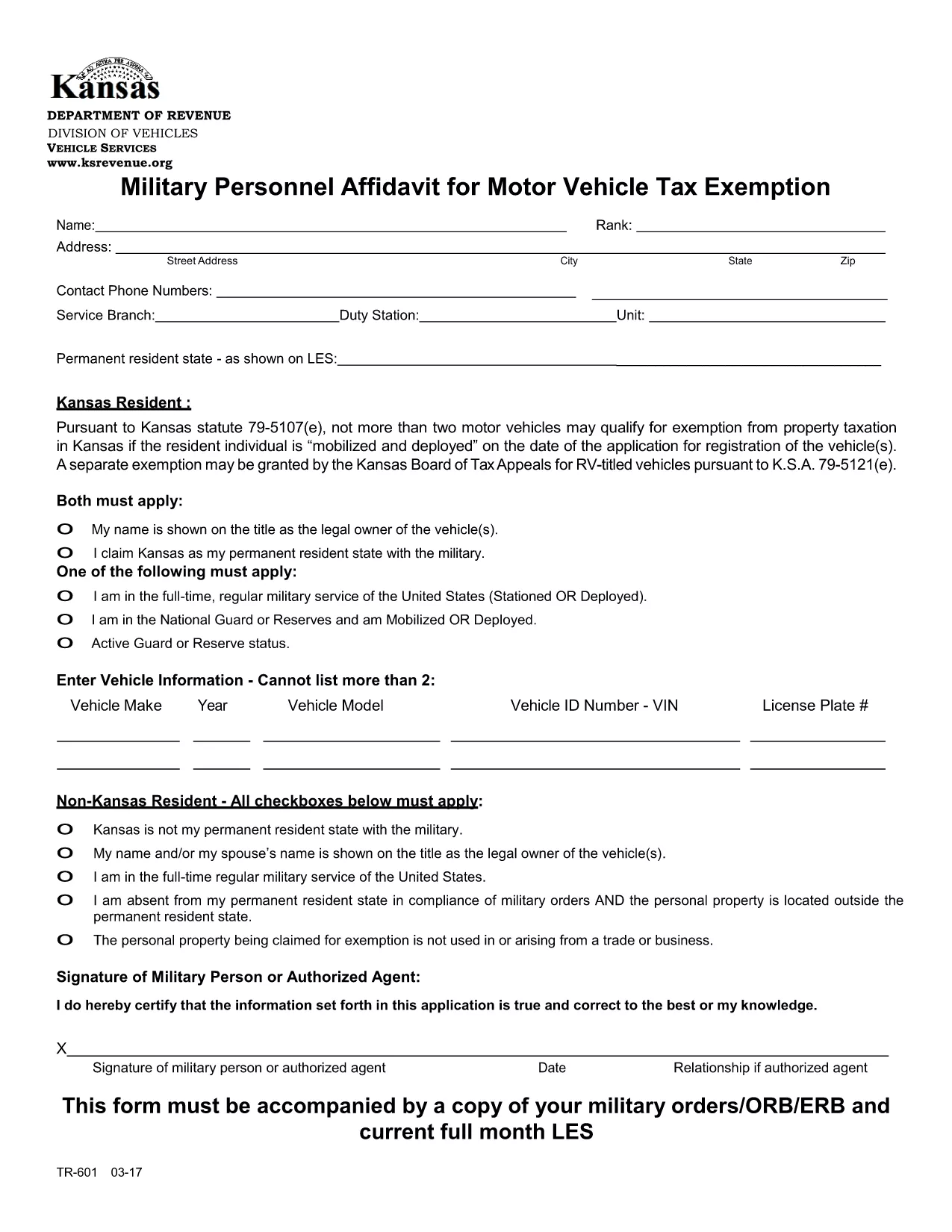
TR‑601 Kansas Military Personnel Affidavit (Fillable PDF)

  1. Land USA
  2. Sprache Englisch
  3. Aktivität Kfz-Zulassung
  4. Zustand Kansas
TR‑601 Kansas Military Personnel Affidavit (Fillable PDF)

The TR‑601 Military Personnel Affidavit is the official Kansas form used by active‑duty service members to claim exemption from motor vehicle property tax. The form must be filed with the Kansas Department of Revenue (or your local county clerk) together with a copy of your military orders.

What Is the TR‑601 Affidavit?

This affidavit verifies that you are a member of the United States Armed Forces and that the vehicle(s) you own qualify for the two‑vehicle exemption under Kansas Statute 79‑5107(e)(1). The form requests basic personal information, vehicle details, and a copy of your orders (ORB/ERB).

How to Complete the Form in Seconds

Instead of downloading, printing, and hand‑filling the PDF, use the Formize fillable PDF feature:

  1. Click the Fill out this form button on this page.
  2. Wait a few seconds for the Formize PDF Filler app to load.
  3. Enter your information directly into the on‑screen fields.
  4. Upload a scanned copy of your military orders.
  5. Review, then click Submit to download a completed PDF you can print or email.

Common Mistakes & Tips for a Smooth Submission

  • Missing orders: The affidavit is invalid without a current copy of your ORB/ERB.
  • Vehicle count: Kansas only allows exemption for up to two qualifying vehicles.
  • Signature: Use an electronic signature in Formize or sign the printed copy before submission.
  • Incorrect VIN: Double‑check the Vehicle Identification Number; a typo will delay processing.

Where to Submit Your Completed Affidavit

After completing the form, you can:

  • Mail the PDF to your county treasurer’s office.
  • Upload it through the Kansas Department of Revenue’s online portal.
  • Deliver a printed copy in person at the local county clerk.

Keep a copy for your records in case the agency requests additional documentation.

FAQ
  • Who is eligible to use the TR‑601 affidavit?

    Active‑duty members of the U.S. Armed Forces who own up to two motor vehicles that are registered in Kansas.

  • Do I need to attach my military orders?

    Yes. A current copy of your ORB/ERB (or other official orders) must accompany the affidavit.

  • Can I claim exemption for more than two vehicles?

    No. Kansas law limits the exemption to a maximum of two qualifying vehicles per service member.

  • Is an electronic signature accepted?

    Yes. The Formize PDF Filler lets you add an electronic signature, which is accepted by the Kansas Department of Revenue.

  • How long does it take for the county to process the affidavit?

    Processing times vary by county, but most offices review the submission within 7‑10 business days.

  • What if I make a mistake after submitting?

    Contact your county treasurer’s office immediately. You may need to submit a corrected affidavit with a new signature.

  • Do I need to re‑file the affidavit each year?

    Yes. The exemption must be renewed annually, and you must provide updated orders if your status changes.

  • Can I file the form online without printing?

    Yes. Once you complete the form in Formize, you can download the PDF and email it directly to the appropriate agency.

WIE MAN

So füllen Sie TR-601 kostenlos online in 5 einfachen Schritten aus:

  1. 1
    Open the Fillable Form
    Click the "Fill out this form" button on this page to launch the Formize PDF Filler.
  2. 2
    Load the PDF Filler
    Wait a few seconds while the Formize app loads the TR‑601 PDF in your browser.
  3. 3
    Enter Your Information
    Type your personal details, vehicle information, and upload a scanned copy of your military orders.
  4. 4
    Review and Sign
    Check all fields for accuracy, add an electronic signature, and click "Submit" to generate the completed PDF.
  5. 5
    Download or Print
    Save the finished affidavit to your device, print it, and send it to the appropriate Kansas agency.
Formize PDF Filler-App
ÜBER

Fahrzeugregistrierungsformulare

TR-601 ist eines der Fahrzeugzulassungsformulare, bei denen es sich um Dokumente handelt, die zur Registrierung eines Kraftfahrzeugs bei der zuständigen Regierungsbehörde verwendet werden, normalerweise beim Department of Motor Vehicles (DMV) oder einer gleichwertigen Behörde. Diese Formulare sind erforderlich, wenn eine Person ein neues oder gebrauchtes Fahrzeug kauft, den Besitz eines Fahrzeugs überträgt oder mit einem Fahrzeug in eine neue Gerichtsbarkeit zieht.

Die spezifischen Fahrzeugzulassungsformulare können je nach Gerichtsbarkeit variieren, erfordern jedoch im Allgemeinen die folgenden Informationen:

Fahrzeuginformationen: Dazu gehören Details zum Fahrzeug, wie Marke, Modell, Baujahr, Fahrzeugidentifikationsnummer (VIN) und Kilometerstand.

Besitzerinformationen: Das Formular erfordert Informationen über den Fahrzeugbesitzer, einschließlich Name, Adresse, Kontaktinformationen und Führerscheinnummer.

Eigentumsnachweis: Abhängig von den Umständen kann ein Eigentumsnachweis erforderlich sein, z. B. eine Eigentumsurkunde, ein Kaufvertrag oder ein Ursprungszeugnis des Herstellers (für Neufahrzeuge).

Versicherungsinformationen: In der Regel ist ein Nachweis einer gültigen Kfz-Versicherung erforderlich. Dazu kann die Angabe der Versicherungspolicennummer, der Versicherungsdaten und der Angaben zur Versicherungsgesellschaft gehören.

Zahlung von Gebühren: Die Fahrzeugregistrierung erfordert die Zahlung verschiedener Gebühren, wie z. B. Registrierungsgebühren, Steuern und möglicherweise anderer gebietsspezifischer Gebühren.

Zusätzlich zu diesen grundlegenden Anforderungen können in einigen Gerichtsbarkeiten zusätzliche Formulare oder Dokumentationsanforderungen gelten. In bestimmten Gebieten können beispielsweise Ergebnisse von Abgastests, Sicherheitsinspektionen oder ein Wohnsitznachweis erforderlich sein.

Sobald die Fahrzeugzulassungsformulare ausgefüllt und eingereicht wurden, stellt die Regierungsbehörde eine Zulassungsbescheinigung, Nummernschilder und Zulassungsaufkleber aus. Aus diesen Dokumenten geht hervor, dass das Fahrzeug ordnungsgemäß zugelassen und für den Betrieb auf öffentlichen Straßen zugelassen ist.

Es ist wichtig zu beachten, dass die Zulassungsanforderungen für Fahrzeuge je nach Gerichtsbarkeit erheblich variieren können. Daher wird empfohlen, sich bezüglich der für Ihren Standort geltenden spezifischen Formulare und Verfahren an das örtliche DMV oder eine gleichwertige Behörde zu wenden.

MERKMALE

PDF-Filler

Der einfachste Weg, PDF-Formulare online auszufüllen

  • Füllen Sie schnell TR-601 aus
    Suchen Sie nach einer Möglichkeit, TR-601 schnell online auszufüllen? Mit unserem kostenlosen Online-PDF-Formularausfüller wissen Sie, wie Sie dieses PDF-Dokument in weniger als einer Minute bearbeiten und ausfüllen.
  • Einfach zu bedienender Online-PDF-Editor
    Haben Sie es satt, PDF-Dateien auszudrucken, damit Sie sie bearbeiten können, bevor Sie sie erneut scannen und zurücksenden? PDF-Dokumente kostenlos online bearbeiten. Nutzen Sie unseren Online-PDF-Editor, um Zeit und Papier zu sparen.
  • Tolle Tools, alle Plattformen
    Sie fragen sich, wie Sie TR-601 auf einem Mac ausfüllen oder vielleicht einen kostenlosen PDF-Ausfüller verwenden können? Unsere Online-PDF-Tools funktionieren auf allen Plattformen.
  • Sichere Dateispeicherung
    Fertige "TR-601"-Dateien werden in einer gesicherten Datenbank gespeichert, die vom Amazon Cloud-Hosting verwaltet wird. Sie können Ihre Dateien jederzeit aus unserem System löschen. In jedem Fall werden diese Dateien nach 24 Stunden automatisch gelöscht.
  • Chatten Sie mit TR-601
    Chatten Sie mit „TR-601“ auf Chatize, einem kostenlosen PDF-Leseassistenten. Stellen Sie Fragen und erhalten Sie Antworten von „TR-601“. Klicken Sie einfach oben auf die Schaltfläche Mit Dokument chatten.

Füllsitzung löschen

Die ausgewählte Füllsitzung löschen? In diesem Fall gehen Ihre Fortschritte beim Ausfüllen des Formulars verloren.

Bearbeitungssitzung löschen

Ausgewählte Bearbeitungssitzung löschen? In diesem Fall geht Ihr Fortschritt beim Erstellen und Bearbeiten des Formulars verloren.