
Sprache auswählen

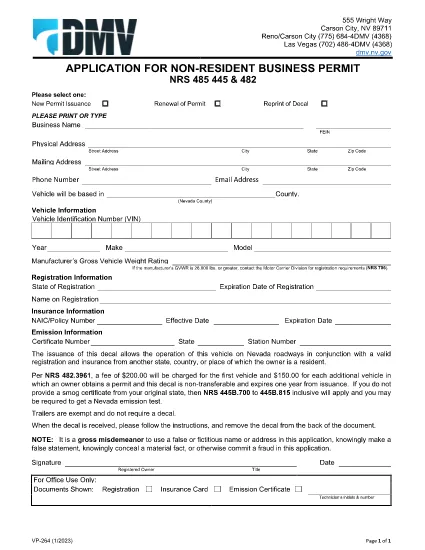
Nevada VP 264 Non‑Resident Business Permit – Fillable PDF

  1. Sprache Englisch
  2. Land USA
  3. Aktivität Kfz-Zulassung
  4. Zustand Nevada
Nevada VP 264 Non‑Resident Business Permit – Fillable PDF

The VP 264 is the Nevada Department of Motor Vehicles (DMV) application for a Non‑Resident Business Permit. This permit allows a vehicle owned by a non‑resident to legally operate on Nevada roadways when the vehicle is registered and insured in another state, country, or jurisdiction.

Our fillable PDF version hosted on Formize lets you complete the entire application directly in your browser—no extra software required. Simply click the "Fill out this form" button, let the Formize PDF Filler load, and start entering your information.

Once you’ve finished, you can download the completed PDF, print it, and mail it to the Nevada DMV along with the required supporting documents and fees.

What Is the VP 264 Form?

VP 264 is used by businesses, out‑of‑state residents, and commercial operators who need a temporary decal to legally drive a vehicle in Nevada. The form collects:

  • Owner and vehicle identification details
  • Proof of registration and insurance from the home jurisdiction
  • Business purpose and duration of stay in Nevada
  • Signature and date

Key Benefits of Using Formize Fillable PDF

  • Instant online editing – no need to download, print, and scan.
  • Auto‑save – your progress is saved locally as you type.
  • Validation cues – required fields are highlighted.
  • Secure download – the final PDF is generated on your device.

Step‑by‑Step Guide to Complete VP 264 Online

Follow the simple steps below (see the “howto” section for a quick checklist).

Common Mistakes to Avoid

  • Leaving the "Vehicle Identification Number" (VIN) blank or entering it with spaces.
  • Submitting an out‑of‑date insurance card – the policy must be active on the submission date.
  • Forgetting to sign the form; an unsigned form will be returned.
  • Using an incorrect mailing address for the Nevada DMV.

Where to Submit Your Completed Form

Mail the printed, signed VP 264 PDF to:

Nevada Department of Motor Vehicles
Vehicle Registration Division
P.O. Box 4565
Carson City, NV 89701‑4565

Include the required fee (check or money order) and any supporting documentation such as proof of out‑of‑state registration and insurance.

FAQ
  • Who needs to file VP 264?

    Any non‑resident individual or business that will operate a vehicle in Nevada while the vehicle remains registered and insured in another jurisdiction.

  • Can I submit the VP 264 form electronically?

    The Nevada DMV currently requires a printed, signed copy of the form to be mailed with supporting documents. The online fillable PDF simplifies data entry but does not replace the mailed submission.

  • How long is the non‑resident business permit valid?

    The permit is typically valid for up to 90 days from the date of issuance, but you can request an extension by submitting a new VP 264 before the current permit expires.

  • What fees are associated with VP 264?

    A standard processing fee of $30 is required, payable by check or money order made out to "Nevada Department of Motor Vehicles".

  • Do I need a Nevada insurance policy?

    No. You must provide proof of valid insurance from your home state or country, but the policy must meet Nevada's minimum liability requirements.

  • What should I do if I make a mistake on the form?

    Correct the error before signing. If you discover an error after printing, cross out the mistake, initial it, and write the correct information clearly.

  • Is there a deadline to submit VP 264 before using the vehicle in Nevada?

    Submit the completed form at least 10 business days before the vehicle’s first day of operation in Nevada to allow processing time.

WIE MAN

So füllen Sie VP 264 kostenlos online in 5 einfachen Schritten aus:

  1. 1
    Open the Fillable Form
    Click the "Fill out this form" button on the page. The Formize PDF Filler app will launch in a new tab.
  2. 2
    Wait for the Loader
    Allow a few seconds for the PDF to load completely. All form fields will become editable.
  3. 3
    Complete Each Section
    Enter the required information exactly as it appears on your vehicle registration and insurance documents. Required fields are marked with an asterisk.
  4. 4
    Review and Sign
    Double‑check every entry, then use the signature field to add your electronic signature or print later to sign manually.
  5. 5
    Download and Submit
    Click "Download PDF" to save the completed form, print it, attach the required documents, and mail it to the Nevada DMV address provided.
Formize PDF Filler-App
ÜBER

Fahrzeugregistrierungsformulare

VP 264 ist eines der DMV-Formulare, auch bekannt als Formulare des Department of Motor Vehicles, bei denen es sich um Dokumente handelt, die bei verschiedenen Transaktionen und Prozessen im Zusammenhang mit Kraftfahrzeugen verwendet werden. Das DMV ist eine staatliche Behörde, die für die Ausstellung von Führerscheinen, die Fahrzeugzulassung und die Durchsetzung der Kraftfahrzeuggesetze zuständig ist. Die spezifischen verfügbaren DMV-Formulare können je nach Gerichtsbarkeit variieren, aber hier sind einige gängige Beispiele:

Führerscheinformulare: Diese Formulare werden zur Beantragung eines Führerscheins oder zur Beantragung von Änderungen oder Erneuerungen verwendet. Sie erfordern in der Regel persönliche Informationen und einen Identitätsnachweis und können Abschnitte für medizinische Informationen oder den Fahrverlauf enthalten.

Fahrzeugzulassungsformulare: Diese Formulare werden zur Registrierung eines Kraftfahrzeugs beim DMV verwendet. Sie benötigen Fahrzeuginformationen, Eigentumsdaten und einen Versicherungsnachweis.

Formulare zur Eigentumsübertragung: Beim Kauf oder Verkauf eines Fahrzeugs werden diese Formulare verwendet, um das Eigentum von einer Partei auf eine andere zu übertragen. Sie erfordern Informationen über den Käufer, den Verkäufer, Fahrzeugdetails und können einen Kaufvertrag enthalten.

Haftungsfreistellungsformulare für Fahrzeuge: Beim Verkauf oder der Eigentumsübertragung eines Fahrzeugs informieren diese Formulare das DMV darüber, dass der Verkäufer nicht mehr für das Fahrzeug verantwortlich ist. Es trägt dazu bei, den Verkäufer vor der Haftung für Unfälle oder Zwischenfälle mit dem Fahrzeug nach dem Verkauf zu schützen.

Formulare zur Erneuerung von Kennzeichen und Registrierung: Diese Formulare werden verwendet, um die Fahrzeugzulassung zu erneuern oder neue Nummernschilder anzufordern. Sie benötigen in der Regel Informationen über den eingetragenen Eigentümer, aktuelle Registrierungsdaten und die Zahlung anfallender Gebühren.

Antragsformulare für Fahrunterlagen: Mit diesen Formularen können Einzelpersonen ihre Fahrunterlagen beim DMV anfordern, die Informationen über Fahrverstöße, den Führerscheinstatus und andere relevante Details enthalten.

Formulare für spezielle oder personalisierte Nummernschilder: Diese Formulare werden für die Beantragung personalisierter oder spezieller Nummernschilder verwendet, die es Einzelpersonen ermöglichen, ihr Nummernschild mit bestimmten Zeichen oder Designs zu personalisieren.

Dies sind nur einige Beispiele der vielen Formulare, die über das DMV erhältlich sein können. Die spezifischen Formulare und Anforderungen können je nach Gerichtsbarkeit variieren. Daher ist es wichtig, die lokale DMV-Website zu konsultieren oder ein DMV-Büro aufzusuchen, um die richtigen Formulare für Ihre speziellen Bedürfnisse zu erhalten.

MERKMALE

PDF-Filler

Der einfachste Weg, PDF-Formulare online auszufüllen

  • Füllen Sie schnell VP 264 aus
    Suchen Sie nach einer Möglichkeit, VP 264 schnell online auszufüllen? Mit unserem kostenlosen Online-PDF-Formularausfüller wissen Sie, wie Sie dieses PDF-Dokument in weniger als einer Minute bearbeiten und ausfüllen.
  • Einfach zu bedienender Online-PDF-Editor
    Haben Sie es satt, PDF-Dateien auszudrucken, damit Sie sie bearbeiten können, bevor Sie sie erneut scannen und zurücksenden? PDF-Dokumente kostenlos online bearbeiten. Nutzen Sie unseren Online-PDF-Editor, um Zeit und Papier zu sparen.
  • Tolle Tools, alle Plattformen
    Sie fragen sich, wie Sie VP 264 auf einem Mac ausfüllen oder vielleicht einen kostenlosen PDF-Ausfüller verwenden können? Unsere Online-PDF-Tools funktionieren auf allen Plattformen.
  • Sichere Dateispeicherung
    Fertige "VP 264"-Dateien werden in einer gesicherten Datenbank gespeichert, die vom Amazon Cloud-Hosting verwaltet wird. Sie können Ihre Dateien jederzeit aus unserem System löschen. In jedem Fall werden diese Dateien nach 24 Stunden automatisch gelöscht.
  • Chatten Sie mit VP 264
    Chatten Sie mit „VP 264“ auf Chatize, einem kostenlosen PDF-Leseassistenten. Stellen Sie Fragen und erhalten Sie Antworten von „VP 264“. Klicken Sie einfach oben auf die Schaltfläche Mit Dokument chatten.

Füllsitzung löschen

Die ausgewählte Füllsitzung löschen? In diesem Fall gehen Ihre Fortschritte beim Ausfüllen des Formulars verloren.

Bearbeitungssitzung löschen

Ausgewählte Bearbeitungssitzung löschen? In diesem Fall geht Ihr Fortschritt beim Erstellen und Bearbeiten des Formulars verloren.