
Sprache auswählen

MVR-27ART Fillable PDF – North Carolina Specialty Plate Application

  1. Sprache Englisch
  2. Land USA
  3. Aktivität Kfz-Zulassung
  4. Zustand North Carolina
MVR-27ART Fillable PDF – North Carolina Specialty Plate Application

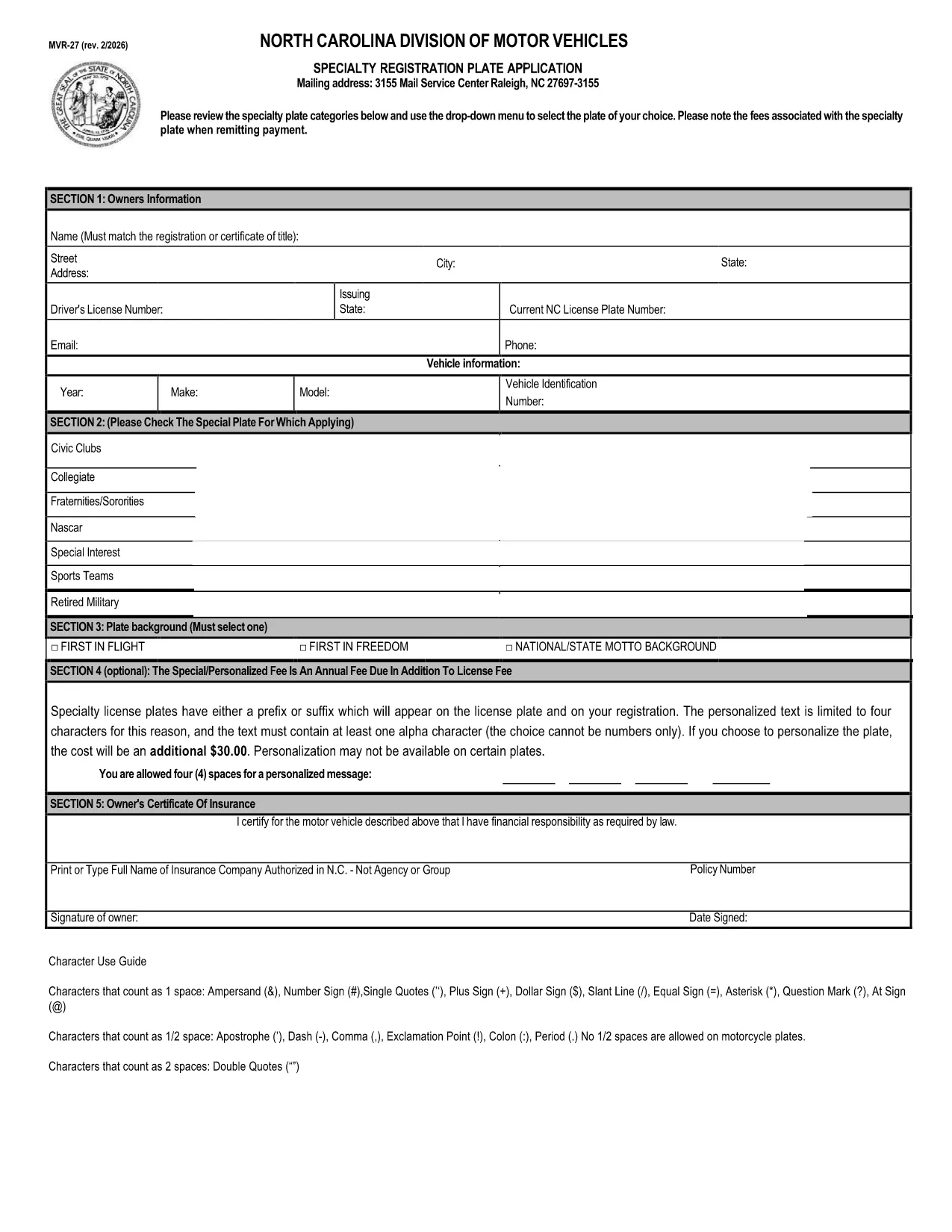
The MVR-27ART is the official North Carolina Division of Motor Vehicles (DMV) application for personalized and specialized license plates. Whether you want a custom design, a commemorative plate, or a plate supporting a cause, this form captures all the required information.

What Is the MVR-27ART Form?

The MVR-27ART (Revision 09/17) collects vehicle and owner details, plate design selection, and payment information. It is used by the NC DMV to process specialty plate requests and to ensure plates meet state regulations.

How to Fill Out the MVR-27ART Online

Instead of downloading, printing, and manually completing the PDF, simply click the **"Fill out this form"** button on this page. The Formize PDF Filler app will load directly in your browser, allowing you to type, select drop‑down options, and sign electronically.

  • Step 1: Click the green "Fill out this form" button.
  • Step 2: Wait a few seconds while the Formize PDF Filler loads.
  • Step 3: Complete each field – the form automatically validates entries.
  • Step 4: Review your information, then click "Submit" to download the completed PDF.
  • Step 5: Print the completed form (if required) and mail it with payment, or submit it electronically if your county accepts digital submissions.

Common Mistakes to Avoid

Even with a fillable PDF, a few errors can delay processing:

  • Leaving the Vehicle Identification Number (VIN) blank or entering it with spaces.
  • Choosing a plate design that is not available for your vehicle type.
  • Forgetting to sign the form – the digital signature field must be completed.
  • Submitting an outdated address; the DMV uses the address on the form for the registration sticker.

Submit Your Application & Pay Fees

After completing the form, follow your local DMV’s payment instructions. Most counties accept credit cards, checks, or money orders. Keep a copy of the completed PDF for your records.

Download the Official PDF

If you prefer the original static version, you can download it directly from the NC DMV:

Download MVR-27ART PDF

Using Formize’s online filler is faster, reduces errors, and eliminates the need for additional software.

FAQ
  • Is the MVR-27ART form free to download?

    Yes, the PDF is provided by the North Carolina DMV at no cost. Fees apply only to the specialty plate you request.

  • Can I submit the form online without printing?

    Many NC counties accept a printed copy, but some allow electronic submission. Check your local DMV’s guidelines after completing the form.

  • What vehicle information do I need?

    You’ll need the VIN, make, model, year, and current registration details of the vehicle you want the specialty plate for.

  • How long does it take to process the application?

    Processing usually takes 2‑4 weeks after the DMV receives the completed form and payment.

  • What if I make a mistake after submitting?

    Contact your local DMV office. In most cases you’ll need to submit a corrected form and may have to pay a small re‑processing fee.

  • Do I need a separate insurance card for the specialty plate?

    No additional insurance is required; the plate is tied to your existing vehicle registration.

  • Can I change the plate design after it’s approved?

    You must submit a new MVR-27ART application for a different design and pay the applicable fee again.

WIE MAN

So füllen Sie MVR-27ART kostenlos online in 4 einfachen Schritten aus:

  1. 1
    Open the Fillable Form
    Click the green "Fill out this form" button on the page. The Formize PDF Filler loads directly in your browser.
  2. 2
    Enter Your Information
    Type in all required fields, select your specialty plate design, and sign using the digital signature field.
  3. 3
    Validate & Submit
    The filler checks for missing or incorrect data. Once everything looks correct, click "Submit" to download the completed PDF.
  4. 4
    Print or Send Electronically
    Print the completed form to mail with payment, or follow your county’s instructions for electronic submission.
Formize PDF Filler-App
ÜBER

Fahrzeugregistrierungsformulare

Wenn Sie ein Kraftfahrzeug, einen Anhänger oder ein Boot besitzen oder leasen, müssen Sie bestimmte Verpflichtungen erfüllen, um Ihr Fahrzeug gesetzlich zugelassen und sicher zu halten.

MVR-27ART ist eines der Fahrzeugregistrierungsformulare, bei denen es sich um Dokumente handelt, die zur Registrierung eines Kraftfahrzeugs bei der zuständigen Landes- oder Provinzbehörde verwendet werden. Diese Formulare werden normalerweise benötigt, wenn eine Person ein neues oder gebrauchtes Fahrzeug kauft oder wenn sie mit einem Fahrzeug in einen neuen Staat oder eine neue Provinz zieht.

Die genauen Anforderungen und Formulare, die für die Fahrzeugregistrierung erforderlich sind, können je nach Standort variieren, aber im Allgemeinen umfasst der Prozess die Bereitstellung von Informationen über das Fahrzeug, den Eigentümer und etwaige Pfandrechte am Fahrzeug.

Sobald die Registrierungsformulare und Gebühren eingereicht wurden, stellt die Landes- oder Provinzbehörde dem Eigentümer des Fahrzeugs eine Registrierungsbescheinigung oder ein Nummernschild aus. Mit dieser Zulassung darf das Fahrzeug legal auf öffentlichen Straßen und Autobahnen betrieben werden.

MERKMALE

PDF-Filler

Der einfachste Weg, PDF-Formulare online auszufüllen

  • Füllen Sie schnell MVR-27ART aus
    Suchen Sie nach einer Möglichkeit, MVR-27ART schnell online auszufüllen? Mit unserem kostenlosen Online-PDF-Formularausfüller wissen Sie, wie Sie dieses PDF-Dokument in weniger als einer Minute bearbeiten und ausfüllen.
  • Einfach zu bedienender Online-PDF-Editor
    Haben Sie es satt, PDF-Dateien auszudrucken, damit Sie sie bearbeiten können, bevor Sie sie erneut scannen und zurücksenden? PDF-Dokumente kostenlos online bearbeiten. Nutzen Sie unseren Online-PDF-Editor, um Zeit und Papier zu sparen.
  • Tolle Tools, alle Plattformen
    Sie fragen sich, wie Sie MVR-27ART auf einem Mac ausfüllen oder vielleicht einen kostenlosen PDF-Ausfüller verwenden können? Unsere Online-PDF-Tools funktionieren auf allen Plattformen.
  • Sichere Dateispeicherung
    Fertige "MVR-27ART"-Dateien werden in einer gesicherten Datenbank gespeichert, die vom Amazon Cloud-Hosting verwaltet wird. Sie können Ihre Dateien jederzeit aus unserem System löschen. In jedem Fall werden diese Dateien nach 24 Stunden automatisch gelöscht.
  • Chatten Sie mit MVR-27ART
    Chatten Sie mit „MVR-27ART“ auf Chatize, einem kostenlosen PDF-Leseassistenten. Stellen Sie Fragen und erhalten Sie Antworten von „MVR-27ART“. Klicken Sie einfach oben auf die Schaltfläche Mit Dokument chatten.

Füllsitzung löschen

Die ausgewählte Füllsitzung löschen? In diesem Fall gehen Ihre Fortschritte beim Ausfüllen des Formulars verloren.

Bearbeitungssitzung löschen

Ausgewählte Bearbeitungssitzung löschen? In diesem Fall geht Ihr Fortschritt beim Erstellen und Bearbeiten des Formulars verloren.