
Sprache auswählen

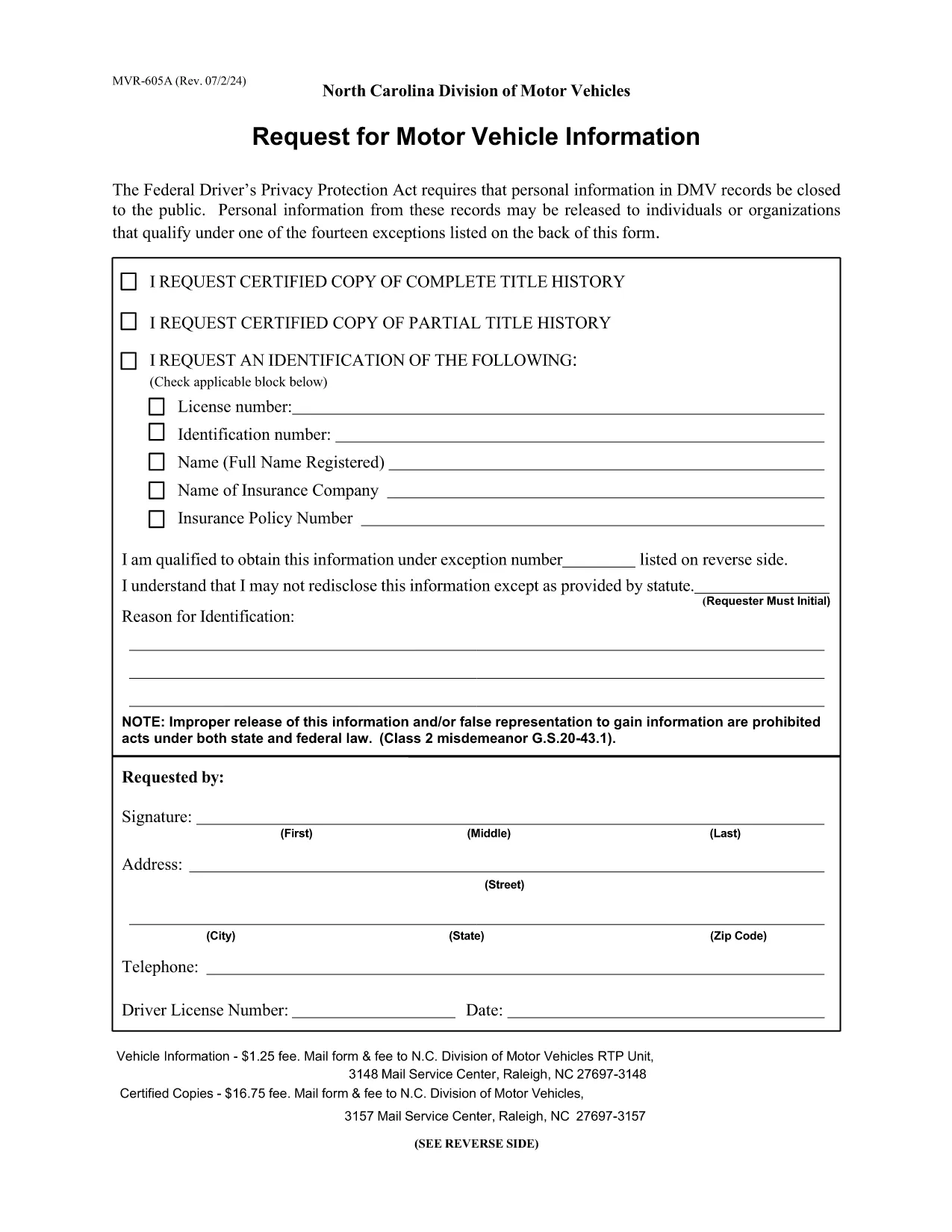
MVR‑605A – Request for Motor Vehicle Information (Fillable PDF)

  1. Sprache Englisch
  2. Land USA
  3. Aktivität Kfz-Zulassung
  4. Zustand North Carolina
MVR‑605A – Request for Motor Vehicle Information (Fillable PDF)

The MVR‑605A is the official North Carolina request form used to obtain motor vehicle records, driver safety data, emissions information, and related vehicle details. Whether you need the form for a legal matter, insurance claim, or personal research, the fillable PDF lets you complete it quickly and securely.

What Is the MVR‑605A Form?

The MVR‑605A (Motor Vehicle Record Request) is issued by the North Carolina Division of Motor Vehicles (NCDOT DMV). It authorizes the DMV to release vehicle and driver information to the requester. The form covers a wide range of uses, including safety investigations, emissions compliance, product recalls, and market research.

How to Fill Out the MVR‑605A Online

Instead of downloading and editing the PDF in a separate editor, simply click the "Fill out this form" button on this page. The Formize PDF Filler app will load the document directly in your browser, allowing you to type, check boxes, and sign electronically.

Common Mistakes to Avoid

  • Missing signatures: The DMV requires the requester's signature for every individual whose records are requested.
  • Incorrect fee amount: Verify the current processing fee on the form before submitting.
  • Incomplete address information: Provide a full mailing address; the DMV will not process partial entries.
  • Wrong vehicle identification: Include the correct VIN, license plate number, and registration details.

Where to Submit Your Request

After completing the form, print it (if a wet signature is required) and mail it to:

N.C. Division of Motor Vehicles – RTP Unit
3148 Mail Service Center
Raleigh, NC 27697‑3148

If you have a digital signature, you may email the PDF to the address listed on the form’s instructions.

Download the Fillable PDF

Click the button below to open the fillable MVR‑605A PDF in the Formize PDF Filler. No software download is needed.

FAQ
  • What fee is required to process the MVR‑605A?

    The standard fee is $1.00 for a basic record request. Certified copies cost $13.00. Verify the current fee on the form before submitting.

  • Can I submit the form electronically?

    Yes, if you use a digital signature the DMV accepts emailed PDFs. Otherwise, print, sign, and mail the form.

  • How long does it take to receive the records?

    Processing usually takes 5‑7 business days after the DMV receives a complete, correctly paid request.

  • Do I need to be the vehicle owner to request records?

    You must have a legitimate purpose and provide a signed authorization from the record holder. The DMV reviews each request for compliance.

  • What information must I include about the vehicle?

    Provide the full VIN, license plate number, and registration state. Incomplete vehicle data will delay the request.

  • Is the MVR‑605A form fillable on mobile devices?

    Yes. The Formize PDF Filler works on most modern smartphones and tablets, allowing you to complete the form on the go.

WIE MAN

So füllen Sie MVR‑605A kostenlos online in 5 einfachen Schritten aus:

  1. 1
    Click the Fill Out Button
    Press the "Fill out this form" button on the page to launch the Formize PDF Filler in your browser.
  2. 2
    Wait for the Filler to Load
    The app loads the MVR‑605A PDF automatically; this usually takes a few seconds.
  3. 3
    Complete Each Field
    Enter your personal information, vehicle details, and the reason for the request. Use the tab key to move between fields.
  4. 4
    Add Your Signature
    Use the signature tool to draw or type your signature, then confirm.
  5. 5
    Review, Save, and Submit
    Double‑check all entries, click "Save" to download a copy, and follow the submission instructions on the form.
Formize PDF Filler-App
ÜBER

Fahrzeugregistrierungsformulare

Wenn Sie ein Kraftfahrzeug, einen Anhänger oder ein Boot besitzen oder leasen, müssen Sie bestimmte Verpflichtungen erfüllen, um Ihr Fahrzeug gesetzlich zugelassen und sicher zu halten.

MVR‑605A ist eines der Fahrzeugregistrierungsformulare, bei denen es sich um Dokumente handelt, die zur Registrierung eines Kraftfahrzeugs bei der zuständigen Landes- oder Provinzbehörde verwendet werden. Diese Formulare werden normalerweise benötigt, wenn eine Person ein neues oder gebrauchtes Fahrzeug kauft oder wenn sie mit einem Fahrzeug in einen neuen Staat oder eine neue Provinz zieht.

Die genauen Anforderungen und Formulare, die für die Fahrzeugregistrierung erforderlich sind, können je nach Standort variieren, aber im Allgemeinen umfasst der Prozess die Bereitstellung von Informationen über das Fahrzeug, den Eigentümer und etwaige Pfandrechte am Fahrzeug.

Sobald die Registrierungsformulare und Gebühren eingereicht wurden, stellt die Landes- oder Provinzbehörde dem Eigentümer des Fahrzeugs eine Registrierungsbescheinigung oder ein Nummernschild aus. Mit dieser Zulassung darf das Fahrzeug legal auf öffentlichen Straßen und Autobahnen betrieben werden.

MERKMALE

PDF-Filler

Der einfachste Weg, PDF-Formulare online auszufüllen

  • Füllen Sie schnell MVR‑605A aus
    Suchen Sie nach einer Möglichkeit, MVR‑605A schnell online auszufüllen? Mit unserem kostenlosen Online-PDF-Formularausfüller wissen Sie, wie Sie dieses PDF-Dokument in weniger als einer Minute bearbeiten und ausfüllen.
  • Einfach zu bedienender Online-PDF-Editor
    Haben Sie es satt, PDF-Dateien auszudrucken, damit Sie sie bearbeiten können, bevor Sie sie erneut scannen und zurücksenden? PDF-Dokumente kostenlos online bearbeiten. Nutzen Sie unseren Online-PDF-Editor, um Zeit und Papier zu sparen.
  • Tolle Tools, alle Plattformen
    Sie fragen sich, wie Sie MVR‑605A auf einem Mac ausfüllen oder vielleicht einen kostenlosen PDF-Ausfüller verwenden können? Unsere Online-PDF-Tools funktionieren auf allen Plattformen.
  • Sichere Dateispeicherung
    Fertige "MVR‑605A"-Dateien werden in einer gesicherten Datenbank gespeichert, die vom Amazon Cloud-Hosting verwaltet wird. Sie können Ihre Dateien jederzeit aus unserem System löschen. In jedem Fall werden diese Dateien nach 24 Stunden automatisch gelöscht.
  • Chatten Sie mit MVR‑605A
    Chatten Sie mit „MVR‑605A“ auf Chatize, einem kostenlosen PDF-Leseassistenten. Stellen Sie Fragen und erhalten Sie Antworten von „MVR‑605A“. Klicken Sie einfach oben auf die Schaltfläche Mit Dokument chatten.

Füllsitzung löschen

Die ausgewählte Füllsitzung löschen? In diesem Fall gehen Ihre Fortschritte beim Ausfüllen des Formulars verloren.

Bearbeitungssitzung löschen

Ausgewählte Bearbeitungssitzung löschen? In diesem Fall geht Ihr Fortschritt beim Erstellen und Bearbeiten des Formulars verloren.