
Sprache auswählen

MVR-7 Fillable PDF – North Carolina DMV Form

  1. Sprache Englisch
  2. Land USA
  3. Aktivität Kfz-Zulassung
  4. Zustand North Carolina
MVR-7 Fillable PDF – North Carolina DMV Form

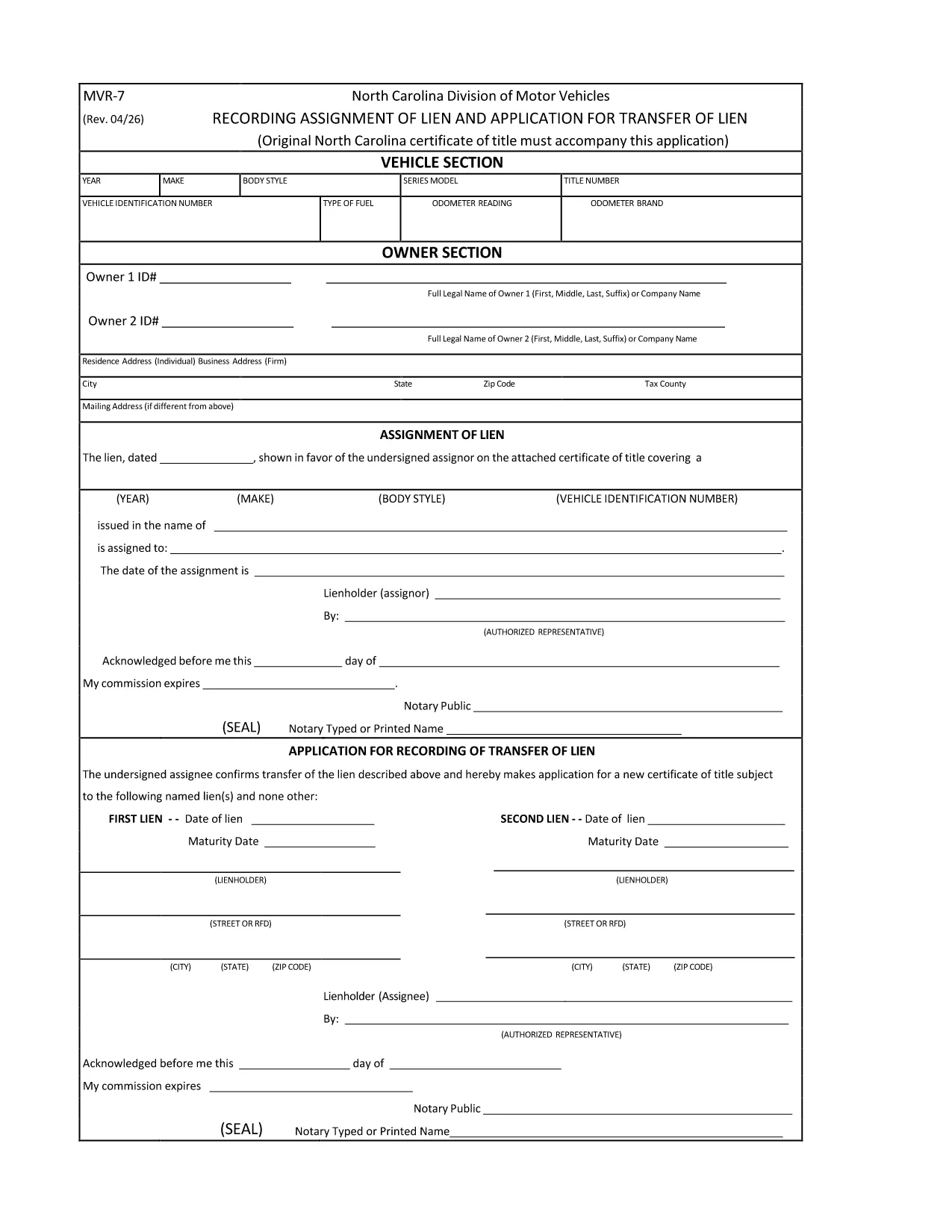
The MVR-7 is the North Carolina Department of Transportation (NCDOT) vehicle registration application used for new titles, transfers, and other title‑related actions. Historically you had to print, hand‑write, and mail the form, but with Formize you can fill it out instantly in a secure, browser‑based PDF filler.

What Is the MVR-7 Form?

The MVR-7 collects essential vehicle information such as VIN, make, model, year, odometer reading, and ownership details. It is required when you:

  • Apply for a new title for a newly purchased vehicle.
  • Transfer ownership of a used vehicle.
  • Correct title information or remove a lien.

How to Complete the MVR-7 Online with Formize

Follow these simple steps to fill out the form without printing a single page:

  1. Click the "Fill out this form" button below.
  2. The Formize PDF Filler app loads in your browser. All fields become interactive.
  3. Enter the required information, use the dropdowns where available, and upload any supporting documents.
  4. When finished, click Save & Download to get a completed PDF you can print or email to the NCDOT.

Common Mistakes to Avoid

  • Incorrect VIN: Double‑check the 17‑character VIN; a single typo can delay processing.
  • Missing signatures: Both buyer and seller must sign; the Formize app lets you add a digital signature.
  • Odometer disclosure errors: Provide the exact mileage at the time of sale; do not round.
  • Leaving optional fields blank: If a field is marked "required" by the NCDOT, the Formize validator will alert you before you can save.

Where to Submit the Completed MVR-7

After downloading the filled PDF, you have two options:

  • In‑person: Bring the form to any North Carolina DMV office.
  • Mail: Send it to the address listed on the form along with any required fees.

Using Formize ensures the PDF meets the NCDOT’s formatting standards, reducing the chance of a rejection.

FAQ
  • Is the MVR-7 form available as a fillable PDF?

    Yes. The original PDF from NCDOT can be used with Formize, which turns it into a fully interactive, fillable document.

  • Can I submit the MVR-7 electronically?

    North Carolina still requires a printed copy with signatures, but you can fill it out electronically, print, sign, and mail it.

  • Do I need a PDF editor to use the Formize filler?

    No. Formize works entirely in your web browser—no additional software or Adobe Acrobat is required.

  • How long does it take to fill out the MVR-7 with Formize?

    Most users complete the form in 5‑10 minutes, depending on how many details need to be entered.

  • What should I do if I make a mistake after saving?

    Open the saved PDF again with Formize, edit the incorrect fields, and re‑save. The app preserves all previous entries.

  • Are there any fees for using Formize?

    Formize’s online filler is free for standard PDF forms like the MVR‑7. Fees only apply for the DMV processing itself.

WIE MAN

So füllen Sie MVR-7 kostenlos online in 3 einfachen Schritten aus:

  1. 1
    Click the Fill‑out Button
    Press the "Fill out this form" button on the page. The Formize PDF Filler will open in a new tab.
  2. 2
    Enter Your Information
    All fields become editable. Type the required data, select options from dropdowns, and upload any supporting documents.
  3. 3
    Save and Download
    When every field is complete, click "Save & Download". The finished MVR‑7 PDF is ready to print or email to the NCDOT.
Formize PDF Filler-App
ÜBER

Fahrzeugregistrierungsformulare

Wenn Sie ein Kraftfahrzeug, einen Anhänger oder ein Boot besitzen oder leasen, müssen Sie bestimmte Verpflichtungen erfüllen, um Ihr Fahrzeug gesetzlich zugelassen und sicher zu halten.

MVR-7 ist eines der Fahrzeugregistrierungsformulare, bei denen es sich um Dokumente handelt, die zur Registrierung eines Kraftfahrzeugs bei der zuständigen Landes- oder Provinzbehörde verwendet werden. Diese Formulare werden normalerweise benötigt, wenn eine Person ein neues oder gebrauchtes Fahrzeug kauft oder wenn sie mit einem Fahrzeug in einen neuen Staat oder eine neue Provinz zieht.

Die genauen Anforderungen und Formulare, die für die Fahrzeugregistrierung erforderlich sind, können je nach Standort variieren, aber im Allgemeinen umfasst der Prozess die Bereitstellung von Informationen über das Fahrzeug, den Eigentümer und etwaige Pfandrechte am Fahrzeug.

Sobald die Registrierungsformulare und Gebühren eingereicht wurden, stellt die Landes- oder Provinzbehörde dem Eigentümer des Fahrzeugs eine Registrierungsbescheinigung oder ein Nummernschild aus. Mit dieser Zulassung darf das Fahrzeug legal auf öffentlichen Straßen und Autobahnen betrieben werden.

MERKMALE

PDF-Filler

Der einfachste Weg, PDF-Formulare online auszufüllen

  • Füllen Sie schnell MVR-7 aus
    Suchen Sie nach einer Möglichkeit, MVR-7 schnell online auszufüllen? Mit unserem kostenlosen Online-PDF-Formularausfüller wissen Sie, wie Sie dieses PDF-Dokument in weniger als einer Minute bearbeiten und ausfüllen.
  • Einfach zu bedienender Online-PDF-Editor
    Haben Sie es satt, PDF-Dateien auszudrucken, damit Sie sie bearbeiten können, bevor Sie sie erneut scannen und zurücksenden? PDF-Dokumente kostenlos online bearbeiten. Nutzen Sie unseren Online-PDF-Editor, um Zeit und Papier zu sparen.
  • Tolle Tools, alle Plattformen
    Sie fragen sich, wie Sie MVR-7 auf einem Mac ausfüllen oder vielleicht einen kostenlosen PDF-Ausfüller verwenden können? Unsere Online-PDF-Tools funktionieren auf allen Plattformen.
  • Sichere Dateispeicherung
    Fertige "MVR-7"-Dateien werden in einer gesicherten Datenbank gespeichert, die vom Amazon Cloud-Hosting verwaltet wird. Sie können Ihre Dateien jederzeit aus unserem System löschen. In jedem Fall werden diese Dateien nach 24 Stunden automatisch gelöscht.
  • Chatten Sie mit MVR-7
    Chatten Sie mit „MVR-7“ auf Chatize, einem kostenlosen PDF-Leseassistenten. Stellen Sie Fragen und erhalten Sie Antworten von „MVR-7“. Klicken Sie einfach oben auf die Schaltfläche Mit Dokument chatten.

Füllsitzung löschen

Die ausgewählte Füllsitzung löschen? In diesem Fall gehen Ihre Fortschritte beim Ausfüllen des Formulars verloren.

Bearbeitungssitzung löschen

Ausgewählte Bearbeitungssitzung löschen? In diesem Fall geht Ihr Fortschritt beim Erstellen und Bearbeiten des Formulars verloren.