
Sprache auswählen

MVR-9 Farmer Affidavit – Fillable PDF Form

  1. Sprache Englisch
  2. Land USA
  3. Aktivität Kfz-Zulassung
  4. Zustand North Carolina
MVR-9 Farmer Affidavit – Fillable PDF Form

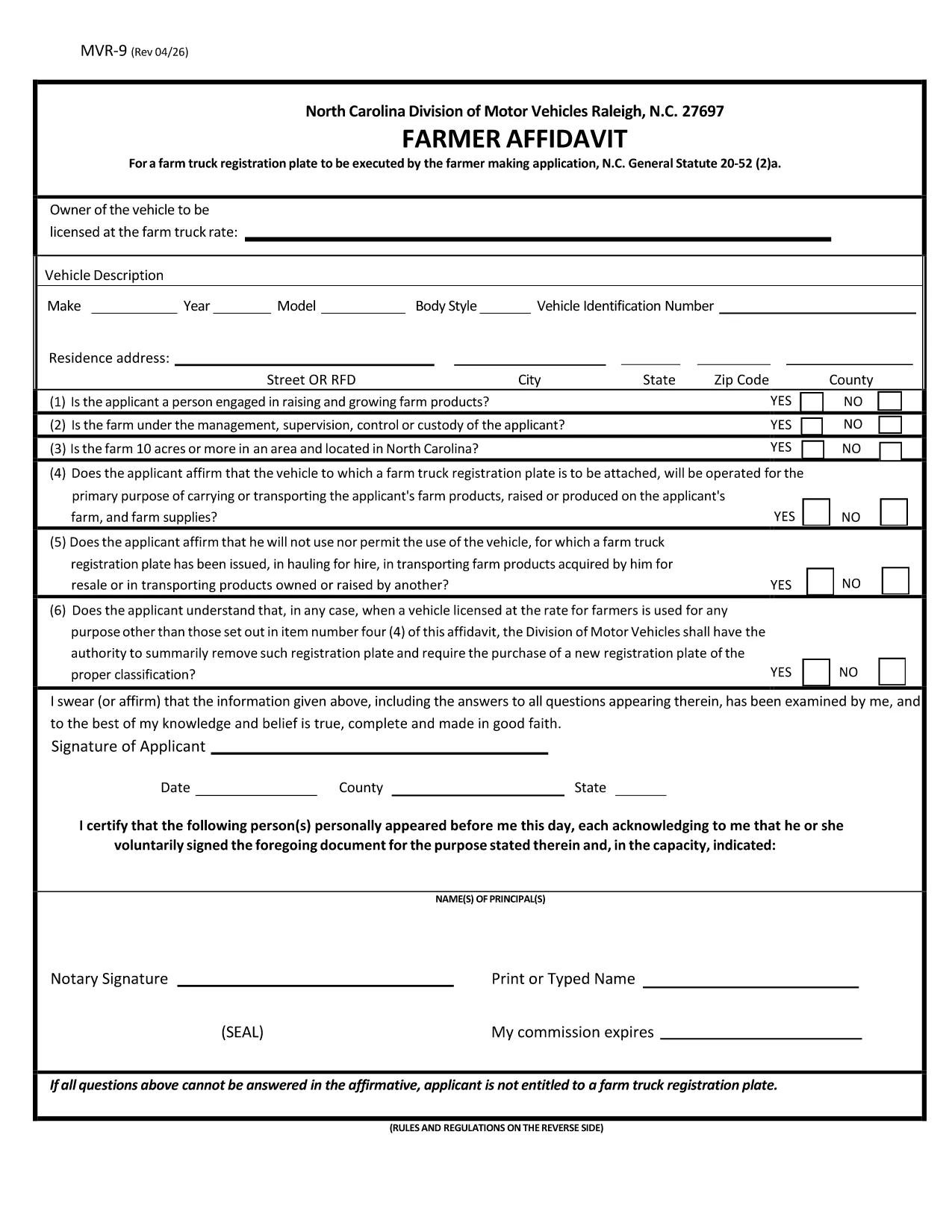
The MVR-9 Farmer Affidavit is a North Carolina Department of Transportation (NCDOT) form required for obtaining a special farm‑truck registration plate. It verifies that the vehicle is used primarily for agricultural purposes, as defined by N.C. General Statute 20‑52(2)(a).

Traditionally, applicants had to print the PDF, fill it by hand, and mail or deliver it to a local DMV office. With Formize’s online PDF filler, you can complete the form directly in your browser, save a digital copy, and print only the final version you need.

What Is the MVR-9 Farmer Affidavit?

The MVR-9 collects essential information about the vehicle, the farmer, and the farm operation. Key sections include:

  • Owner and farmer details
  • Vehicle identification (VIN, make, model)
  • Proof of farm ownership or lease
  • Signature of the farmer and, if applicable, a notary

How to Complete the MVR-9 Online with Formize

Instead of downloading the PDF and opening it in a separate editor, simply click the "Fill out this form" button on this page. The Formize PDF Filler will load automatically. Follow the on‑screen prompts to enter your information, save progress, and download the completed document.

Common Mistakes to Avoid on the MVR-9

  • Leaving fields blank: Every required field must be completed; otherwise the DMV will reject the application.
  • Incorrect VIN: Double‑check the Vehicle Identification Number; a single digit error can delay processing.
  • Missing notarization: If a notary is required, ensure the signature and seal are present before submitting.
  • Outdated farm ownership documents: Provide current proof of ownership or lease.

Where to Submit Your Completed MVR-9

After filling out and printing the form, submit it to any North Carolina DMV office or mail it to the address listed on the form. Keep a copy for your records.

FAQ
  • What is the purpose of the MVR-9 form?

    The MVR-9 Farmer Affidavit verifies that a vehicle is used primarily for agricultural purposes, allowing owners to obtain a special farm‑truck registration plate in North Carolina.

  • Can I file the MVR-9 completely online?

    You can fill out the form online using Formize, but the final submission still requires a printed, signed (and possibly notarized) copy to be handed to the DMV.

  • Do I need a notary for the MVR-9?

    A notary is required only if the affidavit states that the farmer is not the vehicle owner. Check the specific box on the form to see if notarization is needed.

  • How long does it take for the DMV to process the MVR-9?

    Processing times vary by office, but most locations complete the farm‑truck plate issuance within 7‑10 business days after receiving a complete, correctly signed form.

  • What documents should I attach with the MVR-9?

    Attach a copy of the vehicle title, proof of farm ownership or lease (such as a deed or lease agreement), and any required notarization.

  • Is there a fee to file the MVR-9?

    Yes, there is a standard fee for a farm‑truck registration plate, which varies by vehicle weight and type. Check the latest fee schedule on the NCDOT website.

  • Can I edit the MVR-9 after I download it?

    Once you download the completed PDF, you can re‑open it in Formize to make edits before final submission, as long as the form has not been signed and notarized.

WIE MAN

So füllen Sie MVR-9 kostenlos online in 4 einfachen Schritten aus:

  1. 1
    Open the Fillable Form
    Click the "Fill out this form" button on the page. The Formize PDF Filler app will open in a new tab.
  2. 2
    Enter Your Information
    Use the on‑screen fields to type in your farmer details, vehicle information, and farm ownership proof. All fields are searchable and auto‑save.
  3. 3
    Review & Sign
    Check each section for accuracy, then use the digital signature tool to sign. If a notary is required, print the completed form for notarization.
  4. 4
    Download & Submit
    Once satisfied, click "Download PDF" to save a copy. Print the final document and submit it to your local NCDOT DMV office or mail it as instructed.
Formize PDF Filler-App
ÜBER

Fahrzeugregistrierungsformulare

MVR-9 ist eines der DMV-Formulare, auch bekannt als Formulare des Department of Motor Vehicles, bei denen es sich um Dokumente handelt, die bei verschiedenen Transaktionen und Prozessen im Zusammenhang mit Kraftfahrzeugen verwendet werden. Das DMV ist eine staatliche Behörde, die für die Ausstellung von Führerscheinen, die Fahrzeugzulassung und die Durchsetzung der Kraftfahrzeuggesetze zuständig ist. Die spezifischen verfügbaren DMV-Formulare können je nach Gerichtsbarkeit variieren, aber hier sind einige gängige Beispiele:

Führerscheinformulare: Diese Formulare werden zur Beantragung eines Führerscheins oder zur Beantragung von Änderungen oder Erneuerungen verwendet. Sie erfordern in der Regel persönliche Informationen und einen Identitätsnachweis und können Abschnitte für medizinische Informationen oder den Fahrverlauf enthalten.

Fahrzeugzulassungsformulare: Diese Formulare werden zur Registrierung eines Kraftfahrzeugs beim DMV verwendet. Sie benötigen Fahrzeuginformationen, Eigentumsdaten und einen Versicherungsnachweis.

Formulare zur Eigentumsübertragung: Beim Kauf oder Verkauf eines Fahrzeugs werden diese Formulare verwendet, um das Eigentum von einer Partei auf eine andere zu übertragen. Sie erfordern Informationen über den Käufer, den Verkäufer, Fahrzeugdetails und können einen Kaufvertrag enthalten.

Haftungsfreistellungsformulare für Fahrzeuge: Beim Verkauf oder der Eigentumsübertragung eines Fahrzeugs informieren diese Formulare das DMV darüber, dass der Verkäufer nicht mehr für das Fahrzeug verantwortlich ist. Es trägt dazu bei, den Verkäufer vor der Haftung für Unfälle oder Zwischenfälle mit dem Fahrzeug nach dem Verkauf zu schützen.

Formulare zur Erneuerung von Kennzeichen und Registrierung: Diese Formulare werden verwendet, um die Fahrzeugzulassung zu erneuern oder neue Nummernschilder anzufordern. Sie benötigen in der Regel Informationen über den eingetragenen Eigentümer, aktuelle Registrierungsdaten und die Zahlung anfallender Gebühren.

Antragsformulare für Fahrunterlagen: Mit diesen Formularen können Einzelpersonen ihre Fahrunterlagen beim DMV anfordern, die Informationen über Fahrverstöße, den Führerscheinstatus und andere relevante Details enthalten.

Formulare für spezielle oder personalisierte Nummernschilder: Diese Formulare werden für die Beantragung personalisierter oder spezieller Nummernschilder verwendet, die es Einzelpersonen ermöglichen, ihr Nummernschild mit bestimmten Zeichen oder Designs zu personalisieren.

Dies sind nur einige Beispiele der vielen Formulare, die über das DMV erhältlich sein können. Die spezifischen Formulare und Anforderungen können je nach Gerichtsbarkeit variieren. Daher ist es wichtig, die lokale DMV-Website zu konsultieren oder ein DMV-Büro aufzusuchen, um die richtigen Formulare für Ihre speziellen Bedürfnisse zu erhalten.

MERKMALE

PDF-Filler

Der einfachste Weg, PDF-Formulare online auszufüllen

  • Füllen Sie schnell MVR-9 aus
    Suchen Sie nach einer Möglichkeit, MVR-9 schnell online auszufüllen? Mit unserem kostenlosen Online-PDF-Formularausfüller wissen Sie, wie Sie dieses PDF-Dokument in weniger als einer Minute bearbeiten und ausfüllen.
  • Einfach zu bedienender Online-PDF-Editor
    Haben Sie es satt, PDF-Dateien auszudrucken, damit Sie sie bearbeiten können, bevor Sie sie erneut scannen und zurücksenden? PDF-Dokumente kostenlos online bearbeiten. Nutzen Sie unseren Online-PDF-Editor, um Zeit und Papier zu sparen.
  • Tolle Tools, alle Plattformen
    Sie fragen sich, wie Sie MVR-9 auf einem Mac ausfüllen oder vielleicht einen kostenlosen PDF-Ausfüller verwenden können? Unsere Online-PDF-Tools funktionieren auf allen Plattformen.
  • Sichere Dateispeicherung
    Fertige "MVR-9"-Dateien werden in einer gesicherten Datenbank gespeichert, die vom Amazon Cloud-Hosting verwaltet wird. Sie können Ihre Dateien jederzeit aus unserem System löschen. In jedem Fall werden diese Dateien nach 24 Stunden automatisch gelöscht.
  • Chatten Sie mit MVR-9
    Chatten Sie mit „MVR-9“ auf Chatize, einem kostenlosen PDF-Leseassistenten. Stellen Sie Fragen und erhalten Sie Antworten von „MVR-9“. Klicken Sie einfach oben auf die Schaltfläche Mit Dokument chatten.

Füllsitzung löschen

Die ausgewählte Füllsitzung löschen? In diesem Fall gehen Ihre Fortschritte beim Ausfüllen des Formulars verloren.

Bearbeitungssitzung löschen

Ausgewählte Bearbeitungssitzung löschen? In diesem Fall geht Ihr Fortschritt beim Erstellen und Bearbeiten des Formulars verloren.