
Sprache auswählen

RMO-1VR Fillable PDF – Report Vehicle Fraud (Pennsylvania)

  1. Sprache Englisch
  2. Land USA
  3. Aktivität Kfz-Zulassung
  4. Zustand Pennsylvania
RMO-1VR Fillable PDF – Report Vehicle Fraud (Pennsylvania)

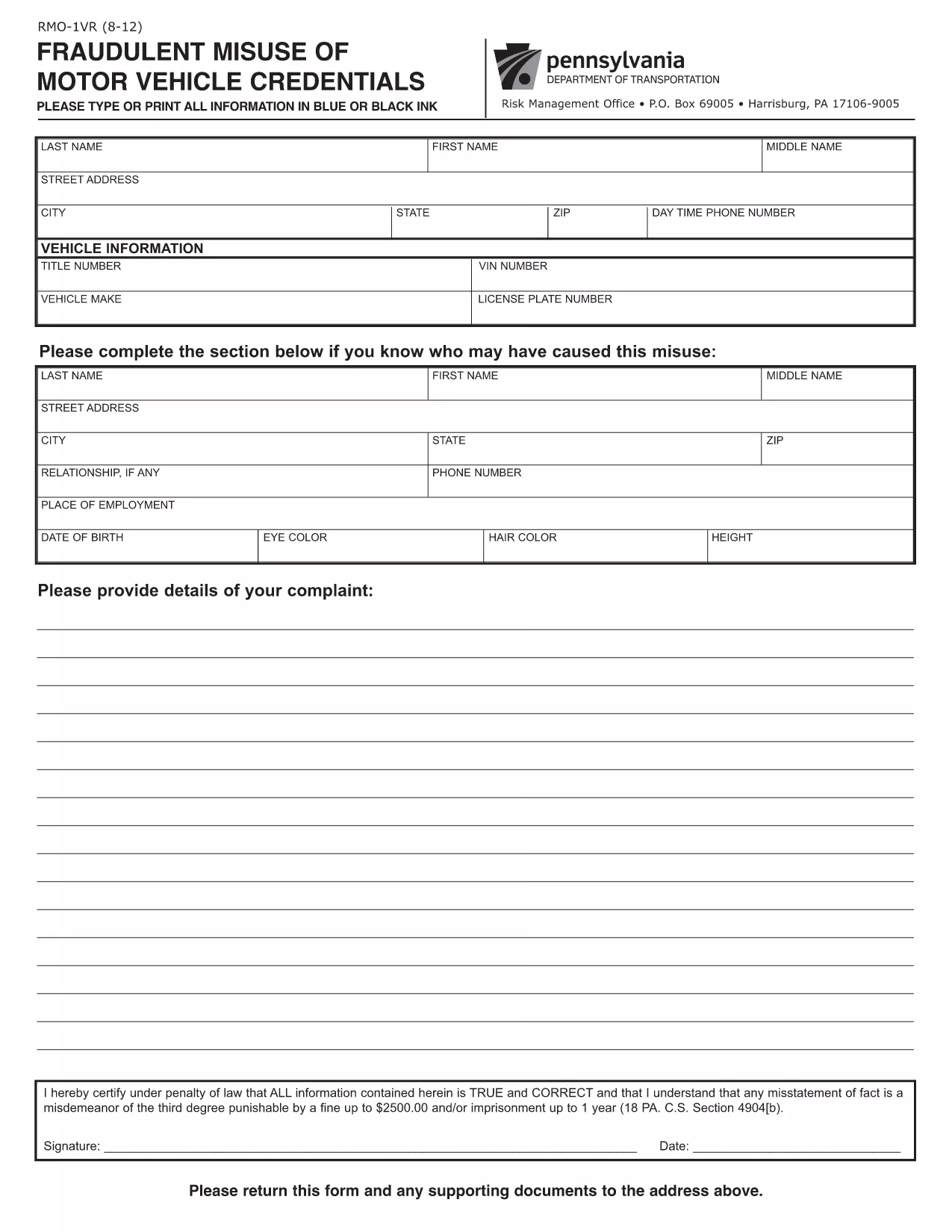
The RMO-1VR (Fraudulent Misuse of Motor Vehicle Credentials) is the official PennDOT form used to report suspected vehicle fraud, such as odometer tampering, title fraud, or misuse of dealer plates. Formize makes this PDF fully fillable online, so you can submit accurate information without printing or scanning.

What Is Form RMO-1VR?

RMO-1VR is a PennDOT Risk Management Office document that collects detailed information about the vehicle, the alleged fraudulent activity, and any supporting evidence. The form helps PennDOT investigate and take action against fraudulent motor‑vehicle transactions.

When Should You Use the RMO-1VR?

  • Odometer rollback or alteration
  • Title or registration fraud
  • Unauthorized use of dealer or temporary plates
  • Any suspicious activity that could affect vehicle ownership or safety

How to Complete the RMO-1VR Online

Follow the simple steps below to fill out the form directly in your browser using Formize’s PDF Filler.

Common Mistakes to Avoid

  • Leaving required fields blank – the form will not submit.
  • Providing vague descriptions – be as specific as possible about dates, VIN, and circumstances.
  • Forgetting to attach supporting documents – photos, police reports, or previous titles strengthen your case.
  • Submitting the form without a signature – use the digital signature field.

Where to Send Your Completed Form

After you download the completed PDF, mail it to:

PennDOT Risk Management Office
P.O. Box 69005
Harrisburg, PA 17106‑9005

If you prefer, you can also deliver the printed form to any PennDOT driver’s license center.

FAQ
  • What does RMO-1VR stand for?

    RMO-1VR stands for "Fraudulent Misuse of Motor Vehicle Credentials" and is used to report vehicle‑related fraud to PennDOT.

  • Can I submit the form electronically?

    PennDOT currently requires a printed and mailed copy, but you can fill out the form online with Formize, download the PDF, and then mail it.

  • What supporting documents should I attach?

    Include copies of the vehicle title, registration, photos of the odometer, police reports, or any correspondence that evidences the fraud.

  • Is there a fee to file RMO-1VR?

    No, filing the RMO-1VR form with PennDOT is free of charge.

  • How long does PennDOT take to investigate?

    Investigation timelines vary, but PennDOT typically acknowledges receipt within 10‑15 business days and may request additional information.

  • Can I use the same form for driver’s‑license fraud?

    No. Driver’s‑license or ID fraud uses a different form (RMO‑1DL). Use RMO‑1VR only for vehicle‑related fraud.

  • What if I make a mistake on the form?

    Correct any errors before printing. If you’ve already mailed it, you can submit a new, corrected form and reference the previous submission.

  • Do I need a notary for this form?

    A notary is not required for RMO‑1VR, but a signature and accurate information are mandatory.

WIE MAN

So füllen Sie RMO-1VR kostenlos online in 5 einfachen Schritten aus:

  1. 1
    Click the Fillable Form Button
    Press the "Fill out this form" button on the page. The Formize PDF Filler app will open instantly.
  2. 2
    Wait for the PDF Filler to Load
    The fillable PDF loads in your browser. No download or extra software is required.
  3. 3
    Enter Your Information
    Complete each field with accurate details about the vehicle, alleged fraud, and any supporting documents.
  4. 4
    Review and Sign
    Double‑check all entries, add a digital signature if required, and click the "Submit" button to generate a completed PDF.
  5. 5
    Download or Print
    Save the finished PDF to your computer, then print and mail it to PennDOT’s Risk Management Office, or keep a digital copy for your records.
Formize PDF Filler-App
ÜBER

Fahrzeugregistrierungsformulare

Wenn Sie ein Kraftfahrzeug, einen Anhänger oder ein Boot besitzen oder leasen, müssen Sie bestimmte Verpflichtungen erfüllen, um Ihr Fahrzeug gesetzlich zugelassen und sicher zu halten.

RMO-1VR ist eines der Fahrzeugregistrierungsformulare, bei denen es sich um Dokumente handelt, die zur Registrierung eines Kraftfahrzeugs bei der zuständigen Landes- oder Provinzbehörde verwendet werden. Diese Formulare werden normalerweise benötigt, wenn eine Person ein neues oder gebrauchtes Fahrzeug kauft oder wenn sie mit einem Fahrzeug in einen neuen Staat oder eine neue Provinz zieht.

Die genauen Anforderungen und Formulare, die für die Fahrzeugregistrierung erforderlich sind, können je nach Standort variieren, aber im Allgemeinen umfasst der Prozess die Bereitstellung von Informationen über das Fahrzeug, den Eigentümer und etwaige Pfandrechte am Fahrzeug.

Sobald die Registrierungsformulare und Gebühren eingereicht wurden, stellt die Landes- oder Provinzbehörde dem Eigentümer des Fahrzeugs eine Registrierungsbescheinigung oder ein Nummernschild aus. Mit dieser Zulassung darf das Fahrzeug legal auf öffentlichen Straßen und Autobahnen betrieben werden.

MERKMALE

PDF-Filler

Der einfachste Weg, PDF-Formulare online auszufüllen

  • Füllen Sie schnell RMO-1VR aus
    Suchen Sie nach einer Möglichkeit, RMO-1VR schnell online auszufüllen? Mit unserem kostenlosen Online-PDF-Formularausfüller wissen Sie, wie Sie dieses PDF-Dokument in weniger als einer Minute bearbeiten und ausfüllen.
  • Einfach zu bedienender Online-PDF-Editor
    Haben Sie es satt, PDF-Dateien auszudrucken, damit Sie sie bearbeiten können, bevor Sie sie erneut scannen und zurücksenden? PDF-Dokumente kostenlos online bearbeiten. Nutzen Sie unseren Online-PDF-Editor, um Zeit und Papier zu sparen.
  • Tolle Tools, alle Plattformen
    Sie fragen sich, wie Sie RMO-1VR auf einem Mac ausfüllen oder vielleicht einen kostenlosen PDF-Ausfüller verwenden können? Unsere Online-PDF-Tools funktionieren auf allen Plattformen.
  • Sichere Dateispeicherung
    Fertige "RMO-1VR"-Dateien werden in einer gesicherten Datenbank gespeichert, die vom Amazon Cloud-Hosting verwaltet wird. Sie können Ihre Dateien jederzeit aus unserem System löschen. In jedem Fall werden diese Dateien nach 24 Stunden automatisch gelöscht.
  • Chatten Sie mit RMO-1VR
    Chatten Sie mit „RMO-1VR“ auf Chatize, einem kostenlosen PDF-Leseassistenten. Stellen Sie Fragen und erhalten Sie Antworten von „RMO-1VR“. Klicken Sie einfach oben auf die Schaltfläche Mit Dokument chatten.

Füllsitzung löschen

Die ausgewählte Füllsitzung löschen? In diesem Fall gehen Ihre Fortschritte beim Ausfüllen des Formulars verloren.

Bearbeitungssitzung löschen

Ausgewählte Bearbeitungssitzung löschen? In diesem Fall geht Ihr Fortschritt beim Erstellen und Bearbeiten des Formulars verloren.