

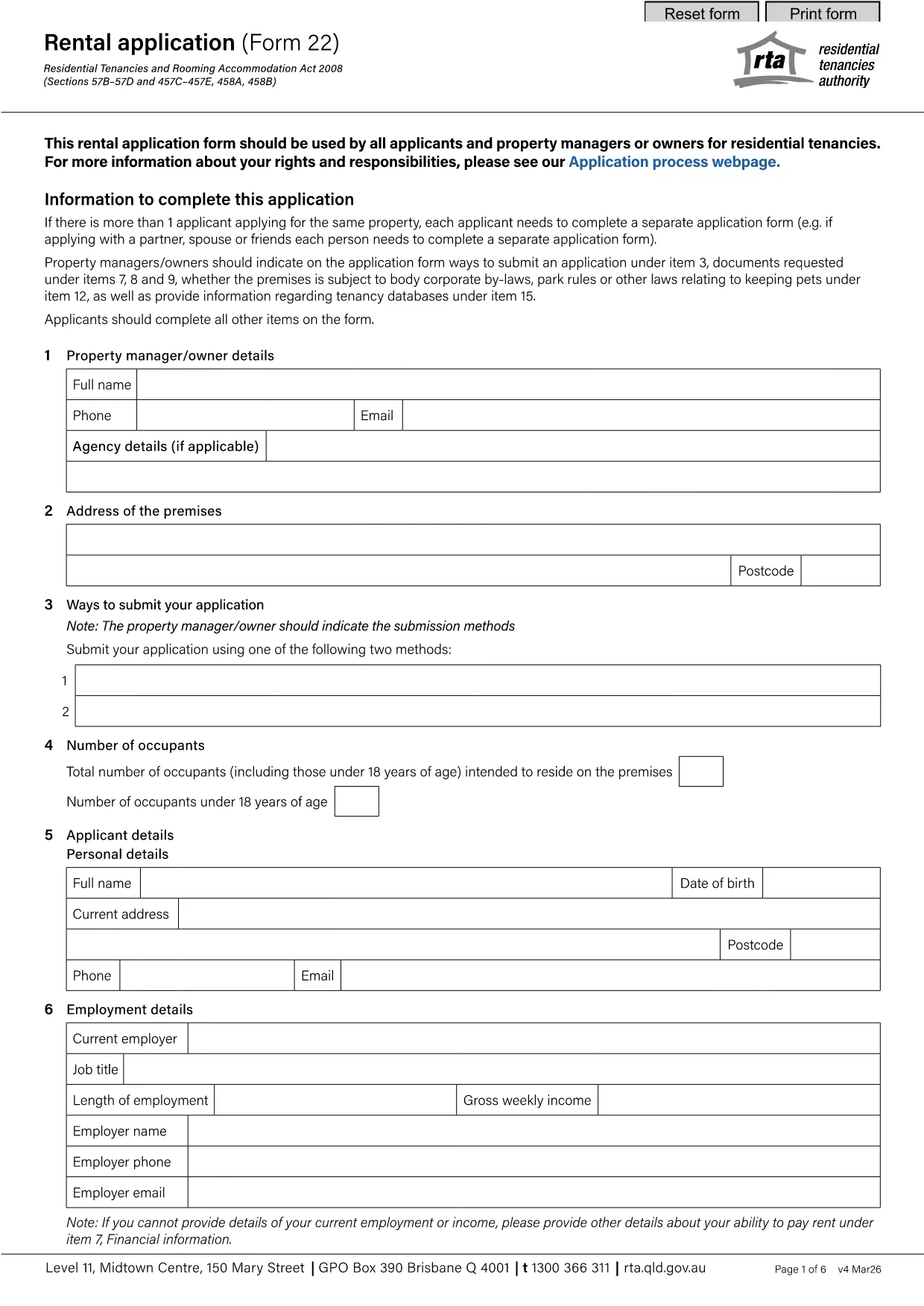

Έντυπα για τους ιδιοκτήτες και/ή τους ενοικιαστές για να προτείνουν ενέργειες σχετικά με συμβάσεις μίσθωσης.
Το rental application pdf είναι ένα από τα έντυπα ενοικίασης που αναφέρονται στα έγγραφα που χρησιμοποιούνται στη διαδικασία σύναψης και διαχείρισης μιας σύμβασης μίσθωσης. Αυτά τα έντυπα χρησιμοποιούνται συνήθως από ιδιοκτήτες, διαχειριστές ακινήτων ή ενοικιαστές για να περιγράψουν τους όρους και τις προϋποθέσεις της μίσθωσης. Ακολουθούν ορισμένες κοινές μορφές μίσθωσης:
Σύμβαση μίσθωσης: Η σύμβαση μίσθωσης, γνωστή και ως συμφωνία μίσθωσης ή συμφωνία μίσθωσης, είναι μια νομικά δεσμευτική σύμβαση μεταξύ του ιδιοκτήτη και του ενοικιαστή. Καθορίζει τα δικαιώματα και τις ευθύνες και των δύο μερών, συμπεριλαμβανομένης της διάρκειας της μίσθωσης, του ποσού του ενοικίου, των όρων πληρωμής, της εγγύησης, των ευθυνών συντήρησης και τυχόν άλλων όρων που αφορούν τη μίσθωση.
Αίτηση ενοικίασης: Οι υποψήφιοι ενοικιαστές συνήθως συμπληρώνουν μια αίτηση ενοικίασης όταν υποβάλλουν αίτηση για ενοικίαση ακινήτου. Αυτή η φόρμα συλλέγει προσωπικές πληροφορίες σχετικά με τον αιτούντα, όπως το όνομά του, στοιχεία επικοινωνίας, ιστορικό απασχόλησης, ιστορικό ενοικίασης και αναφορές. Η αίτηση ενοικίασης βοηθά τους ιδιοκτήτες να αξιολογήσουν την καταλληλότητα των ενοικιαστών και να λαμβάνουν τεκμηριωμένες αποφάσεις.
Ειδοποίηση για εκκένωση: Αυτή η φόρμα χρησιμοποιείται είτε από τον ιδιοκτήτη είτε από τον ενοικιαστή για την παροχή ειδοποίησης πρόθεσης τερματισμού της μίσθωσης. Η απαιτούμενη περίοδος ειδοποίησης μπορεί να διαφέρει ανάλογα με την τοπική νομοθεσία και τους όρους της σύμβασης μίσθωσης.
Ειδοποίηση αύξησης ενοικίου: Εάν ο ιδιοκτήτης σκοπεύει να αυξήσει το ενοίκιο κατά τη διάρκεια της μίσθωσης, συνήθως παρέχει ειδοποίηση αύξησης ενοικίου στον ενοικιαστή. Αυτή η ειδοποίηση ενημερώνει τον ενοικιαστή για την επερχόμενη αναπροσαρμογή ενοικίου και συμμορφώνεται με τις νομικές απαιτήσεις σχετικά με τις αυξήσεις ενοικίου.
Έντυπα αιτήματος συντήρησης και επισκευής: Αυτά τα έντυπα επιτρέπουν στους ενοικιαστές να αναφέρουν ζητήματα συντήρησης ή επισκευής στον ιδιοκτήτη ή στον διαχειριστή του ακινήτου. Η φόρμα περιγράφει τις λεπτομέρειες του προβλήματος, τις ζητούμενες επισκευές και κάθε άλλη σχετική πληροφορία.
Συγκατάθεση για έλεγχο ιστορικού ή πιστωτικό έλεγχο: Οι ιδιοκτήτες ενδέχεται να απαιτήσουν από τους ενοικιαστές να συμπληρώσουν ένα έντυπο συναίνεσης που εξουσιοδοτεί έναν έλεγχο ιστορικού ή πιστωτικό έλεγχο. Αυτό το έντυπο επιτρέπει στον ιδιοκτήτη να επαληθεύσει το ιστορικό, την πιστοληπτική ικανότητα και το ιστορικό ενοικίασης του ενοικιαστή.
Αναφορά αποθέματος και κατάστασης: Αυτή η φόρμα χρησιμοποιείται για την τεκμηρίωση της κατάστασης του ενοικιαζόμενου ακινήτου στην αρχή και στο τέλος της μίσθωσης. Αναφέρει λεπτομερώς την κατάσταση κάθε δωματίου και τυχόν υπάρχουσες ζημιές, διασφαλίζοντας ότι και τα δύο μέρη έχουν αρχείο για την κατάσταση του ακινήτου για την επίλυση διαφορών σχετικά με τις καταθέσεις ασφαλείας ή τις αξιώσεις ζημιών.
Αυτά είναι μερικά παραδείγματα εντύπων μίσθωσης που χρησιμοποιούνται συνήθως στη διαδικασία ενοικίασης. Οι συγκεκριμένες μορφές και απαιτήσεις ενδέχεται να διαφέρουν ανάλογα με την τοπική νομοθεσία και τις ειδικές συνθήκες της μίσθωσης. Είναι σημαντικό να συμβουλευτείτε τους τοπικούς κανονισμούς και να ζητήσετε επαγγελματική συμβουλή για να διασφαλίσετε τη συμμόρφωση και να χρησιμοποιήσετε τις κατάλληλες φόρμες για τη συγκεκριμένη σύμβαση μίσθωσης.