Επιλέξτε γλώσσα

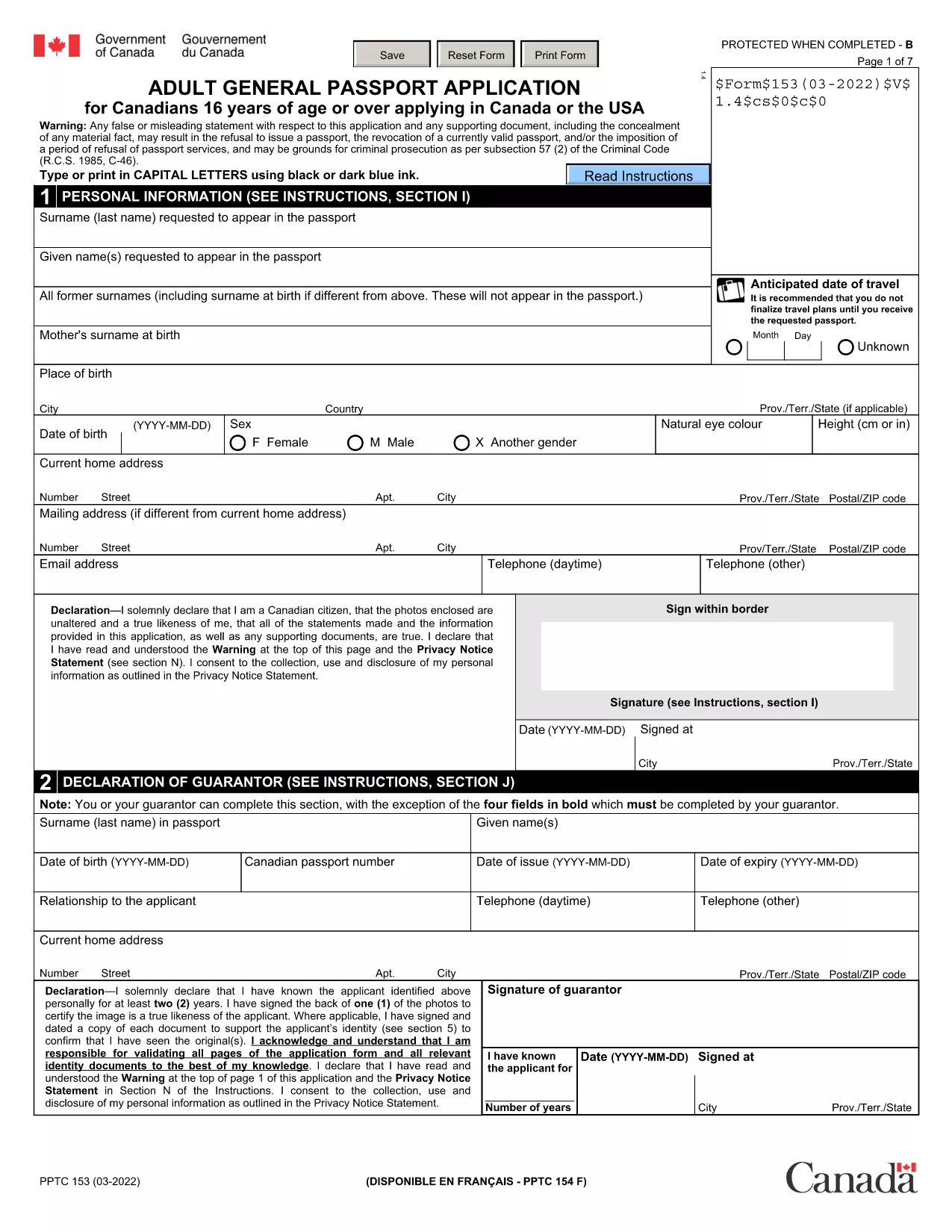
PPTC 153 – Canadian Adult Passport Application Form (Fillable PDF)

  1. Γλώσσα Αγγλικά
  2. Χώρα Καναδάς
  3. Τμήμα Immigration, Refugees and Citizenship Canada
  4. Δραστηριότητα Passport Services
PPTC 153 – Canadian Adult Passport Application Form (Fillable PDF)

The PPTC 153 is the official Adult General Passport Application used by Canadian citizens aged 16 years or older. Whether you are applying for the first time, replacing a lost or damaged passport, or renewing a passport that is beyond the 15‑year simplified‑renewal window, this fillable PDF is the document you need.

What Is the PPTC 153 Form?

PPTC 153 captures personal details, citizenship proof, guarantor information, and passport preferences (5‑year or 10‑year validity). The form is provided by Immigration, Refugees and Citizenship Canada (IRCC) and must be completed, printed, and submitted with supporting documents and fees.

Who Needs to Use PPTC 153?

  • First‑time adult applicants (16 + years) who have never held a Canadian passport.
  • Applicants replacing a lost, stolen, or damaged passport.
  • People whose passport expired more than 15 years ago or does not meet the simplified‑renewal criteria.
  • Canadians applying from within the United States through a consulate or embassy.

How to Complete the Form Online with Formize

Instead of downloading the PDF and editing it in a separate editor, simply click the “Fill out this form” button on this page. The Formize PDF Filler app will load in seconds, letting you:

  1. Enter your information directly into each field. The interface auto‑saves as you type.
  2. Upload supporting documents. Add scanned copies of your citizenship proof, photo ID, and passport photos.
  3. Sign electronically. Use a mouse, touch screen, or typed signature.
  4. Download or print. Export a completed PDF ready for submission.

Common Mistakes to Avoid

  • Incorrect photo size. Passport photos must be 50 mm × 70 mm and signed by the guarantor.
  • Missing guarantor signature. If you cannot find a guarantor, use the statutory declaration (PPTC 132).
  • Leaving blank fields. Even optional fields should be marked “N/A” if not applicable.
  • Using outdated forms. Always use the latest PPTC 153 PDF – the link below points to the current version.

Where to Submit Your Completed Application

After printing and signing the form, send it with the required documents and fees to one of the following:

  • Passport offices or Service Canada Centres in Canada.
  • Canadian embassies or consulates in the United States.
  • Mail (recommended only for non‑urgent applications).

Processing typically takes 10‑20 business days. For urgent travel, request expedited service and provide proof of travel.

FAQ
  • Can I use PPTC 153 for a child under 16?

    No. Children under 16 must use form PPTC 155 (Child General Passport Application).

  • What if my passport expired more than 15 years ago?

    You must use PPTC 153, as the simplified renewal form (PPTC 054) is only for passports expired within the last 15 years.

  • Do I need to provide travel plans with my application?

    Travel itineraries are only required for urgent or expedited processing. Regular applications do not need a travel plan.

  • How long does processing take?

    Standard processing is 10‑20 business days. Expedited service can be as fast as 24‑48 hours with proof of travel.

  • Can I track my application status?

    Yes. Use the receipt number provided at submission to track online via the Government of Canada passport tracking portal.

  • What if I cannot find a guarantor?

    Complete the statutory declaration in lieu of a guarantor (form PPTC 132) and attach it to your PPTC 153.

  • Is the Formize filler free to use?

    Formize offers a free preview and basic editing. Full download and e‑sign features are available at no extra cost for this public form.

  • Can I submit the filled PDF by email?

    IRCC requires a printed, signed copy for passport applications. Email submission is not accepted for this form.

  • What fee do I need to pay?

    Fees depend on passport length (5‑year or 10‑year) and processing speed. Check the current fee schedule on the IRCC website.

  • Do I need to include a passport photo with the PDF?

    Yes. Two recent passport photos (50 mm × 70 mm) signed by the guarantor must be attached to the printed application.

ΠΩΣ ΝΑ

Πώς να συμπληρώσετε το PPTC 153 δωρεάν, στο διαδίκτυο με 5 εύκολα βήματα:

  1. 1
    Click the Fill‑out Button
    Press the “Fill out this form” button on the page. The Formize PDF Filler loads in a secure overlay.
  2. 2
    Enter Your Details
    Type directly into each field. The form auto‑validates dates, passport numbers, and required signatures.
  3. 3
    Upload Supporting Documents
    Add scanned copies of citizenship proof, ID, and passport photos. The app checks file size and format.
  4. 4
    Sign Electronically
    Use your mouse, touch screen, or type your name to create a legal electronic signature.
  5. 5
    Download or Print
    When all sections are complete, click “Download PDF” or “Print” to obtain a ready‑to‑submit document.
Διαμορφώστε την εφαρμογή Filler PDF
ΣΧΕΤΙΚΆ ΜΕ

πρότυπο PPTC 153

Με το παραδοσιακό σύνολο λειτουργιών για την προβολή και τη συμπλήρωση ενός εγγράφου PDF, σε συνδυασμό με τα πλεονεκτήματα μιας εφαρμογής ιστού και την αποκριτική διάταξη, μπορείτε να ολοκληρώσετε το PPTC 153 μέσα σε λίγα λεπτά.

ΧΑΡΑΚΤΗΡΙΣΤΙΚΆ

Πλήρωση PDF

Ο ευκολότερος τρόπος για να συμπληρώσετε το PPTC 153 στο διαδίκτυο

  • Συμπληρώστε γρήγορα PPTC 153
    Αναζητάτε έναν τρόπο να γεμίσετε γρήγορα το PPTC 153 στο διαδίκτυο; Με το ηλεκτρονικό μας δωρεάν συμπλήρωμα φόρμας PDF, θα ξέρετε πώς να επεξεργαστείτε και να συμπληρώσετε αυτό το έγγραφο pdf σε λιγότερο από ένα λεπτό.
  • Εύκολο στη χρήση διαδικτυακό πρόγραμμα επεξεργασίας PDF
    Βαρεθήκατε να εκτυπώνετε αρχεία PDF ώστε να μπορείτε να τα επεξεργαστείτε, πριν τα σαρώσετε ξανά και τα στείλετε πίσω; Επεξεργαστείτε έγγραφα PDF δωρεάν online. Χρησιμοποιήστε το ηλεκτρονικό μας πρόγραμμα επεξεργασίας pdf για να εξοικονομήσετε χρόνο και χαρτί.
  • Υπέροχα εργαλεία, όλες οι πλατφόρμες
    Αναρωτιέστε πώς να συμπληρώσετε το PPTC 153 σε Mac ή μήπως πώς να χρησιμοποιήσετε ένα πρόγραμμα πλήρωσης PDF δωρεάν; Τα διαδικτυακά μας εργαλεία PDF λειτουργούν σε όλες τις πλατφόρμες.
  • Ασφαλής αποθήκευση αρχείων
    Τα ολοκληρωμένα αρχεία "PPTC 153" αποθηκεύονται σε μια ασφαλή βάση δεδομένων που διαχειρίζεται η φιλοξενία Amazon Cloud. Μπορείτε να διαγράψετε τα αρχεία σας από το σύστημά μας ανά πάσα στιγμή. Σε κάθε περίπτωση, αυτά τα αρχεία διαγράφονται αυτόματα μετά από 24 ώρες.
  • Συζήτηση με PPTC 153
    Συνομιλήστε με το "PPTC 153" στο Chatize που είναι ένας δωρεάν βοηθός ανάγνωσης PDF. Κάντε ερωτήσεις και λάβετε απαντήσεις από το "PPTC 153". Απλώς κάντε κλικ στο κουμπί Συζήτηση με έγγραφο παραπάνω.

Διαγραφή συνεδρίας συμπλήρωσης

Διαγραφή της επιλεγμένης περιόδου συμπλήρωσης; Σε αυτήν την περίπτωση, η πρόοδός σας στη συμπλήρωση της φόρμας θα χαθεί.

Διαγραφή συνεδρίας επεξεργασίας

Διαγραφή της επιλεγμένης συνεδρίας επεξεργασίας; Σε αυτήν την περίπτωση, η πρόοδός σας στη δημιουργία και την επεξεργασία της φόρμας θα χαθεί.