
Επιλέξτε γλώσσα

Fillable IRS Form 843 – Claim Refund or Request Abatement

  1. Χώρα ΗΠΑ
  2. Γλώσσα Αγγλικά
  3. Δραστηριότητα Φόροι
  4. Τμήμα Εσωτερική Υπηρεσία Εσόδων
Fillable IRS Form 843 – Claim Refund or Request Abatement

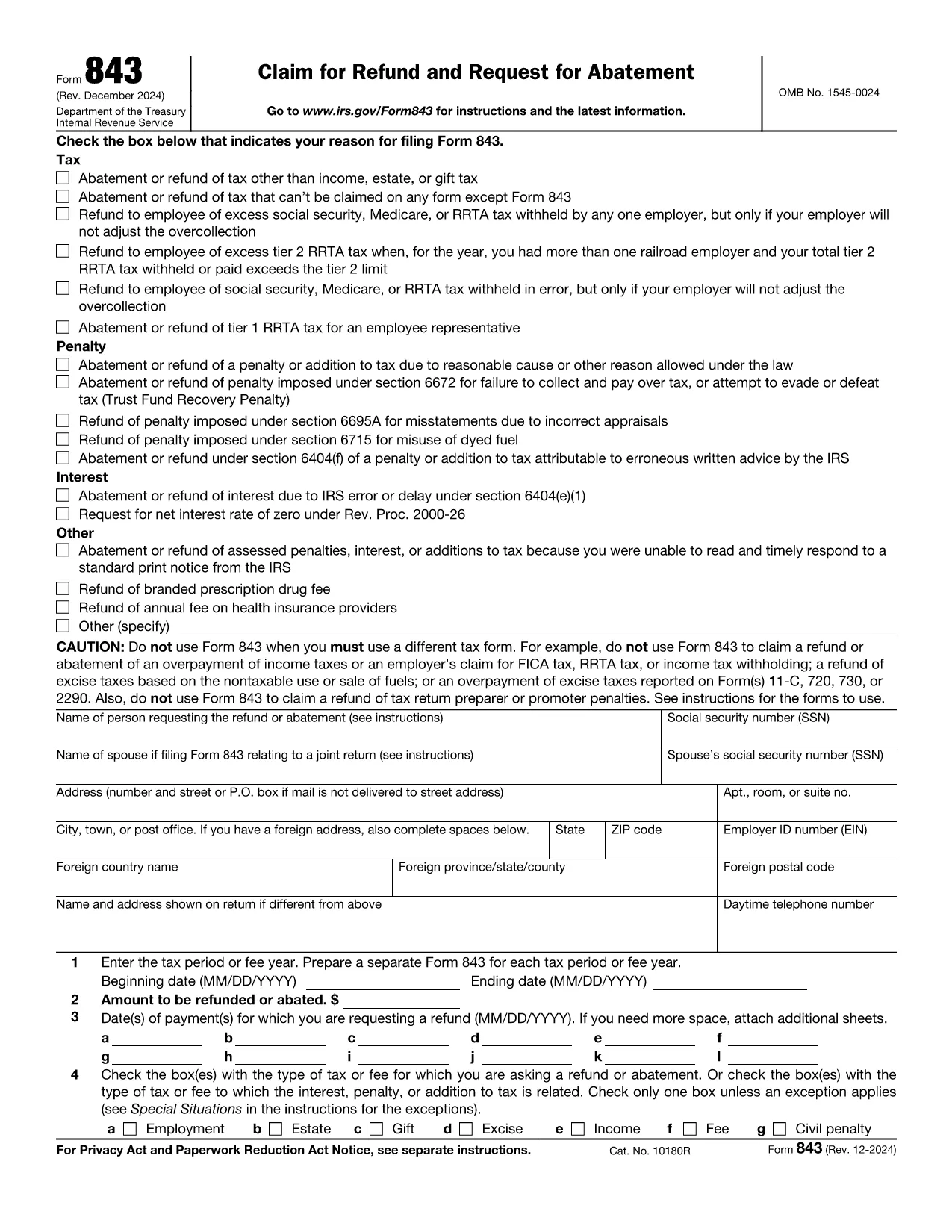
Form 843 (Claim for Refund and Request for Abatement) lets taxpayers ask the Internal Revenue Service for a refund of taxes, penalties, interest, or fees that were paid in error. Whether you’re seeking a refund on an employment tax, an excise tax, or a penalty, this two‑page form is the official way to make the request.

What Is IRS Form 843?

Form 843 is a multipurpose tax document used for:

  • Refunding overpaid taxes (e.g., employment, estate, gift, excise).
  • Requesting abatement of penalties or interest.
  • Claiming refunds for specific fees such as the branded prescription drug fee.

When Should You Use Form 843?

You should file Form 843 when you have a legitimate reason to believe the IRS collected more than it was entitled to, or when an error caused an improper penalty or interest assessment. Typical scenarios include:

  • Incorrect calculation of employment taxes.
  • Excess Tier 2 RRTA tax.
  • Interest charged due to IRS processing delays.
  • Fee refunds for prescription drug fees.

How to Complete Form 843 Online with Formize

Formize makes the process painless. Follow these simple steps:

  1. Click the "Fill out this form" button on this page.
  2. The Formize PDF Filler app loads in your browser – no download needed.
  3. Enter your taxpayer information, tax period, amount, and reason for the claim.
  4. Attach any supporting documents (e.g., W‑2s, Form 8947) using the attachment field.
  5. Review, sign electronically, and submit directly to the IRS or download the completed PDF for mailing.

Common Mistakes to Avoid

  • Leaving lines blank: Every applicable line must be completed, even if the answer is “0”.
  • Incorrect tax type selection: Choose the exact tax or fee from the list on Line 4.
  • Missing signatures: Both the taxpayer and, if applicable, the authorized representative must sign.
  • Insufficient documentation: Attach copies of the original tax return or related forms to support your claim.

Where to Submit Your Completed Form

After filling out Form 843, you have two options:

  • Mail: Send the signed PDF to the address listed in the form’s instructions for your tax type.
  • Electronic submission: Use the IRS’s secure e‑file portal if you have a valid e‑file account.

Using Formize’s online filler ensures the PDF is correctly formatted for both mailing and electronic submission.

Οδηγίες

  • Έντυπο 843 Οδηγίες - Οδηγίες για το έντυπο 843, Αίτηση για επιστροφή χρημάτων και Αίτηση για Μάχη
FAQ
  • What tax types can I claim on Form 843?

    Form 843 covers employment tax, estate tax, gift tax, excise tax, fee refunds, and certain interest or penalty abatements. It does not apply to regular income tax refunds.

  • Do I need a certified tax professional to fill out Form 843?

    No. The form is straightforward, and with Formize’s fillable PDF you can complete it yourself. However, consult a tax professional if your situation is complex.

  • How long does the IRS take to process a Form 843 request?

    Processing time varies, but most refunds or abatements are issued within 60–90 days after the IRS receives a complete and accurate submission.

  • Can I file Form 843 electronically?

    Yes. After completing the form with Formize, you can upload the PDF to the IRS e‑file portal if you have an active e‑file account.

  • What supporting documents should I include?

    Attach copies of the original tax return, payment receipts, related forms (e.g., W‑2, Form 8947), and any IRS notices that explain the penalty or interest.

  • Is there a filing fee for Form 843?

    No. There is no fee to file Form 843; however, you may incur postage costs if mailing a paper copy.

  • Can I request a refund for a penalty that was assessed in error?

    Yes. If you can demonstrate that the penalty was incorrectly assessed, you can use Form 843 to request an abatement.

ΠΩΣ ΝΑ

Πώς να συμπληρώσετε το Form 843 δωρεάν, στο διαδίκτυο με 5 εύκολα βήματα:

  1. 1
    Open the Fillable Form
    Click the "Fill out this form" button on this page. The Formize PDF Filler app will load directly in your browser.
  2. 2
    Enter Your Information
    Complete each section of Form 843 – taxpayer details, tax period, amount, and reason for the claim – using the on‑screen fields.
  3. 3
    Attach Supporting Documents
    Use the attachment option to upload copies of W‑2s, prior tax returns, or any other documents that support your refund or abatement request.
  4. 4
    Review and Sign
    Double‑check all entries, then apply your electronic signature in the signature field.
  5. 5
    Submit or Download
    Choose to submit the completed form directly to the IRS through the portal, or download the PDF to mail it yourself.
Διαμορφώστε την εφαρμογή Filler PDF
ΣΧΕΤΙΚΆ ΜΕ

Ομοσπονδιακά φορολογικά έντυπα

Το Form 843 είναι ένα από τα ομοσπονδιακά φορολογικά έντυπα που είναι έγγραφα που χρησιμοποιούνται για την αναφορά και την υποβολή ομοσπονδιακών φόρων εισοδήματος στην Υπηρεσία Εσωτερικών Εσόδων (IRS) στις Ηνωμένες Πολιτείες. Αυτά τα έντυπα χρησιμοποιούνται από άτομα, επιχειρήσεις και οργανισμούς για να αναφέρουν το εισόδημά τους, τις κρατήσεις και άλλες σχετικές πληροφορίες που είναι απαραίτητες για τον υπολογισμό της ομοσπονδιακής φορολογικής τους υποχρέωσης.

Το πιο συχνά χρησιμοποιούμενο ομοσπονδιακό φορολογικό έντυπο είναι το Έντυπο 1040, το οποίο χρησιμοποιείται από μεμονωμένους φορολογούμενους για να αναφέρουν τον φόρο εισοδήματος φυσικών προσώπων. Άλλες φόρμες που χρησιμοποιούνται συνήθως περιλαμβάνουν το Φόρμα 1065 για συνεργασίες, Έντυπο 1120 για εταιρείες και Έντυπο 990 για οργανισμούς που απαλλάσσονται από φόρους.

Τα ομοσπονδιακά φορολογικά έντυπα απαιτούν συνήθως από τους φορολογούμενους να αναφέρουν διάφορες πηγές εισοδήματος, όπως μισθούς, μισθούς και φιλοδωρήματα, καθώς και εισόδημα από επενδύσεις, ενοικιάσεις ακινήτων και άλλες πηγές. Τα έντυπα επιτρέπουν επίσης στους φορολογούμενους να διεκδικούν εκπτώσεις και πιστώσεις για διάφορα έξοδα, όπως φιλανθρωπικές εισφορές, τόκους στεγαστικών δανείων και έξοδα υγειονομικής περίθαλψης.

Είναι σημαντικό να υποβάλλετε τα ομοσπονδιακά φορολογικά έντυπα με ακρίβεια και έγκαιρα, καθώς η αποτυχία να το κάνετε μπορεί να οδηγήσει σε κυρώσεις και τόκους από το IRS.

ΧΑΡΑΚΤΗΡΙΣΤΙΚΆ

Πλήρωση PDF

Ο ευκολότερος τρόπος για να συμπληρώσετε το Form 843 στο διαδίκτυο

  • Συμπληρώστε γρήγορα Form 843
    Αναζητάτε έναν τρόπο να γεμίσετε γρήγορα το Form 843 στο διαδίκτυο; Με το ηλεκτρονικό μας δωρεάν συμπλήρωμα φόρμας PDF, θα ξέρετε πώς να επεξεργαστείτε και να συμπληρώσετε αυτό το έγγραφο pdf σε λιγότερο από ένα λεπτό.
  • Εύκολο στη χρήση διαδικτυακό πρόγραμμα επεξεργασίας PDF
    Βαρεθήκατε να εκτυπώνετε αρχεία PDF ώστε να μπορείτε να τα επεξεργαστείτε, πριν τα σαρώσετε ξανά και τα στείλετε πίσω; Επεξεργαστείτε έγγραφα PDF δωρεάν online. Χρησιμοποιήστε το ηλεκτρονικό μας πρόγραμμα επεξεργασίας pdf για να εξοικονομήσετε χρόνο και χαρτί.
  • Υπέροχα εργαλεία, όλες οι πλατφόρμες
    Αναρωτιέστε πώς να συμπληρώσετε το Form 843 σε Mac ή μήπως πώς να χρησιμοποιήσετε ένα πρόγραμμα πλήρωσης PDF δωρεάν; Τα διαδικτυακά μας εργαλεία PDF λειτουργούν σε όλες τις πλατφόρμες.
  • Ασφαλής αποθήκευση αρχείων
    Τα ολοκληρωμένα αρχεία "Form 843" αποθηκεύονται σε μια ασφαλή βάση δεδομένων που διαχειρίζεται η φιλοξενία Amazon Cloud. Μπορείτε να διαγράψετε τα αρχεία σας από το σύστημά μας ανά πάσα στιγμή. Σε κάθε περίπτωση, αυτά τα αρχεία διαγράφονται αυτόματα μετά από 24 ώρες.
  • Συζήτηση με Form 843
    Συνομιλήστε με το "Form 843" στο Chatize που είναι ένας δωρεάν βοηθός ανάγνωσης PDF. Κάντε ερωτήσεις και λάβετε απαντήσεις από το "Form 843". Απλώς κάντε κλικ στο κουμπί Συζήτηση με έγγραφο παραπάνω.

Διαγραφή συνεδρίας συμπλήρωσης

Διαγραφή της επιλεγμένης περιόδου συμπλήρωσης; Σε αυτήν την περίπτωση, η πρόοδός σας στη συμπλήρωση της φόρμας θα χαθεί.

Διαγραφή συνεδρίας επεξεργασίας

Διαγραφή της επιλεγμένης συνεδρίας επεξεργασίας; Σε αυτήν την περίπτωση, η πρόοδός σας στη δημιουργία και την επεξεργασία της φόρμας θα χαθεί.