


Φορολογικά έντυπα
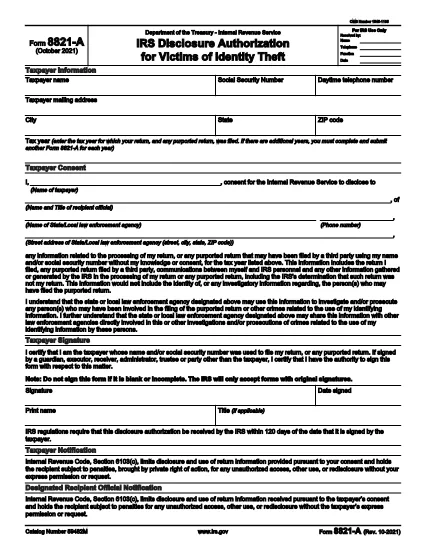
Το IRS Form 8821-A είναι ένα από τα φορολογικά έντυπα που είναι έγγραφα που χρησιμοποιούνται για την αναφορά πληροφοριών σχετικά με το εισόδημα, τις εκπτώσεις και τις φορολογικές υποχρεώσεις ενός ατόμου ή επιχείρησης στην αρμόδια φορολογική αρχή. Αυτά τα έντυπα είναι απαραίτητα για τη συμμόρφωση με τη φορολογική νομοθεσία και την εκπλήρωση φορολογικών υποχρεώσεων. Τα φορολογικά έντυπα ποικίλλουν ανάλογα με τη χώρα και τις συγκεκριμένες φορολογικές απαιτήσεις που ισχύουν. Ακολουθούν ορισμένοι συνήθεις τύποι φορολογικών εντύπων:
Ατομικά φορολογικά έντυπα: Αυτά τα έντυπα χρησιμοποιούνται από μεμονωμένους φορολογούμενους για να αναφέρουν το προσωπικό τους εισόδημα και να διεκδικήσουν εκπτώσεις, πιστώσεις και απαλλαγές. Παραδείγματα περιλαμβάνουν το έντυπο 1040 στις Ηνωμένες Πολιτείες ή το έντυπο αυτοεκτίμησης φορολογικής δήλωσης στο Ηνωμένο Βασίλειο.
Φορολογικά έντυπα επιχειρήσεων: Τα φορολογικά έντυπα επιχειρήσεων χρησιμοποιούνται από εταιρείες, συνεργασίες ή αυτοαπασχολούμενα άτομα για να αναφέρουν τα επιχειρηματικά έσοδα, τα έξοδα και άλλες φορολογικές πληροφορίες. Παραδείγματα περιλαμβάνουν το έντυπο Πρόγραμμα C (Κέρδη ή Ζημιά από Επιχειρήσεις) στις Ηνωμένες Πολιτείες ή το έντυπο CT600 (Δήλωση φόρου εταιρείας) στο Ηνωμένο Βασίλειο.
Έντυπα φόρου μισθοδοσίας: Αυτά τα έντυπα χρησιμοποιούνται από τους εργοδότες για να αναφέρουν τους μισθούς, τους μισθούς και τους φόρους που παρακρατούνται από τους μισθούς των υπαλλήλων τους. Παραδείγματα περιλαμβάνουν το έντυπο W-2 στις Ηνωμένες Πολιτείες ή το έντυπο P60 στο Ηνωμένο Βασίλειο.
Έντυπα φόρου επί των πωλήσεων: Τα έντυπα φόρου επί των πωλήσεων χρησιμοποιούνται από επιχειρήσεις για την αναφορά και την απόδοση του φόρου επί των πωλήσεων που εισπράττεται σε φορολογητέα αγαθά ή υπηρεσίες. Τα συγκεκριμένα έντυπα φόρου επί των πωλήσεων διαφέρουν ανάλογα με τη δικαιοδοσία.
Έντυπα Φόρου Προστιθέμενης Αξίας (ΦΠΑ): Τα έντυπα ΦΠΑ χρησιμοποιούνται σε χώρες που επιβάλλουν φόρο προστιθέμενης αξίας για την αναφορά και την απόδοση ΦΠΑ που εισπράχθηκε από τις πωλήσεις και για τη διεκδίκηση πιστώσεων ΦΠΑ για αγορές. Στα παραδείγματα περιλαμβάνονται τα έντυπα δήλωσης ΦΠΑ που χρησιμοποιούνται σε πολλές χώρες.
Εκτιμώμενα φορολογικά έντυπα: Τα εκτιμώμενα φορολογικά έντυπα χρησιμοποιούνται για την αναφορά και την πληρωμή εκτιμώμενων φόρων σε εισόδημα που δεν υπόκειται σε παρακράτηση, όπως εισόδημα από αυτοαπασχόληση ή εισόδημα από επενδύσεις.
Αυτά είναι μόνο μερικά παραδείγματα των πολυάριθμων φορολογικών εντύπων που μπορεί να υπάρχουν. Τα συγκεκριμένα έντυπα που απαιτούνται εξαρτώνται από τους φορολογικούς νόμους και κανονισμούς στη χώρα ή τη δικαιοδοσία σας. Είναι σημαντικό να συμβουλευτείτε τις οδηγίες της φορολογικής αρχής ή να ζητήσετε επαγγελματική συμβουλή για να προσδιορίσετε ποια έντυπα ισχύουν για την περίπτωσή σας.