
Επιλέξτε γλώσσα

IRS Form 8879‑C – Fillable Corporate E‑File Signature Authorization

  1. Χώρα ΗΠΑ
  2. Γλώσσα Αγγλικά
  3. Δραστηριότητα Φόροι
  4. Τμήμα Εσωτερική Υπηρεσία Εσόδων
IRS Form 8879‑C – Fillable Corporate E‑File Signature Authorization

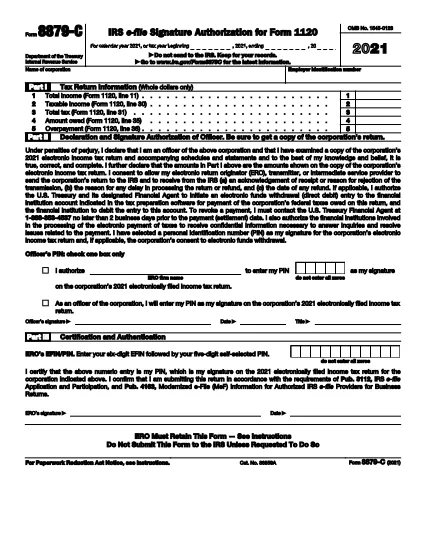
Form 8879‑C, IRS E‑File Signature Authorization for Corporations, is the official document that authorizes the IRS to accept an electronically filed corporate income‑tax return (Form 1120, 1120‑S, 1120‑F, etc.). Instead of mailing a paper signature, corporations can sign electronically using this fillable PDF, saving time and reducing errors.

What is Form 8879‑C?

The form serves as a written declaration that the corporate officer signing the return has reviewed the return, the information is accurate, and the corporation authorizes the IRS to process the e‑filed return. It must be signed by an authorized officer (president, treasurer, or other corporate officer) and attached to the electronic filing.

How to Fill Out Form 8879‑C with Formize

Instead of downloading the PDF and opening a separate editor, simply click the "Fill out this form" button on this page. The Formize PDF Filler app will load instantly, letting you complete every field directly in your browser.

  • Step 1: Click the orange "Fill out this form" button.
  • Step 2: Wait a few seconds for the Formize app to load.
  • Step 3: Enter the corporation’s name, EIN, tax year, and other required data.
  • Step 4: Add the electronic signature of the authorized officer.
  • Step 5: Click "Save" to download the completed PDF, then attach it to your e‑filed return.

Common Mistakes & Tips for a Smooth Submission

  • Incorrect EIN: Double‑check the nine‑digit Employer Identification Number; a typo will cause the return to be rejected.
  • Wrong Tax Year: Use the calendar year or fiscal year that matches the corporate tax return you are filing.
  • Missing Signature: The form is invalid without a clear electronic signature. Use the built‑in signature field—do not draw a signature in a comment box.
  • Unsigned Attachments: If you file multiple returns (e.g., Form 1120‑S and Schedule K‑1), each must have its own Form 8879‑C signed.
  • Saving Errors: After completing the form, click "Download" to store a copy on your computer. Do not rely solely on the browser’s temporary cache.

Where to Find Help and Additional Resources

For detailed instructions, see the IRS Instructions for Form 8879‑C. If you have questions about eligibility, signing authority, or e‑file technical issues, visit the IRS Help & Resources page or contact your tax professional.

FAQ
  • Who must sign Form 8879‑C?

    An officer of the corporation who is authorized to sign the tax return (e.g., president, treasurer, CEO) must sign Form 8879‑C.

  • Can I use a handwritten signature on the fillable PDF?

    Yes, you can draw a handwritten signature using the PDF filler’s signature tool, but the signature must be clear and legible.

  • Is Form 8879‑C required for every corporate e‑file?

    Yes, any corporation that files its income‑tax return electronically must submit a signed Form 8879‑C as the electronic signature authorization.

  • What is the deadline for submitting Form 8879‑C?

    Form 8879‑C must be signed and attached before the corporate tax return is transmitted electronically to the IRS, typically by the filing deadline (usually March 15 for calendar‑year corporations).

  • What should I do if I make a mistake after signing?

    Correct the error on a new copy of Form 8879‑C, have the authorized officer re‑sign, and attach the updated form to the e‑filed return.

  • Do I need a separate Form 8879‑C for each state return?

    State tax authorities may have their own signature forms. Form 8879‑C is only for the federal corporate return.

  • Is there a fee to use Formize’s PDF filler?

    Formize offers a free, no‑cost option for filling out and downloading IRS forms like 8879‑C.

  • Where can I find the official instructions for Form 8879‑C?

    The official IRS instructions are available at https://www.irs.gov/instructions/i8879c.

ΠΩΣ ΝΑ

Πώς να συμπληρώσετε το Form 8879-C δωρεάν, στο διαδίκτυο με 5 εύκολα βήματα:

  1. 1
    Open the Fillable Form
    Click the orange "Fill out this form" button on this page. The Formize PDF Filler will load in a new window.
  2. 2
    Enter Required Information
    Complete the corporation’s name, EIN, tax year, and any other fields shown in the form.
  3. 3
    Add Your Electronic Signature
    Use the built‑in signature field to sign as the authorized corporate officer.
  4. 4
    Save and Download
    After all fields are filled, click "Save" to download the completed PDF to your computer.
  5. 5
    Attach to Your E‑File
    Upload the saved Form 8879‑C PDF with your e‑filed corporate tax return (Form 1120, 1120‑S, etc.).
Διαμορφώστε την εφαρμογή Filler PDF
ΣΧΕΤΙΚΆ ΜΕ

Ομοσπονδιακά φορολογικά έντυπα

Το Form 8879-C είναι ένα από τα ομοσπονδιακά φορολογικά έντυπα που είναι έγγραφα που χρησιμοποιούνται για την αναφορά και την υποβολή ομοσπονδιακών φόρων εισοδήματος στην Υπηρεσία Εσωτερικών Εσόδων (IRS) στις Ηνωμένες Πολιτείες. Αυτά τα έντυπα χρησιμοποιούνται από άτομα, επιχειρήσεις και οργανισμούς για να αναφέρουν το εισόδημά τους, τις κρατήσεις και άλλες σχετικές πληροφορίες που είναι απαραίτητες για τον υπολογισμό της ομοσπονδιακής φορολογικής τους υποχρέωσης.

Το πιο συχνά χρησιμοποιούμενο ομοσπονδιακό φορολογικό έντυπο είναι το Έντυπο 1040, το οποίο χρησιμοποιείται από μεμονωμένους φορολογούμενους για να αναφέρουν τον φόρο εισοδήματος φυσικών προσώπων. Άλλες φόρμες που χρησιμοποιούνται συνήθως περιλαμβάνουν το Φόρμα 1065 για συνεργασίες, Έντυπο 1120 για εταιρείες και Έντυπο 990 για οργανισμούς που απαλλάσσονται από φόρους.

Τα ομοσπονδιακά φορολογικά έντυπα απαιτούν συνήθως από τους φορολογούμενους να αναφέρουν διάφορες πηγές εισοδήματος, όπως μισθούς, μισθούς και φιλοδωρήματα, καθώς και εισόδημα από επενδύσεις, ενοικιάσεις ακινήτων και άλλες πηγές. Τα έντυπα επιτρέπουν επίσης στους φορολογούμενους να διεκδικούν εκπτώσεις και πιστώσεις για διάφορα έξοδα, όπως φιλανθρωπικές εισφορές, τόκους στεγαστικών δανείων και έξοδα υγειονομικής περίθαλψης.

Είναι σημαντικό να υποβάλλετε τα ομοσπονδιακά φορολογικά έντυπα με ακρίβεια και έγκαιρα, καθώς η αποτυχία να το κάνετε μπορεί να οδηγήσει σε κυρώσεις και τόκους από το IRS.

ΧΑΡΑΚΤΗΡΙΣΤΙΚΆ

Πλήρωση PDF

Ο ευκολότερος τρόπος για να συμπληρώσετε το Form 8879-C στο διαδίκτυο

  • Συμπληρώστε γρήγορα Form 8879-C
    Αναζητάτε έναν τρόπο να γεμίσετε γρήγορα το Form 8879-C στο διαδίκτυο; Με το ηλεκτρονικό μας δωρεάν συμπλήρωμα φόρμας PDF, θα ξέρετε πώς να επεξεργαστείτε και να συμπληρώσετε αυτό το έγγραφο pdf σε λιγότερο από ένα λεπτό.
  • Εύκολο στη χρήση διαδικτυακό πρόγραμμα επεξεργασίας PDF
    Βαρεθήκατε να εκτυπώνετε αρχεία PDF ώστε να μπορείτε να τα επεξεργαστείτε, πριν τα σαρώσετε ξανά και τα στείλετε πίσω; Επεξεργαστείτε έγγραφα PDF δωρεάν online. Χρησιμοποιήστε το ηλεκτρονικό μας πρόγραμμα επεξεργασίας pdf για να εξοικονομήσετε χρόνο και χαρτί.
  • Υπέροχα εργαλεία, όλες οι πλατφόρμες
    Αναρωτιέστε πώς να συμπληρώσετε το Form 8879-C σε Mac ή μήπως πώς να χρησιμοποιήσετε ένα πρόγραμμα πλήρωσης PDF δωρεάν; Τα διαδικτυακά μας εργαλεία PDF λειτουργούν σε όλες τις πλατφόρμες.
  • Ασφαλής αποθήκευση αρχείων
    Τα ολοκληρωμένα αρχεία "Form 8879-C" αποθηκεύονται σε μια ασφαλή βάση δεδομένων που διαχειρίζεται η φιλοξενία Amazon Cloud. Μπορείτε να διαγράψετε τα αρχεία σας από το σύστημά μας ανά πάσα στιγμή. Σε κάθε περίπτωση, αυτά τα αρχεία διαγράφονται αυτόματα μετά από 24 ώρες.
  • Συζήτηση με Form 8879-C
    Συνομιλήστε με το "Form 8879-C" στο Chatize που είναι ένας δωρεάν βοηθός ανάγνωσης PDF. Κάντε ερωτήσεις και λάβετε απαντήσεις από το "Form 8879-C". Απλώς κάντε κλικ στο κουμπί Συζήτηση με έγγραφο παραπάνω.

Διαγραφή συνεδρίας συμπλήρωσης

Διαγραφή της επιλεγμένης περιόδου συμπλήρωσης; Σε αυτήν την περίπτωση, η πρόοδός σας στη συμπλήρωση της φόρμας θα χαθεί.

Διαγραφή συνεδρίας επεξεργασίας

Διαγραφή της επιλεγμένης συνεδρίας επεξεργασίας; Σε αυτήν την περίπτωση, η πρόοδός σας στη δημιουργία και την επεξεργασία της φόρμας θα χαθεί.