Επιλέξτε γλώσσα

LS-201 Child Registration Form (Fillable PDF)

  1. Γλώσσα Αγγλικά
  2. Χώρα ΗΠΑ
  3. Τμήμα Education
  4. Δραστηριότητα Child Registration
LS-201 Child Registration Form (Fillable PDF)

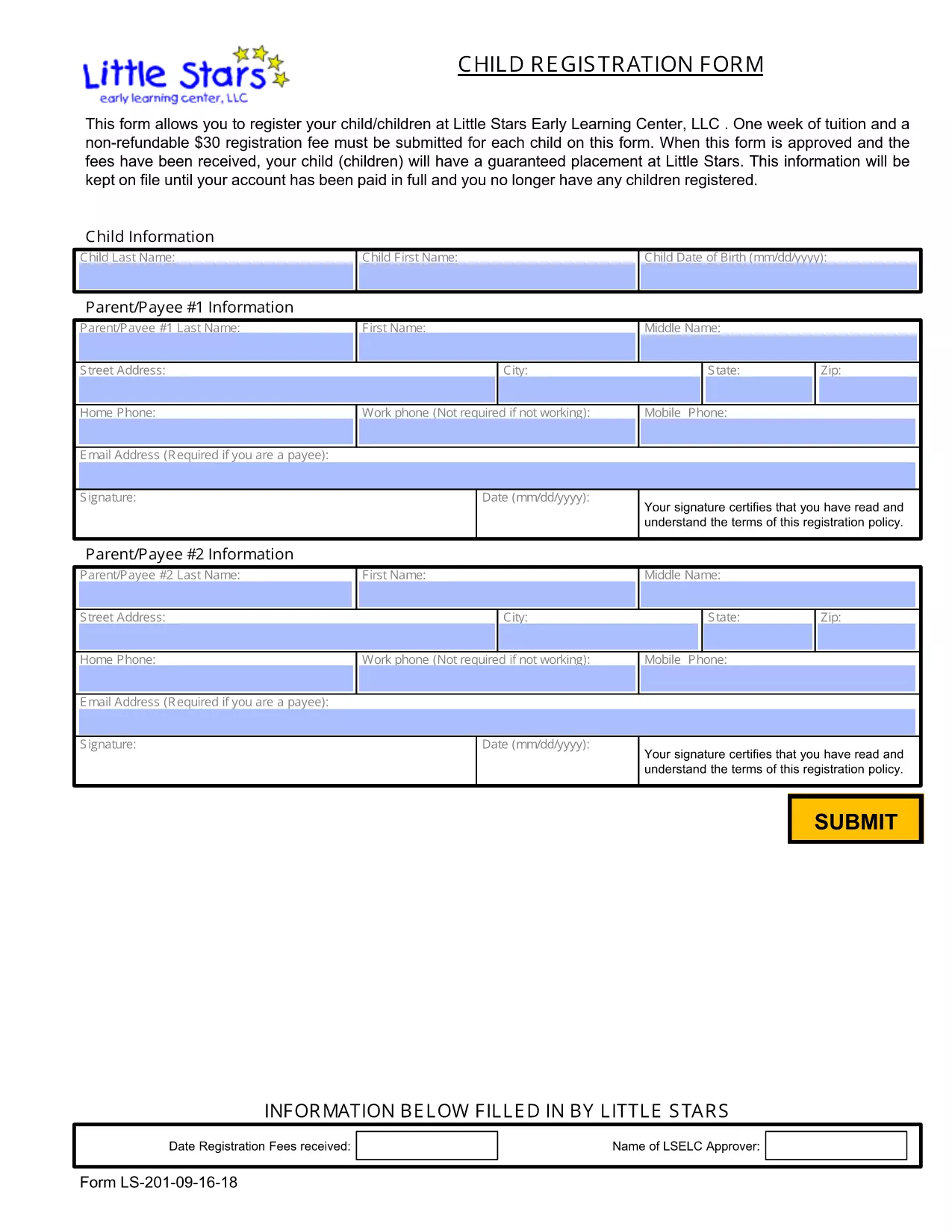
The LS-201 is the standard child registration form used by many early learning centers and preschools across the United States. Instead of printing, printing, and scanning, you can now complete this form online with the Formize PDF Filler – fast, secure, and completely free.

Why Choose the LS-201 Form?

Accepted nationwide by most private and public early‑learning programs.
Collects essential information – child’s name, birth date, parent contact details, medical info, and emergency contacts.
Designed for quick processing – schools can import the data directly into their enrollment systems.

How to Fill the LS-201 Online

Follow these simple steps to complete the LS-201 without leaving your browser:

  • Click the "Fill out this form" button on this page.
  • Wait a few seconds while the Formize PDF Filler app loads.
  • Enter the required information into each fillable field.
  • Review the data, add your digital signature, and click Submit or Download to save a copy.

Common Mistakes to Avoid

  • Leaving required fields blank – the form will not submit until all mandatory sections are completed.
  • Using the wrong date format – follow the MM/DD/YYYY format to prevent processing delays.
  • Forgetting the signature – a digital signature is required for the registration to be valid.

Where to Submit Your Completed Form

After you finish, you can either:

  • Download the completed PDF and email it to the school’s enrollment office.
  • Print the PDF and deliver it in person.
  • If the school provides a secure upload portal, upload the file directly from Formize.

FAQ – LS-201 Child Registration

Below are answers to the most common questions about the LS-201 form.

FAQ
  • What is the LS-201 form used for?

    The LS-201 is a standardized child registration form that collects personal, medical, and emergency‑contact information for preschool and early‑learning enrollment.

  • Do I need special software to fill the LS-201?

    No. With Formize you can fill the PDF directly in your browser—no Adobe Acrobat or other PDF editor required.

  • Can I save my progress and finish later?

    Yes. The Formize app lets you download a partially completed PDF, which you can reopen and finish at any time.

  • Is a digital signature accepted?

    Most schools accept a digital signature on the LS-201. Check with the specific institution if a handwritten signature is required.

  • How do I submit the completed LS-201?

    After filling the form, you can download the PDF and email it, upload it to the school’s portal, or print and deliver it in person.

  • What should I do if I make a mistake?

    Use the Formize editor to correct the error before saving or submitting. If you have already submitted, contact the school’s enrollment office for guidance.

  • Is the LS-201 form free to download?

    Yes. The form is publicly available and can be downloaded at no cost from the link below.

ΠΩΣ ΝΑ

Πώς να συμπληρώσετε το LS-201 δωρεάν, στο διαδίκτυο με 3 εύκολα βήματα:

  1. 1
    Click the Fill‑out Button
    Press the "Fill out this form" button on the page to launch the Formize PDF Filler.
  2. 2
    Enter Your Information
    When the app loads, type the required details into each fillable field, then add your digital signature.
  3. 3
    Save or Submit
    After reviewing, click "Submit" to send the form to the school or "Download" to keep a copy for your records.
Διαμορφώστε την εφαρμογή Filler PDF
ΣΧΕΤΙΚΆ ΜΕ

πρότυπο LS-201

Με το παραδοσιακό σύνολο λειτουργιών για την προβολή και τη συμπλήρωση ενός εγγράφου PDF, σε συνδυασμό με τα πλεονεκτήματα μιας εφαρμογής ιστού και την αποκριτική διάταξη, μπορείτε να ολοκληρώσετε το LS-201 μέσα σε λίγα λεπτά.

ΧΑΡΑΚΤΗΡΙΣΤΙΚΆ

Πλήρωση PDF

Ο ευκολότερος τρόπος για να συμπληρώσετε το LS-201 στο διαδίκτυο

  • Συμπληρώστε γρήγορα LS-201
    Αναζητάτε έναν τρόπο να γεμίσετε γρήγορα το LS-201 στο διαδίκτυο; Με το ηλεκτρονικό μας δωρεάν συμπλήρωμα φόρμας PDF, θα ξέρετε πώς να επεξεργαστείτε και να συμπληρώσετε αυτό το έγγραφο pdf σε λιγότερο από ένα λεπτό.
  • Εύκολο στη χρήση διαδικτυακό πρόγραμμα επεξεργασίας PDF
    Βαρεθήκατε να εκτυπώνετε αρχεία PDF ώστε να μπορείτε να τα επεξεργαστείτε, πριν τα σαρώσετε ξανά και τα στείλετε πίσω; Επεξεργαστείτε έγγραφα PDF δωρεάν online. Χρησιμοποιήστε το ηλεκτρονικό μας πρόγραμμα επεξεργασίας pdf για να εξοικονομήσετε χρόνο και χαρτί.
  • Υπέροχα εργαλεία, όλες οι πλατφόρμες
    Αναρωτιέστε πώς να συμπληρώσετε το LS-201 σε Mac ή μήπως πώς να χρησιμοποιήσετε ένα πρόγραμμα πλήρωσης PDF δωρεάν; Τα διαδικτυακά μας εργαλεία PDF λειτουργούν σε όλες τις πλατφόρμες.
  • Ασφαλής αποθήκευση αρχείων
    Τα ολοκληρωμένα αρχεία "LS-201" αποθηκεύονται σε μια ασφαλή βάση δεδομένων που διαχειρίζεται η φιλοξενία Amazon Cloud. Μπορείτε να διαγράψετε τα αρχεία σας από το σύστημά μας ανά πάσα στιγμή. Σε κάθε περίπτωση, αυτά τα αρχεία διαγράφονται αυτόματα μετά από 24 ώρες.
  • Συζήτηση με LS-201
    Συνομιλήστε με το "LS-201" στο Chatize που είναι ένας δωρεάν βοηθός ανάγνωσης PDF. Κάντε ερωτήσεις και λάβετε απαντήσεις από το "LS-201". Απλώς κάντε κλικ στο κουμπί Συζήτηση με έγγραφο παραπάνω.

Διαγραφή συνεδρίας συμπλήρωσης

Διαγραφή της επιλεγμένης περιόδου συμπλήρωσης; Σε αυτήν την περίπτωση, η πρόοδός σας στη συμπλήρωση της φόρμας θα χαθεί.

Διαγραφή συνεδρίας επεξεργασίας

Διαγραφή της επιλεγμένης συνεδρίας επεξεργασίας; Σε αυτήν την περίπτωση, η πρόοδός σας στη δημιουργία και την επεξεργασία της φόρμας θα χαθεί.