Επιλέξτε γλώσσα

UST‑6 Application Form – Fillable PDF

  1. Γλώσσα Αγγλικά
  2. Χώρα ΗΠΑ
  3. Δραστηριότητα Environmental Compliance
  4. Τμήμα North Carolina Department of Environmental Quality
UST‑6 Application Form – Fillable PDF

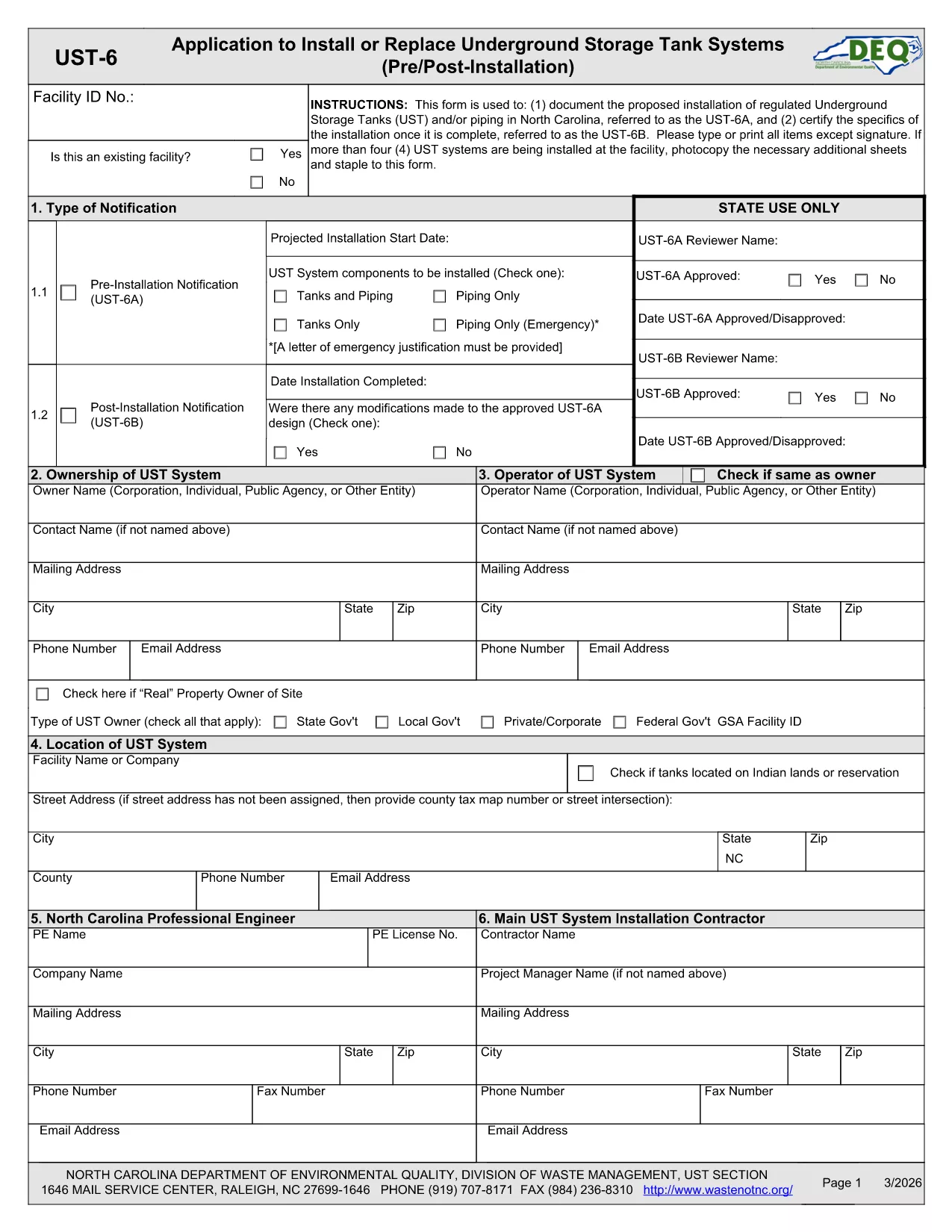
The UST‑6 Application Form is required by the North Carolina Department of Environmental Quality (DEQ) for owners and operators of underground storage tanks (USTs) who need to certify pre‑installation information, report modifications, or request approvals. This page gives you everything you need to download, fill out, and submit the form quickly using Formize’s online PDF filler.

What is the UST‑6 Form?

The UST‑6 is a certification and pre‑installation questionnaire that ensures UST systems meet state environmental standards. It collects details about tank location, design, materials, and compliance measures. Submitting a correctly completed UST‑6 helps avoid penalties and keeps your operation compliant with North Carolina regulations.

How to Fill Out the UST‑6 Online

Instead of printing the PDF and using a third‑party editor, simply click the "Fill out this form" button on this page. The Formize PDF Filler app will load directly in your browser, allowing you to type, select dates, and sign electronically.

Common Mistakes to Avoid

  • Leaving required fields blank – the filler will highlight missing information before you can submit.
  • Using outdated tank specifications – double‑check that the data matches the most recent engineering drawings.
  • Forgetting to attach supporting documents – upload any required permits or inspection reports in the designated attachment sections.

Download the Fillable PDF

If you prefer to work offline, you can download the official UST‑6 PDF using the link below. The file is fully fillable with standard PDF readers, but we recommend the online Formize filler for a smoother experience.

Download UST‑6 Application Form (PDF)

FAQs About the UST‑6 Application

Find quick answers to the most common questions below. If you need further assistance, consult the DEQ guidance documents linked on the form.

FAQ
  • What is the purpose of the UST‑6 form?

    The UST‑6 certifies that a new or modified underground storage tank complies with North Carolina environmental regulations before installation.

  • Can I submit the form electronically?

    Yes. After filling it out with Formize, you can download the completed PDF and upload it through the DEQ online portal, or print and mail it if required.

  • Do I need a digital signature?

    A digital signature is accepted for most submissions. Use the signature field in the Formize filler to add your electronic signature.

  • What supporting documents are required?

    Attach tank design drawings, installation permits, and any previous inspection reports as specified in the attachment sections of the form.

  • Is there a fee to file the UST‑6?

    The UST‑6 itself does not carry a filing fee, but DEQ may charge processing fees for related permits or inspections.

  • How long does it take to process the form?

    Processing time varies, but DEQ typically reviews a completed UST‑6 within 10‑15 business days after receipt.

  • What if I make a mistake after submitting?

    Contact the DEQ UST program office to request a correction. You may need to submit an amended UST‑6 with a cover letter explaining the changes.

  • Can I save my progress and return later?

    Yes. The Formize filler lets you save a draft locally on your computer and resume editing at any time before final submission.

ΠΩΣ ΝΑ

Πώς να συμπληρώσετε το UST-6 form δωρεάν, στο διαδίκτυο με 5 εύκολα βήματα:

  1. 1
    Click the Fill Out Button
    On this page, click the "Fill out this form" button to launch the Formize PDF Filler.
  2. 2
    Wait for the Filler to Load
    The browser will open the fillable PDF inside the Formize app – no download required.
  3. 3
    Complete All Required Fields
    Enter the requested information, select dates, and use the drop‑down menus where applicable.
  4. 4
    Review and Sign
    Check each section for completeness, then add your electronic signature in the designated field.
  5. 5
    Submit or Save
    When finished, click "Submit" to send the form to DEQ (if supported) or download the completed PDF for manual submission.
Διαμορφώστε την εφαρμογή Filler PDF
ΣΧΕΤΙΚΆ ΜΕ

πρότυπο UST-6 form

Με το παραδοσιακό σύνολο λειτουργιών για την προβολή και τη συμπλήρωση ενός εγγράφου PDF, σε συνδυασμό με τα πλεονεκτήματα μιας εφαρμογής ιστού και την αποκριτική διάταξη, μπορείτε να ολοκληρώσετε το UST-6 form μέσα σε λίγα λεπτά.

ΧΑΡΑΚΤΗΡΙΣΤΙΚΆ

Πλήρωση PDF

Ο ευκολότερος τρόπος για να συμπληρώσετε το UST-6 form στο διαδίκτυο

  • Συμπληρώστε γρήγορα UST-6 form
    Αναζητάτε έναν τρόπο να γεμίσετε γρήγορα το UST-6 form στο διαδίκτυο; Με το ηλεκτρονικό μας δωρεάν συμπλήρωμα φόρμας PDF, θα ξέρετε πώς να επεξεργαστείτε και να συμπληρώσετε αυτό το έγγραφο pdf σε λιγότερο από ένα λεπτό.
  • Εύκολο στη χρήση διαδικτυακό πρόγραμμα επεξεργασίας PDF
    Βαρεθήκατε να εκτυπώνετε αρχεία PDF ώστε να μπορείτε να τα επεξεργαστείτε, πριν τα σαρώσετε ξανά και τα στείλετε πίσω; Επεξεργαστείτε έγγραφα PDF δωρεάν online. Χρησιμοποιήστε το ηλεκτρονικό μας πρόγραμμα επεξεργασίας pdf για να εξοικονομήσετε χρόνο και χαρτί.
  • Υπέροχα εργαλεία, όλες οι πλατφόρμες
    Αναρωτιέστε πώς να συμπληρώσετε το UST-6 form σε Mac ή μήπως πώς να χρησιμοποιήσετε ένα πρόγραμμα πλήρωσης PDF δωρεάν; Τα διαδικτυακά μας εργαλεία PDF λειτουργούν σε όλες τις πλατφόρμες.
  • Ασφαλής αποθήκευση αρχείων
    Τα ολοκληρωμένα αρχεία "UST-6 form" αποθηκεύονται σε μια ασφαλή βάση δεδομένων που διαχειρίζεται η φιλοξενία Amazon Cloud. Μπορείτε να διαγράψετε τα αρχεία σας από το σύστημά μας ανά πάσα στιγμή. Σε κάθε περίπτωση, αυτά τα αρχεία διαγράφονται αυτόματα μετά από 24 ώρες.
  • Συζήτηση με UST-6 form
    Συνομιλήστε με το "UST-6 form" στο Chatize που είναι ένας δωρεάν βοηθός ανάγνωσης PDF. Κάντε ερωτήσεις και λάβετε απαντήσεις από το "UST-6 form". Απλώς κάντε κλικ στο κουμπί Συζήτηση με έγγραφο παραπάνω.

Διαγραφή συνεδρίας συμπλήρωσης

Διαγραφή της επιλεγμένης περιόδου συμπλήρωσης; Σε αυτήν την περίπτωση, η πρόοδός σας στη συμπλήρωση της φόρμας θα χαθεί.

Διαγραφή συνεδρίας επεξεργασίας

Διαγραφή της επιλεγμένης συνεδρίας επεξεργασίας; Σε αυτήν την περίπτωση, η πρόοδός σας στη δημιουργία και την επεξεργασία της φόρμας θα χαθεί.