
Επιλέξτε γλώσσα

VR-095 Multipurpose Vehicle Form – Download & Fill Online

  1. Γλώσσα Αγγλικά
  2. Χώρα ΗΠΑ
  3. Δραστηριότητα Εγγραφή οχήματος
  4. κατάσταση Μέριλαντ
VR-095 Multipurpose Vehicle Form – Download & Fill Online

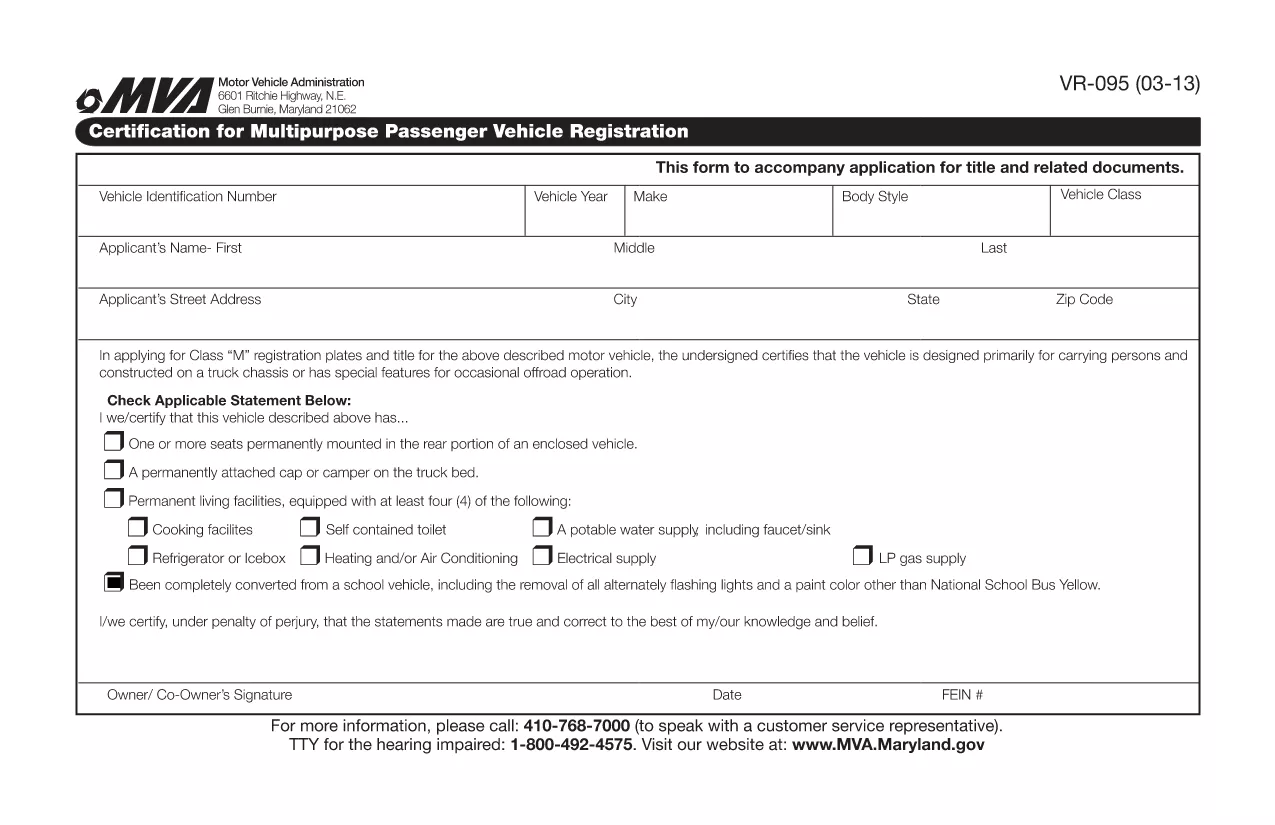
The VR-095 is Maryland’s official application for registering a multipurpose vehicle, such as a utility truck, golf cart, or a custom‑built vehicle that does not fit standard classifications. This form is required by the Maryland Motor Vehicle Administration (MVA) before the vehicle can receive a title, license plates, and registration stickers.

Formize.com hosts a fully fillable PDF version of the VR-095, so you can complete the entire application from any web browser—no need to print, write, or scan.

What is the VR-095 Form?

The VR-095 collects essential information about the vehicle (VIN, weight, dimensions, intended use) and the owner (name, address, insurance). It also includes sections for safety certifications, emissions testing, and any required exemptions.

How to Complete the VR-095 Online

Follow the simple steps below to fill out the form directly on Formize:

  • Click the “Fill out this form” button on the page.
  • Wait for the Formize PDF Filler app to load (usually a few seconds).
  • Enter the required data in each field – the filler automatically validates formats for VIN, dates, and numeric entries.
  • Save your progress at any time, or click Submit to generate a completed PDF.
  • Print the finished document or download it to attach to your MVA submission.

Common Mistakes to Avoid

  • Incorrect VIN entry: Double‑check the 17‑character VIN; a single typo will cause the MVA to reject the form.
  • Missing signatures: The owner and, if applicable, the dealer must sign the form; the online filler lets you add a digital signature.
  • Weight or dimension errors: Use the vehicle’s official weight sticker; inaccurate numbers can delay registration.
  • Out‑of‑date insurance info: Ensure the policy dates cover the registration period.

Download the Fillable PDF

If you prefer to work offline, you can download the original VR-095 PDF from the link below. The file is compatible with Adobe Acrobat Reader and other PDF editors.

Download VR-095 Fillable PDF

Need Help?

For additional guidance, visit the Maryland MVA website or contact your local MVA office. The Formize filler includes tooltips on every field to help you understand exactly what information is required.

FAQ
  • What is the purpose of the VR-095 form?

    VR-095 is used to register multipurpose vehicles in Maryland, allowing the MVA to issue a title, plates, and registration stickers.

  • Can I submit the VR-095 online?

    No. After filling the form online with Formize, you must print the completed PDF and submit it in person or by mail to your local MVA office.

  • Do I need a certified mechanic’s signature?

    If the vehicle’s weight or safety equipment differs from the manufacturer’s specifications, a certified mechanic must sign the appropriate section.

  • Is the PDF truly fillable on mobile devices?

    Yes. Formize’s PDF filler works on most modern smartphones and tablets, but for best experience we recommend a desktop browser.

  • What if I make a mistake after submitting?

    You can download a fresh copy of the VR-095 PDF, correct the error, and re‑submit. The MVA does not accept handwritten corrections on the original.

  • How long does the registration process take after I submit VR-095?

    Processing typically takes 7‑10 business days, provided all required documents and fees are included.

ΠΩΣ ΝΑ

Πώς να συμπληρώσετε το VR-095 δωρεάν, στο διαδίκτυο με 4 εύκολα βήματα:

  1. 1
    Click the Fill‑Out Button
    On the landing page, click the bright “Fill out this form” button to launch the Formize PDF Filler.
  2. 2
    Wait for the Filler to Load
    The browser will load the fillable PDF in a secure iframe. This usually takes 2‑5 seconds.
  3. 3
    Enter Your Information
    Complete each highlighted field. The filler validates VINs, dates, and numeric entries in real time.
  4. 4
    Save, Print, or Download
    When you’re finished, click “Save” to store a copy, “Print” for a hard copy, or “Download” to get the finished PDF for MVA submission.
Διαμορφώστε την εφαρμογή Filler PDF
ΣΧΕΤΙΚΆ ΜΕ

Έντυπα ταξινόμησης οχημάτων

Εάν είστε ιδιοκτήτης ή νοικιάζετε μηχανοκίνητο όχημα, ρυμουλκούμενο ή σκάφος, πρέπει να τηρείτε ορισμένες υποχρεώσεις για να διατηρήσετε το όχημά σας νόμιμα ταξινομημένο και ασφαλές.

Το VR-095 είναι ένα από τα έντυπα εγγραφής οχήματος που είναι έγγραφα που χρησιμοποιούνται για την ταξινόμηση ενός μηχανοκίνητου οχήματος στην αρμόδια κρατική ή επαρχιακή αρχή. Αυτά τα έντυπα απαιτούνται συνήθως όταν ένα άτομο αγοράζει ένα καινούργιο ή μεταχειρισμένο όχημα ή όταν μετακομίζει σε μια νέα πολιτεία ή επαρχία με ένα όχημα.

Οι ακριβείς απαιτήσεις και τα έντυπα που απαιτούνται για την εγγραφή οχήματος μπορεί να διαφέρουν ανάλογα με την τοποθεσία, αλλά γενικά, η διαδικασία περιλαμβάνει την παροχή πληροφοριών σχετικά με το όχημα, τον ιδιοκτήτη και τυχόν προνόμια του οχήματος.

Μόλις υποβληθούν τα έντυπα εγγραφής και τα τέλη, η πολιτειακή ή η επαρχιακή αρχή θα εκδώσει πιστοποιητικό κυκλοφορίας ή πινακίδα κυκλοφορίας στον ιδιοκτήτη του οχήματος. Αυτή η εγγραφή επιτρέπει τη νόμιμη λειτουργία του οχήματος σε δημόσιους δρόμους και αυτοκινητόδρομους.

ΧΑΡΑΚΤΗΡΙΣΤΙΚΆ

Πλήρωση PDF

Ο ευκολότερος τρόπος για να συμπληρώσετε το VR-095 στο διαδίκτυο

  • Συμπληρώστε γρήγορα VR-095
    Αναζητάτε έναν τρόπο να γεμίσετε γρήγορα το VR-095 στο διαδίκτυο; Με το ηλεκτρονικό μας δωρεάν συμπλήρωμα φόρμας PDF, θα ξέρετε πώς να επεξεργαστείτε και να συμπληρώσετε αυτό το έγγραφο pdf σε λιγότερο από ένα λεπτό.
  • Εύκολο στη χρήση διαδικτυακό πρόγραμμα επεξεργασίας PDF
    Βαρεθήκατε να εκτυπώνετε αρχεία PDF ώστε να μπορείτε να τα επεξεργαστείτε, πριν τα σαρώσετε ξανά και τα στείλετε πίσω; Επεξεργαστείτε έγγραφα PDF δωρεάν online. Χρησιμοποιήστε το ηλεκτρονικό μας πρόγραμμα επεξεργασίας pdf για να εξοικονομήσετε χρόνο και χαρτί.
  • Υπέροχα εργαλεία, όλες οι πλατφόρμες
    Αναρωτιέστε πώς να συμπληρώσετε το VR-095 σε Mac ή μήπως πώς να χρησιμοποιήσετε ένα πρόγραμμα πλήρωσης PDF δωρεάν; Τα διαδικτυακά μας εργαλεία PDF λειτουργούν σε όλες τις πλατφόρμες.
  • Ασφαλής αποθήκευση αρχείων
    Τα ολοκληρωμένα αρχεία "VR-095" αποθηκεύονται σε μια ασφαλή βάση δεδομένων που διαχειρίζεται η φιλοξενία Amazon Cloud. Μπορείτε να διαγράψετε τα αρχεία σας από το σύστημά μας ανά πάσα στιγμή. Σε κάθε περίπτωση, αυτά τα αρχεία διαγράφονται αυτόματα μετά από 24 ώρες.
  • Συζήτηση με VR-095
    Συνομιλήστε με το "VR-095" στο Chatize που είναι ένας δωρεάν βοηθός ανάγνωσης PDF. Κάντε ερωτήσεις και λάβετε απαντήσεις από το "VR-095". Απλώς κάντε κλικ στο κουμπί Συζήτηση με έγγραφο παραπάνω.

Διαγραφή συνεδρίας συμπλήρωσης

Διαγραφή της επιλεγμένης περιόδου συμπλήρωσης; Σε αυτήν την περίπτωση, η πρόοδός σας στη συμπλήρωση της φόρμας θα χαθεί.

Διαγραφή συνεδρίας επεξεργασίας

Διαγραφή της επιλεγμένης συνεδρίας επεξεργασίας; Σε αυτήν την περίπτωση, η πρόοδός σας στη δημιουργία και την επεξεργασία της φόρμας θα χαθεί.