
Επιλέξτε γλώσσα

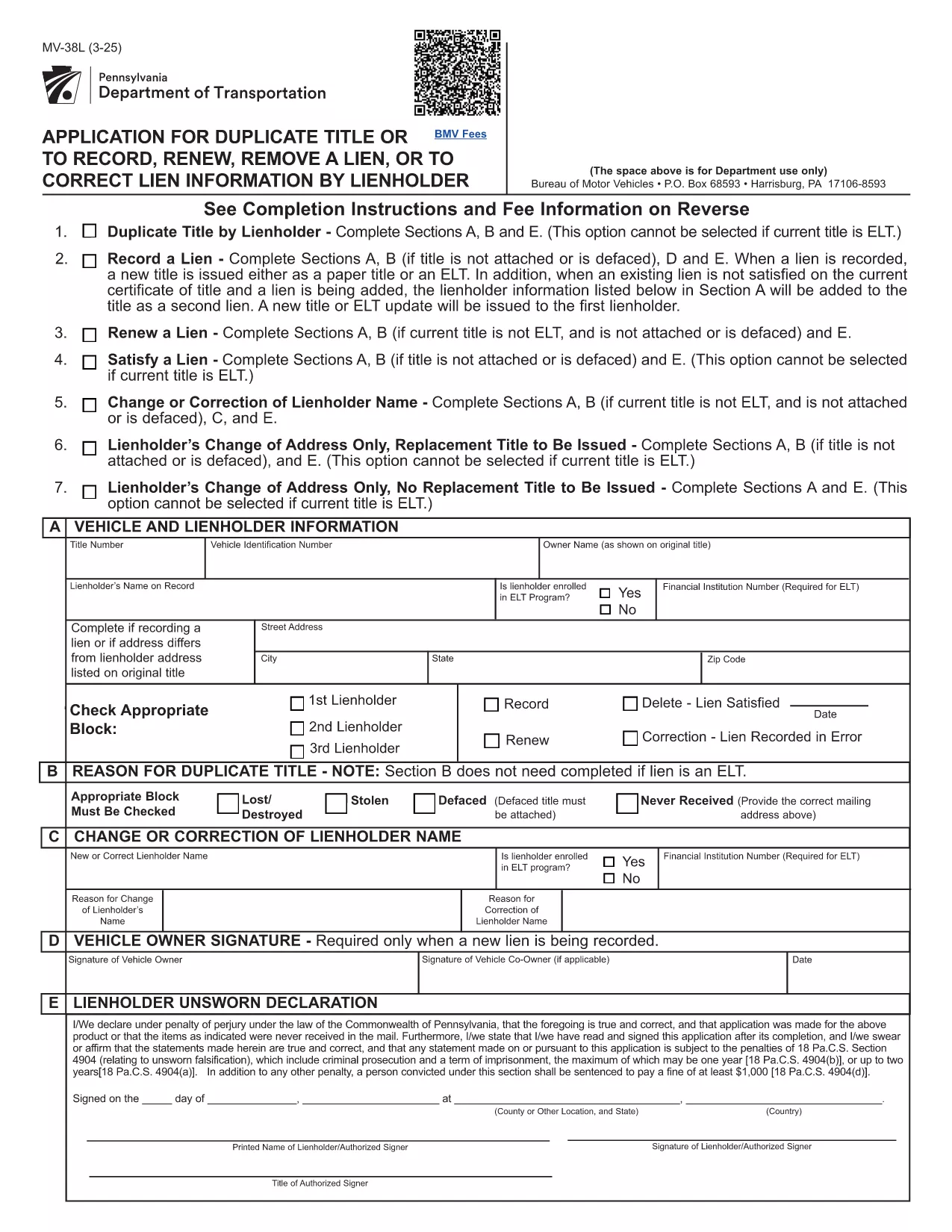
Pennsylvania MV‑38L Fillable Form – Duplicate Title & Lien Requests

  1. Γλώσσα Αγγλικά
  2. Χώρα ΗΠΑ
  3. Δραστηριότητα Εγγραφή οχήματος
  4. κατάσταση Πενσυλβάνια
Pennsylvania MV‑38L Fillable Form – Duplicate Title & Lien Requests

The MV‑38L is Pennsylvania's official application for a duplicate vehicle title, title renewal, lien removal, or title correction. Historically you had to print a paper copy, fill it out by hand, and mail it to PennDOT. With Formize you can now complete the entire form online, save a printed copy for your records, and submit it the way PennDOT requires.

What Is the MV‑38L Form?

MV‑38L is a fillable PDF issued by the Pennsylvania Department of Transportation (PennDOT). It replaces a lost, stolen, or damaged title and can also be used to:

  • Record a new lienholder or remove an existing lien.
  • Renew an expired title.
  • Correct errors on the original title.

When to Use MV‑38L

Typical scenarios include:

  • Your original title was misplaced or destroyed.
  • You have paid off a loan and need the lien released.
  • You are transferring ownership and the buyer needs a clean title.
  • You need to update the vehicle’s information (e.g., name change).

How to Complete the Form Online

Instead of downloading, printing, and scanning, follow these simple steps:

  1. Click the "Fill out this form" button on this page.
  2. The Formize PDF Filler app loads the MV‑38L PDF directly in your browser.
  3. Enter the required information in each field. All fields are editable and auto‑saved.
  4. When finished, click Save & Download to get a completed PDF you can print or email to PennDOT.

The online filler also validates required fields, helping you avoid common errors before submission.

Common Mistakes to Avoid

  • Incorrect VIN: Double‑check the Vehicle Identification Number; a single digit error can delay processing.
  • Missing Notarization: If Block #5 or #6 is checked, PennDOT requires a notarized signature and a fee receipt.
  • Wrong Fee Amount: Fees change annually. Verify the current amount on the PennDOT website before paying.
  • Omitting Lienholder Info: When removing a lien, provide the lender’s name, address, and account number.

Fees, Notarization, and Submission Details

Depending on the option you select, PennDOT may charge a fee (e.g., $22.50 for lien removal) and require notarization. After completing the form, you can either:

  • Print and mail the PDF to the address listed on the form, or
  • Submit electronically if your local PennDOT office accepts e‑filing.

Keep a copy of the completed PDF for your records – it serves as proof of application.

FAQ
  • What is the purpose of the MV‑38L form?

    MV‑38L is used to request a duplicate vehicle title, renew an existing title, remove or record a lien, or correct errors on a Pennsylvania title.

  • Do I need a notary for every MV‑38L submission?

    Notary is required only if you check Block #5 (lien removal) or Block #6 (title correction). Otherwise, a signature alone is sufficient.

  • How much does it cost to get a duplicate title?

    The fee varies; as of the latest update it is $22.50 for lien‑related requests. Check the PennDOT website for the current fee schedule.

  • Can I submit the completed MV‑38L online?

    Many PennDOT offices accept electronic submissions, but some still require a mailed paper copy. Review the instructions on the form for your local office.

  • What information is required for the VIN?

    Enter the 17‑character Vehicle Identification Number exactly as it appears on the registration or insurance card. A single typo can delay processing.

  • Is the Formize filler free to use?

    Yes, Formize provides a free, secure PDF filler for the MV‑38L form. No software download is needed.

  • What should I do if I lose the completed PDF after filling it?

    The Formize app automatically saves a copy to your browser’s download folder. You can also email the PDF to yourself before printing.

  • Do I need to attach any supporting documents?

    If you are removing a lien, attach a lien release letter from the lender. For title corrections, include any relevant proof (e.g., court order).

ΠΩΣ ΝΑ

Πώς να συμπληρώσετε το MV-38L δωρεάν, στο διαδίκτυο με 5 εύκολα βήματα:

  1. 1
    Open the Fillable Form
    Click the "Fill out this form" button on the page. The Formize PDF Filler will open the MV‑38L PDF directly in your browser.
  2. 2
    Enter Your Information
    Complete each editable field—vehicle details, owner information, and lien data. The app highlights required fields.
  3. 3
    Add Notarization (if required)
    If you checked Block #5 or #6, print the completed form, have it notarized, and scan it back into the PDF.
  4. 4
    Save and Download
    When all fields are filled, click "Save & Download" to get a finished PDF you can print or email to PennDOT.
  5. 5
    Submit to PennDOT
    Mail the printed PDF with the appropriate fee, or follow any electronic submission instructions provided on the form.
Διαμορφώστε την εφαρμογή Filler PDF
ΣΧΕΤΙΚΆ ΜΕ

Έντυπα ταξινόμησης οχημάτων

Εάν είστε ιδιοκτήτης ή νοικιάζετε μηχανοκίνητο όχημα, ρυμουλκούμενο ή σκάφος, πρέπει να τηρείτε ορισμένες υποχρεώσεις για να διατηρήσετε το όχημά σας νόμιμα ταξινομημένο και ασφαλές.

Το MV-38L είναι ένα από τα έντυπα εγγραφής οχήματος που είναι έγγραφα που χρησιμοποιούνται για την ταξινόμηση ενός μηχανοκίνητου οχήματος στην αρμόδια κρατική ή επαρχιακή αρχή. Αυτά τα έντυπα απαιτούνται συνήθως όταν ένα άτομο αγοράζει ένα καινούργιο ή μεταχειρισμένο όχημα ή όταν μετακομίζει σε μια νέα πολιτεία ή επαρχία με ένα όχημα.

Οι ακριβείς απαιτήσεις και τα έντυπα που απαιτούνται για την εγγραφή οχήματος μπορεί να διαφέρουν ανάλογα με την τοποθεσία, αλλά γενικά, η διαδικασία περιλαμβάνει την παροχή πληροφοριών σχετικά με το όχημα, τον ιδιοκτήτη και τυχόν προνόμια του οχήματος.

Μόλις υποβληθούν τα έντυπα εγγραφής και τα τέλη, η πολιτειακή ή η επαρχιακή αρχή θα εκδώσει πιστοποιητικό κυκλοφορίας ή πινακίδα κυκλοφορίας στον ιδιοκτήτη του οχήματος. Αυτή η εγγραφή επιτρέπει τη νόμιμη λειτουργία του οχήματος σε δημόσιους δρόμους και αυτοκινητόδρομους.

ΧΑΡΑΚΤΗΡΙΣΤΙΚΆ

Πλήρωση PDF

Ο ευκολότερος τρόπος για να συμπληρώσετε το MV-38L στο διαδίκτυο

  • Συμπληρώστε γρήγορα MV-38L
    Αναζητάτε έναν τρόπο να γεμίσετε γρήγορα το MV-38L στο διαδίκτυο; Με το ηλεκτρονικό μας δωρεάν συμπλήρωμα φόρμας PDF, θα ξέρετε πώς να επεξεργαστείτε και να συμπληρώσετε αυτό το έγγραφο pdf σε λιγότερο από ένα λεπτό.
  • Εύκολο στη χρήση διαδικτυακό πρόγραμμα επεξεργασίας PDF
    Βαρεθήκατε να εκτυπώνετε αρχεία PDF ώστε να μπορείτε να τα επεξεργαστείτε, πριν τα σαρώσετε ξανά και τα στείλετε πίσω; Επεξεργαστείτε έγγραφα PDF δωρεάν online. Χρησιμοποιήστε το ηλεκτρονικό μας πρόγραμμα επεξεργασίας pdf για να εξοικονομήσετε χρόνο και χαρτί.
  • Υπέροχα εργαλεία, όλες οι πλατφόρμες
    Αναρωτιέστε πώς να συμπληρώσετε το MV-38L σε Mac ή μήπως πώς να χρησιμοποιήσετε ένα πρόγραμμα πλήρωσης PDF δωρεάν; Τα διαδικτυακά μας εργαλεία PDF λειτουργούν σε όλες τις πλατφόρμες.
  • Ασφαλής αποθήκευση αρχείων
    Τα ολοκληρωμένα αρχεία "MV-38L" αποθηκεύονται σε μια ασφαλή βάση δεδομένων που διαχειρίζεται η φιλοξενία Amazon Cloud. Μπορείτε να διαγράψετε τα αρχεία σας από το σύστημά μας ανά πάσα στιγμή. Σε κάθε περίπτωση, αυτά τα αρχεία διαγράφονται αυτόματα μετά από 24 ώρες.
  • Συζήτηση με MV-38L
    Συνομιλήστε με το "MV-38L" στο Chatize που είναι ένας δωρεάν βοηθός ανάγνωσης PDF. Κάντε ερωτήσεις και λάβετε απαντήσεις από το "MV-38L". Απλώς κάντε κλικ στο κουμπί Συζήτηση με έγγραφο παραπάνω.

Διαγραφή συνεδρίας συμπλήρωσης

Διαγραφή της επιλεγμένης περιόδου συμπλήρωσης; Σε αυτήν την περίπτωση, η πρόοδός σας στη συμπλήρωση της φόρμας θα χαθεί.

Διαγραφή συνεδρίας επεξεργασίας

Διαγραφή της επιλεγμένης συνεδρίας επεξεργασίας; Σε αυτήν την περίπτωση, η πρόοδός σας στη δημιουργία και την επεξεργασία της φόρμας θα χαθεί.