
Επιλέξτε γλώσσα

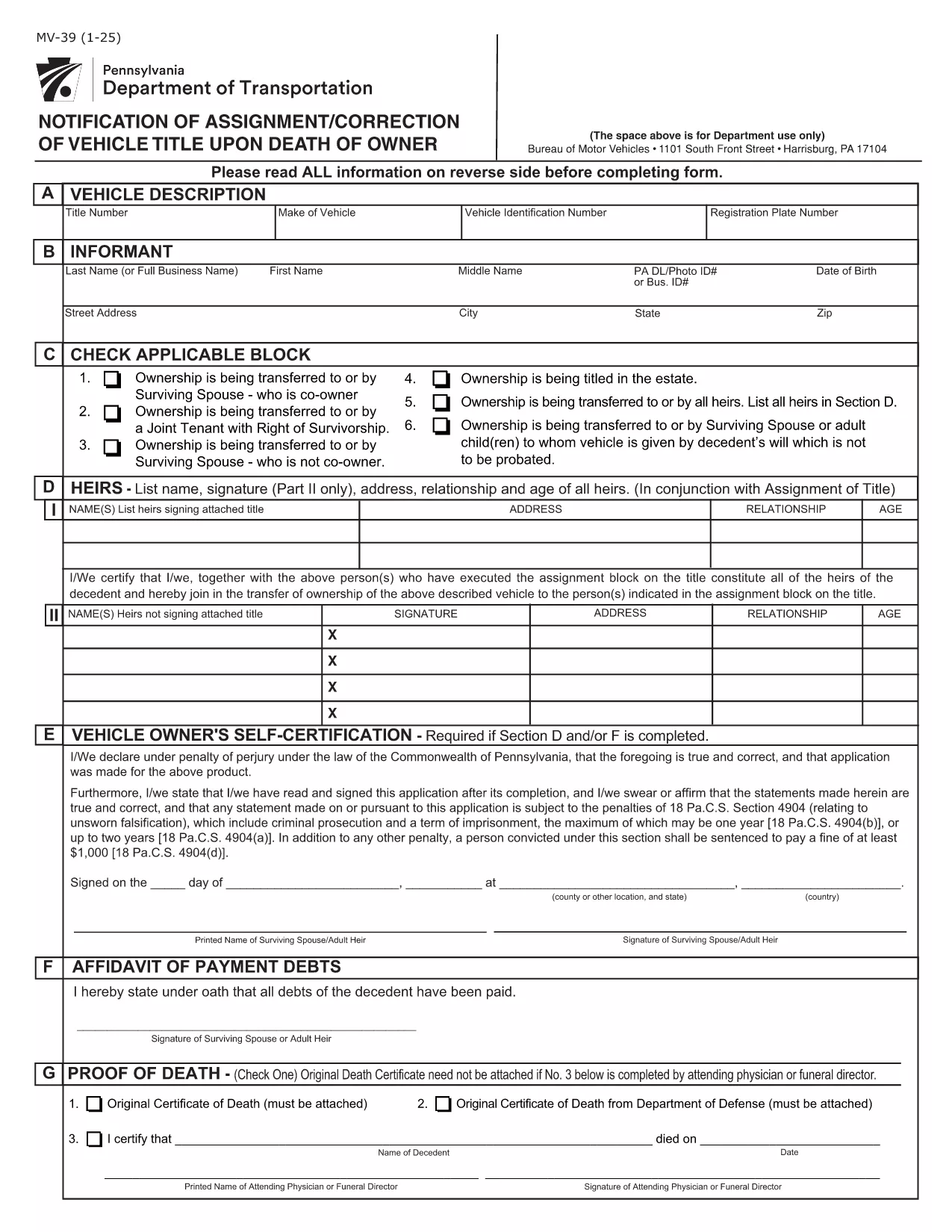
Pennsylvania Form MV-39 – Notification of Assignment/Correction of Vehicle Title

  1. Γλώσσα Αγγλικά
  2. Χώρα ΗΠΑ
  3. Δραστηριότητα Εγγραφή οχήματος
  4. κατάσταση Πενσυλβάνια
Pennsylvania Form MV-39 – Notification of Assignment/Correction of Vehicle Title

Form MV-39, titled “Notification of Assignment/Correction of Vehicle Title upon Death of Owner,” is required by the Pennsylvania Department of Transportation (PennDOT) whenever a vehicle title must be transferred after the owner’s death.

Our online fillable PDF lets you complete the form quickly without printing or using a separate PDF editor. Simply click the “Fill out this form” button, edit the fields, and download the finished document to submit to your local BMV office.

What Is Form MV-39?

This form notifies PennDOT of a change in ownership caused by the death of the original vehicle owner. It is used to assign the title to a surviving spouse, heir, or other qualified party and to correct any errors on the original title.

How to Complete Form MV-39 Online

Follow the step‑by‑step guide below to fill out the form directly in your browser using Formize’s PDF Filler.

  • Section A – Vehicle Information: Enter VIN, make, model, and year.
  • Section B – Owner’s Details: Provide the deceased owner’s name, Social Security Number, and date of death.
  • Section C – New Owner: List the name(s) of the surviving spouse, heir, or purchaser, along with their contact information.
  • Section G & H – Registration Intent: Indicate whether the vehicle will be re‑registered.
  • Section I – Signature: The new owner must sign and date the form.

Common Mistakes to Avoid

  • Leaving any required field blank – every section marked with an asterisk (*) is mandatory.
  • Using an illegible or mismatched VIN – copy it exactly as it appears on the current title.
  • Forgetting to attach a certified copy of the death certificate when required.
  • Signing the form with a pen before the PDF is fully completed – sign only after all information is entered.

Where to Submit the Completed Form

After saving the filled PDF, mail or deliver it to your nearest PennDOT Driver & Vehicle Services (DVS) office along with any supporting documents (e.g., death certificate, proof of relationship). Some offices also accept electronic submissions; check your local BMV’s website for details.

Frequently Asked Questions

Below are answers to the most common queries about Form MV-39.

FAQ
  • Do I need to print Form MV-39 after filling it online?

    Most PennDOT offices require a hard copy with an original signature, so print the completed PDF, sign it, and mail or deliver it as instructed.

  • Can I submit Form MV-39 electronically?

    Some DVS locations accept electronic submissions. Check your local office’s website for specific instructions and accepted file formats.

  • What supporting documents are required?

    You’ll need a certified copy of the owner’s death certificate, proof of relationship (e.g., marriage certificate), and any existing title documents.

  • Is there a fee for filing Form MV-39?

    PennDOT does not charge a fee for the MV-39 notification itself, but standard title transfer fees may apply when the new title is issued.

  • What if I make a mistake after submitting?

    Contact your local PennDOT office immediately. They may require you to submit a corrected MV-39 or an additional affidavit.

  • How long does it take to process the form?

    Processing times vary by office, but expect 7‑10 business days from receipt of the completed form and required documents.

ΠΩΣ ΝΑ

Πώς να συμπληρώσετε το MV-39 δωρεάν, στο διαδίκτυο με 4 εύκολα βήματα:

  1. 1
    Open the Fillable Form
    Click the “Fill out this form” button on the page. The Formize PDF Filler app will load the MV-39 document directly in your browser.
  2. 2
    Enter Required Information
    Complete each highlighted field (Sections A, B, C, G, H, and I). The filler validates entries in real time, so you’ll know immediately if something is missing.
  3. 3
    Review and Sign
    Double‑check all data for accuracy, then add your electronic signature in the designated signature box.
  4. 4
    Save and Submit
    Click “Save PDF” to download the completed form. Print it (if required) and submit it to your local PennDOT office with any supporting documents.
Διαμορφώστε την εφαρμογή Filler PDF
ΣΧΕΤΙΚΆ ΜΕ

Έντυπα ταξινόμησης οχημάτων

Εάν είστε ιδιοκτήτης ή νοικιάζετε μηχανοκίνητο όχημα, ρυμουλκούμενο ή σκάφος, πρέπει να τηρείτε ορισμένες υποχρεώσεις για να διατηρήσετε το όχημά σας νόμιμα ταξινομημένο και ασφαλές.

Το MV-39 είναι ένα από τα έντυπα εγγραφής οχήματος που είναι έγγραφα που χρησιμοποιούνται για την ταξινόμηση ενός μηχανοκίνητου οχήματος στην αρμόδια κρατική ή επαρχιακή αρχή. Αυτά τα έντυπα απαιτούνται συνήθως όταν ένα άτομο αγοράζει ένα καινούργιο ή μεταχειρισμένο όχημα ή όταν μετακομίζει σε μια νέα πολιτεία ή επαρχία με ένα όχημα.

Οι ακριβείς απαιτήσεις και τα έντυπα που απαιτούνται για την εγγραφή οχήματος μπορεί να διαφέρουν ανάλογα με την τοποθεσία, αλλά γενικά, η διαδικασία περιλαμβάνει την παροχή πληροφοριών σχετικά με το όχημα, τον ιδιοκτήτη και τυχόν προνόμια του οχήματος.

Μόλις υποβληθούν τα έντυπα εγγραφής και τα τέλη, η πολιτειακή ή η επαρχιακή αρχή θα εκδώσει πιστοποιητικό κυκλοφορίας ή πινακίδα κυκλοφορίας στον ιδιοκτήτη του οχήματος. Αυτή η εγγραφή επιτρέπει τη νόμιμη λειτουργία του οχήματος σε δημόσιους δρόμους και αυτοκινητόδρομους.

ΧΑΡΑΚΤΗΡΙΣΤΙΚΆ

Πλήρωση PDF

Ο ευκολότερος τρόπος για να συμπληρώσετε το MV-39 στο διαδίκτυο

  • Συμπληρώστε γρήγορα MV-39
    Αναζητάτε έναν τρόπο να γεμίσετε γρήγορα το MV-39 στο διαδίκτυο; Με το ηλεκτρονικό μας δωρεάν συμπλήρωμα φόρμας PDF, θα ξέρετε πώς να επεξεργαστείτε και να συμπληρώσετε αυτό το έγγραφο pdf σε λιγότερο από ένα λεπτό.
  • Εύκολο στη χρήση διαδικτυακό πρόγραμμα επεξεργασίας PDF
    Βαρεθήκατε να εκτυπώνετε αρχεία PDF ώστε να μπορείτε να τα επεξεργαστείτε, πριν τα σαρώσετε ξανά και τα στείλετε πίσω; Επεξεργαστείτε έγγραφα PDF δωρεάν online. Χρησιμοποιήστε το ηλεκτρονικό μας πρόγραμμα επεξεργασίας pdf για να εξοικονομήσετε χρόνο και χαρτί.
  • Υπέροχα εργαλεία, όλες οι πλατφόρμες
    Αναρωτιέστε πώς να συμπληρώσετε το MV-39 σε Mac ή μήπως πώς να χρησιμοποιήσετε ένα πρόγραμμα πλήρωσης PDF δωρεάν; Τα διαδικτυακά μας εργαλεία PDF λειτουργούν σε όλες τις πλατφόρμες.
  • Ασφαλής αποθήκευση αρχείων
    Τα ολοκληρωμένα αρχεία "MV-39" αποθηκεύονται σε μια ασφαλή βάση δεδομένων που διαχειρίζεται η φιλοξενία Amazon Cloud. Μπορείτε να διαγράψετε τα αρχεία σας από το σύστημά μας ανά πάσα στιγμή. Σε κάθε περίπτωση, αυτά τα αρχεία διαγράφονται αυτόματα μετά από 24 ώρες.
  • Συζήτηση με MV-39
    Συνομιλήστε με το "MV-39" στο Chatize που είναι ένας δωρεάν βοηθός ανάγνωσης PDF. Κάντε ερωτήσεις και λάβετε απαντήσεις από το "MV-39". Απλώς κάντε κλικ στο κουμπί Συζήτηση με έγγραφο παραπάνω.

Διαγραφή συνεδρίας συμπλήρωσης

Διαγραφή της επιλεγμένης περιόδου συμπλήρωσης; Σε αυτήν την περίπτωση, η πρόοδός σας στη συμπλήρωση της φόρμας θα χαθεί.

Διαγραφή συνεδρίας επεξεργασίας

Διαγραφή της επιλεγμένης συνεδρίας επεξεργασίας; Σε αυτήν την περίπτωση, η πρόοδός σας στη δημιουργία και την επεξεργασία της φόρμας θα χαθεί.