
Seleccione el idioma

Australian Age Pension Application Form (Fillable PDF)

  1. Idioma Inglés
  2. País Australia
  3. Departamento Centrelink
  4. Actividad Retirement Benefits
Australian Age Pension Application Form (Fillable PDF)

Applying for the Centrelink Age Pension can feel overwhelming, but with the right form and clear instructions you can submit your claim confidently. This page gives you a direct link to the fillable PDF, a quick walkthrough of each section, and answers to the most common questions.

Why You Need the Age Pension Application Form

The Age Pension is a government‑provided income support for Australians aged 67 or older who meet residency and means‑test requirements. To start receiving payments you must complete the official application form, attach supporting documents, and submit it through myGov or a Centrelink service centre.

How to Fill Out the Form with Formize PDF Filler

Instead of downloading the PDF and editing it in a separate program, simply click the “Fill out this form” button on this page. The Formize PDF Filler app will load in your browser, letting you type, select dates, and add checkmarks directly on the form. When you’re done, you can save a copy and submit it online.

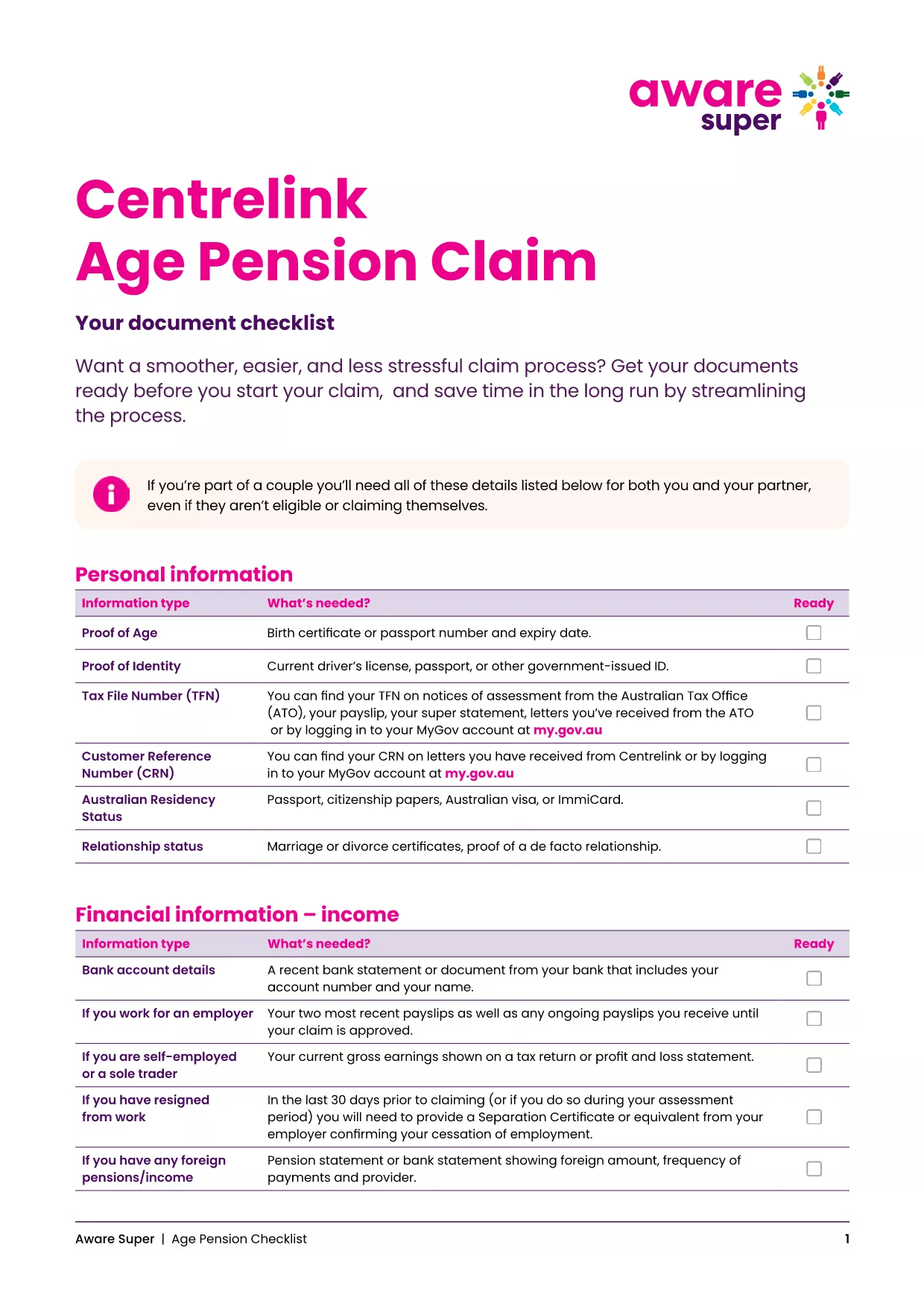
Key Documents & Information Required

  • Proof of identity (passport, driver’s licence, or birth certificate)
  • Centrelink Reference Number (CRN)
  • Bank account details for pension payments
  • Details of assets, superannuation, and income
  • Proof of Australian residency (e.g., rental agreement or utility bill)

Common Mistakes to Avoid

  • Leaving fields blank: Even if a question does not apply, enter “N/A”.
  • Mismatched personal details: Ensure the name, date of birth and address match your Centrelink records.
  • Incorrect bank account: Payments are only made to accounts in the applicant’s name.
  • Out‑of‑date asset values: Use current market values for property, vehicles and investments.

Download & Print the Checklist PDF

For a printable, step‑by‑step checklist that helps you gather all required paperwork before you start the online claim, download the Age Pension Checklist PDF. Use it alongside the fillable application to keep everything organised.

PREGUNTAS MÁS FRECUENTES
  • When can I start my Age Pension application?

    You can lodge an application up to 13 weeks before you turn 67. It’s best to gather all documents early to avoid delays.

  • Do I need to fill out a separate form for my partner?

    Yes. Even if your partner is not claiming the pension, you must provide their details and any assets they own.

  • Can I edit the PDF after I’ve saved it?

    Absolutely. The Formize PDF Filler lets you reopen the saved file, make changes, and re‑save before submitting.

  • What if I don’t have a myGov account?

    Create a myGov account at my.gov.au, then link it to your Centrelink profile using your CRN.

  • How long does the Age Pension claim take to process?

    Typical processing time is 2‑4 weeks after all required documents are received. You’ll be notified via email or SMS.

  • Is the PDF form truly fillable on mobile devices?

    Yes. Formize PDF Filler works on all modern browsers, including mobile Safari and Chrome.

  • What happens if I make a mistake on the form?

    Centrelink may contact you for clarification, which can delay payment. Double‑check each section before submitting.

  • Do I need to provide proof of home ownership?

    You must disclose any property you own, even if it’s rented out, and provide a recent valuation or mortgage statement.

  • Can I claim the Age Pension if I have superannuation?

    Yes, but your superannuation balances are counted towards the assets test. Include the current balance in the form.

  • Where can I get help if I’m stuck?

    Visit your nearest Centrelink service centre or call the Seniors Helpline on 132 300.

CÓMO

Cómo completar age pension application australia gratis, en línea en 5 sencillos pasos:

  1. 1
    Open the Fillable Form
    Click the “Fill out this form” button on this page. The Formize PDF Filler will open in a new tab.
  2. 2
    Enter Your Personal Details
    Type your name, date of birth, CRN and contact information into the highlighted fields.
  3. 3
    Add Supporting Information
    Upload or type details about your assets, income, and residency status as prompted.
  4. 4
    Review and Save
    Use the “Review” button to check for empty fields, then click “Save” to download a copy for your records.
  5. 5
    Submit Your Claim
    Log into myGov, link your Centrelink account, and upload the completed PDF. Submit and wait for confirmation.
Aplicación Formize PDF Filler
SOBRE

age pension application australia plantilla

Con el conjunto tradicional de funciones para ver y completar un documento PDF, combinado con los beneficios de una aplicación web y un diseño receptivo, puede completar age pension application australia en minutos.

CARACTERÍSTICAS

Relleno de PDF

La forma más fácil de llenar formularios PDF en línea

  • Rellene rápidamente age pension application australia
    ¿Está buscando una manera de llenar rápidamente age pension application australia en línea? Con nuestro rellenador de formularios PDF gratuito en línea, sabrá cómo editar y rellenar este documento PDF en menos de un minuto.
  • Editor de PDF en línea fácil de usar
    ¿Cansado de imprimir archivos PDF para poder editarlos antes de volver a escanearlos y enviarlos de vuelta? Edite documentos PDF gratis en línea. Utilice nuestro editor de pdf en línea para ahorrar tiempo y papel.
  • Excelentes herramientas, todas las plataformas.
    ¿Se pregunta cómo completar age pension application australia en una Mac, o tal vez cómo usar un relleno de PDF gratis? Nuestras herramientas de PDF en línea funcionan en todas las plataformas.
  • Almacenamiento seguro de archivos
    Los archivos "age pension application australia" completados se almacenan en una base de datos segura administrada por Amazon Cloud hosting. Puede eliminar sus archivos de nuestro sistema en cualquier momento. En cualquier caso, estos archivos se eliminan automáticamente después de 24 horas.
  • Chatea con {palabra clave}
    Chatea con "age pension application australia" en Chatize, que es un asistente de lectura de PDF gratuito. Haga preguntas y obtenga respuestas de "age pension application australia". Simplemente haga clic en el botón Chatear con documento de arriba.

Eliminar sesión de llenado

¿Eliminar la sesión de llenado seleccionada? En este caso, se perderá su progreso al completar el formulario.

Eliminar sesión de edición

¿Eliminar la sesión de edición seleccionada? En este caso, se perderá su progreso en la creación y edición del formulario.